
More project photos (3)
The problem
Photographers returning from a shoot, students organizing assignment folders, and office staff archiving scans all face the same chore: hundreds of files named IMG_20250112_071523.jpg or scan001.pdf that need meaningful, ordered names. Doing it by hand is slow and error-prone; doing it with a shell one-liner is powerful but dangerous — one wrong pattern can destroy a naming scheme with no undo. A bulk file renamer sits in the middle: it lets the user stack simple rules (replace text, add numbering, change case, insert dates), shows exactly what every filename will become before anything touches the disk, flags collisions in advance, and keeps a reversible log of every batch. This project implements that as a real desktop utility with a rule pipeline, dry-run preview, conflict detection and a 30-day undo history.
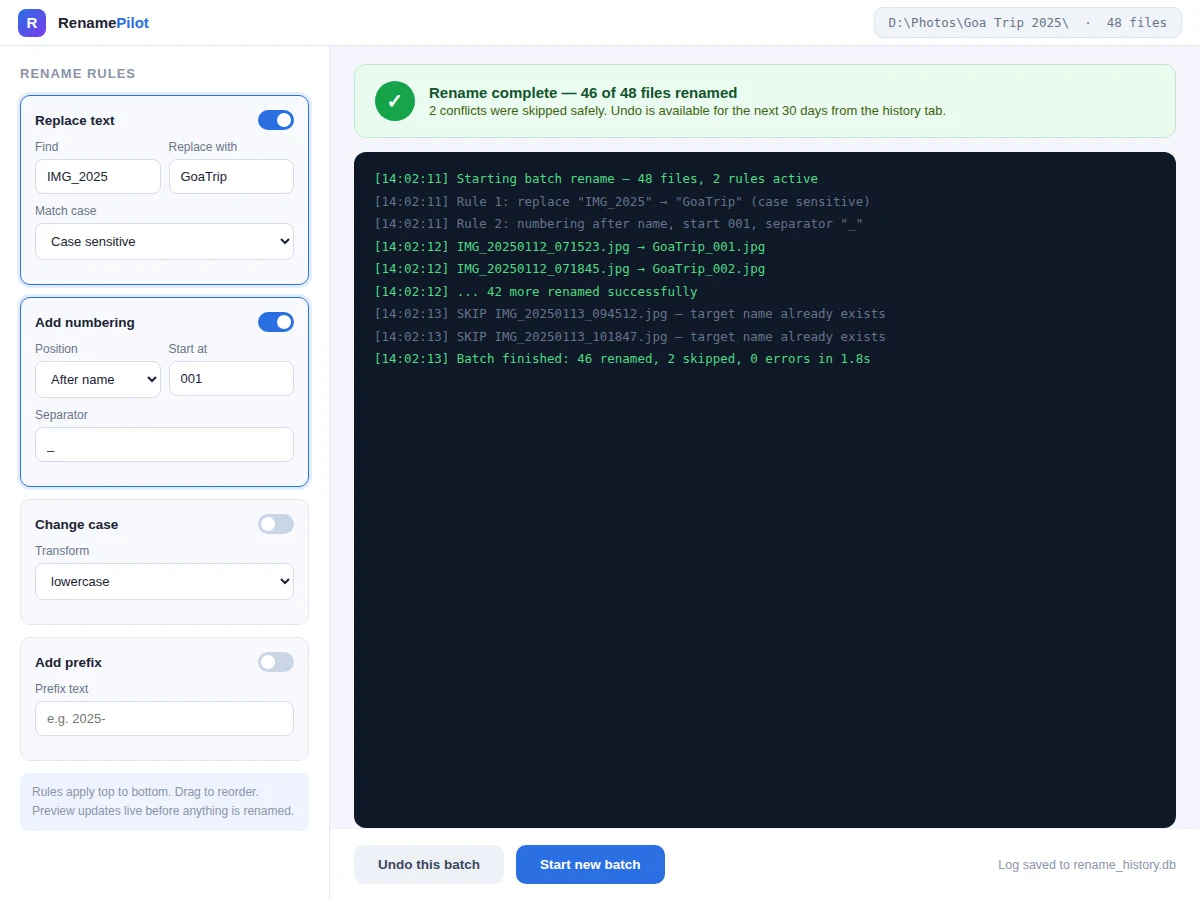
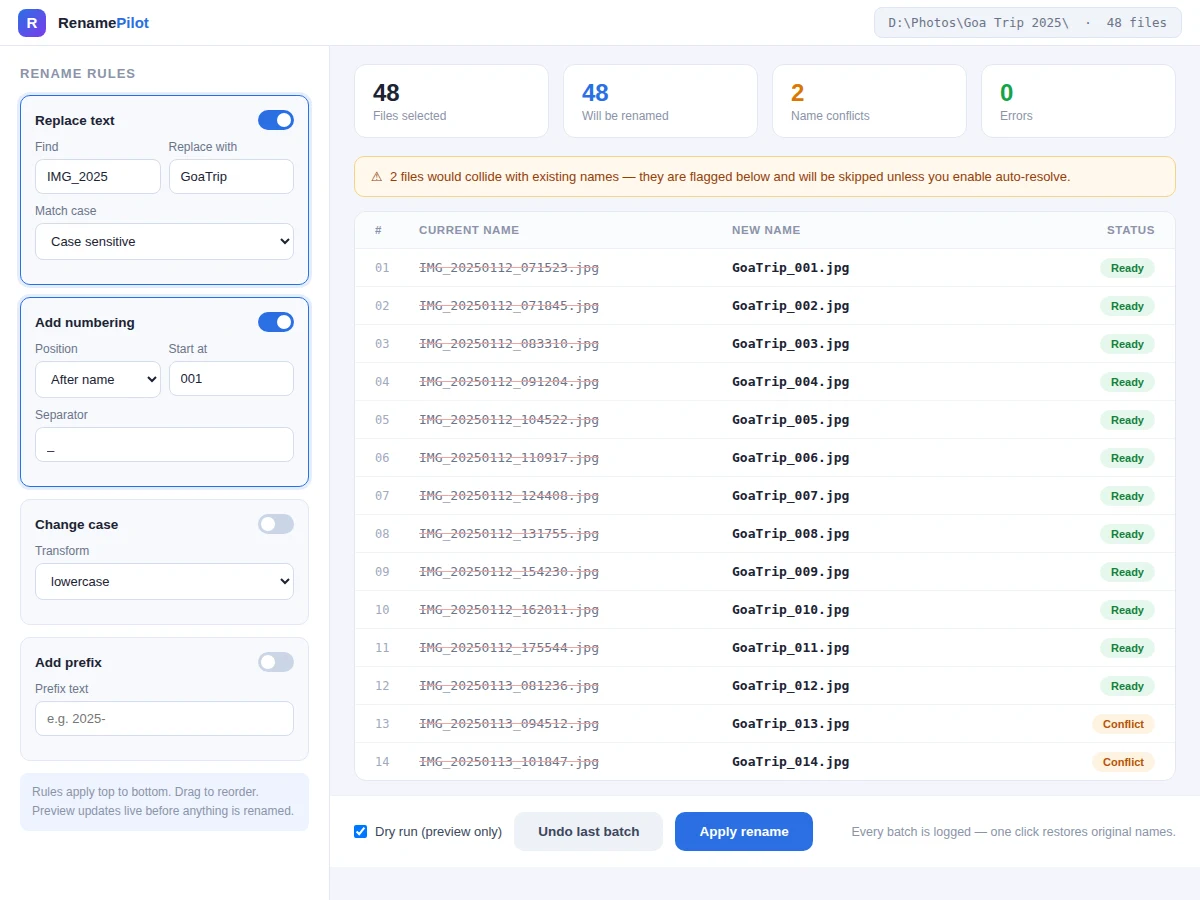
Stacks rename rules in order, previews the before-and-after table and confirms the batch.
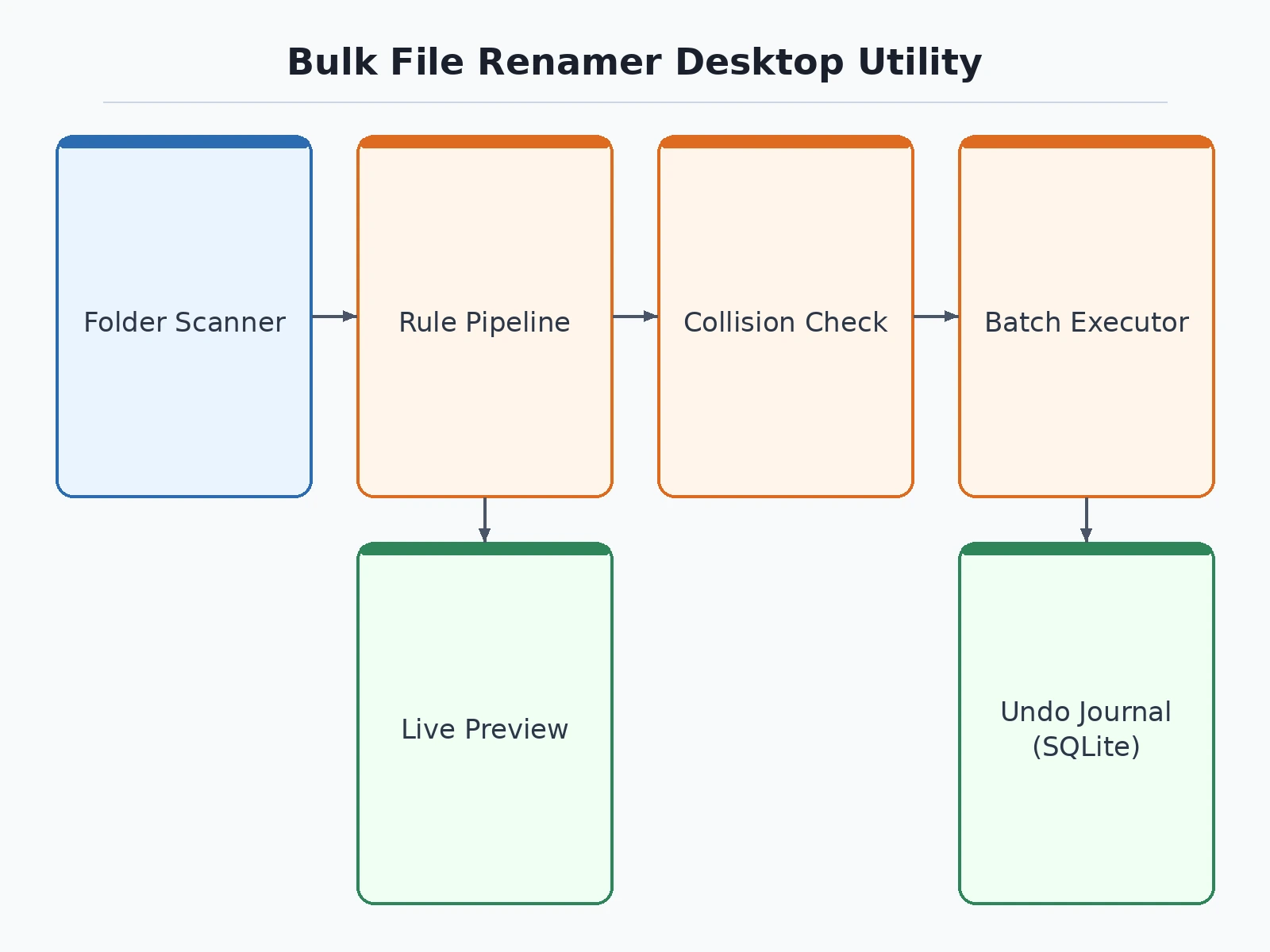
Follow the working sequence
How it works
- The user selects a folder (optionally including subfolders); the app enumerates files with their names, sizes and dates into the preview table.
- Rules are added from the rule panel and ordered by drag-and-drop; each rule is a pure function from old name to new name.
- The engine composes the pipeline and computes every new name, then runs collision detection against the directory listing and within the batch itself.
- In dry-run mode the app simulates the renames and reports the outcome; in apply mode it renames files sequentially, journaling each old→new pair.
- On completion, a summary log shows renamed, skipped and error counts with per-file detail.
- Undo reads the batch journal and renames everything back in reverse order, verifying each file still exists before touching it.
Tech stack:
- Python 3
- PyQt6 · Qt (desktop UI)
- SQLite (batch journal)
- Pillow (EXIF metadata tokens)
- watchdog (folder refresh)
- PyInstaller (packaging)
| Parameter | Value |
|---|---|
| Platforms | Windows 10/11, macOS 13+, Ubuntu 22.04+ (expected) |
| Rule types | 8 (replace, prefix/suffix, numbering, case, date, metadata, trim, regex) |
| Preview | Live, per-file before/after table |
| Collision handling | Detect + flag, optional auto-resolve |
| Undo window | 30 days per batch (configurable) |
| Batch size tested | Up to ~10,000 files per batch (design target) |
| Rename speed | Approximately 300–600 files/sec on SSD (expected) |
| Packaging | Single-file installer per OS |
Project features
- [Composable rule pipeline] Stack rules — replace text, add prefix/suffix, sequential numbering, case transform, insert date/metadata — applied top to bottom in order.
- [Live before/after preview] A table shows every current filename beside its computed new name, updating instantly as rules are edited.
- [Collision detection] Targets that would clash with existing files or with each other are flagged before the batch runs, with optional auto-resolve by suffixing.
- [Dry-run mode] Preview the full batch including a simulated file-system pass, with zero writes until the user confirms.
- [One-click undo] Every batch is journaled to a local database with original names; any batch can be fully reverted within 30 days.
- [Batch history] A history tab lists past renames with timestamps, folders and file counts for audit and repeat runs.
- [Metadata tokens] Insert EXIF dates, file creation dates and counters into names — handy for photo and scan archives.
What is included
- Complete desktop utility source code
- Installers for Windows, macOS and Linux
- User manual with rule recipes (photos, scans, music libraries)
- Project report PDF (rule-engine design, collision algorithms, filesystem safety)
- PPT presentation for final review
- Viva Q&A preparation document (regex, filesystem atomicity, journaling, EXIF)
Limitations & prerequisites
- Renames are limited to the files the OS user account can write — system/protected files are skipped with a clear message.
- Undo requires the files to still exist at their renamed locations; files moved or deleted afterwards cannot be auto-restored.
- Network drives work but rename speed depends on the connection; approximately 300–600 files/sec is a local-SSD expectation.
- Regex rules are powerful but can produce surprising results — the preview table exists precisely so the user verifies before applying.
- Filename length and illegal-character rules follow the host OS; cross-OS batches need a re-check.
- The 30-day undo history is pruned automatically; older batches age out of the journal.
Frequently Asked Questions
How is this different from a shell rename command?
The rule pipeline gives the same power with guardrails: live preview of every new name, collision detection before anything runs, and a journaled undo — a mistyped shell pattern has none of these.
What happens if two files would get the same name?
The engine flags both rows in the preview with a conflict badge and skips them at apply time, unless auto-resolve is enabled to append numeric suffixes.
Can I undo a rename from last week?
Yes. Every batch is stored with its old→new mapping for 30 days; one click renames everything back, verified file by file.
Does it handle photo dates from EXIF?
Yes — metadata tokens can insert the EXIF capture date (falling back to file creation date) into the new name, which is the standard workflow for organizing photo archives.
How many files can it handle at once?
The design target is ~10,000 files per batch; the preview table virtualizes rendering so the UI stays responsive.
Is this project suitable for a final-year project?
Yes — for Computer Science and IT programs. It demonstrates rule-engine design, filesystem safety, journaling for reversibility and a polished desktop product. Suitable for B.E./B.Tech final-year projects in Computer Science and IT.
Components & software requirements
- Python 3
- PyQt6 · Qt (desktop UI)
- SQLite (batch journal)
- Pillow (EXIF metadata tokens)
- watchdog (folder refresh)
- PyInstaller (packaging)
Delivery information
Built-to-order project. Delivery timeline is shared after order confirmation based on current queue.
Support terms
Complete documentation, setup guide, and viva preparation included. Support for setup and explanation provided.
Download free synopsis (PDF)
Enter your name and WhatsApp number — the synopsis PDF downloads immediately. We may send occasional project updates on WhatsApp; no spam.