
More project photos (2)

The problem
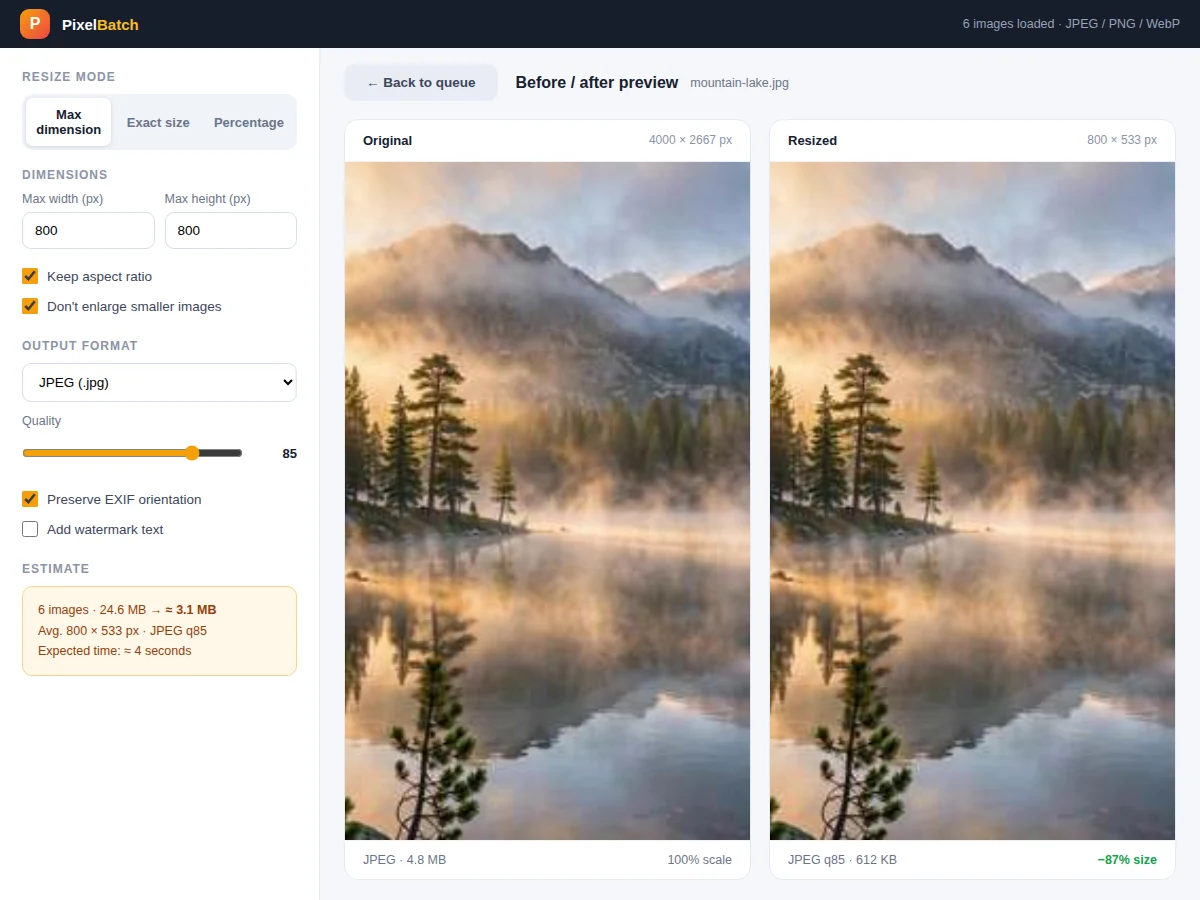
A single phone photo is 4–6 MB; a folder of two hundred is over a gigabyte — too big to email, slow to upload, and wasteful as website assets. The standard fixes (online compressors, one-at-a-time editors) either upload private photos to a stranger's server or take all afternoon. A bulk image resizer solves it locally: point it at a folder, choose a max dimension and quality, and it rewrites every image smaller and lighter in seconds, with a preview that proves the quality tradeoff before committing. This project implements that as a real desktop utility with three resize modes, format conversion, EXIF handling, per-image savings reporting and a batch log — all processed on-device, so photos never leave the machine.
How it works
- The user drops files or a folder into the queue; the app reads each image's format, dimensions, file size and EXIF data without loading full pixels yet.
- Resize settings compute target dimensions per image: max-dimension scales the long edge, exact-size fits or crops per the chosen policy, percentage multiplies both axes.
- The estimate panel totals expected output bytes using the quality setting, so the user sees the savings before starting.
- On start, a worker thread pool decodes, resamples (Lanczos), applies EXIF orientation correction and re-encodes each image to the target format and quality.
- Results stream into the log with per-image stats; failures (corrupt files, unsupported formats) are listed without aborting the batch.
- Converted files land in the output folder preserving the source folder structure, and the batch summary reports totals.
Tech stack:
- Python 3
- PyQt6 · Qt (desktop UI)
- Pillow (decode/resample/encode)
- piexif (EXIF orientation & stripping)
- ThreadPoolExecutor (parallel batch)
- PyInstaller (packaging)
| Parameter | Value |
|---|---|
| Platforms | Windows 10/11, macOS 13+, Ubuntu 22.04+ (expected) |
| Input formats | JPEG, PNG, WebP, BMP, TIFF |
| Output formats | JPEG, PNG, WebP |
| Resample filter | Lanczos (high quality) |
| Quality range | 10–100 (JPEG/WebP) |
| Throughput | Approximately 15–40 images/min at 800px (expected, CPU-dependent) |
| Memory | Streams per image; ~200 MB peak typical |
| Packaging | Single-file installer per OS |
Project features
- [Three resize modes] Max-dimension (fit within a box), exact-size and percentage scaling, with optional aspect-ratio lock and no-upscale protection.
- [Format conversion] Convert between JPEG, PNG and WebP in the same pass, with a quality slider and live output-size estimate.
- [Before/after preview] Pick any image to compare original vs resized side by side, with dimensions, file size and percentage saved.
- [EXIF-aware processing] Honors EXIF orientation so phone photos never come out sideways, with an option to strip metadata for privacy.
- [Originals untouched] Output always goes to a separate folder; the source images are only ever read, never modified.
- [Batch log and savings report] Per-image input→output dimensions and sizes, totals, percentage saved and processing time in an exportable log.
- [Smart defaults] Remembers the last used preset (e.g. "web upload: 1600px JPEG q80") for one-click repeat batches.
What is included
- Complete desktop utility source code
- Installers for Windows, macOS and Linux
- Preset recipes (web upload, email, archive, thumbnail set)
- Project report PDF (resampling filters, color spaces, EXIF, format tradeoffs)
- PPT presentation for final review
- Viva Q&A preparation document (Lanczos vs bilinear, JPEG quality, WebP, EXIF orientation)
Limitations & prerequisites
- This is a resize/convert tool, not an editor — no cropping UI, filters or retouching beyond the exact-size fit policy.
- Animated formats (GIF, animated WebP) convert using the first frame; animation is not preserved.
- Quality below ~60 can show visible JPEG artifacts — the before/after preview exists so the user judges this per image set.
- RAW camera formats (.CR2, .NEF, .ARW) are not decoded in this build.
- Processing speed depends on CPU and image size; the stated throughput is an expectation on a mid-range laptop, not a guarantee.
- CMYK JPEGs are converted to RGB on output, which can shift colors slightly in print-oriented files.
Frequently Asked Questions
Will resizing reduce visible quality?
At sensible settings (e.g. 1600px, JPEG q80) the difference is imperceptible on screen — and the before/after preview lets you verify on your own photos before committing to the batch.
Are my originals safe?
Yes. The app only reads source files; every output is written to a separate folder, so the originals are byte-identical afterwards.
Why WebP as an output option?
WebP is designed to deliver meaningfully smaller files than JPEG at similar visual quality, which matters for websites — the report includes a buyer-run procedure so you can measure the exact difference on your own image set.
What does "EXIF-aware" mean?
Phone photos store orientation as metadata rather than rotated pixels; the app applies it during conversion so outputs display correctly everywhere, and can strip EXIF (including GPS) for privacy.
How fast is it?
Expect roughly 15–40 images per minute at 800px output on a mid-range laptop, using a worker thread pool; the log shows your machine's actual time per batch.
Is this project suitable for a final-year project?
Yes — for Computer Science and IT programs. It covers image processing pipelines, multithreading, format internals and a genuinely useful shipped utility. Suitable for B.E./B.Tech final-year projects in Computer Science and IT.
Components & software requirements
- Python 3
- PyQt6 · Qt (desktop UI)
- Pillow (decode/resample/encode)
- piexif (EXIF orientation & stripping)
- ThreadPoolExecutor (parallel batch)
- PyInstaller (packaging)
Delivery information
Built-to-order project. Delivery timeline is shared after order confirmation based on current queue.
Support terms
Complete documentation, setup guide, and viva preparation included. Support for setup and explanation provided.