
More project photos (2)
The problem
Every student accumulates thousands of files across semesters — lecture notes, assignments, PDFs, code, spreadsheets — yet the search built into the operating system only matches filenames. Finding a document by a phrase inside it, a definition buried in notes, an error string in a log file, or a clause in a report means opening files one by one and using find-in-page repeatedly. Cloud drives index content but require uploading personal files and a constant internet connection. This project solves that gap with a desktop utility that builds a full-text inverted index of user-chosen folders and searches file contents instantly, entirely offline. The student learns how real search works end to end: text extraction from multiple formats, tokenization, inverted indexing with SQLite FTS5, ranked retrieval, snippet generation and incremental reindexing when files change.
User who selects folders and searches the indexed documents.
Follow the working sequence
How it works
- The user selects which folders to watch; the indexer walks them and lists every supported file with its size and modification time.
- Each file passes through its format-specific extractor (PDF, DOCX, spreadsheet, plain text or code), producing clean text; files over the 50 MB cap are skipped and logged.
- The text is tokenized and inserted into a local SQLite FTS5 full-text index together with filename, path, size and timestamps.
- When the user types, the query is tokenized the same way and matched against the index; filename hits score 10× a content hit and term frequency adds weight.
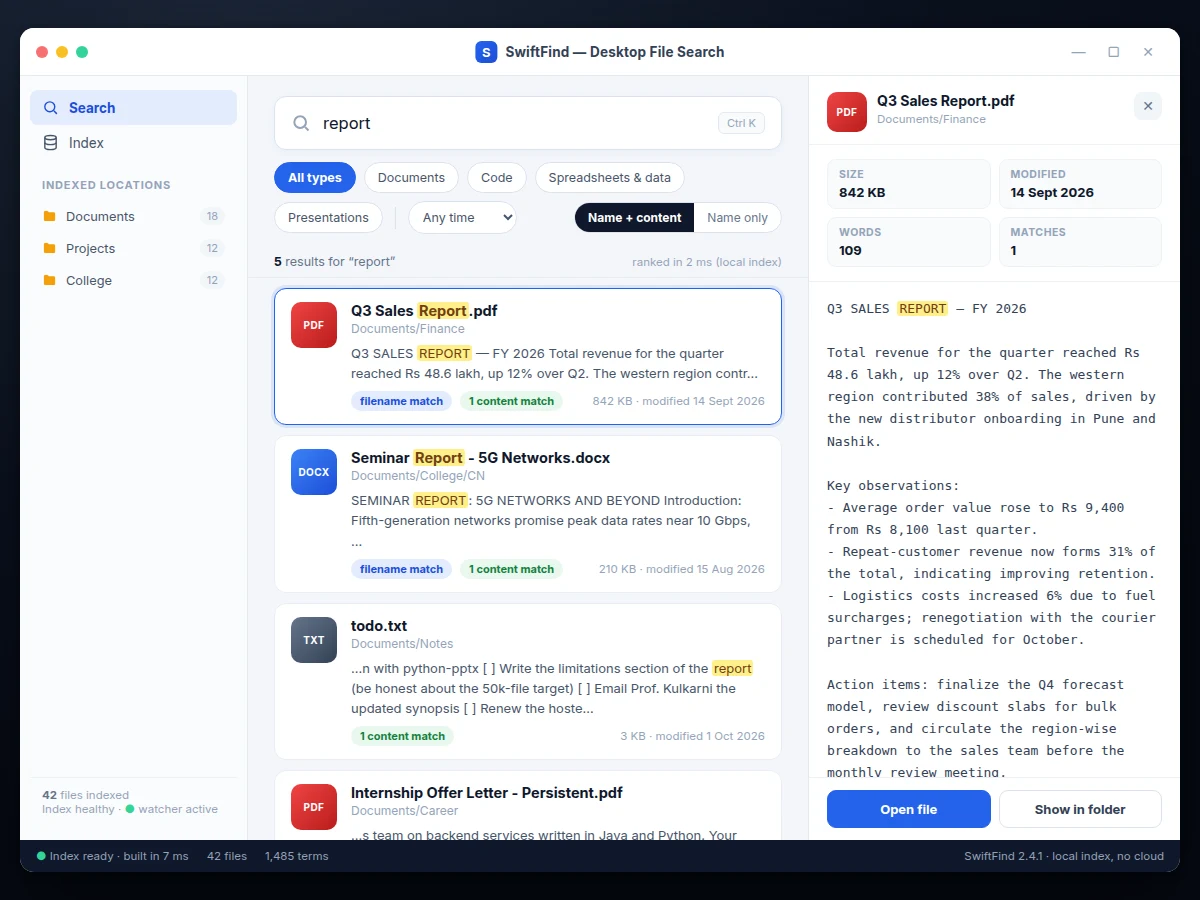
- The top results render with highlighted snippets cut around the first match, plus badges showing filename vs content matches.
- Filters (file type, date range, search scope) and sorting constraints apply on top of the ranked list without re-querying the disk.
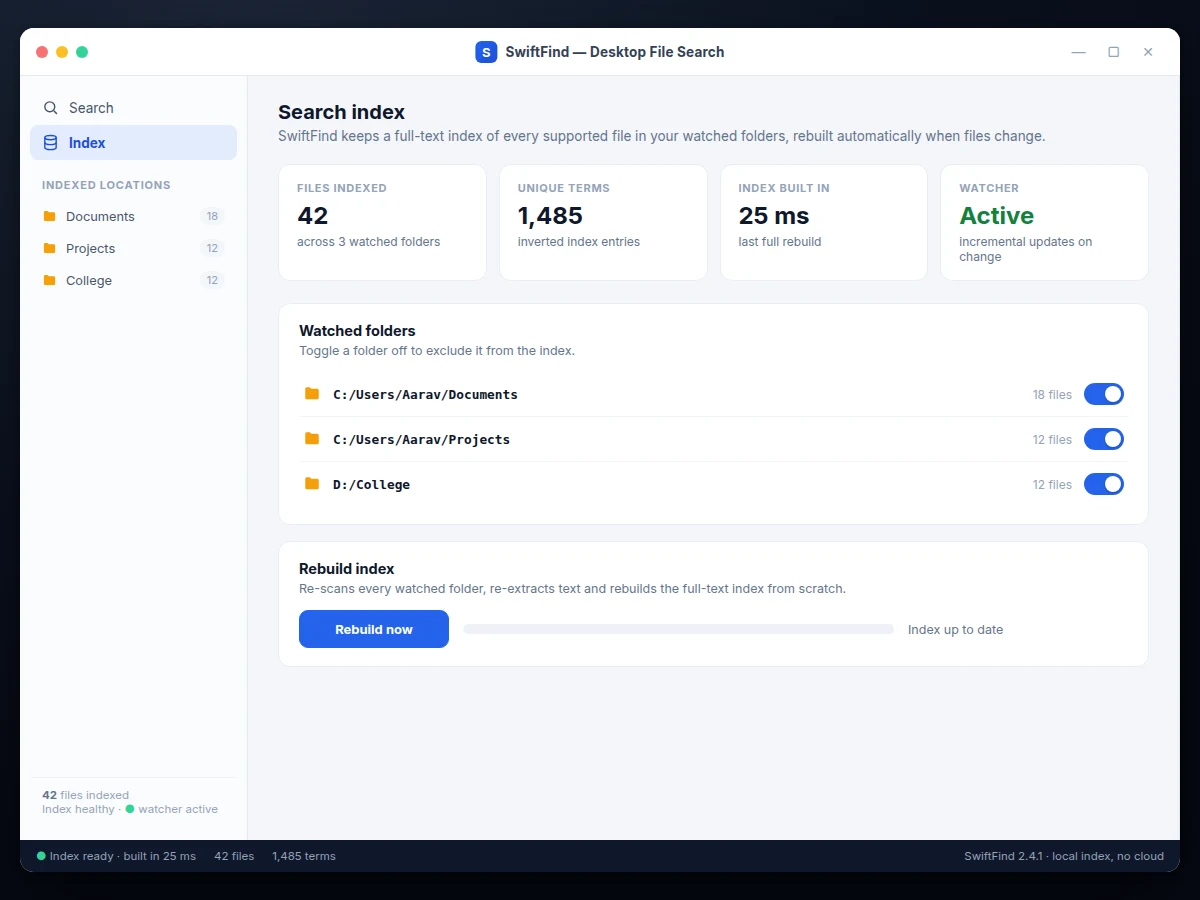
- A background folder watcher keeps the index in sync as files change; a manual rebuild re-scans everything from scratch.
Tech stack:
- Python 3
- PyQt6 (desktop UI)
- SQLite FTS5 (full-text index)
- watchdog (folder monitoring)
- PyPDF2 · python-docx · openpyxl · python-pptx (text extraction)
- PyInstaller (Windows/Linux executables)
| Parameter | Value |
|---|---|
| Platform | Windows 10/11 and Linux (expected) |
| Index engine | SQLite FTS5, stored locally under the user profile |
| Supported formats | PDF, DOCX, PPTX, XLSX, CSV, TXT, Markdown, PY/JS/HTML/CSS/SQL/JSON/SH |
| Corpus size | Design target: up to ~50,000 files on a typical student laptop |
| Query response | Expected sub-second on an indexed corpus; depends on corpus size and hardware |
| Max file indexed | 50 MB per file (configurable) |
| Ranking | Filename weight 10, content weight 1, recency tie-break (configurable) |
| Connectivity | Fully offline; no account, no cloud, no telemetry |
Project features
- [Instant as-you-type search] Results re-rank live with every keystroke, typically in well under a second on an indexed corpus, with the query latency shown next to the result count.
- [Full-text content indexing] A local SQLite FTS5 inverted index covers file contents, not just filenames, so a phrase inside a PDF or log file is found without opening anything.
- [Multi-format text extraction] Reads PDF, DOCX, PPTX, XLSX, CSV, TXT, Markdown and common code formats (Python, JavaScript, HTML, CSS, SQL, JSON, shell), each handled by a dedicated extractor module.
- [Match snippets with highlighting] Every content hit shows a contextual snippet with each query term highlighted, so relevance can be judged before opening the file.
- [Ranked results] Filename matches outrank content matches, frequent terms score higher, and recency breaks ties — the ranking weights are configurable in one settings file.
- [File-type, date and scope filters] Filter chips for documents, code, spreadsheets and presentations, a date-range selector, and a name-only vs name-plus-content scope toggle narrow any search.
- [In-app file preview] Clicking a result opens a preview pane with file metadata (size, modified date, word count, match count) and the full extracted text with all matches highlighted.
- [Automatic index updates] A folder watcher detects created, modified and deleted files and updates the index incrementally, with a one-click full rebuild and progress indicator.
What is included
- Complete Python source code with modular extractor, indexer and UI layers
- Windows and Linux executables built with PyInstaller
- User guide (installation, watched-folder setup, filter reference, troubleshooting)
- Project report PDF (background, indexing theory, architecture, methodology, honest evaluation)
- PPT presentation for final review
- Viva Q&A preparation document (inverted indexes, tokenization, FTS5, ranking, file watching)
- Sample test corpus and setup instructions for the demo
Limitations & prerequisites
- Scanned or image-only PDFs are not searchable — the base build has no OCR; text must be extractable.
- Tokenization and ranking are tuned for English text in the base build.
- Files larger than 50 MB per file are skipped by the indexer (configurable, with a log entry).
- Network drives and cloud-synced folders are not watched for live updates in the base build; they can be indexed with a manual rebuild.
- The ~50,000-file corpus and sub-second query figures are design targets, stated honestly — actual speed depends on the buyer's hardware and corpus.
- Images, audio and video match by filename only; their contents are not analyzed.
Frequently Asked Questions
Does it search inside file contents or just filenames?
Inside contents. The indexer extracts text from every supported file into a local SQLite FTS5 full-text index, so a phrase buried in a PDF, log file or spreadsheet is found without opening anything. Filenames are indexed too and ranked higher.
Which file formats can it read?
PDF, DOCX, PPTX, XLSX, CSV, TXT, Markdown and common code formats (Python, JavaScript, HTML, CSS, SQL, JSON, shell scripts). Unsupported formats are skipped and listed in the index log; adding a new extractor is a documented customization.
Does it need the internet?
No. Indexing, searching and previewing all run locally on the machine. There is no account, no cloud upload and no telemetry, which also makes it suitable for private documents.
How does the index stay up to date when files change?
A watchdog-based folder monitor detects created, modified, renamed and deleted files and updates the index incrementally in the background. A manual "Rebuild index" option re-scans everything from scratch with a progress bar.
Can it really handle 50,000 files with instant results?
That is the design target, not a measured claim on your machine: FTS5 inverted indexes are designed for exactly this scale, and query time depends on corpus size, disk speed and RAM. The report documents the architecture honestly and includes a procedure to benchmark it on the buyer's own corpus.
Is this project suitable for a final-year project?
Yes — for Computer Science and IT programs. It demonstrates information retrieval fundamentals (tokenization, inverted indexes, ranking), file-format parsing, desktop UI development and performance-aware engineering, with a working tool the student can demo live in the viva. Suitable for B.E./B.Tech final-year projects in Computer Science and Information Technology.
Components & software requirements
- Python 3
- PyQt6 (desktop UI)
- SQLite FTS5 (full-text index)
- watchdog (folder monitoring)
- PyPDF2 · python-docx · openpyxl · python-pptx (text extraction)
- PyInstaller (Windows/Linux executables)
Delivery information
Built-to-order project. Delivery timeline is shared after order confirmation based on current queue.
Support terms
Complete documentation, setup guide, and viva preparation included. Support for setup and explanation provided.
Download free synopsis (PDF)
Enter your name and email — the synopsis PDF downloads immediately. We may send occasional project updates; no spam, unsubscribe anytime.