
More project photos (2)
The problem
Students and developers take screenshots constantly — error dialogs, code snippets, chat conversations, receipts, whiteboard photos — and then lose them. Operating systems file screenshots by capture time alone, so finding one means scrolling through months of identically named files or remembering exactly when it was taken. The text inside the image, which is usually what the person actually remembers ("the docker error about the port", "the forum answer about Tesseract speed"), is completely invisible to search. This project builds ScreenVault, a desktop application that closes that gap: it watches a screenshots folder, extracts the text from every image with Tesseract OCR, and stores it in a local SQLite full-text index. Any word visible in any screenshot becomes searchable in milliseconds. An auto-tagging engine labels each capture by source application and content type, and color labels plus date filters keep large collections navigable — all offline, with no account and no cloud upload.
Drops screenshots in the watch folder and searches them later by text or tag.
Follow the working sequence
How it works
- The app registers a watch folder (default ~/Pictures/Screenshots) using filesystem events via the watchdog library; every new PNG, JPG or BMP is picked up within seconds.
- Each image is perceptually hashed and skipped if an identical capture is already indexed.
- New images are preprocessed (grayscale, downscale toward a ~300 DPI equivalent) and queued to a background OCR worker pool running Tesseract with English language data and PSM 6.
- The extracted text, file metadata and detected source application are written to SQLite; the text goes into an FTS5 virtual table for full-text search.
- The auto-tagger applies keyword rules over the OCR text and window-title patterns to attach tags such as code, error, terminal or web.
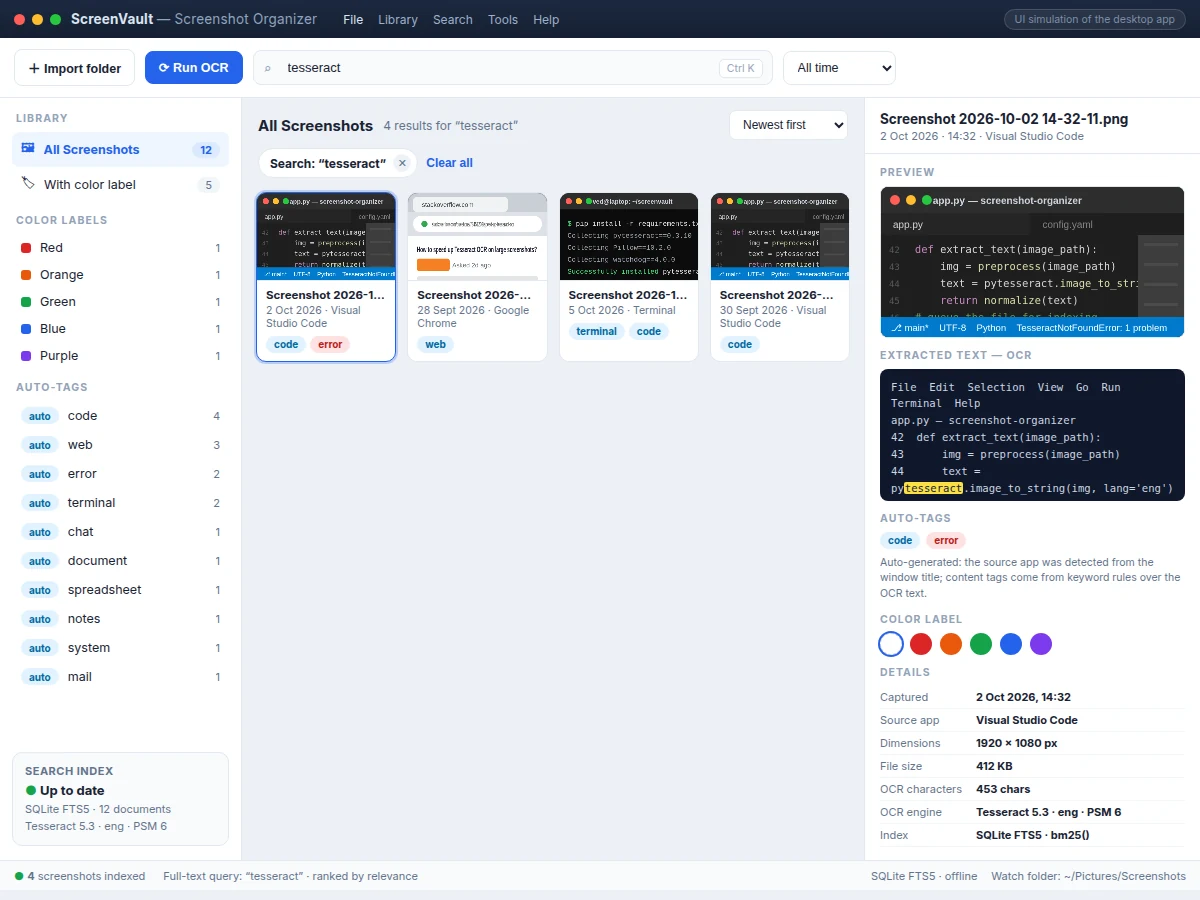
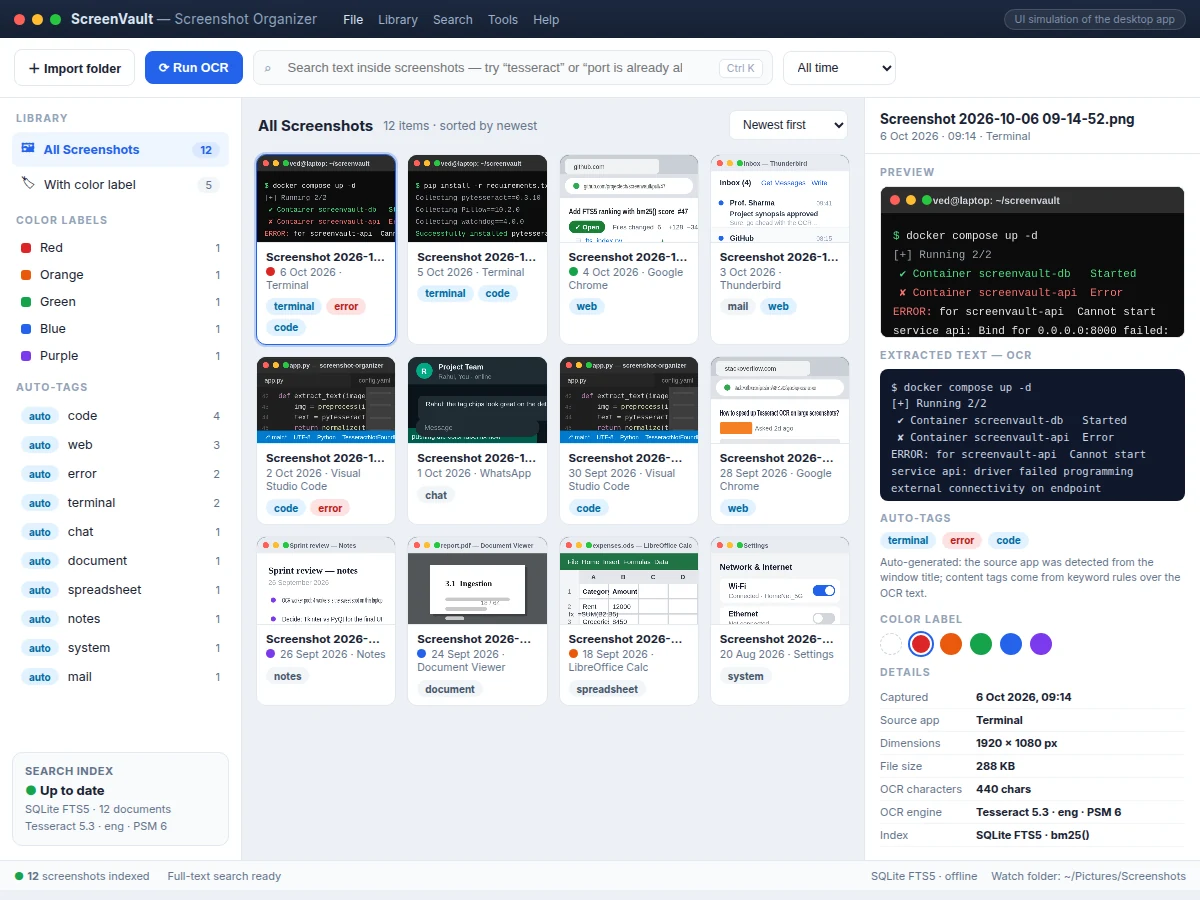
- The library UI renders the collection as a thumbnail grid; typing in the search box runs an FTS5 query with bm25() ranking and highlights the matched terms in each result's OCR preview.
- Selecting a screenshot opens the detail pane with its extracted text, tags, color label and capture metadata; label, tag and date filters narrow the grid instantly and combine with text search.
Tech stack:
- Python 3
- Tesseract OCR via pytesseract
- SQLite with FTS5 full-text index
- Tkinter with CustomTkinter widgets
- Pillow for image preprocessing
- watchdog for folder monitoring
- PyYAML for configuration
- PyInstaller for packaging
| Parameter | Value |
|---|---|
| Application type | Desktop GUI for Windows, Linux and macOS |
| OCR engine | Tesseract 5 via pytesseract |
| OCR language data | English (additional language packs configurable) |
| Search index | SQLite FTS5 virtual table, bm25() ranking |
| Supported formats | PNG, JPG, BMP |
| Folder monitoring | Filesystem events (watchdog), no polling |
| OCR worker pool | 4 workers (configurable) |
| Indexing throughput | Approximately 2 s per 1080p screenshot on a mid-range laptop (design target) |
| Search latency | Under 100 ms for typical queries on a 10,000-image index (design target) |
| Installed size | Approximately 60–90 MB including Tesseract language data (expected) |
Project features
- [Watch-folder ingestion] The app monitors the screenshots folder with filesystem events and imports new captures within seconds — no manual adding, no polling loop. Each file is perceptually hashed first, so exact duplicates are skipped instead of indexed twice.
- [Tesseract OCR pipeline] Every new image is preprocessed (grayscale conversion, optional downscale to a ~300 DPI equivalent) and passed to Tesseract OCR in a background worker pool, so the UI never freezes while a batch is being read.
- [SQLite FTS5 full-text search] Extracted text lands in an FTS5 virtual table inside a local SQLite database; queries rank results with bm25() and matched terms are highlighted in the OCR preview. Search is instant and works with zero internet.
- [Auto-tagging engine] The source application is detected from the window title or file context, and content tags (code, error, terminal, web, chat, document) are attached by keyword rules over the OCR text — no manual tagging needed.
- [Color labels and date filters] Five color labels can be assigned per screenshot, and the library filters by label, auto-tag, or date range (today, last 7 days, last 30 days, all time), combinable with the text search.
- [Screenshot detail pane] Selecting any screenshot shows a preview, the full extracted OCR text with search-term highlighting, its auto-tags, color label, and capture metadata (source app, dimensions, file size, OCR character count).
- [Configurable: languages, tag rules, workers] OCR language packs, the auto-tag keyword rules, the watch folder and the OCR worker-pool size are all set in a YAML config — no code changes needed.
- [Optional: encrypted vault mode] AES-encrypted storage of the screenshot library and index can be added on request; it is not part of the base build and is quoted separately.
What is included
- Complete Python source code (ingestion, OCR pipeline, FTS5 search, auto-tagger, desktop UI)
- SQLite schema and FTS5 index setup scripts
- YAML configuration with documented options
- PyInstaller packaging configs for Windows, Linux and macOS
- Setup guide (installing Tesseract and language data on each OS)
- Project report PDF (design, OCR pipeline, indexing, evaluation procedure)
- PPT presentation for the final review
- Viva Q&A preparation document
Limitations & prerequisites
- OCR quality follows image quality: fonts below ~10 px, stylized lettering and heavy JPEG compression reduce recognition; no accuracy figure is claimed.
- Tesseract reads printed text; handwriting recognition is out of scope for this build.
- Text in heavily watermarked images or in screenshots of video frames may extract poorly.
- The app indexes local folders only; screenshots from a phone must first be copied into the watch folder (phone sync is an optional add-on).
- The first full scan of a large library takes time (design target ~2 s per 1080p screenshot); incremental additions are near-instant.
- Duplicate detection uses perceptual hashing, so near-identical screenshots with small edits may not be flagged as duplicates.
- Tesseract must be installed on the target machine or bundled with the package (~60–90 MB installed).
Frequently Asked Questions
Is this project suitable for a final-year project?
Yes — for Computer Science and IT programs. It combines filesystem monitoring, an OCR pipeline, full-text indexing with SQLite FTS5 and a desktop GUI: four distinct, viva-friendly subsystems. The report documents the design decision behind each one, and the working app gives examiners something concrete to click through during the demonstration.
Does it need the internet?
No. OCR, indexing, search and tagging all run locally on the student's machine. The internet is needed exactly once, during setup, to install Python packages and the Tesseract language data. After that the app works fully offline, and no screenshot ever leaves the computer.
Which images can it search?
Any PNG, JPG or BMP placed in the watch folder: screenshots, saved diagrams, scanned pages and photos of whiteboards or error dialogs. Tesseract reads printed text best; very small fonts, stylized lettering and handwriting extract less reliably, which the report states openly.
Is the database included?
Yes. The app uses SQLite, which is a single local file — no database server to install or configure. The FTS5 full-text index lives in the same file, so search works out of the box and the whole library is backed up by copying one folder.
Can it be customized?
Yes. Realistic options include a PyQt interface instead of Tkinter, additional OCR languages such as Hindi, an encrypted vault mode, phone-to-PC sync, or a web dashboard over the same SQLite index. Each changes the build scope and is quoted separately.
How is this different from searching file names?
File names say nothing about image content. This app reads the actual pixels: an error dialog saying "port is already allocated" becomes findable by typing those words, even when the file is named "Screenshot 2026-10-06.png". That is the entire point of the OCR plus full-text index design.
Components & software requirements
- Python 3
- Tesseract OCR via pytesseract
- SQLite with FTS5 full-text index
- Tkinter with CustomTkinter widgets
- Pillow for image preprocessing
- watchdog for folder monitoring
- PyYAML for configuration
- PyInstaller for packaging
Delivery information
Built-to-order project. Delivery timeline is shared after order confirmation based on current queue.
Support terms
Complete documentation, setup guide, and viva preparation included. Support for setup and explanation provided.
Download free synopsis (PDF)
Enter your name and email — the synopsis PDF downloads immediately. We may send occasional project updates; no spam, unsubscribe anytime.