
More project photos (2)

The problem
A typing tutor app is a guided practice app that teaches touch typing step by step instead of only timing how fast you already type. This Android typing tutor app teaches English QWERTY touch typing through 12 progressive lessons, measures speed with timed tests, and tracks accuracy per key, so learners can find and fix their weakest keys.
| Approach | What the learner does | What is measured |
|---|---|---|
| Desktop typing test app | Takes a timed test on a passage | WPM and accuracy for that one test only |
| Self-taught typing | Types daily work and hopes to improve | Nothing — weak keys stay invisible |
| This Android typing tutor | Follows 12 guided lessons, then takes timed tests | WPM, accuracy and per-key error rates over time |
Most students type for hours every day — assignments, code, reports — yet never learn proper finger placement, so they stay slow and make the same mistakes for years. A test-only app measures the problem without fixing it. This app fixes it: the lesson curriculum builds the skill key by key, the on-screen keyboard shows which finger owns each key, and the weak-key drills turn the learner's own error data into targeted practice. Everything runs on the phone, offline, with no account.
This is a built-to-order software project: the Kotlin Android app, the 12-lesson curriculum, the speed-test engine, the local Room database and the complete viva kit (report, PPT, Q&A) are prepared fresh for you.
A typing tutor Android app with speed tests, accuracy tracking and practice lessons solves a problem every student recognises but few measure: people type for hours daily yet never learn to type properly, so slow hunting-and-pecking and repeated errors become permanent habits. Classroom typing practice is usually a single timed test, which only reports a score and never teaches the skill behind it, and browser typing tests need an internet connection, show advertising, and keep results on someone else's server. A phone is the device students actually carry, but there is no structured English QWERTY tutor on it that combines a real lesson curriculum with honest measurement. This Android app fills that gap: 12 progressive lessons teach finger placement key by key, timed tests measure speed, and per-key accuracy tracking shows exactly which keys need work, all offline on the student's own phone.
Follows the lessons, takes timed tests and practises weak keys.
Follow the working sequence
How it works
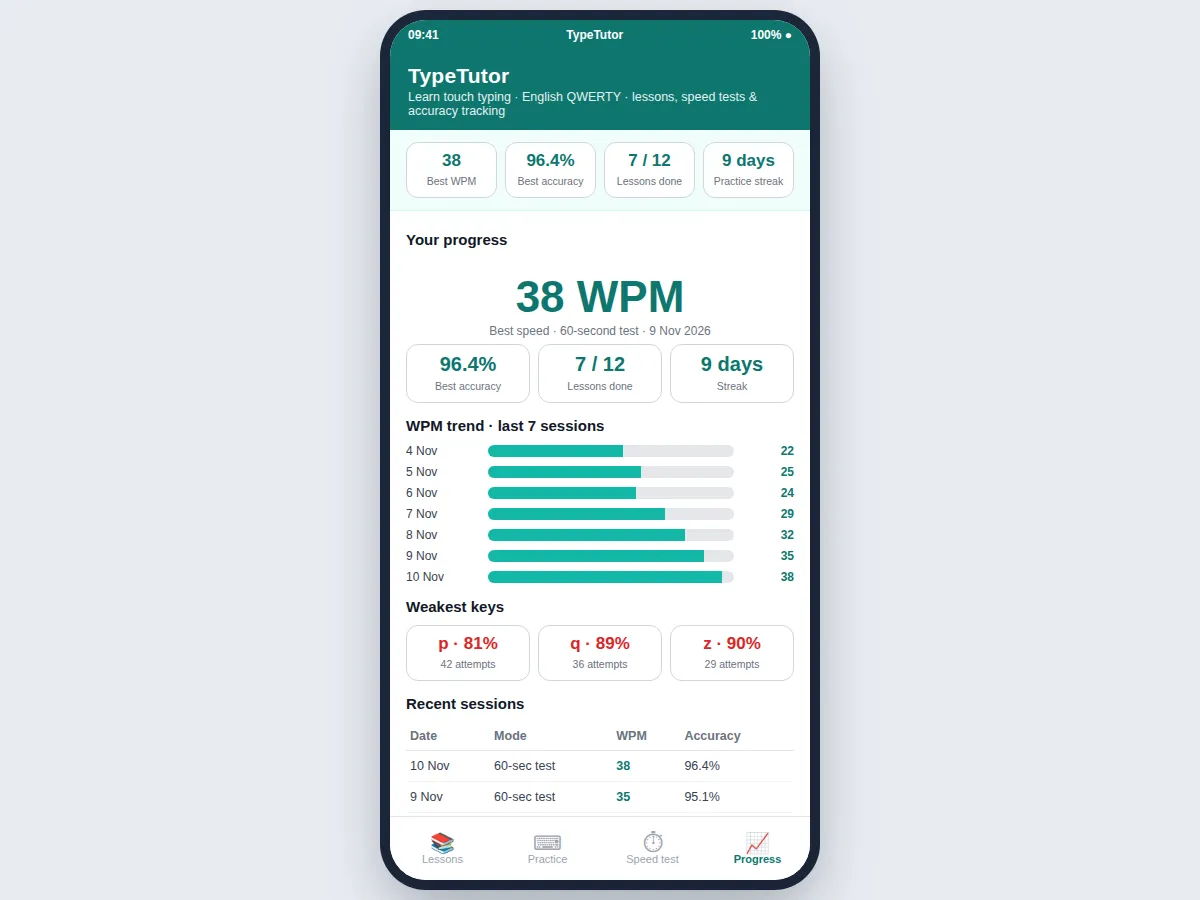
The typing tutor app works end to end like this: the learner opens the lesson list and starts the next unlocked lesson, which shows a short passage built only from keys already taught; each keystroke is compared with the expected character as it is typed, and the on-screen keyboard highlights the finger zone for the next key. Live WPM and accuracy update on every keystroke, and finishing a lesson unlocks the next one while the session is saved to the local Room database. Speed tests run separately for 30, 60 or 120 seconds with the timer starting on the first keystroke, and the results screen reports net WPM, accuracy and keystroke counts. The progress view turns all saved sessions into a WPM trend, a weakest-keys list and a session history, and the weakest keys automatically feed the weak-key drill lesson.
- The learner picks the next unlocked lesson from the 12-lesson curriculum, ordered from home-row basics to full-keyboard sentences.
- The lesson shows a passage built only from keys already taught, so new keys are practised without re-testing old ones.
- Each keystroke is compared with the expected character immediately; correct keys advance the passage and mistakes are highlighted in red.
- The on-screen keyboard lights up the finger zone for the next key, so the learner keeps their fingers on the home row and reaches instead of looking down.
- Live WPM and accuracy update on every keystroke from the standard formula: correct characters divided by 5, divided by minutes elapsed.
- Completing a lesson saves the session to the local Room database and unlocks the next lesson in the curriculum.
- In speed-test mode the learner picks 30, 60 or 120 seconds; the timer starts on the first keystroke and the results screen reports net WPM, accuracy and keystroke counts.
- The progress view shows the WPM trend across sessions, the weakest keys by accuracy, and the full session history, and the weakest keys feed the weak-key drill lesson.
Tech stack:
- Kotlin
- Android SDK · API level 26 and above
- Room · Jetpack local database
- Material Design 3 · Android UI
- Android Jetpack ViewModel · LiveData
- HTML · CSS · JavaScript (working demo)
- Gradle · Android Studio build
- Git
| Parameter | Value |
|---|---|
| Lessons | 12 lessons across 4 stages (count) |
| Lesson length | Approximately 5–8 minutes per lesson (expected) |
| Speed-test durations | 30 seconds · 60 seconds · 120 seconds (selectable) |
| WPM formula | Correct characters ÷ 5 ÷ minutes elapsed (standard formula) |
| Accuracy formula | Correct keystrokes ÷ total keystrokes × 100 (standard formula) |
| Demo-run result | 21 WPM at 97.7% accuracy (demo run, 10 Nov 2026, not a benchmark) |
| Demo-run keystrokes | 129 correct characters · 3 errors · 132 total keystrokes (demo run) |
| Demo-run duration | 75 seconds (demo run) |
| Weakest keys (demo data) | p at 81% accuracy (34 of 42 attempts) · q at 89% accuracy (32 of 36 attempts) |
| Local storage | Room database on the device (no cloud upload) |
| Minimum Android version | Android 8.0 · API level 26 (design target) |
| Installed app size | Approximately 8–12 MB (expected) |
| Offline use | Yes — lessons, tests and history need no internet connection (design) |
Project features
The app's three strongest capabilities are its progressive lesson curriculum, its finger-zone on-screen keyboard, and its per-key accuracy tracking. The 12-lesson curriculum teaches English QWERTY touch typing in four stages — home row, top row, bottom row, then full-keyboard mastery — so a complete beginner can start from zero and finish typing real sentences. The on-screen keyboard colours each key by finger zone and highlights the next key, which teaches correct finger placement without a separate diagram. Per-key accuracy tracking records every keystroke and ranks the weakest keys, so practice targets the exact keys that cost the most speed. Timed speed tests with live WPM complete the loop by measuring progress honestly. The results screen closes it by reporting net WPM, raw WPM and accuracy with the exact keystroke counts behind them, so every number on the screen can be explained in the viva without guessing.
- [Progressive lesson curriculum] 12 lessons in 4 stages — home row, top row, bottom row, then full-keyboard sentences, punctuation and capitals — each unlocking only after the previous lesson is finished. Implemented in the base build.
- [Finger-zone on-screen keyboard] A QWERTY keyboard coloured by finger zone that highlights the next key, teaching correct finger placement while the learner types. Implemented in the base build.
- [Timed speed tests] Tests run for 30, 60 or 120 seconds with the timer starting on the first keystroke, matching how real typing tests behave. Implemented in the base build.
- [Live WPM and accuracy tracking] Speed and accuracy update on every keystroke from the open scoring formula, with mistakes highlighted immediately. Implemented in the base build.
- [Weak-key drills] The app ranks keys by accuracy and builds a drill lesson from the learner's own weakest keys, so practice targets real errors instead of random text. Implemented in the base build.
- [Local progress history and trend view] Every lesson and test is saved to a local Room database and shown as a WPM trend, weakest-keys list and session history, with no account and no internet connection. Implemented in the base build.
- [Results breakdown screen] Each finished test reports net WPM, raw WPM, accuracy and the counts of correct, incorrect and total keystrokes, so every number can be explained in the viva. Implemented in the base build.
- [Custom lessons (optional customization)] Loading the teacher's own lesson passages can be added on request; it is not part of the base build.
What is included
- Complete Kotlin Android source code (lessons, typing engine, speed tests, Room database)
- 12-lesson English QWERTY curriculum with finger-placement guidance
- Working demo build of the app for the student's phone
- Project report PDF (background, lesson design, WPM mathematics, demo-run results)
- PPT presentation for final review
- Viva Q&A preparation document (WPM formula, accuracy definition, Room storage, lesson design)
Delivery timeline
- Requirement confirmation and lesson selection: Approximately 1–2 working days.
- App build (lesson engine, typing view, speed tests, Room history): Approximately 5–6 working days.
- Documentation and viva kit (report, PPT, Q&A): Approximately 2–3 working days.
- Total delivery window: Approximately 1–2 weeks from confirmed requirements, subject to feedback rounds.
Support
- Setup help on the student's phone (installing the demo build) is included with delivery.
- Bug fixes for the delivered build are covered for 30 days after delivery.
- Small customizations (extra lessons, duration options, colour theme) can be added on request after delivery.
- A walkthrough of the code and the WPM calculation is included so the student can explain the app in the viva.
Limitations & prerequisites
- Scores depend on passage difficulty: a lesson passage with unusual words produces lower WPM than plain prose, so sessions are only comparable on similar passages.
- The 30-second test varies more between runs than the 60-second or 120-second test, because a single error moves the percentage further on fewer keystrokes.
- Accuracy counts keystrokes only; it does not judge typing posture or finger placement beyond the keyboard guidance.
- The base build is English QWERTY only: it does not teach Hindi or any other language keyboard layout, unlike the separate Hindi typing practice app.
- All history lives on one phone: sessions are not synced between devices unless the Room database file is copied manually.
- Reported figures are practice metrics for learning and demonstration, not a certified typing certificate.
- The app measures typing on its own lessons and passages; it does not grade free-form documents or code typed elsewhere.
Frequently Asked Questions
How is this different from the desktop typing speed test app?
The desktop app is a Python and Tkinter program that only runs timed tests on a computer: it measures WPM and accuracy but teaches nothing, has no lessons and no mobile version. This Android app is built around a 12-lesson curriculum that teaches touch typing key by key, with speed tests as one mode inside it, plus weak-key drills built from the learner's own errors. If the goal is to learn typing, this app teaches; if the goal is only to measure an existing skill on a desktop, the desktop app fits better.
How is WPM calculated?
WPM uses the standard formula: correct characters divided by 5, divided by minutes elapsed, where one word is defined as 5 characters including spaces and punctuation, so longer words do not change the score. Accuracy is correct keystrokes divided by total keystrokes, multiplied by 100. In the demo run of this build, 129 correct characters in 75 seconds gives 129 ÷ 5 ÷ 1.25 = 20.6, reported as 21 WPM, with accuracy 129 ÷ 132 × 100 = 97.7%.
Does the app need an internet connection?
No, the app works fully offline on the student's own phone, with no internet connection required at any point. Lessons and passages are bundled locally, history is stored in a local Room database, and no account, upload or server is involved, which also makes classroom and viva demonstrations straightforward.
Can I add my own lessons or passages?
Custom lesson passages are available as an optional customization, not in the base build. The base build ships with the 12-lesson English QWERTY curriculum covering home row, top row, bottom row and full-keyboard sentences, and teacher-supplied passages for a specific class can be added on request.
Is this project suitable for a final-year project?
Yes, for Computer Science, IT and Android App Development programmes. It demonstrates Android UI development with Kotlin, a structured lesson curriculum, event-driven input handling, timer design, local data storage with Room, and a transparent scoring formula, and the student can explain every number on the results screen in the viva.
Components & software requirements
- Kotlin
- Android SDK · API level 26 and above
- Room · Jetpack local database
- Material Design 3 · Android UI
- Android Jetpack ViewModel · LiveData
- HTML · CSS · JavaScript (working demo)
- Gradle · Android Studio build
- Git
Delivery information
Built-to-order project. Delivery timeline is shared after order confirmation based on current queue.
Support terms
Complete documentation, setup guide, and viva preparation included. Support for setup and explanation provided.
Download free synopsis (PDF)
Enter your name and WhatsApp number — the synopsis PDF downloads immediately. We may send occasional project updates on WhatsApp; no spam.