
More project photos (2)

The problem
The Sign Language Learning App for Android with Video Lessons and Practice Quizzes teaches Indian Sign Language (ISL) through short videos of a real signer, so learners copy hand shape, movement, and facial expression together instead of guessing a sign from a written description. Many beginners try to learn signs from text lists or still images, and that route hides exactly what matters: where the hand starts, which way it moves, and how fast. The result is slow progress, signs that look close but are wrong, and no way to check what was actually learned. This app closes that gap with one clear loop per sign: watch the video, read the hand-shape steps, mirror the sign at half speed, then answer a sign-to-word quiz. Progress, streaks, and missed signs are tracked on the device, so revision returns to the signs a learner actually got wrong.
| Learning method | What the learner sees | What it checks |
|---|---|---|
| Video sign lessons (this app) | A real signer, hand shape, movement and expression | Sign-to-word quiz after each lesson |
| Text lists of signs | Written descriptions only | Nothing, unless tested separately |
| Still-image sign charts | One frozen hand position | Nothing, movement is missing |
Opens a lesson, watches the signer and mirrors each sign at slow speed.
Follow the working sequence
How it works
The Sign Language Learning App for Android works as a short, repeatable loop: the learner picks a lesson, watches a video of a real signer performing one sign, reads the numbered hand-shape steps beside it, and mirrors the movement at half speed or in mirror view. Each sign ends with a sign-to-word quiz question, and the app records which signs were answered correctly and which were missed. Missed signs go into a review list that appears first in the next session, while completed lessons, minutes practised, and the daily streak are stored in the on-device database. Lessons are downloaded once and then play offline, and the optional camera view shows the learner beside the lesson still so hand position can be compared by eye, with no score given because the camera does not recognise signs.
- The learner opens a lesson from the home screen, for example Greetings, and sees its signs listed with a video length and a progress bar.
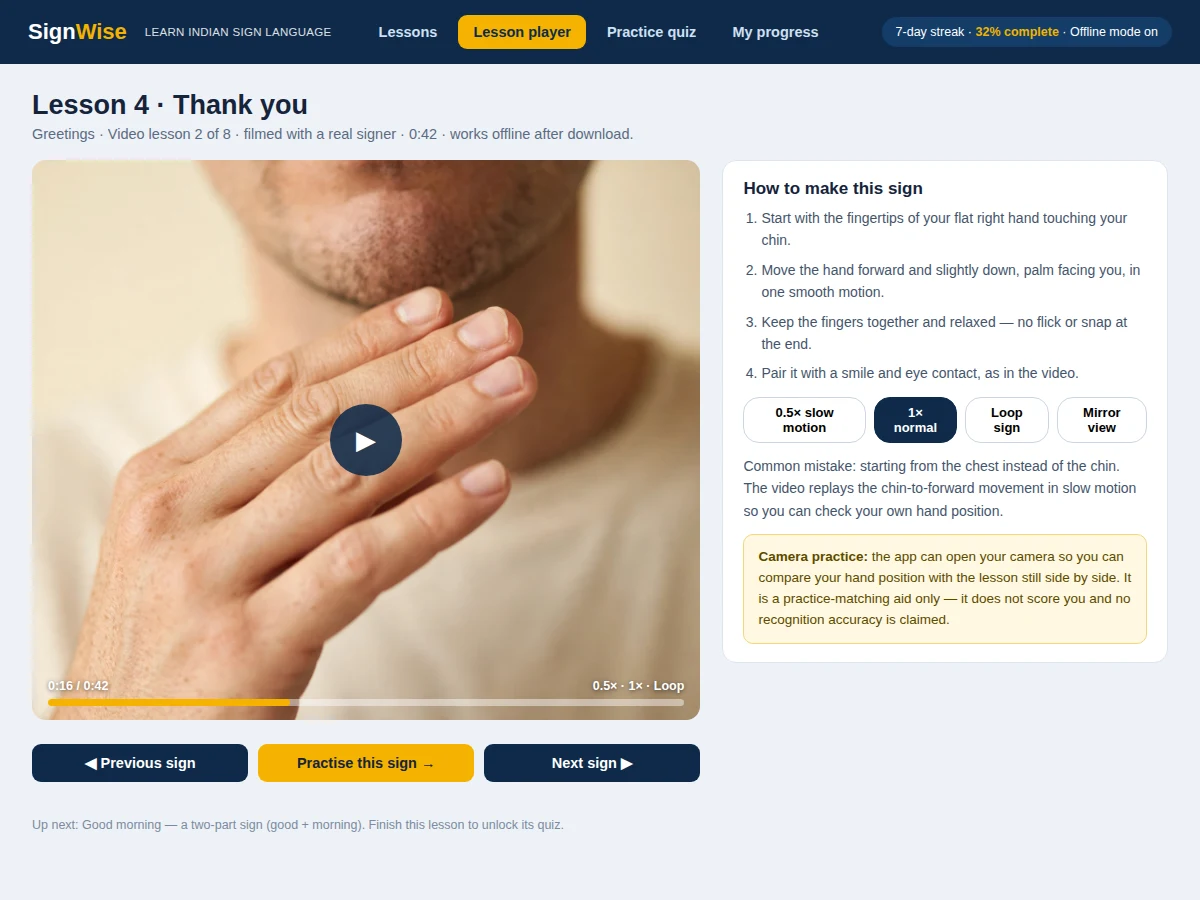
- Tapping a sign opens the lesson player: the video plays, and the numbered hand-shape steps sit beside it with slow-motion, loop, and mirror controls.
- The learner mirrors the sign at 0.5x speed, optionally opening the camera view to compare their hand position with the lesson still.
- After the signs in a lesson, the app opens a 10-question sign-to-word quiz: a sign video or still is shown and the learner picks the matching word.
- Each answer gets instant feedback, including which similar sign it is usually confused with, and missed signs are added to the review list.
- The progress screen updates completed lessons, quiz scores, minutes practised, and the daily streak, all stored locally in the Room database.
Tech stack:
- Kotlin
- Android Studio
- Jetpack Compose · Material 3
- Room database
- ExoPlayer · offline video playback
- CameraX · camera practice view
- WorkManager · practice reminders
- Git
| Parameter | Value |
|---|---|
| Lessons | 12 lessons (design count) |
| Signs taught | 48 signs (design count) |
| Fingerspelling | 26 letters A-Z (design count) |
| Lesson video length | Approximately 30-60 seconds per sign lesson (design target) |
| Quiz questions | 10 questions per lesson (design count) |
| Offline lesson pack | Approximately 300-400 MB (expected, depends on video encoding) |
| Minimum Android version | Android 8.0 · API level 26 (design target) |
| Demo file size | Approximately 1.4 MB (measured, single-file demo) |
| Daily practice reminder | 1 reminder per day (configurable) |
Project features
The Sign Language Learning App for Android centres on three capabilities that work as one learning loop: video sign lessons filmed with a real signer, sign-to-word practice quizzes after every lesson, and progress tracking that sends missed signs back for review. The video lessons carry the teaching, with slow-motion replay, looping, and a mirror view so a learner can copy hand shape and movement accurately. The quizzes carry the checking, showing a sign and asking for its word, with instant feedback and an explanation of the usual mix-up. The progress screen carries the revision, listing the signs missed in quizzes, the daily streak, and minutes practised, so the next session starts with the weakest signs rather than the easiest ones, and the daily streak keeps the habit visible without any leaderboard or social pressure.
- [Video sign lessons] Short videos of a real signer for every sign, with 0.5x slow-motion replay, looping, and a mirror view so hand shape and movement can be copied accurately.
- [Step-by-step hand-shape notes] Numbered notes beside each video state the starting position, the direction of movement, and the common mistake for that sign.
- [Sign-to-word practice quizzes] Each lesson ends with a 10-question quiz that shows a sign and asks for its word, with instant feedback and the usual mix-up explained.
- [Fingerspelling trainer] One hand shape per letter across 26 letters A-Z, with timed recall practice that separates similar shapes such as A, S, and T.
- [Camera practice view] The app can open the camera so the learner compares their own hand position with the lesson still side by side; it is a practice-matching aid only and gives no score.
- [Offline lessons and progress tracking] Downloaded lessons play without internet, and completed lessons, minutes practised, quiz scores, and the daily streak are stored in the on-device Room database.
- [Review list for missed signs] Signs answered wrong in quizzes return first in the next session, so revision focuses on the weakest signs instead of repeating the easy ones.
What is included
- Complete Android app source code in Kotlin with Jetpack Compose
- Lesson content pack: 12 lessons and 48 signs with video lessons and hand-shape notes
- Sign-to-word quiz bank with 10 questions per lesson and a review list
- Fingerspelling trainer for 26 letters A-Z
- Camera practice view and offline playback with Room database storage
- Project report PDF (background, methodology, architecture, outcomes)
- PPT presentation for final review
- Viva Q&A preparation document
Limitations & prerequisites
- The lesson videos teach Indian Sign Language (ISL); signs from other sign languages are not included in the base pack.
- The camera practice view only shows the learner beside the lesson still for comparison by eye; it does not recognise signs and gives no accuracy score.
- Video quality and file size depend on the recorded lesson pack; approximately 300-400 MB of storage is expected for the full offline pack.
- The app teaches signs and short signed phrases; it is not a certified sign-language course and does not replace a qualified ISL teacher.
- Quiz results measure recall of the taught signs only; they do not measure fluency in a live signed conversation.
- Practice reminders need notification permission on the device; without it, reminders do not appear.
Frequently Asked Questions
Is this project suitable for a final-year project?
Yes, it is suitable for B.E./B.Tech final-year projects in Computer Engineering, IT, and Electronics and Telecommunication. It demonstrates Android development with Kotlin and Jetpack Compose, offline video playback, local database storage with Room, camera use with CameraX, and a complete lesson-and-quiz learning design. The report and viva kit explain each of these parts.
Which sign language does the app teach?
The app teaches Indian Sign Language (ISL), the sign language used by the deaf community in India. Every lesson video shows a real signer performing ISL signs, and the hand-shape notes describe the ISL hand shape and movement. Signs from American Sign Language or other sign languages are not included in the base lesson pack.
How is this different from a vocabulary flashcard app?
A flashcard app shows a word and asks the learner to remember it, which suits spoken-language vocabulary but not signs. This app shows a video of a real signer, because a sign is a hand shape plus a movement, and a still card cannot show the movement. Each sign is then checked with a sign-to-word quiz.
Does the camera check my signs and give me a score?
No, the camera does not recognise signs and does not give a score or an accuracy figure. It opens a practice view that shows the learner beside the lesson still, so hand position can be compared by eye. The only scored part of the app is the sign-to-word quiz, which checks whether the learner picked the right word.
Does the app work offline?
Yes, after the lesson pack is downloaded once, the video lessons, hand-shape notes, and quizzes all work without internet. Progress, quiz scores, and the daily streak are stored in the on-device Room database. Internet is only needed again if new lessons are downloaded or the lesson pack is updated.
Can new lessons or signs be added?
Yes, new lessons can be added by recording a video for each new sign, writing its hand-shape steps, and adding quiz questions to the lesson bank. The lesson list, quiz bank, and progress tracking are data-driven, so a new lesson appears in the app once its content is added. College-specific lesson sets can be prepared on request.
Components & software requirements
- Kotlin
- Android Studio
- Jetpack Compose · Material 3
- Room database
- ExoPlayer · offline video playback
- CameraX · camera practice view
- WorkManager · practice reminders
- Git
Delivery information
Built-to-order project. Delivery timeline is shared after order confirmation based on current queue.
Support terms
Complete documentation, setup guide, and viva preparation included. Support for setup and explanation provided.
Download free synopsis (PDF)
Enter your name and WhatsApp number — the synopsis PDF downloads immediately. We may send occasional project updates on WhatsApp; no spam.