
More project photos (2)

The problem
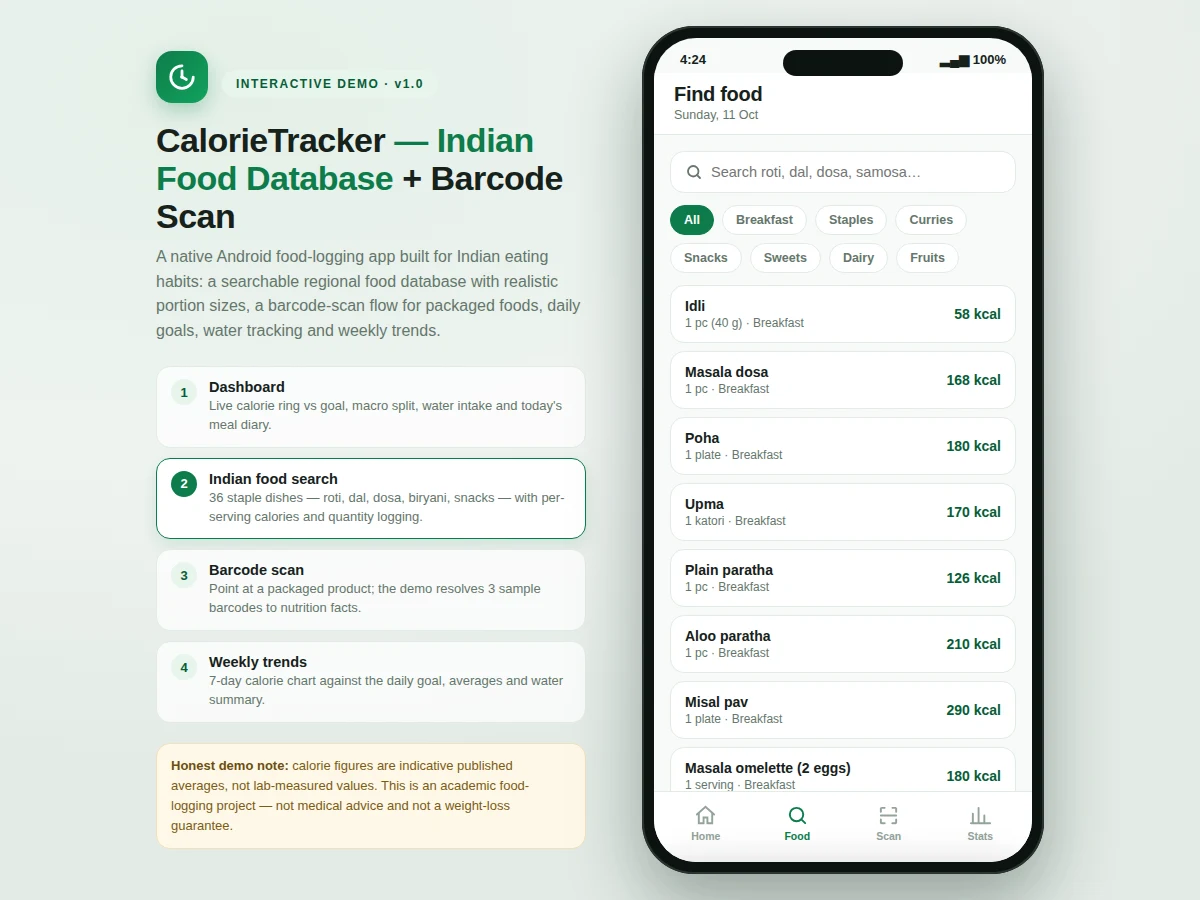
Calorie Tracker with an Indian food database and barcode scanning is a native Android food-logging app designed around how Indian students actually eat. Global calorie apps ship with Western food databases, so logging roti, dal tadka or misal pav becomes guesswork, and portion units like katori or "one pc" have no meaningful equivalent in cup-and-ounce systems. This project fixes that with a curated offline database of familiar Indian dishes across breakfast, staples, curries, snacks, sweets, dairy and fruits, each with per-serving calorie and macro figures stated honestly as indicative published averages. A barcode-scan flow handles packaged products, a daily dashboard shows the calorie ring against a configurable goal with water tracking, and 7-day charts make a full week of logging reviewable. It is an academic food-logging project, not a medical device: it gives no diagnosis, treatment or weight-loss promises.
Logs meals by searching the food database or scanning packaged products.
Follow the working sequence
How it works
- The app opens on the dashboard: today's calorie ring against the goal (default 2000 kcal), estimated macros, water intake and the meal diary grouped by meal.
- To log food, the user searches the Indian food database or filters by category, picks a dish, sets the quantity in servings, tags the meal and adds it.
- The diary, calorie ring, macro bars and remaining-calorie count update immediately; entries can be deleted from the diary.
- For packaged products, the scanner screen opens the camera viewfinder; a decoded EAN-13 barcode resolves to the product's nutrition facts.
- The scanned product is added to the diary with the quantity stepper, exactly like a database entry.
- The statistics screen renders the 7-day calorie bar chart against the goal line plus averages for calories, water and meals logged.
- All data persists locally in a Room database — the full logging loop works offline with no account or internet.
Tech stack:
- Kotlin (native Android, MVVM architecture)
- Android Studio
- Room database (offline-first local storage)
- Material 3 UI components
- ZXing · ML Kit (barcode scanning)
- MPAndroidChart (7-day trend charts)
- Git
| Parameter | Value |
|---|---|
| Platform | Android 8.0 (API 26) and above (expected) |
| Language & architecture | Kotlin, MVVM |
| Local storage | Room database; core logging works fully offline |
| Food database | Approximately 36 Indian entries, pc/katori/plate/glass serving units |
| Calorie figures | Indicative published averages per serving — not lab-measured |
| Barcode | EAN-13 decode via scanner library; demo resolves a fixed sample set |
| Daily calorie goal | 2000 kcal default, configurable 800–6000 kcal |
| Water target | 2000 ml default (8 × 250 ml glasses), configurable |
| Charts | 7-day calories vs goal line; avg kcal/day, water and meals logged |
| Deliverable | Android Studio project + report + PPT + viva Q&A (built-to-order) |
Project features
- [Indian food database] Approximately 36 curated entries — idli, dosa, roti, biryani, dal makhani, samosa, gulab jamun and more — with serving sizes in familiar units (pc, katori, plate, glass) and per-serving calories plus protein/carbs/fat. (Implemented)
- [Search with category filters] Instant text search across the database plus category chips (Breakfast, Staples, Curries, Snacks, Sweets, Dairy, Fruits), so a dish is found in seconds. (Implemented)
- [Quantity-aware meal logging] Every entry is logged with a serving-quantity stepper and a meal tag (breakfast, lunch, dinner, snacks); the diary, calorie ring and macros update immediately. (Implemented)
- [Daily dashboard] Calorie progress ring against the goal, estimated protein/carbs/fat split, a water-intake tracker (8 × 250 ml glasses) and the day's diary grouped by meal. (Implemented)
- [Barcode-scan flow] Camera viewfinder decodes EAN-13 barcodes and resolves packaged products to nutrition facts with a quantity stepper for one-tap diary entry. The demo resolves a fixed set of sample barcodes; the shipped build integrates a real scanner library (ZXing / ML Kit) with a packaged-product lookup. (Implemented; product coverage extensible)
- [7-day trend charts] Bar chart of daily calories against the goal line, with average kcal/day, best day, average water intake and total meals logged. (Implemented)
- [Configurable goals] Daily calorie goal (default 2000 kcal, adjustable 800–6000 kcal) and water target editable in settings — no code changes needed. (Configurable)
- Optional customization: cloud sync with user accounts, additional regional foods, photo-based portion estimation or a Hindi/Marathi UI — developed separately on request. Future scope: regional recipe builder (full thalis with summed nutrition) and PDF/CSV export of weekly logs.
What is included
- Complete Kotlin Android source code (MVVM, Material 3)
- Room database with the curated Indian food database preloaded
- Barcode-scan flow wired to the scanner library with sample product resolution
- Dashboard, search, scanner and statistics screens as documented
- Project report PDF (background, methodology, architecture, honest limitations)
- PPT presentation for final review
- Viva Q&A preparation document (Android lifecycle, Room, MVVM, camera integration)
- Setup and build instructions for Android Studio
Limitations & prerequisites
- Calorie and macro figures are indicative published averages, not lab-measured — real dishes vary with recipe, oil and portion.
- This is a food-logging academic project, not a medical device: no diagnosis, treatment, diet prescription or weight-loss claims.
- Barcode lookup covers the bundled sample products; a full commercial packaged-food database is not included (available as optional customization).
- Photo-based portion estimation is not implemented — quantities are entered manually (listed as future scope).
- Scanning needs a working camera; products without a readable barcode must be found via search.
- Targets Android 8.0 and above; older devices are not covered by the build.
Frequently Asked Questions
Is this project suitable for a final-year project?
Yes — for Computer Engineering, IT and MCA programs. It demonstrates native Android development (Kotlin, MVVM), local database design with Room, camera/scanner integration and charting. Students can run the full logging loop live on a phone during the demonstration, and the documented build with report, PPT and viva Q&A is easy to defend.
Does the barcode scanner really work?
Yes. The shipped build integrates a real scanner library (ZXing or ML Kit) that decodes EAN-13 barcodes through the camera and resolves them to nutrition facts for one-tap diary entry. The demo build proves the full flow by resolving a fixed set of sample barcodes.
How accurate are the calorie values?
They are indicative published averages per serving, not lab-measured figures — the page and the app both say so plainly. Home cooking varies with recipe and oil, so the values are honest estimates suitable for a student logging project, not clinical use.
Does the app need the internet?
No. The food database, diary, goals and charts all live in the local Room database, so the complete logging loop works offline. Your diary and settings stay on the device, which also keeps the demonstration reliable in a classroom with poor connectivity. Internet would only be needed for optional future additions like cloud sync.
Can it be customized for my college requirements?
Yes. Realistic customizations include more regional foods, additional screens or reports, cloud sync with login, photo-based portion estimation, and a Hindi/Marathi UI. Each addition is estimated separately before work begins, and the report documents exactly what the base build contains so nothing optional is ever presented as included.
What will I receive with the project?
The full Kotlin source code as an Android Studio project, the preloaded Indian food database, the barcode-scan flow, project report PDF, presentation PPT, viva Q&A document and build instructions — everything prepared built-to-order for your submission. The setup guide walks through building and running the app in Android Studio on your own machine.
Components & software requirements
- Kotlin (native Android, MVVM architecture)
- Android Studio
- Room database (offline-first local storage)
- Material 3 UI components
- ZXing · ML Kit (barcode scanning)
- MPAndroidChart (7-day trend charts)
- Git
Delivery information
Built-to-order project. Delivery timeline is shared after order confirmation based on current queue.
Support terms
Complete documentation, setup guide, and viva preparation included. Support for setup and explanation provided.
Download free synopsis (PDF)
Enter your name and email — the synopsis PDF downloads immediately. We may send occasional project updates; no spam, unsubscribe anytime.