
More project photos (2)
The problem
Small retail shops still track stock in paper registers or in the shopkeeper's memory, which means fast-moving items run out without warning while slow-moving stock quietly expires on the shelf. Off-the-shelf billing software is expensive, needs a computer at the counter, and is designed for supermarkets — not for a 200-square-foot kirana store. This project builds a phone-first alternative: an Android inventory app where the shopkeeper's own phone becomes the stock register. The camera acts as a barcode scanner — point it at a product to pull up its record and add received stock with two taps. Every product carries a reorder level, so when quantities dip below it the app raises low-stock and out-of-stock alerts, and a reorder dashboard converts the shortages into a suggested purchase list with an estimated cost. The app is offline-first: all data lives in a local database on the phone, which matters because small shops frequently have unreliable internet.
Registers products, scans incoming stock, enters quantities and reviews the reorder list.
Follow the working sequence
How it works
- The shopkeeper registers each product once: name, barcode (scanned with the camera or typed), cost price, selling price and reorder level.
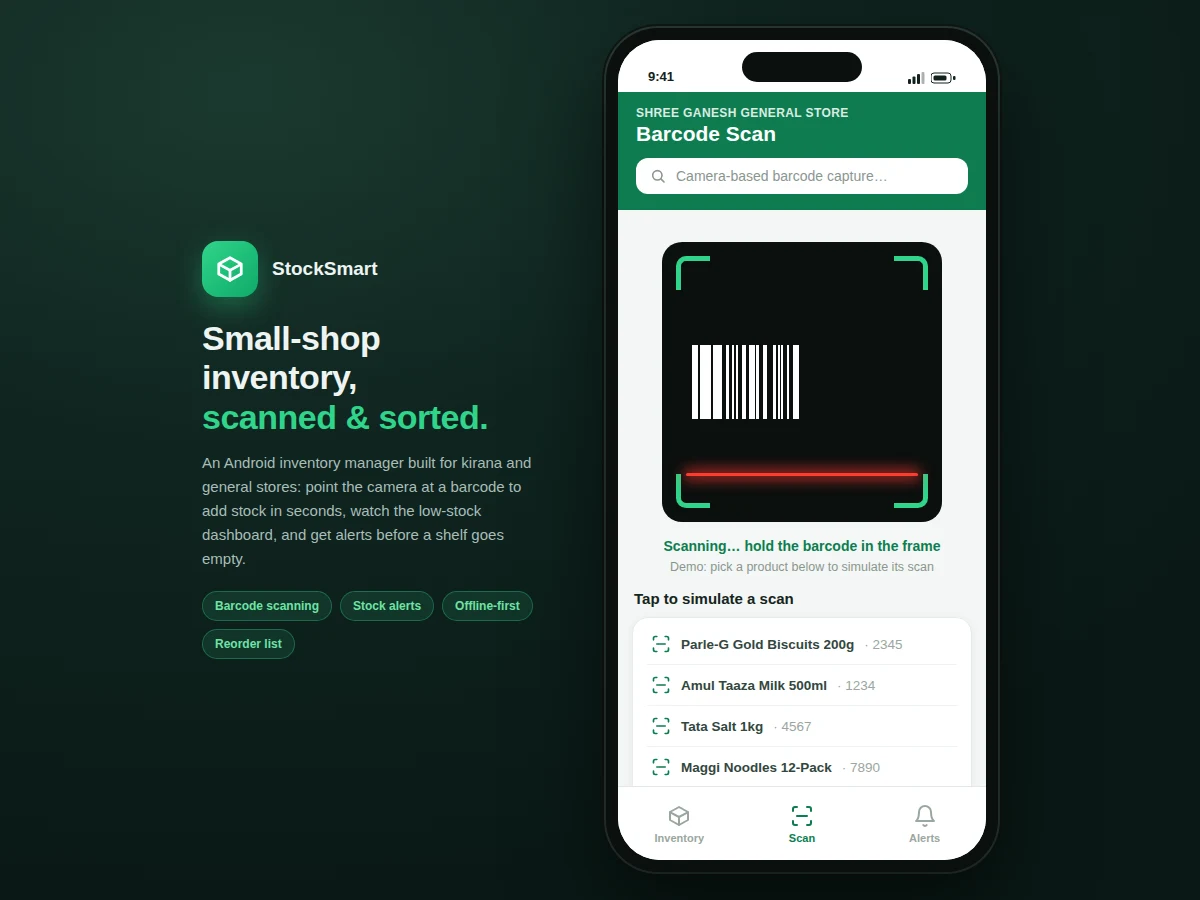
- When new stock arrives, the Scan tab opens the camera; the scanner library decodes the barcode and matches it against the catalog.
- On a match, the app shows the product card; the shopkeeper sets the received quantity on the stepper and saves — the database updates instantly.
- On a miss (an unknown barcode), the app opens a quick-add screen to register the new product on the spot, then continues the stock entry.
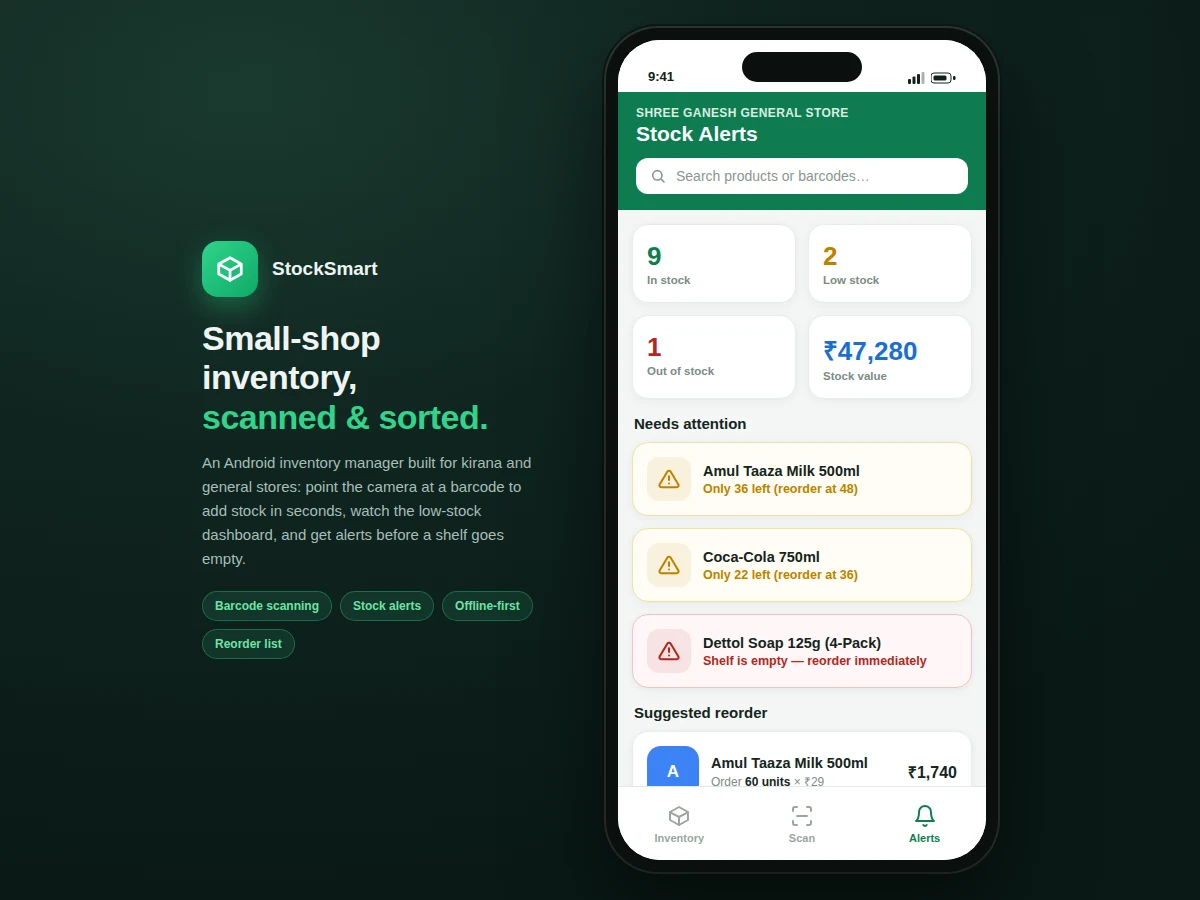
- After every change, the alert engine compares each product's quantity against its reorder level and refreshes the alerts feed and dashboard counts.
- The reorder dashboard aggregates the shortfalls into a purchase list with suggested quantities and estimated cost, exportable for the wholesaler.
Tech stack:
- Kotlin (or Java) with Android SDK
- CameraX + ZXing/ML Kit for barcode scanning
- Room (SQLite) for offline-first local storage
- Material Design 3 components
- WorkManager for scheduled low-stock notification checks
| Parameter | Value |
|---|---|
| Platform | Android 8.0 (API 26) and above |
| Barcode formats | EAN-13, UPC-A, Code 128 (via scanner library) |
| Local database | Room/SQLite, fully offline |
| Demo catalog | 12 sample products with barcodes (illustrative data) |
| Scan-to-record time | Approximately 2 seconds per item (design target on test device) |
| Installed app size | Approximately 18 MB (expected) |
| Reorder logic | Per-product reorder level; suggested order = 2 × reorder level − current stock |
Project features
- [Barcode-scan stock entry] The camera scans a product's barcode and pulls up its record instantly; a quantity stepper adds received stock in two taps, with a quick-add flow for barcodes not yet in the catalog.
- [Live inventory list] Every product shows its barcode, current quantity, selling price, stock value and a status badge — searchable by product name or barcode digits.
- [Low-stock and out-of-stock alerts] Per-product reorder levels drive an alerts feed that lists out-of-stock items first, so the shopkeeper sees what needs buying today.
- [Reorder dashboard] Shortfalls are converted into a suggested purchase list (target stock = 2 × reorder level) with per-item quantities and an estimated total cost for the wholesaler run.
- [Offline-first local database] All products, stock movements and alerts live in on-device storage — scanning, editing and reporting work with zero connectivity.
- [Stock value tracking] Live total stock value at cost price, plus per-product value in the list, so the capital locked in the shop is always visible.
- [Product catalog management] Add and edit products with name, barcode, cost price, selling price and reorder level, all from the phone.
What is included
- Complete Android app source code (Kotlin)
- Demo APK build for testing on a phone
- Sample product catalog with barcodes for the demo
- Project report PDF (background, requirements, architecture, methodology, testing)
- PPT presentation for final review
- Viva Q&A preparation document (barcode formats, offline-first design, Room, camera permissions)
Limitations & prerequisites
- The demo ships with sample barcodes; real-world scan speed depends on camera quality and lighting conditions.
- No billing/POS or GST invoicing — this is inventory management (stock in, stock levels, alerts, reorder); billing is future scope.
- Single-device, single-shop in the base build — multi-branch cloud sync is listed as future scope.
- The reorder suggestion is a simple transparent heuristic, not a demand-forecasting model.
- Barcode printing for unlabeled loose goods is not included.
Frequently Asked Questions
Does the app need the internet to work?
No. It is offline-first — every product, stock movement and alert lives in the phone's local database. Internet is only needed if the optional cloud-backup module is added later.
Which barcodes can it scan?
The scanner library handles the standard retail formats — EAN-13, UPC-A and Code 128 — which cover the barcodes printed on packaged goods sold in Indian stores.
What happens when a scanned barcode is not in the catalog?
The app opens a quick-add screen so the shopkeeper can register the new product — name, prices, reorder level — in under a minute, right at the shelf, then continues the stock entry.
Can it print bills or handle GST?
Not in the base build — this project is inventory management: stock entry, stock levels, alerts and reordering. Billing and invoicing are listed as future scope in the report.
How does the reorder list decide quantities?
A transparent heuristic: suggested order = twice the reorder level minus current stock, with estimated cost summed from cost prices. It is simple, easy to explain in a viva, and easy to extend.
Is this project suitable for a final-year project?
Yes — for Computer Science, IT and related programs. It covers mobile UI design, camera and barcode integration, local database design, and a genuine real-world problem domain.
Components & software requirements
- Kotlin (or Java) with Android SDK
- CameraX + ZXing/ML Kit for barcode scanning
- Room (SQLite) for offline-first local storage
- Material Design 3 components
- WorkManager for scheduled low-stock notification checks
Delivery information
Built-to-order project. Delivery timeline is shared after order confirmation based on current queue.
Support terms
Complete documentation, setup guide, and viva preparation included. Support for setup and explanation provided.
Download free synopsis (PDF)
Enter your name and email — the synopsis PDF downloads immediately. We may send occasional project updates; no spam, unsubscribe anytime.