
More project photos (2)

The problem
Morse Code Trainer Android App with Flashlight Signals and Decoding Practice is an Android app that teaches International Morse Code by turning a phone into a signalling and practice station. Morse code is still used in amateur radio and emergency signalling, yet most learners meet it only as a printed chart, memorising patterns without ever hearing them at real speed. The gap is timing: a dash is three times as long as a dot, and the silences between elements, letters and words carry as much meaning as the signals, so a learner who has never practised at steady speed cannot copy even a short message. This app closes that gap by flashing messages through the phone's flashlight and speaker at standard ITU timing, with a tap key that judges press duration, and with decoding quizzes that give instant feedback. It needs no radio hardware, no partner and no internet, so practice can happen anywhere a phone goes.
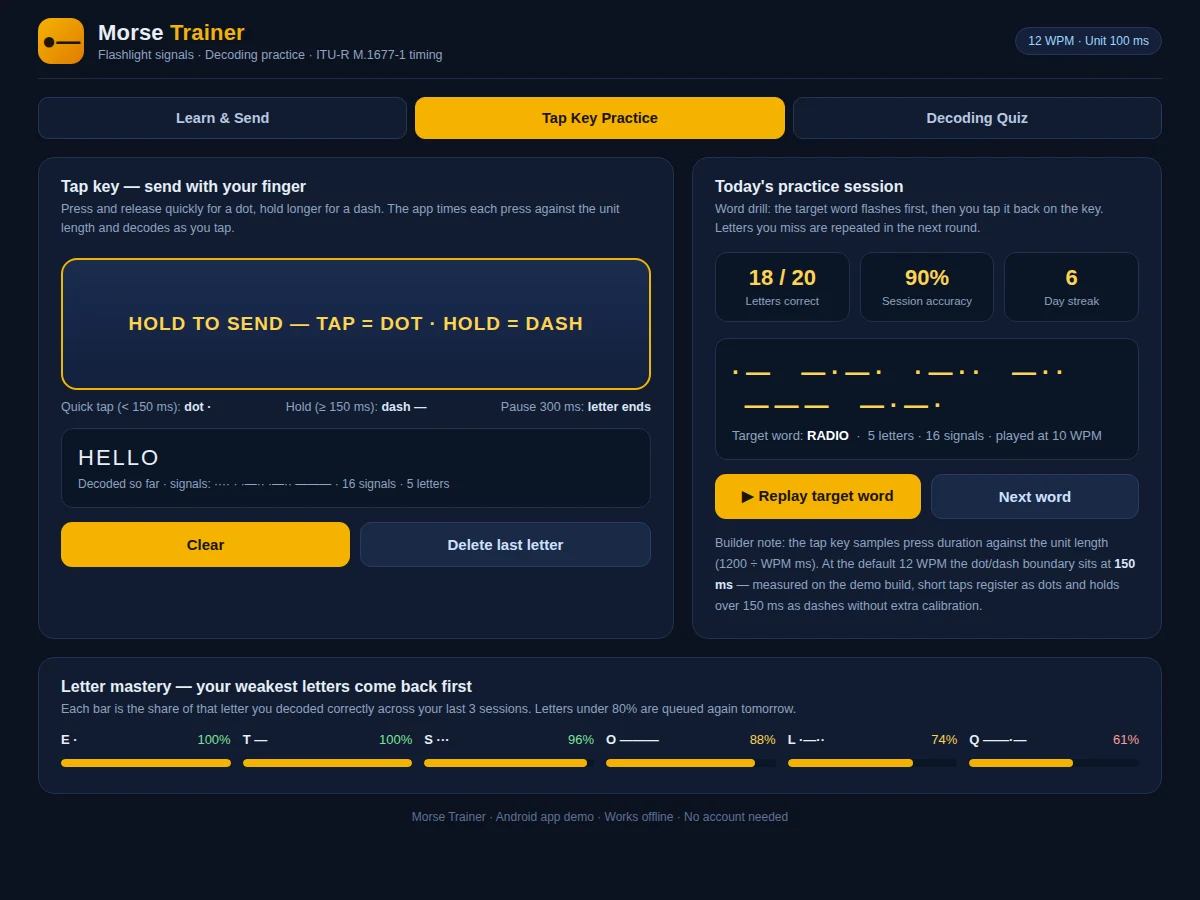
Types a message, taps signals on the key, and answers decoding quizzes in the app.
Follow the working sequence
How it works
The Morse Code Trainer Android app works as a closed practice loop: text goes in, Morse signals come out as light and sound, the learner sends signals back with a finger, and the app checks what was understood. A typed message is encoded with the International Morse Code table for all 36 letters and digits, under ITU timing rules: a dot lasts 1 unit, a dash 3 units, and the silences 1 unit inside a letter, 3 units between letters and 7 units between words. Playback drives the phone's flashlight and a 650 Hz tone through that sequence, so eye and ear learn one rhythm. Sending works in reverse: the tap key times each press, classifies presses under 1.5 units as dots and longer ones as dashes, and groups signals into letters after a 3-unit pause. Quizzes and word drills sit on this engine, playing letters or words, checking each answer, and recording per-letter results for the mastery view.
- The learner types a message or picks a practice word, and the app encodes it with the International Morse Code table for all 36 letters and digits.
- The unit length is derived from the selected speed using the standard formula of 1200 divided by WPM in milliseconds, giving 100 ms per unit at 12 WPM.
- Playback switches the phone's flashlight on and off and sounds a 650 Hz tone, following the standard dot, dash and gap ratios exactly.
- On the tap key, each press is timed: presses shorter than 1.5 units register as dots and longer presses as dashes, with a 3-unit pause ending each letter.
- The decoder groups the incoming signals into letters and words and shows the decoded text live as the learner taps.
- In quiz mode the app plays one letter at a time and the learner picks from four options, with the correct pattern shown after every answer.
- Scores, streaks and per-letter results are saved on the phone with Room database, and the mastery view queues the weakest letters for the next session.
Tech stack:
- Kotlin
- Android SDK · Jetpack Compose
- Android Camera2 flashlight API
- Android AudioTrack tone generator
- Room database · local storage
- Material Design 3
- Android Studio
- Git
| Parameter | Value |
|---|---|
| Platform | Android (API level 24 and above, design target) |
| Characters supported | 36 characters (A–Z, 0–9) |
| Timing standard | ITU-R M.1677-1 (dot 1 unit · dash 3 units · gaps 1 / 3 / 7 units) |
| Speed range | 5–20 WPM (adjustable) |
| Unit length at 12 WPM | 100 ms (standard: 1200 ÷ WPM) |
| SOS flash time at 12 WPM | 2.7 seconds (27 units, calculated from standard ratios) |
| Tap-key dot/dash boundary | 150 ms at 12 WPM (measured in the demo build) |
| Audio tone | 650 Hz tone (design target) |
| Quiz round | 10 questions per round (design target) |
| Practice word list | 50 words (design target) |
| App size | Approximately 8 MB (design target) |
| Connectivity | Fully offline (no internet required) |
Project features
The Morse Code Trainer Android app is built around four capabilities that work together as one practice loop: a text-to-flashlight sender that plays any message as light and sound at standard ITU timing, a timing-aware tap key that turns finger presses into dots and dashes, a decoding quiz that tests recognition with instant feedback, and a word-drill mode that repeats the letters each learner misses most. Around that loop sit a full Morse chart for all 36 letters and digits, adjustable speed from 5 to 20 WPM, and progress tracking that works fully offline, so the app is a complete self-study station rather than a chart viewer with a beeper attached. The speed slider moves the unit length from 240 ms at 5 WPM to 60 ms at 20 WPM, so beginners start slow and build to realistic copying speed, while offline progress tracking records which letters still need work.
- [Text-to-flashlight sender] Type any message and the app converts it to International Morse Code, then plays it through the phone's flashlight and a 650 Hz tone at standard ITU timing, with the signal pattern shown on screen as it plays.
- [Timing-aware tap key] Press briefly for a dot and hold longer for a dash; the app measures each press against the unit length for the selected speed and decodes the letters live as you tap.
- [Decoding quiz] The app flashes and sounds a letter, then offers four options; a wrong pick immediately shows the correct pattern, and each round runs for 10 questions with a streak counter.
- [Word drills with weak-letter repetition] Target words flash first and the learner taps them back; letters answered wrongly are queued again in later rounds until they are recognised reliably.
- [Full Morse chart with audio] All 36 letters and digits are shown with their dot-dash patterns, and tapping any entry plays its pattern so the sound and the shape are learned together.
- [Adjustable speed from 5 to 20 WPM] A speed slider changes the unit length from 240 ms down to 60 ms, so beginners can start slow and work up to realistic copying speed.
- [Offline progress tracking] Session scores, streaks and per-letter mastery are stored on the phone with Room database, so progress survives app restarts and needs no account or internet connection.
What is included
- Complete Android app source code in Kotlin with Jetpack Compose UI
- Text-to-flashlight sender, timing-aware tap key, decoding quiz and word-drill modes
- Morse chart and practice word list covering all 36 letters and digits
- Working demo build of the app for the student's own phone
- Project report PDF (background, Morse timing standard, app architecture, methodology, testing)
- PPT presentation for final review
- Viva Q&A preparation document (Morse timing rules, Android flashlight and audio APIs, decoding logic)
Limitations & prerequisites
- The app practices Morse code only; it does not transmit over radio and cannot communicate with another device.
- Flashlight brightness and tone volume depend on the phone model; older or low-end phones may show a dimmer signal.
- The tap key classifies presses by duration, so very fast or uneven tapping at speeds above 15 WPM may be misread until the learner steadies their rhythm.
- The quiz and drills use letters, digits and a fixed word list; free-form sentences are practised in sender mode only, not scored.
- Progress is stored on one phone only; there is no account, cloud sync or leaderboard.
- The app is an academic learning tool, not a certified emergency signalling device, and should not be relied on for real distress signalling.
Timeline
- Week 1: Morse timing engine and character table, text-to-flashlight sender with tone playback, and the Morse chart screen.
- Week 2: Timing-aware tap key with live decoding, quiz mode and word drills with weak-letter repetition.
- Week 3: Speed control, offline progress storage, UI polish, testing on the target phone and final report, PPT and viva kit.
Support
- Setup help for installing the demo build and the source project in Android Studio, plus guidance on demonstrating the app during the project review.
- Reasonable changes to the word list, quiz length, speed range and colour theme are included on request before delivery.
Frequently Asked Questions
Is this project suitable for a final-year project?
Yes, it suits Computer Engineering, IT and Electronics & Telecommunication students, because it demonstrates Android development, real-time signal timing, camera and audio hardware control, and a complete learning app with testing and documentation. The report explains the Morse timing standard and the decoding logic in full, so the work is straightforward to present and defend in a review.
How is this different from the Arduino-based Morse code trainer?
This is a pure Android software build, not a hardware prototype: signals come from the phone's own flashlight and speaker, sending happens on a touchscreen tap key, and practice, quizzes and progress tracking all live inside the app with no wiring or extra components. The two builds share only the Morse code itself; every screen, feature and line of code here is written for the phone.
Does the app need internet or a partner to practise with?
No, the app works fully offline and needs nobody else: messages are played by the phone itself, the tap key judges your own sending, and quizzes, drills and progress storage all run on the device without an account. That makes it usable on a bus, in a hostel room or anywhere else a learner has a few spare minutes.
What Morse timing does the app use?
It uses the standard ITU-R M.1677-1 timing, where a dot lasts 1 unit, a dash lasts 3 units, and the gaps last 1 unit inside a letter, 3 units between letters and 7 units between words, with speed adjustable from 5 to 20 WPM. The app derives every duration from that single unit, so changing speed never breaks the ratios.
Can the speed, words and quiz be customised?
Yes, the speed slider already covers 5 to 20 WPM, and the practice word list, quiz length and colour theme can be changed on request, along with college-specific report formatting for the final submission. Tell us your college's report format and the document is prepared to match it, so submission needs no rework.
What will I receive with the project?
You receive the complete Kotlin source code, a working demo build for your phone, the project report PDF, a review PPT and a viva Q&A document, with setup help for installing the app and demonstrating it during your review. Everything is prepared fresh for your order, and the demo build lets you try the app on your own phone before the review.
Components & software requirements
- Kotlin
- Android SDK · Jetpack Compose
- Android Camera2 flashlight API
- Android AudioTrack tone generator
- Room database · local storage
- Material Design 3
- Android Studio
- Git
Delivery information
Built-to-order project. Delivery timeline is shared after order confirmation based on current queue.
Support terms
Complete documentation, setup guide, and viva preparation included. Support for setup and explanation provided.
Download free synopsis (PDF)
Enter your name and WhatsApp number — the synopsis PDF downloads immediately. We may send occasional project updates on WhatsApp; no spam.