
More project photos (2)
The problem
A trip expense splitter is a desktop app that records what each traveller paid, converts every expense to one base currency, splits each cost fairly, and works out who owes whom. This project builds one for group trips: it takes multi-currency expenses, nets each person's paid amount against their share, and outputs the smallest set of repayments that settles everyone.
Group trips usually end in a messy spreadsheet: one person paid the hotel, another booked flights in dollars, a third covered food in euros, and suddenly everyone owes everyone else a different amount. The Trip Expense Splitter Desktop App replaces that spreadsheet with one local app. Travellers are added once, each expense is entered in the currency it was actually paid in, and the app converts it to the trip's base currency at a rate the organiser enters by hand. It totals what each person paid, subtracts their fair share, and nets the result into a single balance per person. Then it matches the largest amounts owed against the largest amounts owing, producing the smallest set of repayments that settles the whole trip. No data is sent to a server, and no money moves inside the app.
| This Trip Expense Splitter | Spreadsheet manual split | Generic bill-splitter app | |
|---|---|---|---|
| Currency handling | Expenses entered in INR, USD, EUR or GBP and converted at organiser-entered manual rates | One currency per sheet unless the user builds conversion formulas | Usually one currency, or automatic rates the user cannot inspect |
| Settlement size | Minimum-transfer plan from netted balances (3 transfers for the demo trip) | One repayment per share, worked out by hand | Often one repayment per expense share, not a netted minimum |
| Works offline | Yes — a local single-file app with no account | Yes, but formulas break easily when rows are edited | Usually needs an account and an internet connection |
| Money movement | None — settlement records are manual logs only | None | Often links to payment apps, which this academic build deliberately does not |
Members of the group trip.
Follow the working sequence
How it works
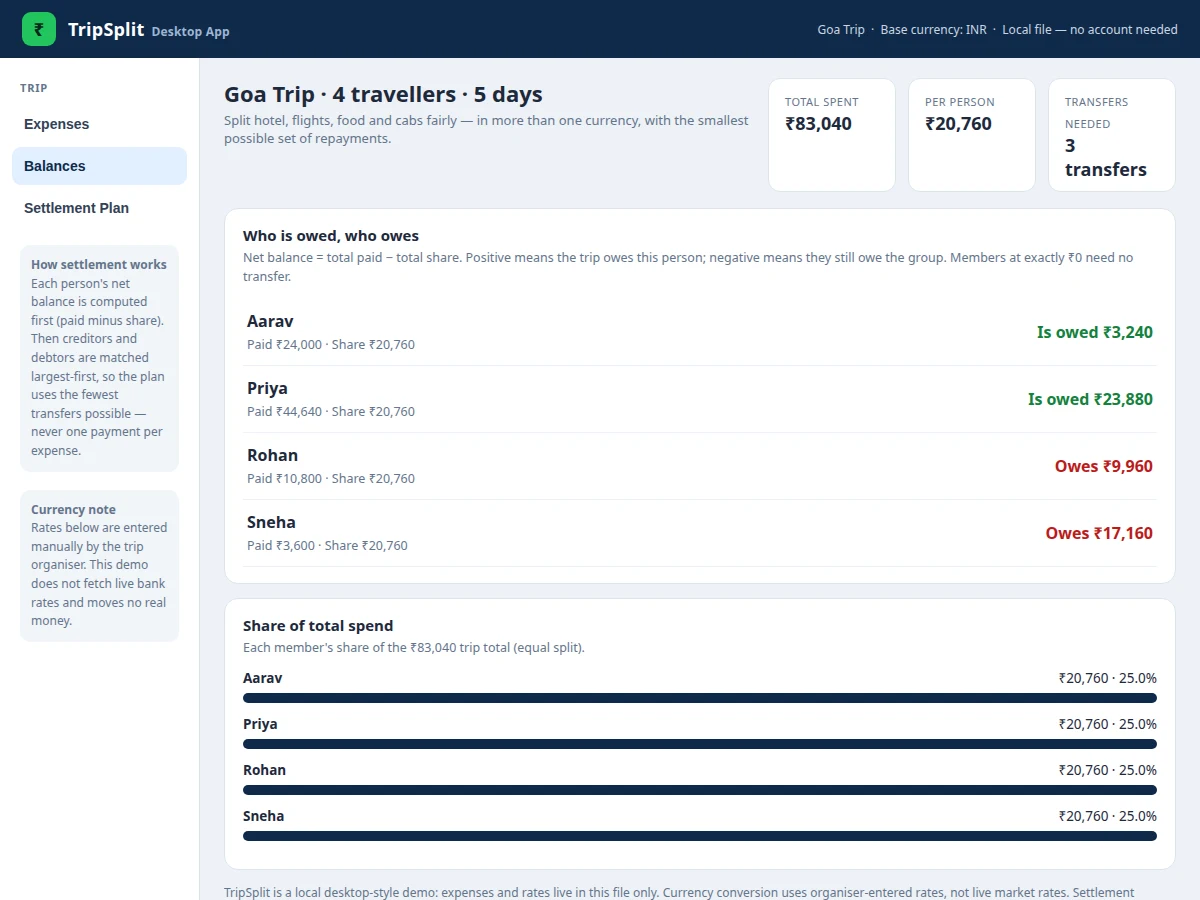
Using the Trip Expense Splitter Desktop App is a straight line from trip setup to a settled group. The organiser adds the travellers, then logs each expense with its payer, amount and original currency, and the app converts it to Indian Rupees at the manual rate on file. Every expense is split equally across the current members, so each person's share grows as expenses are added. The app then subtracts each member's total share from their total payments to get one net balance per person — positive for members the group owes, negative for members who still owe. A greedy matching step pairs the largest debtor with the largest creditor, takes the smaller of the two amounts, and repeats until every balance is zero. The resulting list is the settlement plan, which the group works through outside the app and marks recorded as each transfer is done.
- Add the travellers who will share the trip's costs.
- Log each expense with a description, the member who paid, the amount, and the currency it was paid in.
- The app converts each expense to INR using the organiser-entered manual rate for that currency.
- Each expense is split equally across the current members, building each person's total share.
- The app computes one net balance per member: total paid minus total share.
- Creditors and debtors are matched largest-first; each match becomes one transfer for the smaller of the two amounts, repeated until all balances reach zero.
- The group pays each transfer outside the app, marks it recorded in the plan, and exports the balances and plan as a CSV file.
Tech stack:
- HTML · CSS · JavaScript (single-file desktop-style app)
- Local browser storage (no server or account)
- CSV export (balances and settlement plan)
- Greedy largest-first settlement algorithm
- Manual multi-currency conversion (INR base)
- Git (version control)
| Parameter | Value |
|---|---|
| Platform | Desktop-style single-file web app · runs in a browser (no install step) |
| Base currency | INR (Indian Rupees) |
| Supported currencies | 4 currencies (INR · USD · EUR · GBP) |
| Demo trip members | 4 members (demo data) |
| Demo trip expenses | 5 expenses (demo data) |
| Demo trip total | ₹83,040 (demo data, at manual rates) |
| Demo trip per-person share | ₹20,760 (demo data, equal split) |
| Settlement transfers | 3 transfers for the demo trip (minimum for 2 creditors and 2 debtors) |
| Transfer bound | At most (creditors + debtors − 1) transfers (algorithm bound) |
| Manual exchange rates | 1 USD = ₹83 · 1 EUR = ₹90 · 1 GBP = ₹105 (demo defaults, organiser-entered) |
Project features
The Trip Expense Splitter Desktop App centres on four capabilities: multi-currency expense entry, per-person net balances, a minimum-transfer settlement plan, and CSV export of the final record. Multi-currency entry lets each expense stay in the currency it was paid in, converted to Indian Rupees at a rate the organiser types in, so a dollar flight and a euro grocery bill sit in one honest total. Net balances collapse every member's payments and shares into one figure — owed or owing — instead of a tangle of pairwise debts. The settlement plan then matches the largest debtors to the largest creditors first, producing the fewest transfers that can settle the trip. CSV export turns the finished balances and plan into a file the group can keep, print, or attach to a report.
- [Multi-currency expense entry] Each expense is recorded in INR, USD, EUR or GBP with the payer and a description, and converted to the INR base at the organiser's manual rate, shown beside the original amount.
- [Per-person net balances] For every member the app totals amounts paid, subtracts their equal share of every expense, and shows one net figure: is owed, owes, or settled at zero.
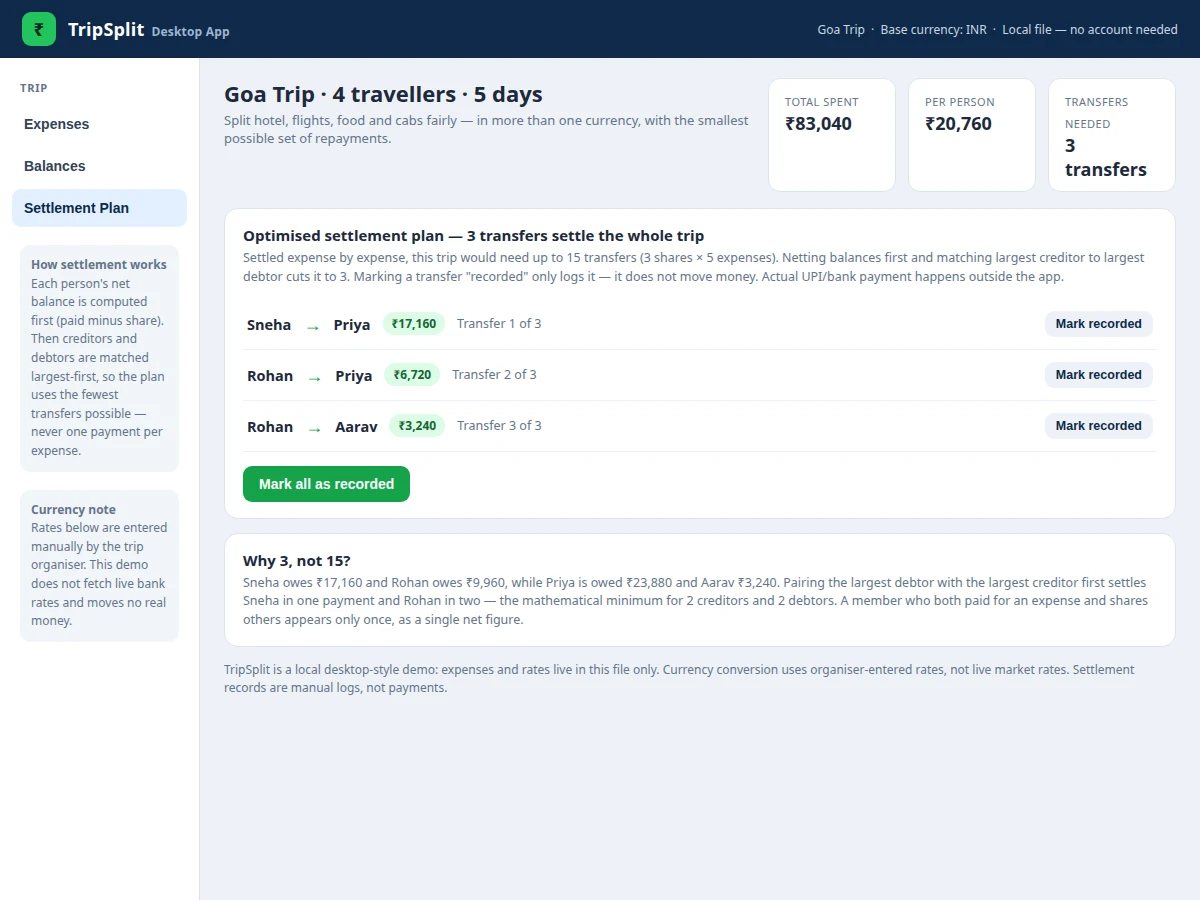
- [Minimum-transfer settlement plan] A greedy largest-first match between creditors and debtors produces the smallest set of repayments; the demo trip settles in 3 transfers instead of up to 15 expense-by-expense shares.
- [Member management] Members can be added at any time, and later expenses split across the new group size; the demo trip starts with 4 travellers.
- [Editable manual exchange rates] The organiser can change the USD, EUR and GBP rates to INR, and every converted total, balance and transfer updates immediately.
- [Settlement recording] Each planned transfer can be marked as recorded once the group has paid it outside the app; the record is a log entry only and moves no money.
- [CSV export] Balances and the settlement plan export to a CSV file for the group's records or for inclusion in the project report.
Optional customization: custom share weights per expense (unequal splits), additional currencies, and multi-trip history can be added on request. Future scope: fetched live exchange rates, a UPI payment link for each transfer, and a native installable desktop build are future scope, not part of the base project.
Builder note from the demo build: the settlement edge case that shaped the design is a member who both pays and shares — Priya pays ₹44,640 across two expenses while also sharing every expense, yet she appears once in the plan as a single net creditor of ₹23,880, not once per expense. Netting before matching is what makes the 3-transfer plan possible; matching per expense would have produced up to 15 transfers.
What is included
- Complete single-file desktop-style demo app (member, expense, balance, settlement and CSV export features)
- Project report PDF (background, methodology, settlement algorithm, limitations)
- PPT presentation for final review
- Viva Q&A preparation document (netting, greedy matching, currency conversion, limitations)
- Setup and demo walkthrough guidance
- Next step: message on WhatsApp for a quotation stating scope (desktop trip expense splitter with multi-currency entry at organiser-entered rates and a minimum-transfer settlement plan), as a built-to-order project with no fixed price
Limitations & prerequisites
- Exchange rates are entered manually by the organiser; the app fetches no live bank or market rates, so converted totals are only as current as the entered rates.
- The base build splits every expense equally; custom share weights are an optional customization, not included by default.
- The app moves no money: settlement records are manual logs, and any UPI or bank payment happens outside the app; a UPI payment link is future scope.
- The demo holds one trip at a time; multi-trip history is not part of the base build.
- Displayed amounts are rounded to whole rupees; sub-rupee remainders from conversion are not tracked.
- The app runs as a single file in a browser; it is not a natively installed desktop program, and it stores data locally rather than syncing across devices.
Frequently Asked Questions
How does the settlement optimization work?
It first nets every member's payments against their share into one balance per person, then repeatedly matches the largest debtor with the largest creditor for the smaller of the two amounts until all balances reach zero. Because each match clears at least one person completely, the plan uses the fewest transfers possible for that set of balances. For the demo trip this gives 3 transfers — Sneha to Priya ₹17,160, Rohan to Priya ₹6,720, Rohan to Aarav ₹3,240 — where settling expense by expense would need up to 15. A member who both paid and shares appears only once, as a single net figure, and a member at exactly zero gets no transfer.
Which currencies are supported, and are the rates live?
The app accepts expenses in Indian Rupees, US Dollars, Euros and British Pounds, converting each to an Indian Rupee base at a rate the organiser enters by hand. The rates are manual, not live: the demo defaults are 1 USD = ₹83, 1 EUR = ₹90 and 1 GBP = ₹105, and the organiser can change them at any time. This keeps the build honest — no claim is made about bank rates — and fetched live rates are listed as future scope.
Does the app move money or pay through UPI?
No — the app only records expenses, balances and a settlement plan, and marking a transfer as recorded merely logs that the group has already paid it outside the app, connecting to no bank, wallet or payment gateway and never moving money itself. A UPI payment link per transfer is future scope; in the base build the group pays by its own UPI or bank app and ticks transfers off in the plan.
Can expenses be split unequally?
Not in the base build: every expense is split equally across the current members, which keeps the settlement maths simple and auditable for a report. Custom share weights — for example when one traveller joins late or skips an expense — are an optional customization that can be added on request. The demo's expense form offers equal split only, so what the page claims matches what the demo does.
Is this project suitable for a final-year project?
Yes — for Computer Science and IT programmes, because it combines a complete working desktop-style application with a genuinely interesting algorithm: netting balances and proving a minimum-transfer settlement plan. Students can demonstrate currency conversion, greedy matching, local data handling and CSV export in one coherent build. The report documents the algorithm with the demo trip's worked numbers, and the limitations — manual rates, no real payments — are stated openly for the viva.
Components & software requirements
- HTML · CSS · JavaScript (single-file desktop-style app)
- Local browser storage (no server or account)
- CSV export (balances and settlement plan)
- Greedy largest-first settlement algorithm
- Manual multi-currency conversion (INR base)
- Git (version control)
Delivery information
Built-to-order project. Delivery timeline is shared after order confirmation based on current queue.
Support terms
Complete documentation, setup guide, and viva preparation included. Support for setup and explanation provided.
Download free synopsis (PDF)
Enter your name and WhatsApp number — the synopsis PDF downloads immediately. We may send occasional project updates on WhatsApp; no spam.