
More project photos (2)
The problem
Desktop unit conversion sounds trivial until a student actually needs it in the middle of real work: a lab report needs pounds in kilograms, a recipe needs gallons in litres, a travel budget needs rupees in dollars, and every one of those conversions currently means opening a browser, finding a converter site, waiting through adverts and cookie banners, then retyping the value. Web converters also stop working the moment the internet drops, which is exactly when a student on a train or in a lab with weak Wi-Fi needs them most, and currency converters hide their rate's age so a stale figure can pass as current. This project builds a desktop unit converter in Python with Tkinter that works offline for all unit conversions, converts across 8 categories with 52 units, updates results live as the user types, and handles currency honestly: rates refresh online and fall back to visibly labelled cached rates offline, with the cache date shown.
This is a built-to-order software project: the Python desktop app, conversion engine, currency provider module with offline cache, history and favourites, and the complete viva kit (report, PPT, Q&A) are prepared fresh for you.
Concept
The app is a single-window Tkinter desktop application built around a small conversion engine: every unit is stored as a factor against its category's base unit (metre, kilogram, litre, square metre, metre per second, byte, US dollar), so any conversion is two multiplications through the base unit, and temperature uses the correct offset formula (Fahrenheit = Celsius × 9/5 + 32, Kelvin = Celsius + 273.15) instead of a factor. Currency is handled by a separate provider module with a configurable endpoint — the reference configuration uses the free Frankfurter rates API, which needs no key — and every fetched rate set is saved to a JSON cache file on disk with its fetch date. A settings toggle switches the app into offline mode: unit conversions keep working exactly as before, while currency conversions use the cached rates and the window shows a notice stating the rates are cached and when they were saved. History and favourites are stored in local JSON files, so the app never needs an account or a server of its own.
Types a value, picks the units and reads the result.
Follow the working sequence
How it works
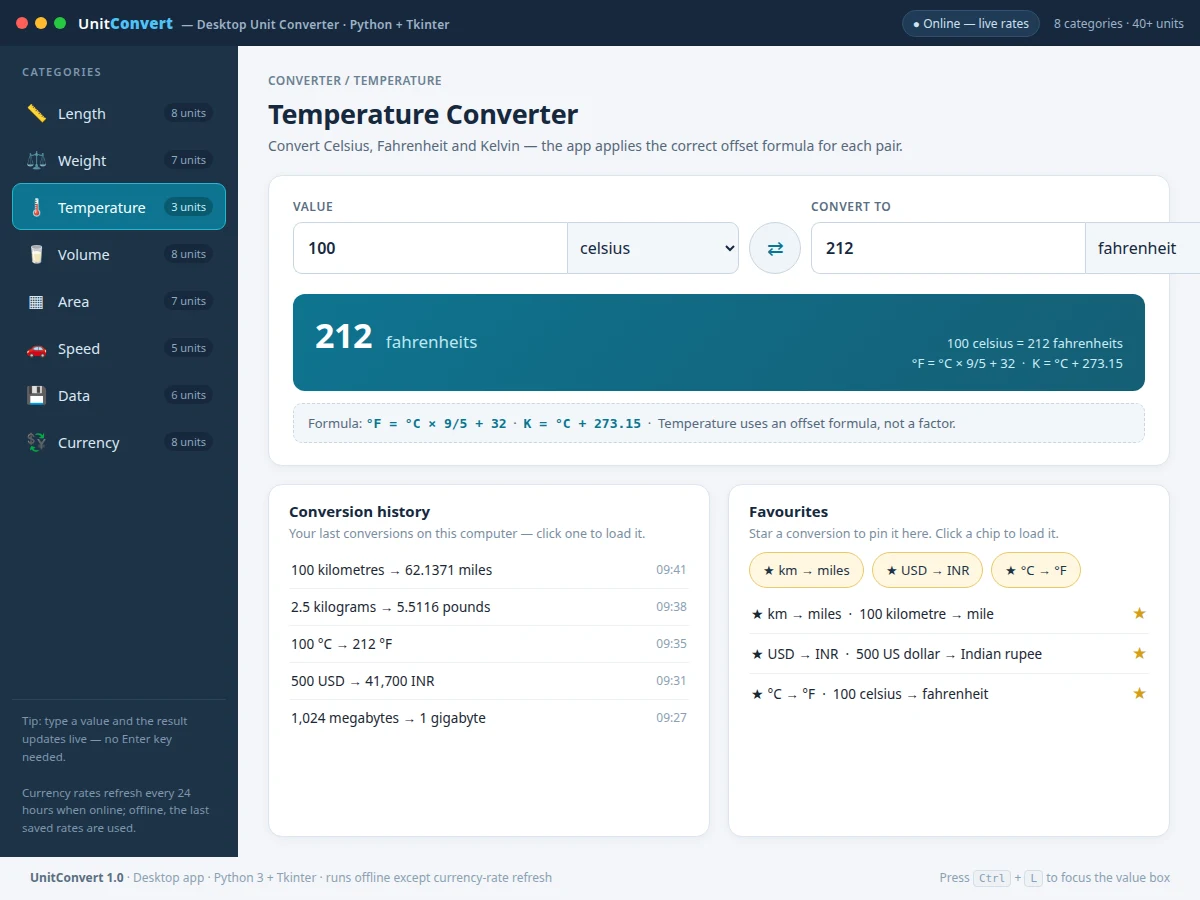
A value typed into the converter travels through a short, visible chain: the input is read as you type, the conversion engine turns the value into the category's base unit, the base-unit value is turned into the target unit, and the result, the formula and the history entry are all updated together in the same pass. Currency takes one extra step through the provider module: the provider module fetches the latest rates when the app is online and saves them with the fetch date, and when offline mode is on the engine reads the saved rates instead and marks the result as cached. Temperature is the one category that does not use a factor — the engine applies the offset formula for the pair — which is why the formula line shows the equation instead of a multiplier.
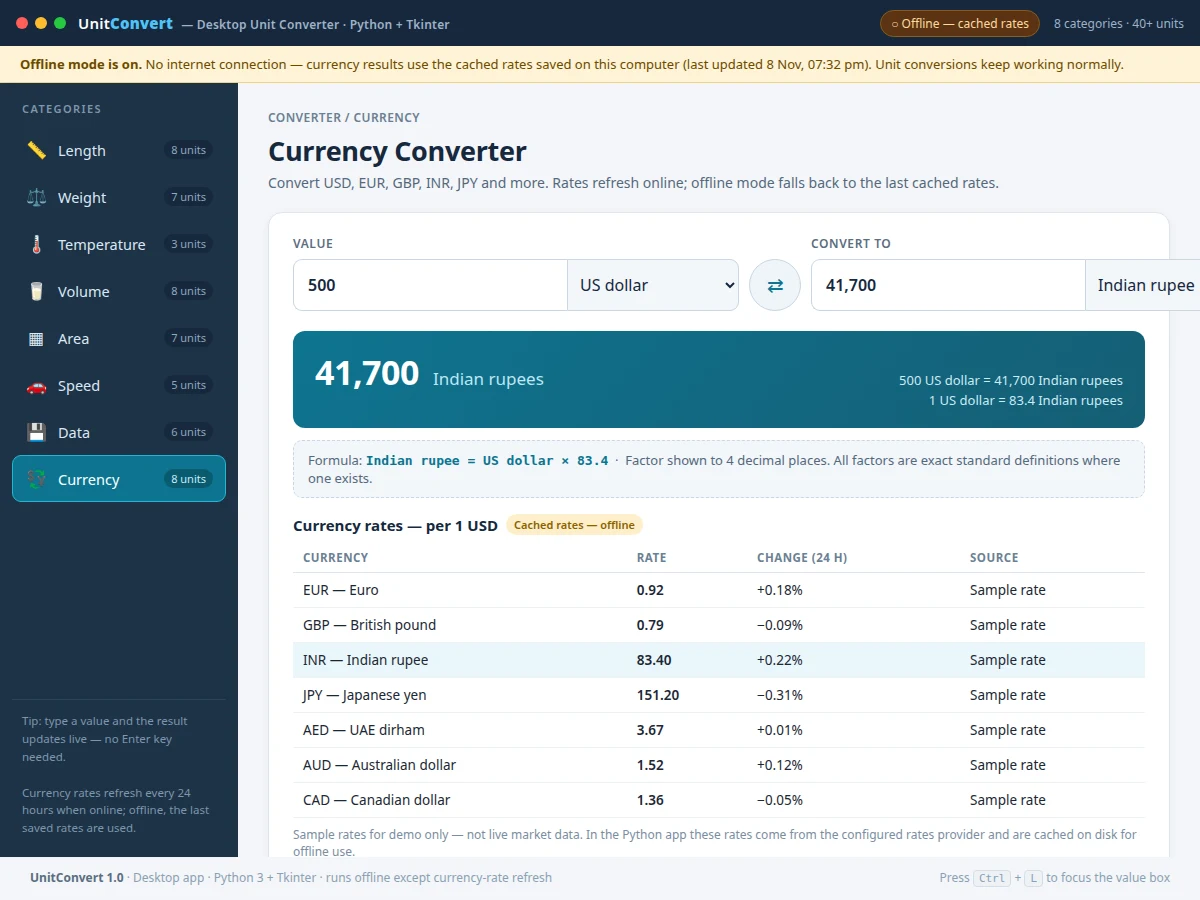
Builder note from the demo build: every conversion path in the demo was checked against known anchors — 100 kilometres converts to 62.1371 miles, 100 °C converts to 212 °F, 1,024 megabytes converts to 1 gigabyte, and 500 US dollars converts to 41,700 Indian rupees at the demo's labelled sample rate of 83.40 INR per USD — and switching offline mode on falls back to the cached rates within one click, with the cached-rates notice shown.
- The user picks a category (length, weight, temperature, volume, area, speed, data or currency) from the sidebar.
- The user types a value and picks the from-unit and to-unit; the result updates on every keystroke with no convert button.
- The conversion engine converts the value into the category's base unit (metre, kilogram, litre, square metre, metre per second, byte or US dollar).
- The engine converts the base-unit value into the target unit — or, for temperature, applies the correct offset formula.
- The result panel shows the converted value, the full equation and the factor or formula used, so the working is visible, not hidden.
- For currency, the provider module fetches rates when online and saves them with the fetch date; in offline mode it reads the saved JSON cache and the window shows the cached-rates notice with the cache date.
- Every conversion is added to the history list (last 50 entries kept) and any conversion can be starred as a favourite for one-click reuse.
Tech stack:
- Python 3 · Tkinter
- Conversion engine · base-unit factors
- Rates provider module · configurable endpoint
- JSON cache · history store
- CSV export
- PyInstaller packaging
- HTML · CSS · JavaScript demo
- Git
| Parameter | Value |
|---|---|
| Application type | Desktop app · Python 3 + Tkinter · single window |
| Unit categories | 8 categories (design count) |
| Units covered | 52 units (counted in the demo build) |
| Currencies | 8 currencies (design count) |
| Conversion response | Live on every keystroke (design target: under 100 ms per keystroke on a typical laptop) |
| Temperature handling | Offset formula, not a factor (design) |
| Rate refresh | Every 24 hours when online (configurable) |
| Rate cache | JSON file on disk · last fetched rates retained with fetch date (design) |
| History kept | Last 50 conversions (design limit) |
| Decimal places | 2 to 6 places (configurable) |
| Offline behaviour | All unit conversions work offline · currency uses cached rates with a visible notice (design) |
| Operating system | Windows 10 or later · macOS 12 or later · Linux (expected) |
| Work plan | 80 hours total (planned) |
Project features
The converter ships with seven working capabilities: live conversion across 8 categories and 52 units, currency conversion with a visible rates table, an offline mode that falls back to clearly labelled cached rates, a conversion history that reloads any earlier conversion with one click, favourites that pin frequent conversions, and a formula display that shows the exact factor behind every result. The currency panel is the part that makes this project more than a calculator: it shows each rate, its 24-hour change and its source, and the offline notice states the cache date so a stale rate can never pass as current. History and favourites turn the converter into a daily tool rather than a one-off calculator: the conversions a student repeats every week are one click away, and the formula line means the working behind any result can be checked and explained in a viva.
- [Eight-category live conversion] Length, weight, temperature, volume, area, speed, data and currency — 52 units in total — with the result updating on every keystroke, so there is no convert button to press and no waiting for a page to reload.
- [Live currency conversion with rates table] Currency conversion across 8 currencies, with a rates table showing each rate per 1 US dollar, its 24-hour change and its source, so the number on screen can always be traced back to a rate and a date.
- [Offline mode with cached rates] A single toggle switches the app offline: all unit conversions keep working, and currency conversions use the last cached rates with a visible notice stating the rates are cached and the date they were saved.
- [Conversion history] The last 50 conversions are stored on the computer and listed with their time, and clicking any entry loads that conversion back into the converter.
- [Favourites and quick chips] Any conversion can be starred as a favourite, and favourite conversions appear as one-click chips, so the three or four conversions a student uses every week are always at hand.
- [Swap, formula display and precision control] A swap button exchanges the two units, the formula line shows the exact factor or offset formula used, and decimal places are configurable from 2 to 6 places.
- [CSV export of history] The conversion history can be exported as a CSV file, so a list of converted values can be carried into a lab report or a spreadsheet without retyping.
Optional on request — not part of the base build: a mobile companion view and a voice-input mode. Future scope: a plug-in for new unit categories, a graph of currency-rate history, and a packaged installer for one-click setup on lab computers.
What is included
- Complete Python source code (Tkinter app, conversion engine, currency provider module with JSON cache, history and favourites, CSV export)
- Interactive web demo of the app (the three views shown on this page): length conversion, currency conversion with the offline-mode notice, and temperature conversion with history and favourites
- Project report PDF (background, conversion method, currency and caching design, testing against known anchors, limitations)
- PPT presentation for final review
- Viva Q&A preparation document (unit systems, base-unit conversion, temperature offset formulas, exchange-rate caching, offline design, limitations)
- Specific next step: message on WhatsApp for a quotation stating scope (desktop unit converter in Python with 8 categories, live currency rates and offline cached-rate mode, history and favourites), with delivery under the 80-hour work plan as a built-to-order project
Requirements
- Python 3.10 or later (expected) and the Tkinter library, which ships with standard Python on Windows and macOS (on Linux, the python3-tk package, approximately 5 MB download, expected)
- The requests library (approximately 1 MB installed size, expected) for the currency-rate fetch; all unit conversions work without it
- Internet access only for refreshing currency rates; every other feature, including all unit conversions, history and favourites, works fully offline
- A computer with at least 4 GB RAM (expected) and approximately 50 MB free disk space (expected) for the app, cache and history files
Work plan & timeline
Total work plan: 80 hours, split across five phases. Phase 1, requirements and conversion tables: 10 hours — the 8 categories, 52 units, base-unit factors and temperature formulas, verified against standard definitions. Phase 2, Tkinter interface and live conversion: 25 hours — the single-window layout, category sidebar, live result updating, swap button and formula display. Phase 3, currency provider, cache and offline mode: 20 hours — the provider module with its configurable endpoint, the JSON rate cache with fetch dates, and the offline toggle with its visible notice. Phase 4, history, favourites and export: 10 hours — the last-50 history store, favourites chips and CSV export. Phase 5, testing and documentation: 15 hours — checking every conversion path against known anchors, plus the report, PPT and viva Q&A.
Support
Support covers setup help for the delivered code, a walkthrough of the app and the demo, and fixes for defects in the delivered code. Guidance is also provided for adapting the report and presentation to the student's college format and for answering guide questions about unit systems, base-unit conversion, temperature offset formulas, exchange-rate caching and offline design. Support does not cover choosing a different rates provider's paid plan, and it does not invent conversion results that were not produced by the app.
Limitations & prerequisites
- Currency rates depend on the configured provider: if the provider is unreachable and no cache exists yet, currency conversion shows a clear message instead of a number.
- Cached rates go stale: the app always shows the cache date, but a cached rate is not the current market rate and must not be presented as one.
- The demo's currency rates are labelled sample rates, not live market data, and the demo's 83.40 INR per USD figure is a sample, not a quoted rate.
- Temperature conversion covers Celsius, Fahrenheit and Kelvin only; no other temperature scale is included in the base build.
- Data units use 1 KB = 1,024 bytes, as operating systems report it; storage manufacturers sometimes use 1 KB = 1,000 bytes, so figures can differ from a product label.
- The app is a desktop application, not a website or a phone app: it runs on the student's own computer and has no multi-user or cloud-sync feature.
Frequently Asked Questions
Is this project suitable for a final-year project?
Yes — this project suits Computer Engineering, IT, BCA and MCA final-year programmes because it demonstrates desktop application development with Tkinter, a conversion engine built on base-unit factors, temperature offset formulas, a currency provider module with a JSON rate cache, and an honest offline mode with a working demo a reviewer can operate. The work plan totals 80 hours across conversion tables, interface, currency and caching, history and favourites, and testing with documentation.
Does the currency conversion need internet?
Only for refreshing the currency rates: the provider module fetches the latest rates when the app is online and saves them with the fetch date, while all unit conversions, history and favourites work without internet at any time on the student's own computer. When the app is offline, currency conversion uses the last cached rates and the window shows a notice stating the rates are cached and the date they were saved, so a stale rate is never shown as current.
What happens to currency rates when the app is offline?
Currency conversion keeps working from the saved cache: the last fetched rate set is stored in a JSON file on disk with its fetch date, and switching offline mode on makes the app read that file instead of the network. The window shows a visible notice — "Offline mode is on" — with the cache date, and the rates table is labelled as cached rates, so anyone reading the screen can see the figures are not live.
What is the main technology used?
Python 3 with Tkinter for the desktop interface: the conversion engine is plain Python, every unit is stored as a factor against its category's base unit, temperature uses offset formulas, and currency rates come through a provider module with a configurable endpoint, cached as JSON on disk. The requests library handles the rate fetch, and the app can be packaged into a standalone executable with PyInstaller.
Can this project be customised?
Yes, within realistic limits: new unit categories or extra units can be added by extending the conversion tables, more currencies can be added to the provider module, and the interface can be restyled or rearranged for a college's format without touching the conversion engine. A mobile companion view and a voice-input mode are possible as separate additions, not part of the base build, and any customisation is quoted after the requirements are fixed.
How do I get a quotation?
Message on WhatsApp for a quotation stating scope (desktop unit converter in Python with 8 categories and 52 units, live currency rates with offline cached-rate mode, conversion history and favourites), with delivery under the 80-hour work plan as a built-to-order project. The final price is confirmed after the scope and any customisation are locked, and no fixed price is listed on this page.
Components & software requirements
- Python 3 · Tkinter
- Conversion engine · base-unit factors
- Rates provider module · configurable endpoint
- JSON cache · history store
- CSV export
- PyInstaller packaging
- HTML · CSS · JavaScript demo
- Git
Delivery information
Built-to-order project. Delivery timeline is shared after order confirmation based on current queue.
Support terms
Complete documentation, setup guide, and viva preparation included. Support for setup and explanation provided.
Download free synopsis (PDF)
Enter your name and WhatsApp number — the synopsis PDF downloads immediately. We may send occasional project updates on WhatsApp; no spam.