
More project photos (2)
The problem
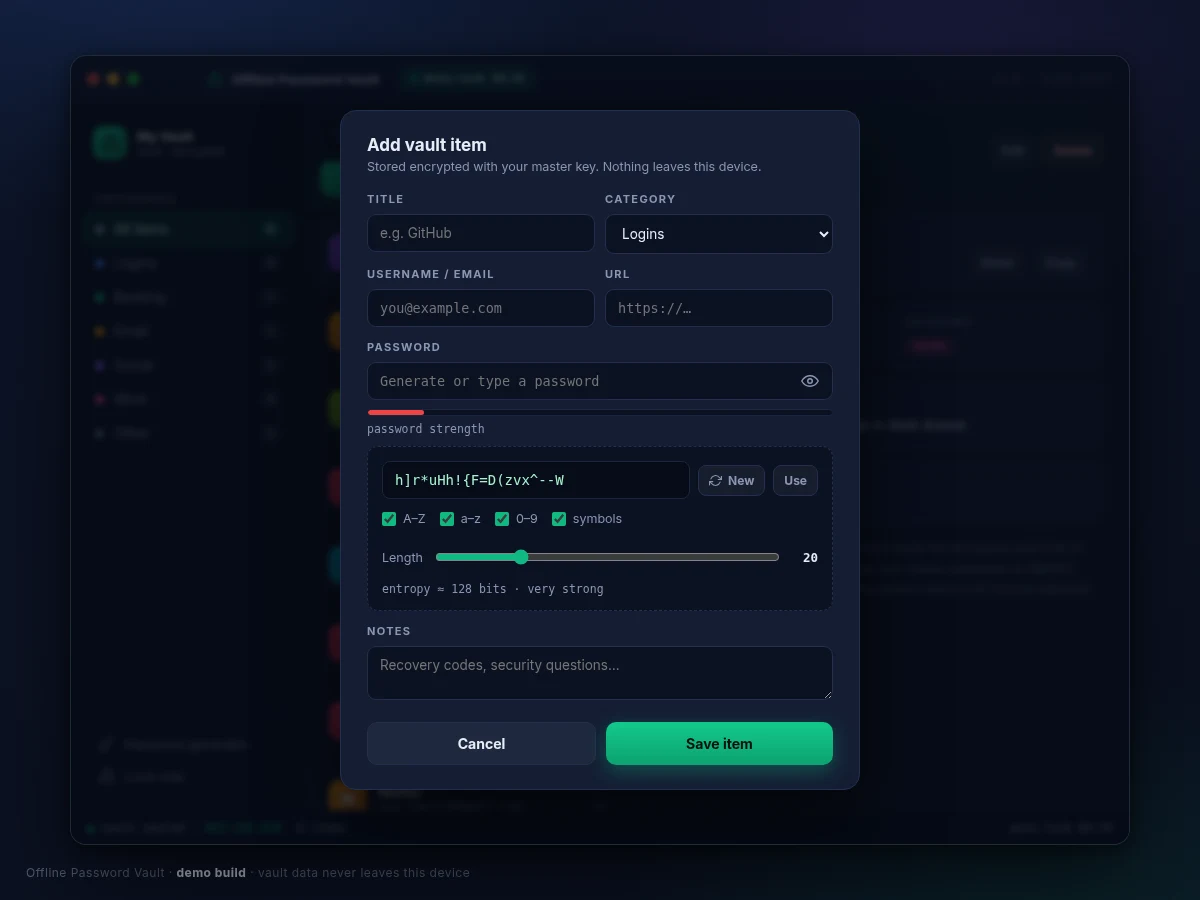
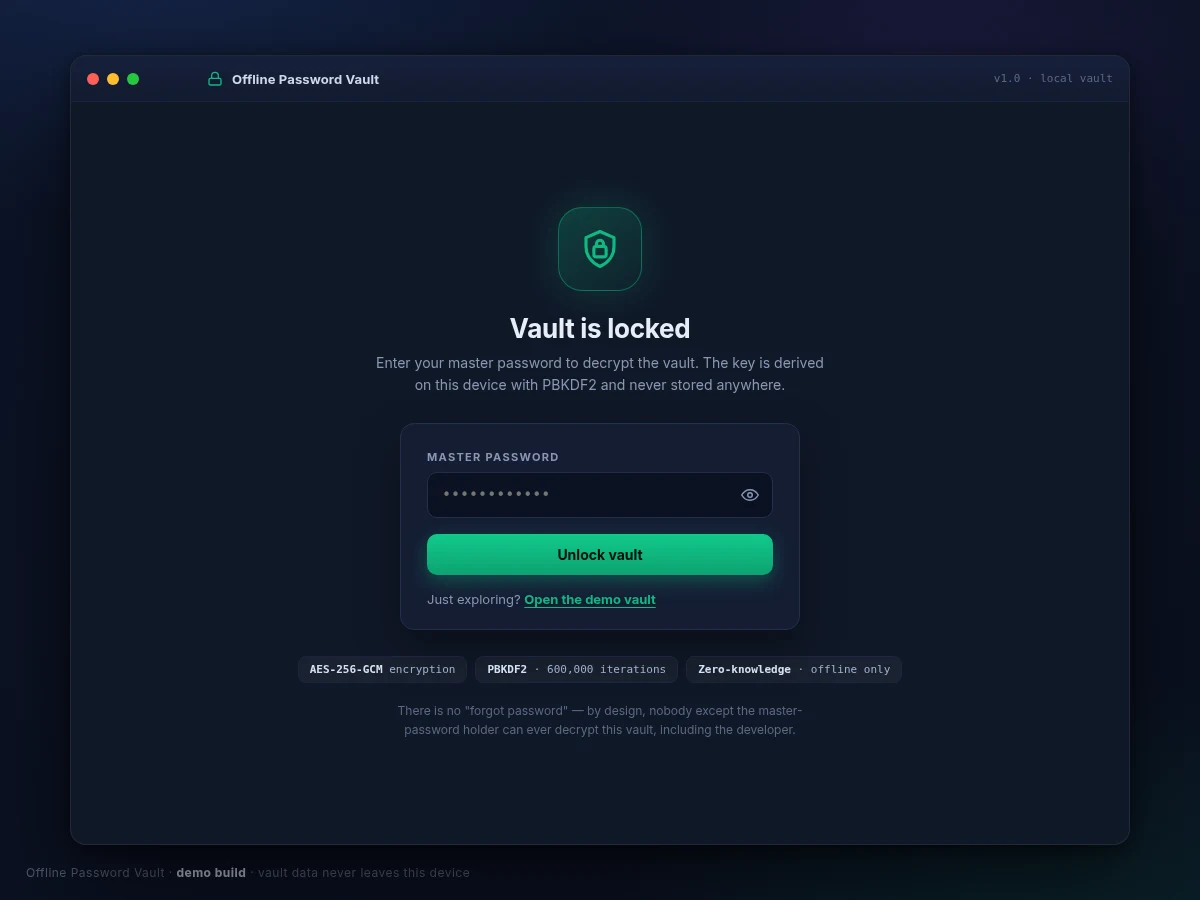
Most people reuse a handful of weak passwords because remembering dozens of strong, unique ones is genuinely hard — and every breach dump proves how costly that habit is. Cloud password managers solve the memory problem but ask users to trust a third-party server with their entire credential life, and several high-profile breaches have shown why some users refuse that trade. This project takes the offline route: a desktop password vault that stores every credential in a single file encrypted with AES-256-GCM, where the encryption key is derived from one master password using PBKDF2 with 600,000 iterations and is never stored anywhere. The app locks itself after five idle minutes, generates strong passwords with an entropy readout, and wipes copied passwords from the clipboard after twenty seconds. There is no account, no server and no sync — by design, forgetting the master password means the vault cannot be recovered, which is exactly the security property the project demonstrates.
Enters the master password, manages entries and generates strong passwords.
Follow the working sequence
How it works
- On first run the app creates a vault: it generates a random 16-byte salt and stores it next to the (initially empty) encrypted blob.
- When the master password is entered, PBKDF2-HMAC-SHA256 runs 600,000 iterations over the password and salt to derive a 256-bit key; the password is then discarded from memory.
- The key decrypts the vault blob with AES-256-GCM. A wrong password fails authentication, and the app reports "incorrect master password" without revealing anything about the contents.
- Every save serializes all entries to JSON, generates a fresh 96-bit nonce, re-encrypts with AES-256-GCM, and writes the single vault file — so each save produces completely different ciphertext.
- A background timer tracks input idle time; after 5 minutes it zeroes the key in memory and returns to the lock screen.
- Copying a password starts a 20-second timer that overwrites the clipboard; the generator draws from the OS cryptographic RNG and reports the password's entropy in bits.
Tech stack:
- Python 3 (desktop application)
- Tkinter (native desktop GUI)
- cryptography package (AESGCM, PBKDF2-HMAC-SHA256)
- HTML, CSS, JavaScript (working interactive demo)
- WebCrypto API (demo encryption: AES-GCM + PBKDF2)
- Single-file encrypted vault format
- Git
| Parameter | Value |
|---|---|
| Encryption | AES-256-GCM (authenticated encryption) |
| Key derivation | PBKDF2-HMAC-SHA256, 600,000 iterations |
| Salt / nonce | 16-byte random salt; fresh 96-bit nonce per save |
| Auto-lock | 5 minutes idle default, configurable 1–30 minutes (design) |
| Clipboard auto-clear | 20 seconds after copy (implemented in demo) |
| Password generator | 8–64 characters, selectable sets, entropy-bits readout |
| Vault format | Single encrypted file on local disk; no network calls |
| Unlock time | Approximately 1–2 seconds on a typical laptop (expected) |
| Platform | Windows / Linux desktop (expected) |
Project features
- [Master-password unlock with PBKDF2] PBKDF2-HMAC-SHA256 runs 600,000 iterations over the master password and a random salt to derive the 256-bit vault key; the password itself is never stored, so there is nothing on disk worth stealing.
- [AES-256-GCM encrypted vault] All entries live in one encrypted blob. GCM authenticated encryption means a tampered vault file fails to decrypt loudly instead of silently corrupting.
- [Idle auto-lock] The vault re-locks after 5 minutes without input (configurable 1–30 minutes in the desktop build), wiping the derived key from memory.
- [Strong password generator] Cryptographically random passwords, 8–64 characters with selectable character sets, plus a live entropy-bits readout so weak choices are visible.
- [Clipboard auto-clear] Any copied password is wiped from the system clipboard after 20 seconds, limiting exposure from an unattended machine.
- [Search, categories and favorites] Instant search across titles, usernames and URLs, six categories with counts, and favorite pinning for everyday credentials.
- [Full entry management] Add, edit and delete entries (title, username, password, URL, category, notes); every save re-encrypts the whole vault with a fresh 96-bit nonce.
What is included
- Complete Python desktop application source code (Tkinter GUI + cryptography package)
- Working interactive demo mirroring the vault flow (unlock, entries, generator, auto-lock)
- Encrypted vault file-format documentation
- Project report PDF (cryptography background, threat model, design decisions, methodology)
- PPT presentation for final review
- Viva Q&A preparation document (KDFs, AES-GCM, nonces, zero-knowledge design, threat modeling)
- Setup and usage guide
Limitations & prerequisites
- Single-device by design: no cloud sync, no multi-device access and no browser extension in the base build (encrypted export or sync can be quoted as customization).
- A forgotten master password means permanent, unrecoverable data loss — there is no recovery flow, and none can be added without weakening the security design.
- Clipboard auto-clear is best-effort: it wipes the system clipboard after 20 seconds but cannot erase text already pasted elsewhere or captured by other software.
- The implementation has not undergone an independent security audit; it is an academic application of standard primitives, not a certified security product.
- Auto-lock protects an idle unlocked vault; it cannot defend against a machine already compromised by malware or a keylogger.
- The vault is only as strong as the master password — a weak master password undermines the 600,000-iteration key derivation.
Frequently Asked Questions
What encryption does it actually use?
The vault file is encrypted with AES-256 in GCM mode, and the key is derived from the master password with PBKDF2-HMAC-SHA256 at 600,000 iterations. The interactive demo performs the same operations with the browser WebCrypto API; the delivered desktop build uses Python's cryptography package with identical parameters.
What happens if I forget the master password?
The vault cannot be recovered — the key exists only as a PBKDF2 derivation of that password, and the password itself is never stored anywhere. That is the zero-knowledge property of the design, and the report explains exactly why recovery is mathematically out of reach.
Does it need the internet?
No. The vault file lives on the machine, all key derivation and encryption run locally, and there is no account, server or telemetry of any kind. The desktop application works fully offline once installed — the password generator, search and auto-lock timer need no network at all, so the vault runs fine even on air-gapped lab machines.
Can it sync between my phone and laptop?
Not in the base build — sync is deliberately excluded so the threat model stays simple and auditable, with a single encrypted file on one machine. An encrypted export/import flow, a companion mobile app, or a cloud-sync customization can be developed and quoted separately if your project needs multi-device access.
Is this project suitable for a final-year project?
Yes — for Computer Science and IT programs. It demonstrates applied cryptography (key-derivation functions, authenticated encryption, nonces, threat modeling) and secure desktop-application design, with a working interactive demo and honestly documented security limitations that make for strong viva discussion material. Suitable for B.E./B.Tech final-year projects in Computer Science and IT.
Components & software requirements
- Python 3 (desktop application)
- Tkinter (native desktop GUI)
- cryptography package (AESGCM, PBKDF2-HMAC-SHA256)
- HTML, CSS, JavaScript (working interactive demo)
- WebCrypto API (demo encryption: AES-GCM + PBKDF2)
- Single-file encrypted vault format
- Git
Delivery information
Built-to-order project. Delivery timeline is shared after order confirmation based on current queue.
Support terms
Complete documentation, setup guide, and viva preparation included. Support for setup and explanation provided.
Download free synopsis (PDF)
Enter your name and email — the synopsis PDF downloads immediately. We may send occasional project updates; no spam, unsubscribe anytime.