
More project photos (2)
The problem
Two-factor authentication is only as convenient as the device that holds the codes, and most students keep their 2FA secrets on a phone app they cannot use while working on a laptop. This project builds a desktop TOTP authenticator: a native-feel app that implements the RFC 6238 time-based one-time password algorithm from first principles — base32 secret decoding, HMAC-SHA1, dynamic truncation and the 30-second time counter — so every code on screen is computed, not faked. Secrets are encrypted at rest with AES-256 under a vault password the user sets; the app supports adding accounts by scanning a service's 2FA QR or pasting the secret manually, searching across accounts, and exporting an encrypted backup file for migration. The accompanying web demo runs the same algorithm in JavaScript with six realistic accounts, so the viva can show live code generation, the countdown ring and the add/backup flows directly. The report documents the TOTP mathematics, the vault encryption design and the threat model honestly.
How it works
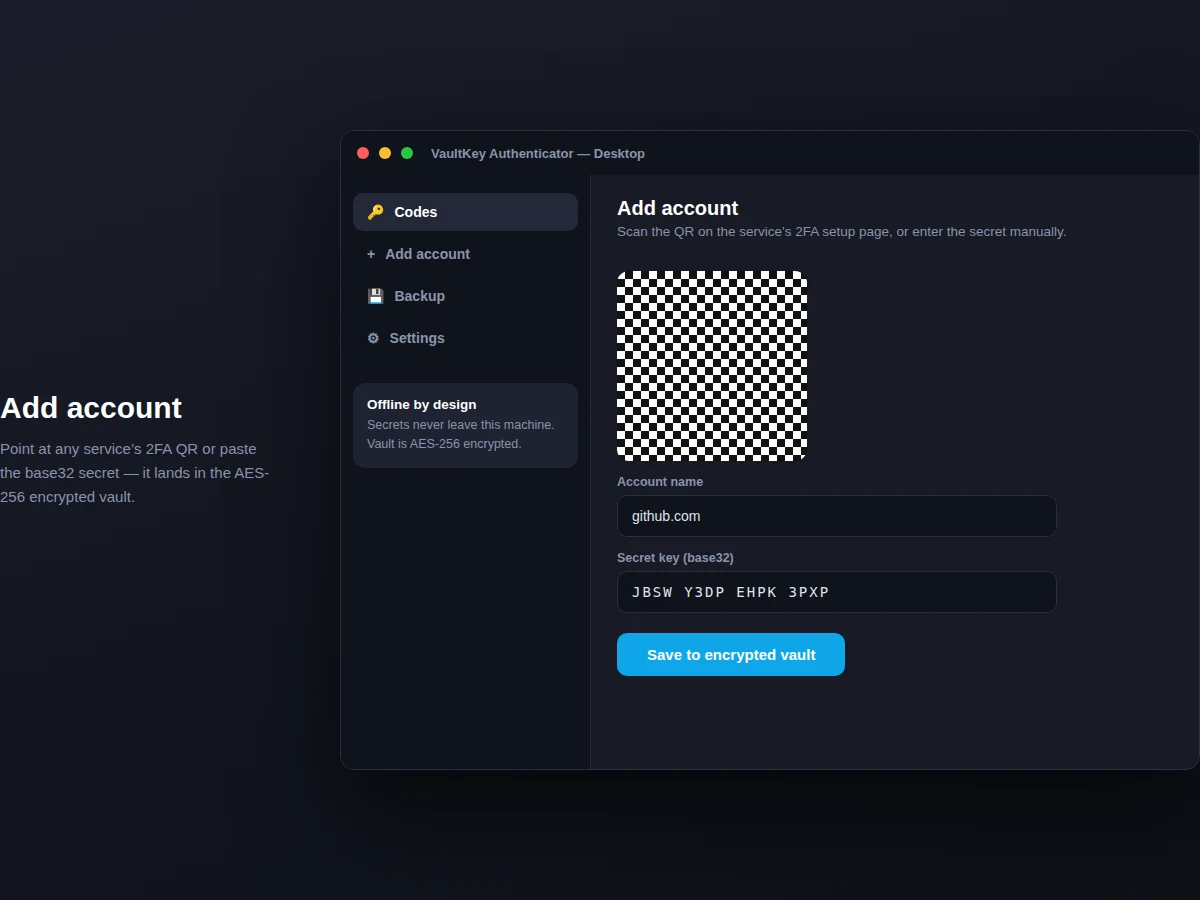
- The user enrols an account by scanning the service's 2FA QR or pasting the base32 secret; the secret is encrypted into the vault immediately.
- Every 30 seconds the app computes the Unix time counter (floor of epoch seconds divided by 30).
- The counter is HMAC-SHA1 hashed with the account's secret key, dynamically truncated to 31 bits, and reduced modulo 1,000,000 to a 6-digit code.
- The UI renders the code with a countdown ring showing seconds remaining in the current window.
- Clicking copy places the code on the clipboard; it is cleared automatically after the configured interval.
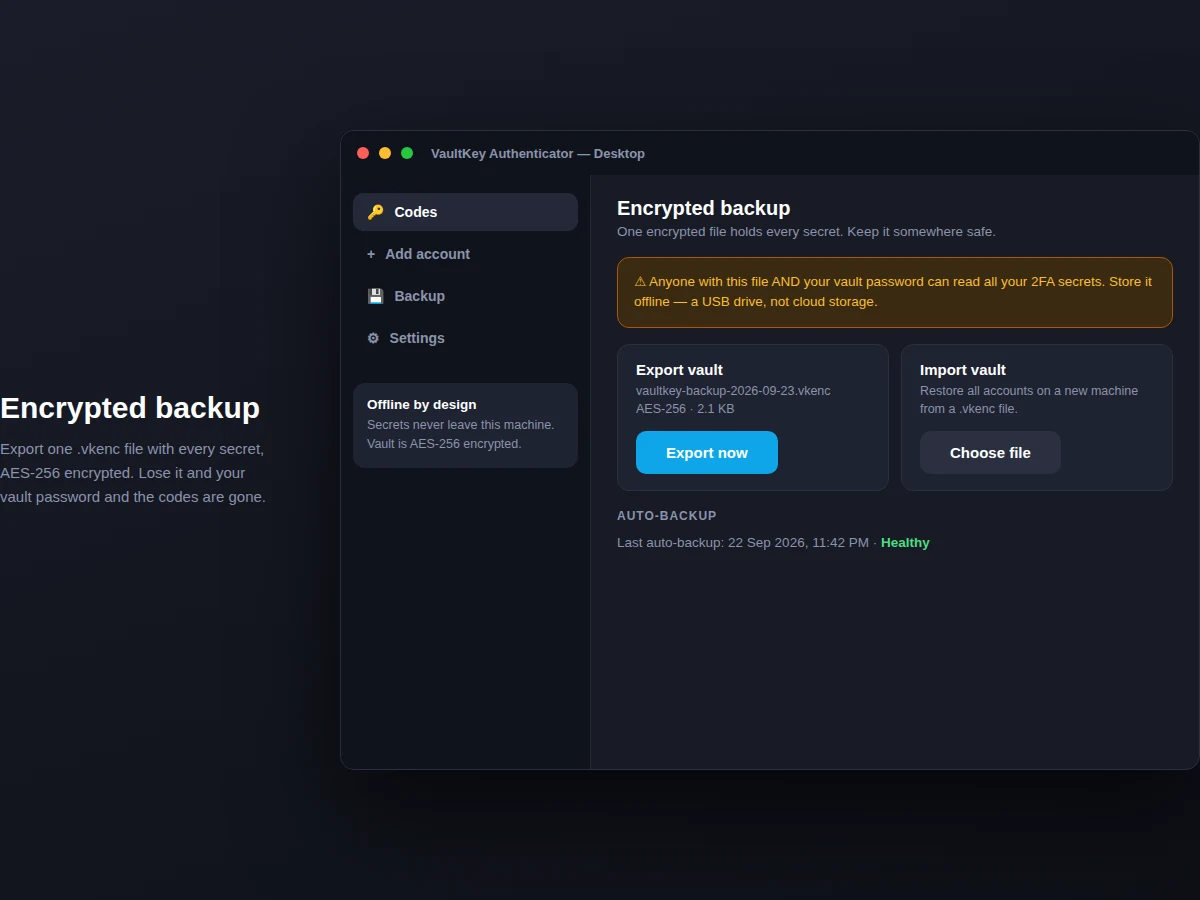
- Backup exports the encrypted vault as one file; restore decrypts it on the new machine after the vault password is verified.
Tech stack:
- Python 3 with Tkinter / PyQt (desktop shell)
- cryptography library (AES-256-GCM, PBKDF2)
- qrcode + OpenCV (QR enrolment flow)
- RFC 6238 TOTP core (implemented from spec)
- HTML/CSS/JS (working web demo of the algorithm)
| Parameter | Value |
|---|---|
| Algorithm | TOTP per RFC 6238; 6 digits, 30 s step, SHA-1 (design target) |
| Vault encryption | AES-256-GCM, PBKDF2 key derivation, 200,000 iterations (design target) |
| Accounts | Unlimited local accounts (expected) |
| Clock tolerance | Accepts plus/minus 1 time step for clock skew (configurable) |
| Backup format | Single .vkenc file, approximately 2 KB for 6 accounts (expected) |
| Platforms | Windows 10+, Ubuntu 22.04+ (design target) |
| Demo | Web demo with 6 live accounts + desktop source |
| Documentation | Report PDF, PPT, viva Q&A (included) |
Project features
- [Real RFC 6238 TOTP] Base32 decoding, HMAC-SHA1, dynamic truncation and 30-second counters implemented and documented — the report walks through the algorithm step by step.
- [AES-256 encrypted vault] All secrets encrypted at rest under a user-set vault password; the plaintext secret never touches the disk.
- [30-second countdown ring] Per-account visual countdown with automatic code rollover, matching the behaviour of standard authenticator apps.
- [One-click copy] Copies the current 6-digit code to the clipboard, with the copy expiring from the clipboard after a configurable interval.
- [Add via QR or manual entry] Scan the service's 2FA setup QR with the desktop camera flow, or paste the base32 secret for manual enrolment.
- [Encrypted backup & restore] Export a single .vkenc backup file and restore it on a new machine with the vault password.
- [Search across accounts] Instant filtering by service or username for users with dozens of enrolled accounts.
What is included
- Complete desktop app source code (Python) with TOTP core implemented from the RFC
- Working web demo generating real codes for 6 sample accounts
- Vault encryption module with documented key-derivation parameters
- QR enrolment flow documentation
- Project report PDF (TOTP mathematics, encryption design, threat model, testing)
- PPT presentation for final review
- Viva Q&A preparation document (HMAC, time counters, AES-GCM, PBKDF2, clipboard security)
Limitations & prerequisites
- The vault password cannot be recovered — losing it means losing all secrets, which is stated upfront in the app and the report.
- Code correctness depends on the system clock; a machine with a badly skewed clock generates codes the server rejects (the plus/minus-one-step tolerance covers small skew only).
- The app stores TOTP secrets, not FIDO2/WebAuthn keys — hardware security keys are out of scope.
- QR enrolment needs a working camera; manual secret entry is the documented fallback.
- The demo web version keeps secrets in memory only and is not a password manager replacement.
Frequently Asked Questions
Is the TOTP algorithm really implemented, not faked?
Yes. The demo and the desktop app both implement RFC 6238 — base32 decode, HMAC-SHA1 over the 8-byte time counter, dynamic truncation, modulo 1,000,000 — and the report derives each step so you can defend it in the viva.
How are the secrets protected?
They are encrypted with AES-256-GCM; the encryption key is derived from your vault password with PBKDF2 (200,000 iterations). Plaintext secrets never touch the disk.
What happens if I lose my vault password?
The secrets cannot be recovered — that is the honest trade-off of local encryption, and the app warns about it during setup. The encrypted backup only helps if you remember the password.
Why do codes sometimes fail on the website?
Almost always clock skew: if your machine's clock is more than about 30 seconds off, the time counter disagrees with the server. The app tolerates plus/minus one step.
Can I move my accounts to a new laptop?
Yes — export the .vkenc backup, copy it to the new machine, and restore with the same vault password.
Is this project suitable for a final-year project?
Yes — for Computer Science, IT and Cybersecurity programs. It combines applied cryptography, RFC implementation, secure storage design and a genuinely usable security tool. Suitable for B.E./B.Tech final-year projects in Computer Science, IT and Cybersecurity.
Components & software requirements
- Python 3 with Tkinter / PyQt (desktop shell)
- cryptography library (AES-256-GCM, PBKDF2)
- qrcode + OpenCV (QR enrolment flow)
- RFC 6238 TOTP core (implemented from spec)
- HTML/CSS/JS (working web demo of the algorithm)
Delivery information
Built-to-order project. Delivery timeline is shared after order confirmation based on current queue.
Support terms
Complete documentation, setup guide, and viva preparation included. Support for setup and explanation provided.