
More project photos (2)
The problem
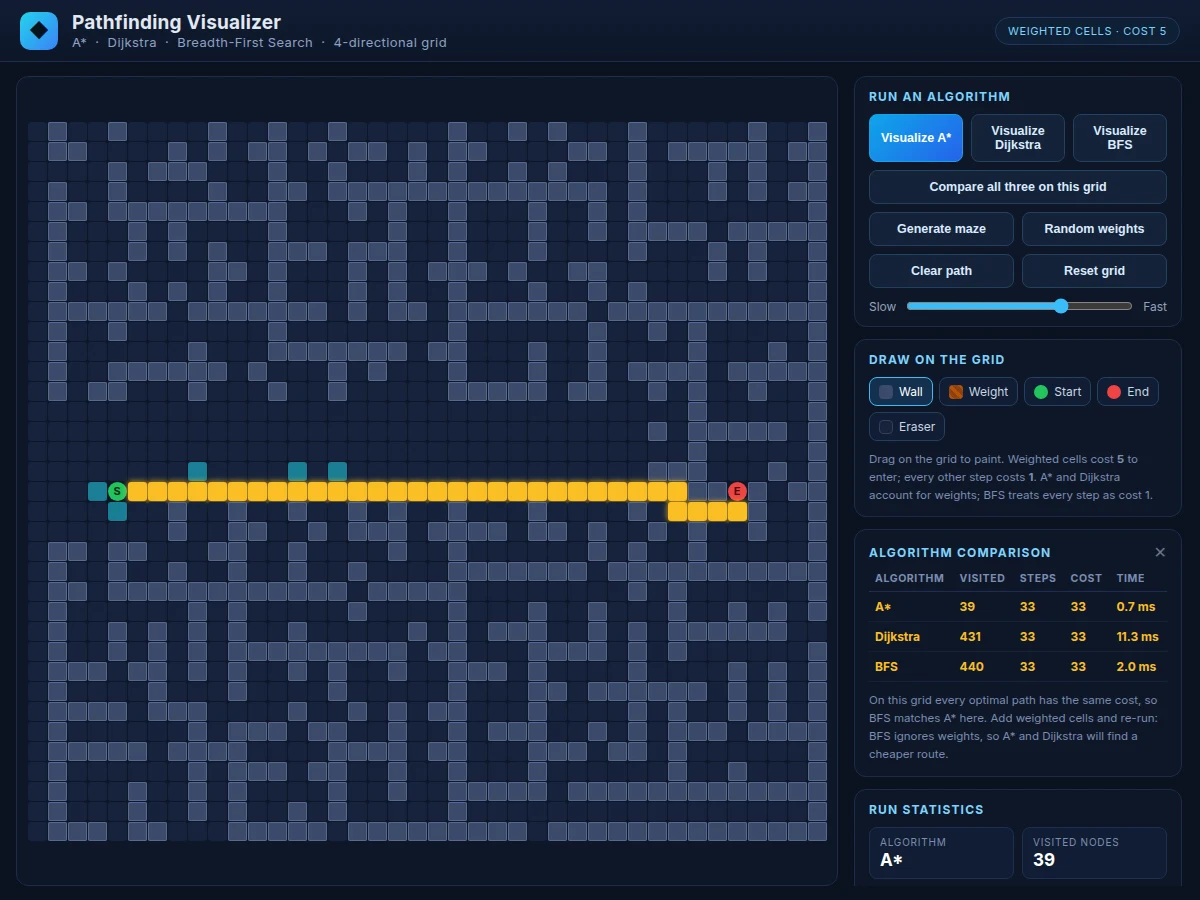
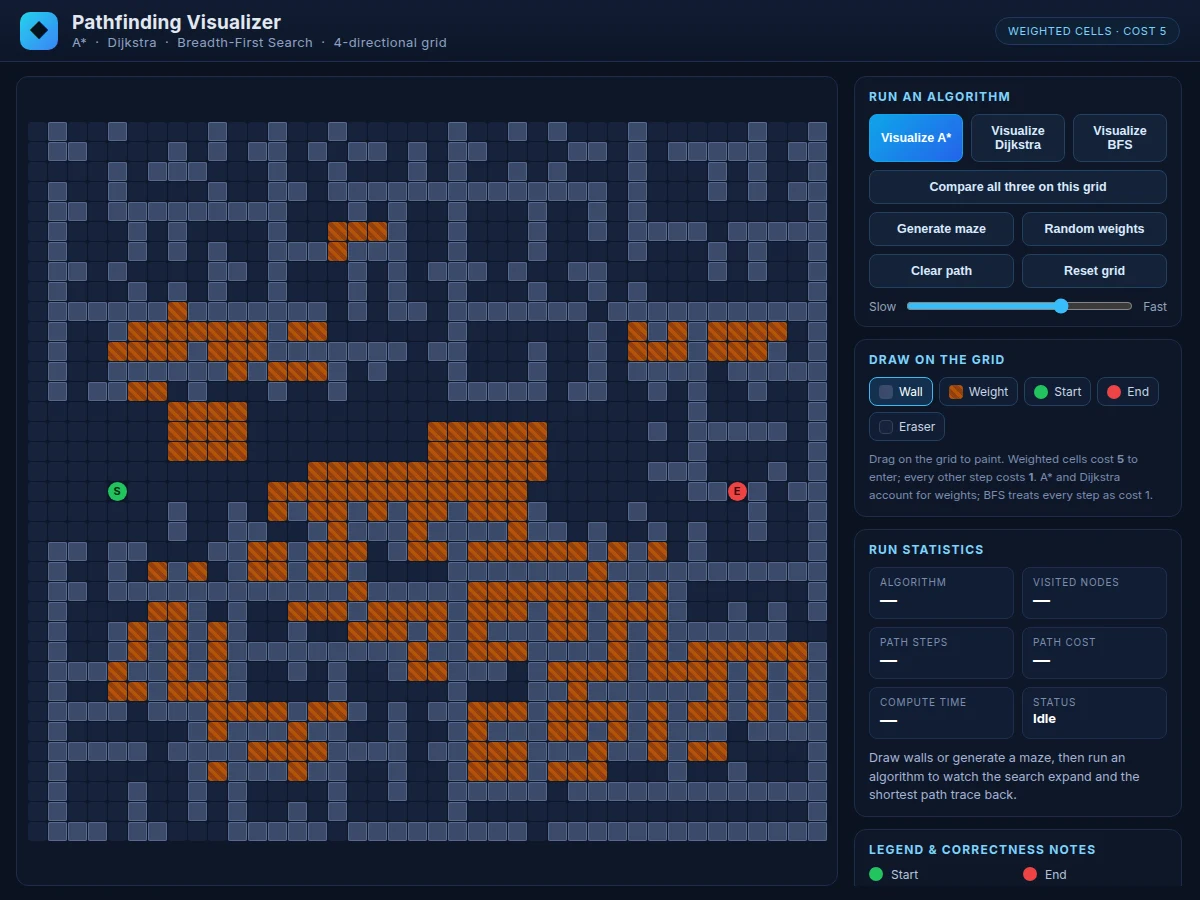
Pathfinding algorithms are usually taught with pseudocode and static diagrams, which hide the most instructive part: how the search actually behaves on a real map. Students can recite that A* uses a heuristic but cannot explain why it visits fewer nodes than Dijkstra, or why breadth-first search — optimal on plain grids — picks a costlier route once weighted terrain appears. This project closes that gap with an interactive visualizer built in Python. A grid editor lets you draw walls, paint weighted cells, drag the start and end points, and generate solvable mazes at one click. Each algorithm then animates its real execution: the frontier expands in visited order, and the final path traces back, while a statistics panel reports visited nodes, path steps, total cost and compute time measured live. A comparison mode runs A*, Dijkstra and BFS on the identical grid and tabulates the results, turning abstract complexity claims into something the student can point at during a viva.
Draws walls and weights, drags start and end, picks a solver and adjusts playback speed.
Follow the working sequence
How it works
- The map is a 40 × 36 grid (1,440 cells); each cell is free, a wall, or weighted, and movement is 4-directional with no diagonals.
- A* expands nodes in order of f(n) = g(n) + h(n), where g(n) is the cost from the start and h(n) is Manhattan distance to the goal; because every step costs at least 1, the heuristic never overestimates, so A* returns an optimal path.
- Dijkstra runs the same loop with h(n) = 0 — pure uniform-cost search — which is optimal but expands every direction equally, visiting far more nodes than A*.
- BFS uses a FIFO queue and treats every step as cost 1, ignoring weights; it finds the fewest-step path, which is optimal only when no weighted cells are present.
- During animation, cells are colored in the exact order the algorithm visits them, the most recent frontier is highlighted, and the reconstructed path is traced from goal back to start via parent pointers.
- Comparison mode executes all three solvers back-to-back on the current grid and renders the measured visited counts, steps, costs and timings in one table.
Tech stack:
- Python 3 (algorithm implementations, no external algorithm libraries)
- Tkinter · canvas (interactive grid visualizer GUI)
- heapq (binary-heap priority queue for A* and Dijkstra)
- collections.deque (FIFO queue for BFS)
- time.perf_counter (live compute-time measurement)
- HTML · CSS · JavaScript (companion browser demo with identical algorithms)
- Git
| Parameter | Value |
|---|---|
| Grid size | 40 × 36 cells (1,440 nodes) |
| Movement | 4-directional (up/down/left/right); no diagonal moves |
| Step cost | 1 per free cell; 5 per weighted cell (design choice) |
| A* heuristic | Manhattan distance (admissible on 4-directional grids; guarantees an optimal path) |
| Priority queue | Binary heap via heapq |
| Example measurement | A* visited 39 nodes vs Dijkstra 431 on the bundled sample maze (measured live by the app; varies with maze layout) |
| Compute time | Approximately 1–12 ms per run on a laptop CPU (measured live; varies with maze and machine) |
| Maze generator | Recursive division with connectivity repair; every maze solvable (verified at generation) |
| Delivery | Python 3 source + Tkinter GUI; runs fully offline |
Project features
- [Three correct algorithm implementations] A*, Dijkstra (uniform-cost search) and BFS written in pure Python with a binary-heap priority queue — no algorithm libraries, so every line is viva-explainable.
- [Animated search visualization] The search expands in true visited order with a visible frontier, then the final path traces back; playback speed is adjustable from step-by-step to instant.
- [Guaranteed-solvable maze generator] Recursive-division mazes with a connectivity repair pass, so every generated maze has a valid path — no dead "no path" demos.
- [Weighted terrain cells] Paint cells that cost 5 to enter (all other steps cost 1); this is what separates BFS from A* and Dijkstra in the comparison view.
- [One-click comparison mode] Runs all three algorithms on the identical grid and tabulates visited nodes, path steps, total cost and compute time side by side.
- [Interactive grid editor] Draw and erase walls, paint weights, and reposition start/end by dragging; the grid state is the single source of truth for every run.
- [Live statistics panel] Visited-node count, path length in steps, total path cost and wall-clock compute time are measured during each run, never hard-coded.
What is included
- Complete Python source: A*, Dijkstra and BFS implementations with the Tkinter grid visualizer
- Maze generator (recursive division with guaranteed connectivity) and weighted-terrain editor
- Comparison mode with tabulated live statistics
- Companion single-file browser demo running the identical algorithms for instant walkthroughs
- Project report PDF (algorithm theory, heuristic admissibility proof sketch, methodology, results)
- PPT presentation for final review
- Viva Q&A preparation document (A* vs Dijkstra vs BFS, heuristics, complexity, weighted graphs)
Limitations & prerequisites
- Movement is 4-directional only; diagonal moves are not supported (they would need an octile heuristic to stay optimal).
- The grid is fixed at 40 × 36 cells; much larger grids make the Tkinter animation sluggish (expected GUI limitation, not an algorithm limit).
- Weighted cells use one fixed cost (5); per-cell custom costs are not supported in this build.
- BFS ignores cell weights by design — on weighted grids it minimizes steps, not cost, and can return a costlier path; this is the teaching point, not a bug.
- Compute times are wall-clock measurements on the student's own machine, suitable for relative comparison but not benchmark-grade.
- This is a teaching visualizer, not a production path planner: no dynamic replanning (D*), no multi-agent coordination.
Frequently Asked Questions
Why does A* visit far fewer nodes than Dijkstra on the same maze?
Dijkstra expands uniformly in all directions because it has no information about where the goal is. A* adds the Manhattan-distance heuristic h(n) to the cost-so-far g(n) and always expands the node with the smallest f(n) = g(n) + h(n), which focuses the search toward the goal. On the bundled sample maze this difference is directly visible: A* visits 39 nodes while Dijkstra visits 431 for the identical optimal path.
When does BFS fail to find the cheapest path?
Whenever weighted cells are present. BFS expands level by level and treats every step as cost 1, so it minimizes the number of steps, not the total cost. If the fewest-step route crosses weighted terrain (cost 5 per cell), BFS will take it while A* and Dijkstra route around the weights to a cheaper path. The comparison mode demonstrates this on any grid you paint weights onto.
Is the A* heuristic admissible, and why does it matter?
Yes. On a 4-directional grid where every step costs at least 1, Manhattan distance never overestimates the true remaining cost, which is the definition of admissibility. An admissible heuristic guarantees A* returns an optimal (cheapest) path. If the heuristic overestimated, A* could skip over the true optimum — the report includes this argument for the viva.
Can I draw my own maze instead of using the generator?
Yes. The grid editor supports painting and erasing walls, painting weighted cells, and dragging the start and end markers anywhere on the 40 × 36 grid. Every run — single algorithm or comparison — executes on exactly the grid you see, and the generator itself is one click away when you want a fresh solvable maze.
What is the time complexity of each algorithm?
BFS and Dijkstra are O(V + E) in the worst case on this grid, where V is 1,440 cells and E is roughly 4 per cell; both can visit the whole reachable region. A* with a good heuristic visits far fewer nodes in practice but shares the same worst case. The statistics panel shows the actual visited-node counts per run, so complexity stops being abstract.
Is this project suitable for a final-year project?
Yes — for Computer Science, IT and Computer Engineering programs. It demonstrates correct implementations of three fundamental graph-search algorithms, heuristic design with an admissibility argument, empirical comparison methodology, and a working interactive application, all of which give strong viva material.
Components & software requirements
- Python 3 (algorithm implementations, no external algorithm libraries)
- Tkinter · canvas (interactive grid visualizer GUI)
- heapq (binary-heap priority queue for A* and Dijkstra)
- collections.deque (FIFO queue for BFS)
- time.perf_counter (live compute-time measurement)
- HTML · CSS · JavaScript (companion browser demo with identical algorithms)
- Git
Delivery information
Built-to-order project. Delivery timeline is shared after order confirmation based on current queue.
Support terms
Complete documentation, setup guide, and viva preparation included. Support for setup and explanation provided.
Download free synopsis (PDF)
Enter your name and email — the synopsis PDF downloads immediately. We may send occasional project updates; no spam, unsubscribe anytime.