
More project photos (2)
The problem
Most students study encryption and steganography as two separate textbook chapters: AES as a block cipher in a slides deck, and LSB hiding as a paragraph nobody implements. The gap between the two is where the interesting engineering lives — how a password becomes a key, how ciphertext is packed into pixels without visibly damaging the image, and how the receiver proves the data is intact rather than corrupted. This project closes that gap with a Python desktop application that encrypts a message with AES-256 in GCM mode, derives the key from a user password with PBKDF2, and embeds the result in the least-significant bits of a PNG image. The stego image looks identical to the original, yet extraction with a wrong password — or a single tampered pixel — fails loudly through authentication instead of returning garbage. A working browser demo of the full pipeline ships alongside the desktop app, so the concept can be shown on any machine without installing anything.
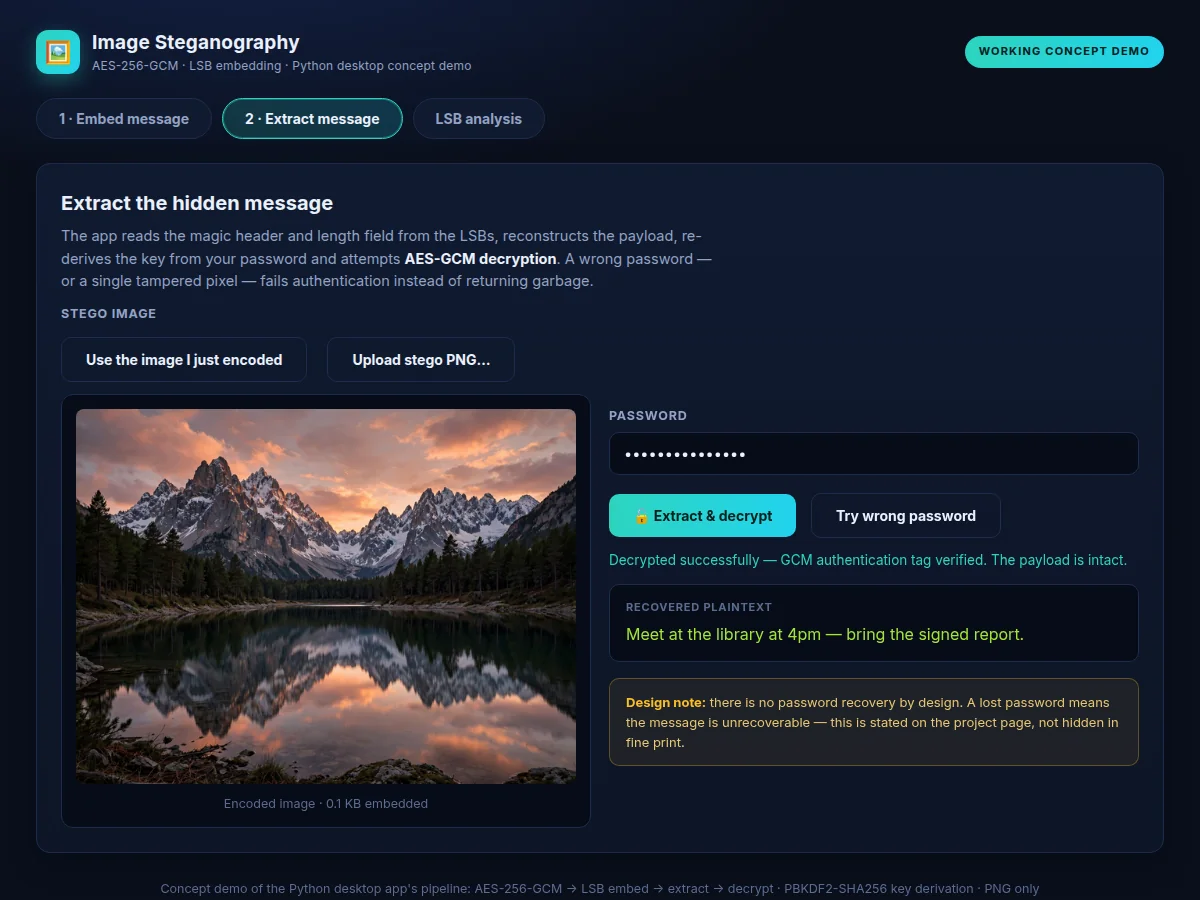
Types the secret message and password; on receipt, extracts with the same password.
Follow the working sequence
How it works
- The user types a message and a password; PBKDF2-SHA256 derives a 256-bit key from the password and a random 16-byte salt over 200,000 iterations (design target).
- AES-256-GCM encrypts the message with a fresh random 12-byte nonce; the 16-byte authentication tag is appended to the ciphertext.
- The app computes the image's LSB capacity — 3 bits per pixel, one per colour channel — and refuses the message if the payload does not fit.
- A 4-byte magic marker and 4-byte length header, followed by salt, nonce and ciphertext-plus-tag, are written into the least-significant bits of the R, G and B channels.
- The stego image is saved as PNG — visually identical to the original — and can be shared like any ordinary picture.
- Extraction reverses the pipeline: the header is verified, the payload is read from the LSBs and GCM decryption is attempted; a wrong password or any tampered pixel fails authentication instead of producing garbage.
Tech stack:
- Python 3
- Pillow (PIL)
- cryptography (AES-GCM, PBKDF2)
- Tkinter (desktop GUI)
- WebCrypto · HTML/CSS/JS (concept demo)
- Git
| Parameter | Value |
|---|---|
| Embedding method | 1 bit per colour channel per pixel (LSB, design target) |
| Capacity | Approximately (width × height × 3) ÷ 8 bytes, minus 12-byte header (design formula) |
| Image format | PNG (lossless) only — JPEG recompression destroys the hidden payload |
| Encryption | AES-256-GCM with a fresh 12-byte random nonce per message (design target) |
| Key derivation | PBKDF2-SHA256, 200,000 iterations, random 16-byte salt (design target) |
| Authentication | 16-byte GCM tag per payload — any tampering fails decryption (design target) |
| Header overhead | 8 bytes per message: 4-byte magic + 4-byte length (design target) |
| Example capacity | An 800 × 600 PNG holds approximately 180 KB of payload (approximate) |
| Wrong password | Decryption fails with an authentication error; the message is unrecoverable (by design) |
| Platform | Desktop app on Windows/Linux/macOS (Python 3.10+); concept demo runs offline in a browser |
Project features
- [AES-256-GCM payload encryption] Every message is encrypted with AES-256 in Galois/Counter mode before any embedding, using a fresh random 12-byte nonce per message; the 16-byte authentication tag travels with the payload for tamper detection.
- [PBKDF2 password key derivation] The 256-bit encryption key is derived from the user's password with PBKDF2-SHA256 at 200,000 iterations over a random 16-byte salt, so the password itself is never stored or transmitted.
- [LSB embedding with capacity check] Ciphertext bits are written into the least-significant bits of the red, green and blue channels; the app computes the image's true capacity first and refuses messages that do not fit.
- [PNG-only format guard] Embedding is accepted only on lossless PNG images, and the app states plainly why: JPEG recompression rewrites pixel values and destroys hidden payloads.
- [Extract-and-decrypt flow] The receiver loads the stego image, the app verifies the magic header and length field, reads the payload from the LSBs and decrypts it back to the original plaintext.
- [Tamper-evident integrity] Any flipped bit in the stego image breaks the GCM authentication tag, so extraction fails with a clear error instead of silently returning corrupted text.
- [Desktop GUI plus CLI mode] A Tkinter interface covers everyday use, while a command-line mode supports batch embedding and scripting for demonstrations and testing.
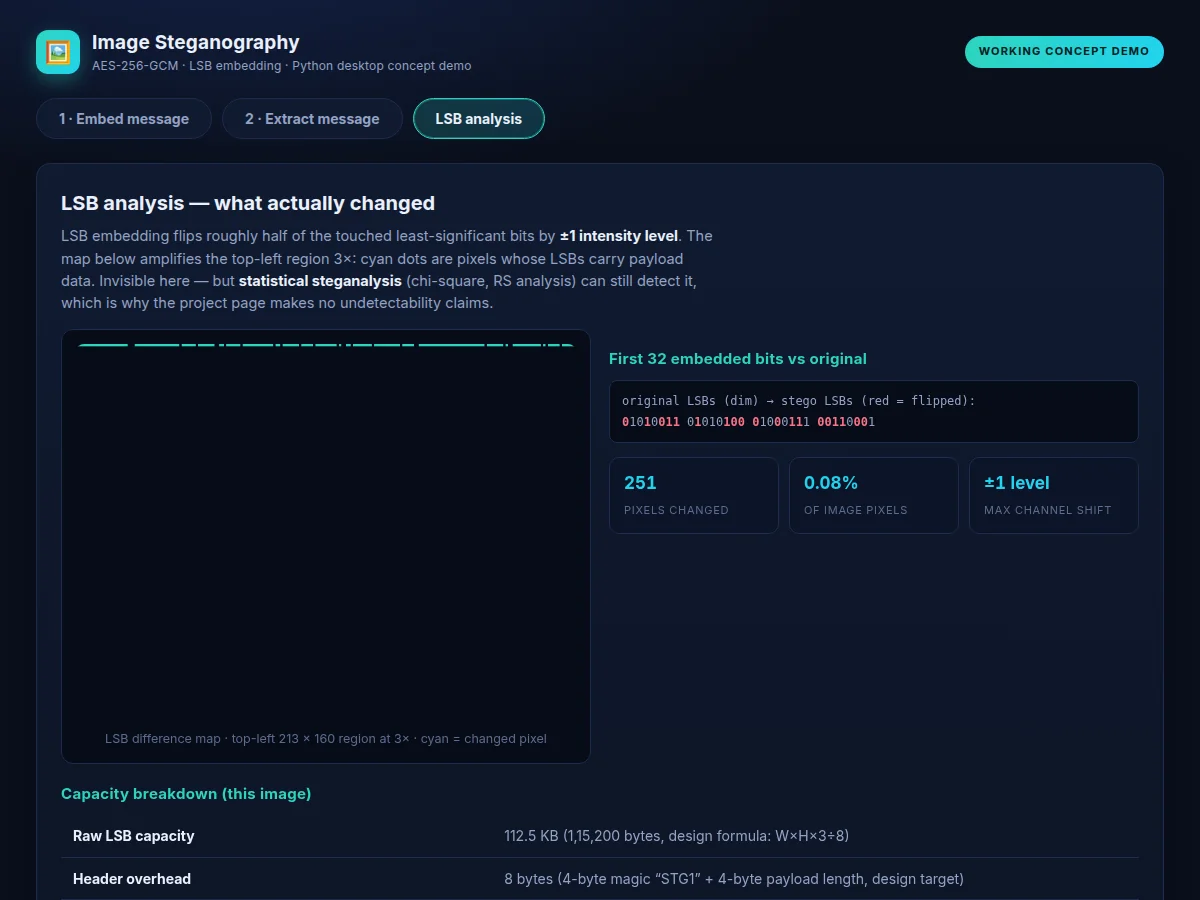
- [Stego comparison view] Original and stego images are shown side by side with an amplified LSB-difference map that pinpoints exactly which pixels changed and by how much.
What is included
- Complete Python source code (embed/extract crypto module, LSB engine, Tkinter GUI, CLI mode)
- Working browser concept demo of the full encrypt–embed–extract pipeline
- Sample PNG images and test messages for demonstration
- Project report PDF (cryptography background, methodology, capacity analysis, honest limitations)
- PPT presentation for final review
- Viva Q&A preparation document (AES modes, PBKDF2, GCM authentication, LSB capacity math, steganalysis)
- Setup and usage guide
Limitations & prerequisites
- LSB steganography is detectable by statistical steganalysis — chi-square and RS analysis can reveal hidden data in suspicious images; no claim of undetectability is made.
- The stego image must remain a PNG; any JPEG conversion, resize or crop destroys the payload.
- A forgotten password means the message is unrecoverable — there is no backdoor, by design.
- Capacity is roughly 12.5% of the raw pixel data, so long messages need large carrier images.
- The scheme offers no plausible-deniability features; it is framed as an educational cryptography implementation, not a covert-communications tool.
Frequently Asked Questions
Is this project suitable for a final-year project?
Yes — for Computer Science and IT programs. It demonstrates symmetric encryption (AES-GCM), password-based key derivation (PBKDF2), bit-level image manipulation with Pillow, capacity mathematics and honest security analysis including steganalysis limitations — strong material for both the demo and the viva.
How is my password turned into an encryption key?
The app never uses your password directly. PBKDF2-SHA256 stretches it through 200,000 iterations with a random 16-byte salt to produce a 256-bit AES key. The salt is stored with the payload so the receiver re-derives the identical key; the password itself is never stored anywhere.
Why must the image be PNG and not JPEG?
LSB hiding depends on exact pixel values. JPEG is lossy — its compression rewrites nearly every pixel, wiping the hidden bits. PNG is lossless, so pixels survive exactly. The app enforces this with a PNG-only guard and explains the reason in the documentation.
Can someone detect that a message is hidden?
Possibly, with the right tools. The image looks identical to the eye, but statistical steganalysis (chi-square, RS analysis) can flag LSB anomalies in suspicious files. The project states this openly in its limitations — it is an educational cryptography build, not an undetectability claim.
What happens if I enter the wrong password during extraction?
Decryption fails cleanly and visibly. AES-GCM is authenticated: the wrong key produces a tag mismatch, and the app reports an authentication error instead of returning garbage text. The same failure occurs if even one pixel of the stego image was altered.
What will I receive with the project?
The complete Python source (crypto module, LSB engine, Tkinter GUI, CLI), the browser concept demo, sample images and test messages, the project report PDF, PPT slides, a viva Q&A document and a setup guide — all prepared fresh for your order.
Components & software requirements
- Python 3
- Pillow (PIL)
- cryptography (AES-GCM, PBKDF2)
- Tkinter (desktop GUI)
- WebCrypto · HTML/CSS/JS (concept demo)
- Git
Delivery information
Built-to-order project. Delivery timeline is shared after order confirmation based on current queue.
Support terms
Complete documentation, setup guide, and viva preparation included. Support for setup and explanation provided.
Download free synopsis (PDF)
Enter your name and email — the synopsis PDF downloads immediately. We may send occasional project updates; no spam, unsubscribe anytime.