
More project photos (3)
The problem
Setting a university exam paper is still a manual Word-document chore in most departments: a faculty member copies questions from old papers, hand-tallies the marks, and hopes the units and difficulty came out balanced. The result is predictable — papers that over-weight one unit, repeat questions across years, or quietly add up to 98 instead of 100. Existing alternatives are either generic online quiz plugins or subscription cloud tools that keep the question bank on someone else's server. What departments actually need is an offline desktop tool that treats the paper like an engineering artefact: a blueprint declares the structure, the software enforces the arithmetic, and the output is a print-ready paper with a matching answer key. This project builds exactly that — a desktop app where every question is tagged by unit, marks and difficulty, and generation is constrained by configurable blueprint rules.
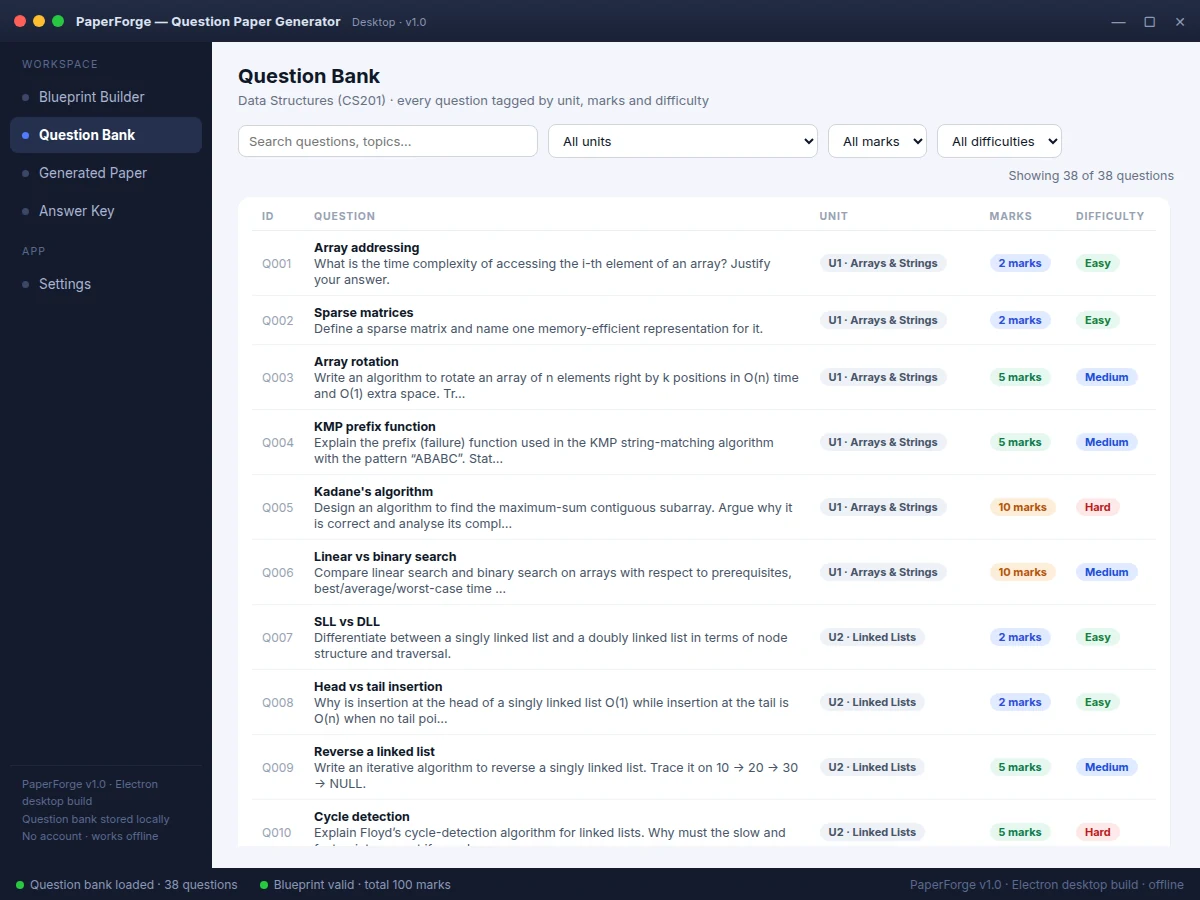
Defines the paper blueprint and enters questions tagged by unit, marks and difficulty.
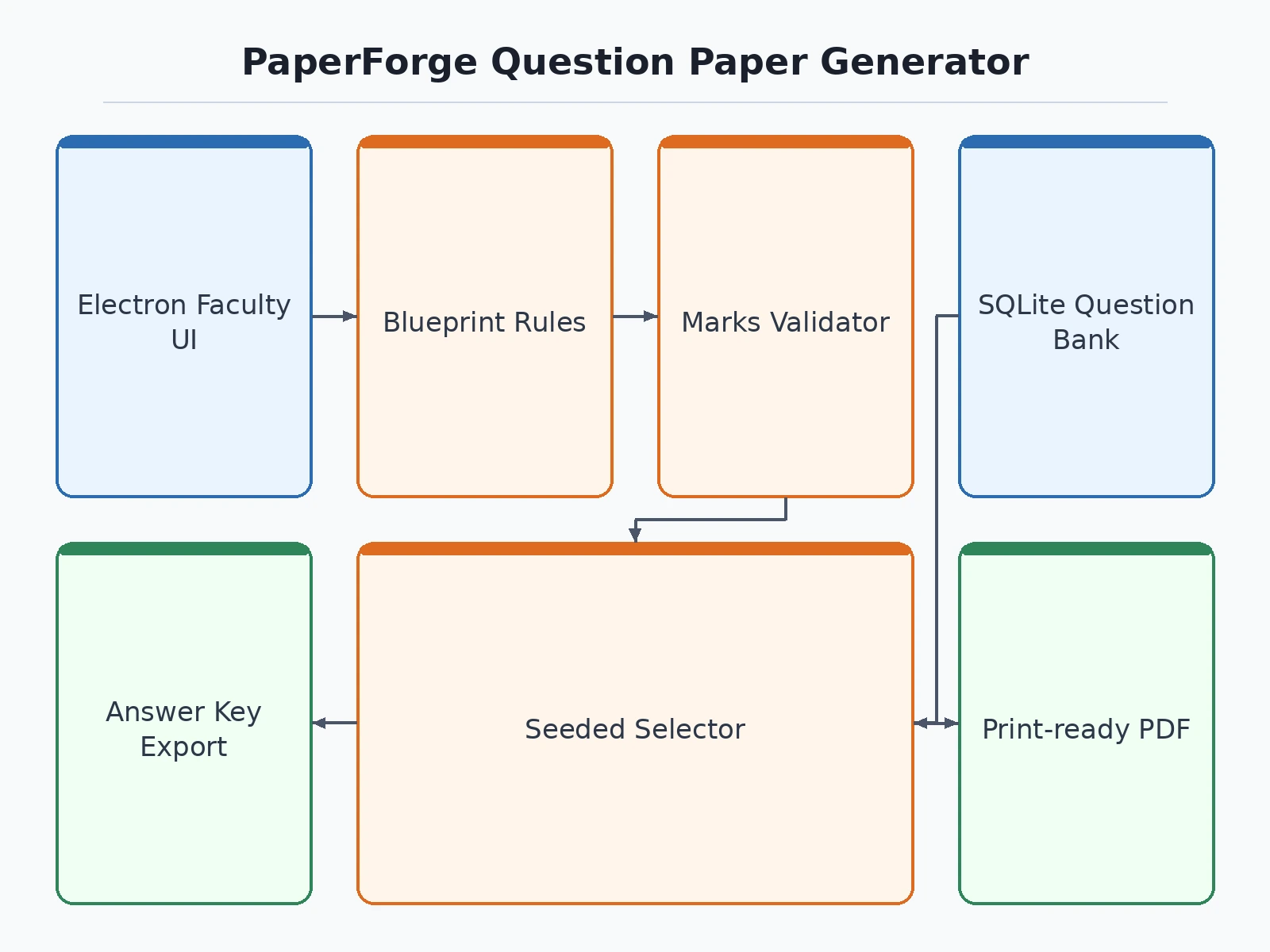
Follow the working sequence
How it works
- Questions are entered into the local SQLite bank, each tagged with unit, marks (2, 5 or 10) and difficulty (Easy/Medium/Hard).
- The faculty defines the blueprint: three sections (A: 10 × 2 marks compulsory; B: set 9, attempt any 6 × 5 marks; C: set 7, attempt any 5 × 10 marks), unit weightages, difficulty targets and per-unit min/max marks.
- The validator checks the arithmetic up front: attempted marks total exactly 100, weightages sum to 100%, difficulty targets sum to 100%, and the bank holds enough questions for every section.
- The generator uses a seeded random selector that deals questions round-robin across units while matching the difficulty targets, filling "extra" questions so each section offers the configured choice.
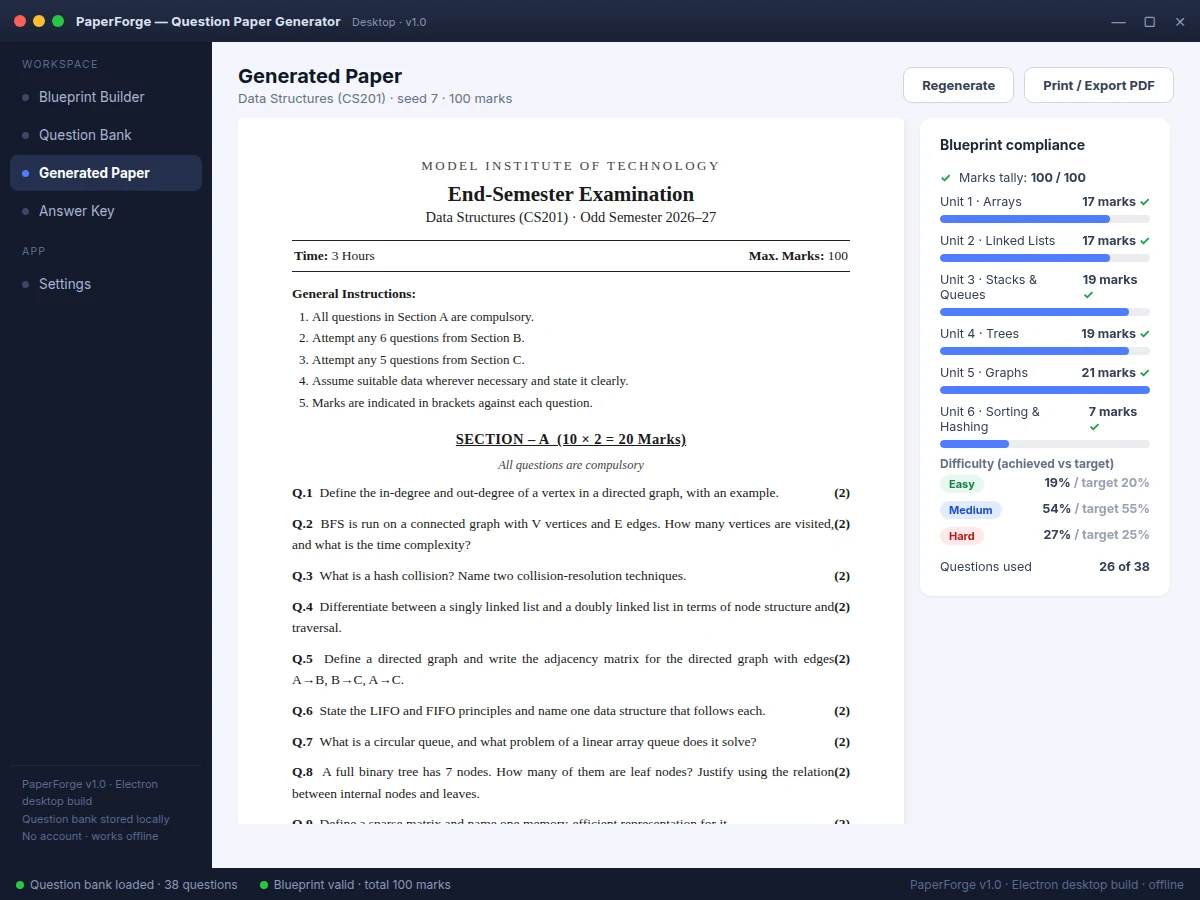
- The paper preview renders in examination format with general instructions; a compliance panel re-verifies the tally (100/100), per-unit marks and the achieved difficulty split against targets.
- The paper is exported via print/PDF and the faculty answer key is exported separately with model answers for every set question.
Tech stack:
- Electron (desktop application shell)
- JavaScript, HTML, CSS (application UI)
- SQLite (local question-bank storage)
- Node.js (packaging and runtime)
- Seeded RNG selection engine (deterministic generation)
- System print dialog (PDF export)
| Parameter | Value |
|---|---|
| Paper total | 100 marks (configurable; default pattern) |
| Duration | 3 hours (configurable) |
| Section A | 10 questions × 2 marks = 20 marks, all compulsory |
| Section B | 9 set, attempt any 6 × 5 marks = 30 marks |
| Section C | 7 set, attempt any 5 × 10 marks = 50 marks |
| Sample bank | 38 questions across 6 units (shipped demo bank) |
| Difficulty mix | Easy 20% / Medium 55% / Hard 25% by marks (configurable) |
| Unit coverage rule | 5–25 marks per unit by default (configurable) |
| Generation | Deterministic seeded selection; one new seed per parallel set (expected behavior) |
| Storage | Local SQLite file; approximately 1 MB per 1,000 questions (expected) |
| Platform | 64-bit desktop OS installer, approximately 80 MB (design target) |
| Answer key | Generated from the same selection as the paper (implemented) |
Project features
- [Blueprint-driven paper generation] Define sections with questions set versus questions to attempt and marks per question; the generator produces a complete paper that honours the blueprint instead of picking questions at random.
- [Tagged question bank] Every question carries unit, marks (2/5/10) and difficulty tags, with search and filters across the bank; the app ships with a 38-question Data Structures sample bank across 6 units.
- [Automatic marks-tally validation] The blueprint is validated before anything generates — attempted totals must equal the paper total (20 + 30 + 50 = 100 marks in the default pattern), weightages must sum to 100%, and each section must be covered by the bank.
- [Difficulty-balance engine] Set target difficulty mix by marks (default Easy 20% / Medium 55% / Hard 25%); the seeded selector matches it as closely as the bank allows and reports the achieved split honestly.
- [Unit-coverage rules] (Configurable) Per-unit minimum and maximum marks (default 5–25 marks per unit on a 100-mark paper) keep any single unit from dominating; the generator deals questions round-robin across units.
- [Seeded, reproducible sets] The same seed always regenerates the same paper, so parallel sets (Set A, Set B) are produced by changing one number — verifiable and demo-friendly.
- [One-click answer key] A separate faculty-only answer key with model answers is generated from the same selection, so the key can never drift out of sync with the paper.
- [Print-ready paper export] The paper renders in a classic examination layout with institution header, instructions and marks in brackets, exported via print/PDF.
What is included
- Complete Electron desktop app source code with the blueprint engine
- Local SQLite question-bank schema plus the 38-question Data Structures sample bank
- Blueprint validator, seeded generator and compliance-reporting modules
- Print/PDF paper export and separate answer-key export
- Installer build guide and setup instructions
- Project report PDF (background, blueprint design, methodology, validation)
- PPT presentation for final review
- Viva Q&A preparation document (blueprint logic, selection algorithm, validation, SQLite)
Limitations & prerequisites
- Desktop-only in the base build — there is no web or mobile client (a web companion is an optional extension).
- Single-user local bank; concurrent multi-faculty editing with conflict resolution is not included (optional cloud sync).
- Generation quality depends on the bank: a small or carelessly tagged bank limits how well difficulty and unit balance can be met — the compliance panel reports this honestly rather than hiding it.
- No cross-year duplication check against previous papers in the base build (listed as future scope).
- The paper layout is a clean standard examination format, not any single university's official template (template styling is customizable).
- This tool generates question papers; it is not an online examination or proctoring system.
Frequently Asked Questions
Is this project suitable for a final-year project?
Yes — for Computer Science and IT programs. It demonstrates desktop application development with Electron, local database design in SQLite, a constrained randomized-selection algorithm, input validation logic, and document generation — a complete, demonstrable system with clear viva material in the blueprint arithmetic.
What is the main technology used?
Electron wraps a JavaScript/HTML/CSS front end into an installable desktop app, with the question bank in a local SQLite database and a seeded selection engine implementing the blueprint rules. SQLite fits because the bank is single-user and relational — questions, tags and generated papers map naturally to tables. Everything runs offline on the faculty machine.
How does the blueprint logic guarantee the marks add up?
Three layers: the blueprint validator rejects any configuration whose attempted marks do not equal the paper total; the generator only ever picks the exact configured counts per section; and the compliance panel re-computes the tally, per-unit marks and difficulty split on every generated paper and displays them.
Can it be customized for my college's paper pattern?
Yes. Sections, marks per question, questions set versus attempted, unit weightages, difficulty targets, per-unit min/max, instructions text and the institution header are all configurable. The default 100-mark pattern (10 × 2, attempt 6 × 5, attempt 5 × 10) is only a starting point — the validator re-checks the arithmetic after every change, and the report documents how to adapt it.
Does it work without internet?
Fully. The bank lives in a local SQLite file, generation runs locally, and export uses the system print dialog — no account, no subscription, and no data ever leaves the machine. That also makes it practical for departments with unreliable connectivity, since the app behaves identically whether the network is up or down.
Components & software requirements
- Electron (desktop application shell)
- JavaScript, HTML, CSS (application UI)
- SQLite (local question-bank storage)
- Node.js (packaging and runtime)
- Seeded RNG selection engine (deterministic generation)
- System print dialog (PDF export)
Delivery information
Built-to-order project. Delivery timeline is shared after order confirmation based on current queue.
Support terms
Complete documentation, setup guide, and viva preparation included. Support for setup and explanation provided.
Download free synopsis (PDF)
Enter your name and email — the synopsis PDF downloads immediately. We may send occasional project updates; no spam, unsubscribe anytime.