
More project photos (2)
The problem
Small shops, freelancers and service providers across India must issue GST-compliant invoices, but the tools available to them are a poor fit: cloud billing apps need a permanent internet connection and charge monthly subscriptions, while Excel-based billing relies on hand-typed tax math that routinely gets CGST/SGST splits, round-off and HSN codes wrong. InvoiceDesk is an offline-first desktop application built with Electron that fixes both problems at once. The invoice builder computes taxable value, CGST, SGST or IGST per line item automatically from the configured slab and the buyer-seller state combination, generates the invoice number sequence, converts totals to amount-in-words, and produces a print-ready tax invoice. A local client master, invoice history with paid/unpaid tracking, and a sales-reports dashboard with monthly revenue charts and tax summaries complete the package. All data stays in a local database on the user's PC — no account, no cloud, no subscription.
This is a built-to-order software project: the full Electron source, packaged desktop installer, demo data and the complete viva kit (report, PPT, Q&A) are prepared fresh for you.
The problem
Billing is where small businesses lose money quietly. A shopkeeper issuing twenty invoices a day on a spreadsheet multiplies quantity by rate by hand, looks up the GST slab from memory, and splits CGST/SGST on a calculator — every step is a chance to under- or over-charge tax, and mistakes surface months later during filing or audit. Cloud billing software solves the math but creates new problems: it stops working when the internet drops, which is routine in small towns and market areas; it stores sensitive sales data on someone else's servers; and it charges a subscription a two-person shop resents paying. Full accounting suites are powerful but expensive and intimidating for a first-time computer user. The gap is a simple, honest, offline billing tool: install it once, type items, get a correct GST invoice every time, and see at a glance how the business is doing this month. That gap is exactly what this project fills.
Enters buyers, line items and GST slabs; marks invoices paid or unpaid.
Follow the working sequence
How it works
- On first launch the app loads the seller profile (business name, address, GSTIN, home state) stored locally; this header prints on every invoice.
- The user enters buyer details — name, address, state and optional GSTIN — or picks a repeat buyer from the client master.
- Line items are added with description, HSN/SAC code, quantity, rate and GST slab; each row's taxable value and tax are recomputed instantly as values change.
- The app compares buyer state with seller state: matching states split each row's tax into CGST + SGST; different states apply the full tax as IGST.
- Subtotal, tax breakup, round-off to the nearest rupee and grand total are derived, and the total is converted to amount-in-words using the Indian numbering system.
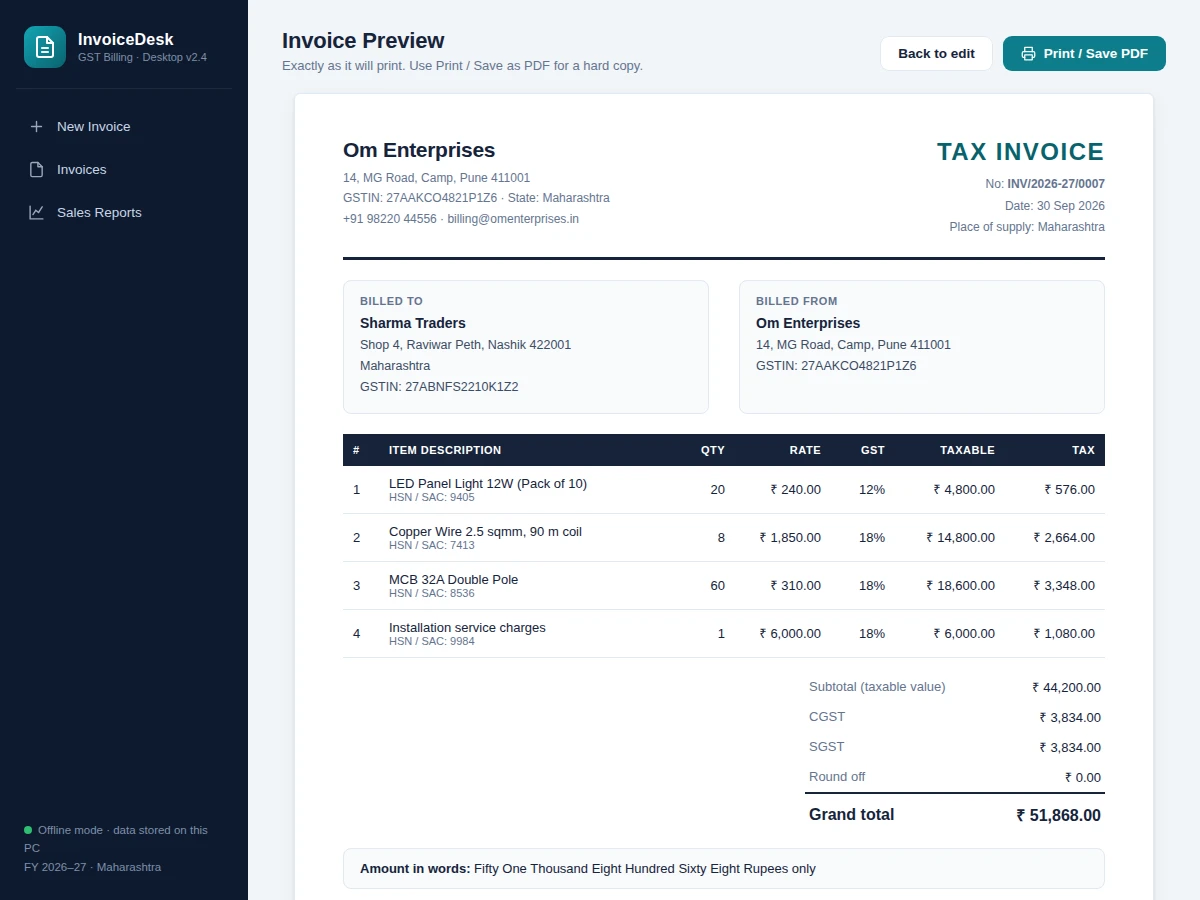
- Saving stores the invoice in the local database with an auto-sequenced number (INV/2026-27/0001 and on); the preview renders the formal tax invoice for printing or PDF export.
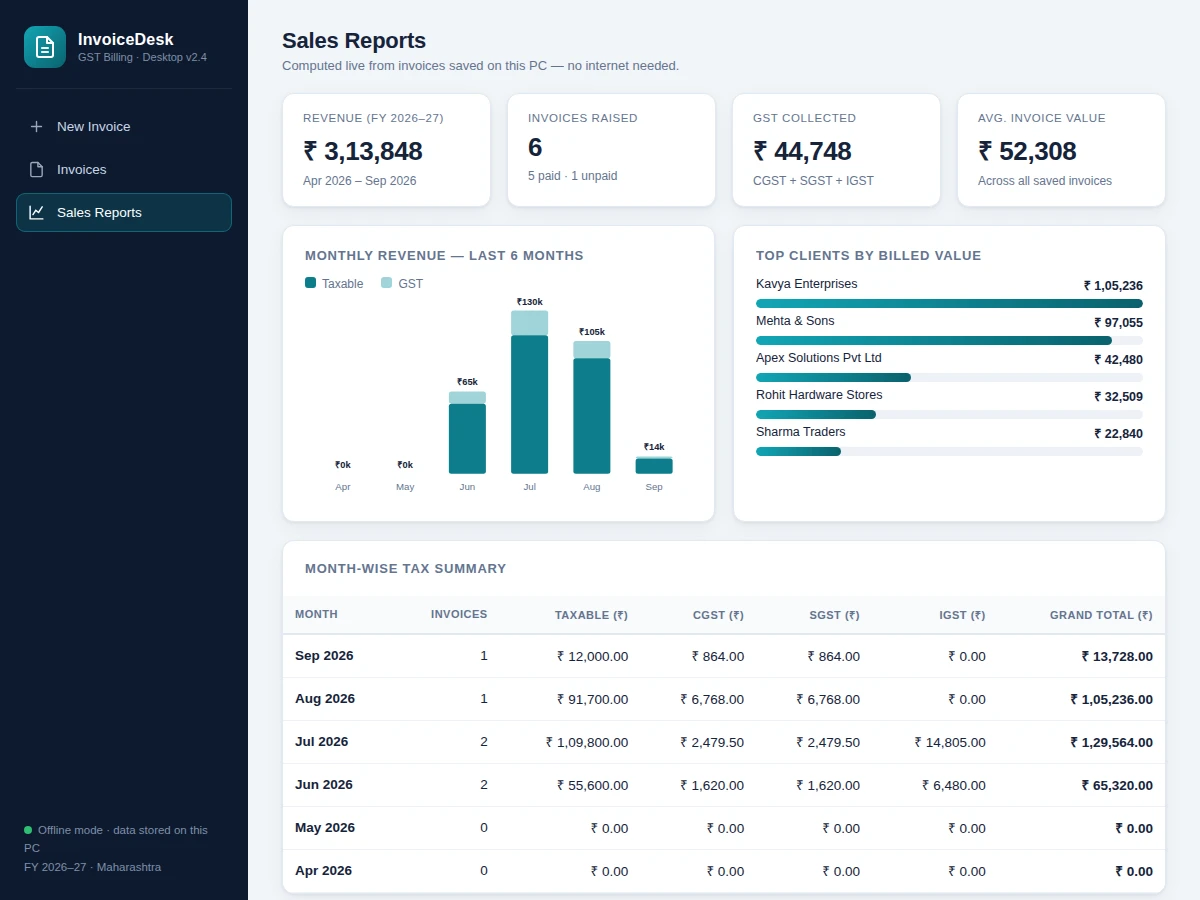
- The reports dashboard aggregates all saved invoices into revenue statistics, a monthly stacked bar chart, top-client rankings and a month-wise CGST/SGST/IGST summary.
Tech stack:
- Electron (desktop application shell)
- JavaScript, HTML5, CSS3 (renderer UI)
- Node.js (main process)
- SQLite via better-sqlite3 (local database)
- Custom SVG charting (reports dashboard)
- Print-to-PDF export (invoice output)
- Electron Builder (Windows installer packaging)
- Git (version control)
| Parameter | Value |
|---|---|
| Application type | Offline desktop app, Windows installer (design target) |
| Invoice numbering | Auto-sequenced, e.g. INV/2026-27/0001 (configurable prefix) |
| GST slabs supported | 0%, 5%, 12%, 18%, 28% per line item |
| Tax logic | CGST + SGST for intra-state, IGST for inter-state (design behavior) |
| Amount in words | Indian numbering (thousand / lakh / crore), auto-derived |
| Builder to print preview | Under ~2 seconds on a typical PC (design target) |
| Local capacity | Design target: 10,000+ invoices in local SQLite without slowdown |
| Data storage | Local SQLite database file; no cloud sync (by design) |
| Report range | Rolling 6-month revenue chart plus full financial-year tax summary |
| Deliverable package | Full source, Windows installer, report, PPT, viva Q&A |
Project features
- [Automatic GST calculation engine] Every line item computes taxable value and tax from quantity, rate and the selected 0/5/12/18/28% slab; invoice subtotal, tax breakup, round-off to the nearest rupee and amount-in-words are derived automatically, never typed.
- [Intra-state vs inter-state tax logic] The app compares the seller's state with the buyer's state: the same state splits tax equally into CGST + SGST, different states apply IGST on the full amount — matching how GST actually works.
- [Client master with GSTIN records] Buyer name, address, state and GSTIN are stored per client, so repeat billing becomes a selection instead of retyping, with GSTIN format validated on entry.
- [Invoice history with payment tracking] Every saved invoice is listed with taxable value, tax breakup and grand total; invoices can be marked paid or unpaid and searched by client name or invoice number.
- [Sales reports dashboard] Saved invoices feed live stat cards (revenue, invoice count, GST collected, average invoice value), a six-month stacked revenue chart, top-client rankings and a month-wise tax summary.
- [Print-ready tax invoice] One click renders a formal tax invoice — business header, billed-to/billed-from blocks, HSN-wise item table, tax breakup, terms and signature block — ready for printing or saving as PDF.
- [Offline-first local storage] All invoices, clients and settings live in a local database on the PC; the app works fully without internet and no sales data ever leaves the machine.
What is included
- Complete Electron application source (main + renderer processes, documented)
- Packaged Windows installer built with Electron Builder
- Seeded demo dataset (sample business, clients and invoices) for evaluation
- Project report PDF (architecture, GST logic design, database schema, testing notes)
- PPT presentation for the final review
- Viva Q&A preparation document (Electron architecture, GST rules implemented, offline storage design)
- User manual: installation, daily billing workflow, and backing up the local database
Limitations & prerequisites
- GST slabs and rules are user-configured data, not a live feed — the app cannot track GST law changes by itself; rates must be updated manually when the law changes (offline by design).
- No e-invoicing/IRN integration: it produces standard tax invoices for small businesses, not IRN-registered e-invoices under the GST e-invoice mandate.
- GSTIN is validated by format (15-character pattern) only; the app cannot verify a GSTIN against the GST portal without an internet connection.
- Single-user, single-PC: no multi-user login, no cloud sync, no multi-branch consolidation.
- The packaged installer targets Windows (design target); macOS/Linux builds are possible from the same codebase but are not part of the default deliverable.
- Amount-in-words covers whole rupees only; paise are rounded per the round-off rule before conversion.
Frequently Asked Questions
Does it really work without internet?
Yes — that is the core design. The Electron app runs entirely on the PC: the UI, the GST math, the SQLite database and the reports all work offline. Internet is never required for billing, and no sales data leaves the machine.
How does the CGST/SGST vs IGST logic work?
The app compares the seller's home state with the buyer's state on each invoice. Same state: the tax on every line item is split equally into CGST and SGST. Different states: the full tax is charged as IGST. The correct breakup prints on the invoice automatically.
Can I use my own business details?
Yes. The seller profile — business name, address, GSTIN, phone, email and home state — is editable and prints in the invoice header on every invoice. Changes apply to all future invoices while saved history keeps the details it was raised with. A logo upload is an optional extension; the default header is text-based and prints cleanly.
Is my invoice data safe?
Data lives in a local SQLite database file on your own PC, not on any server — there is no account to hack and no cloud copy to leak. The user manual documents exactly where the database file sits and how to back it up to a pen drive, and the built-to-order package can add scheduled local backups on request.
Is this project suitable for a final-year project?
Yes — for Computer Science and IT programs. It demonstrates desktop application architecture (Electron main/renderer processes), local database design, real tax-domain logic, data visualization, and print/PDF generation in one coherent product. The report documents every design decision, so the student can defend the build confidently in the viva. Suitable for B.E./B.Tech final-year projects in Computer Science and IT.
Components & software requirements
- Electron (desktop application shell)
- JavaScript, HTML5, CSS3 (renderer UI)
- Node.js (main process)
- SQLite via better-sqlite3 (local database)
- Custom SVG charting (reports dashboard)
- Print-to-PDF export (invoice output)
- Electron Builder (Windows installer packaging)
- Git (version control)
Delivery information
Built-to-order project. Delivery timeline is shared after order confirmation based on current queue.
Support terms
Complete documentation, setup guide, and viva preparation included. Support for setup and explanation provided.
Download free synopsis (PDF)
Enter your name and email — the synopsis PDF downloads immediately. We may send occasional project updates; no spam, unsubscribe anytime.