
More project photos (3)
The problem
Photographers, students and small businesses sit on folders of multi-megabyte photos that are too heavy to email, upload or submit with project documentation. Online compressors solve this one image at a time and demand uploading private photos to a stranger's server; command-line tools like ImageMagick work but intimidate non-technical users and give no feedback on what was actually saved. This project builds the missing middle: a desktop app where you drop in a whole folder of images, pick an output format, drag a quality slider, choose a resize preset — and get a clear per-file report of what each image weighed before and after. Everything runs locally on the machine, so private photos never leave the disk, and the batch engine keeps the interface responsive while dozens of files encode in the background. It is a practical utility with real engineering inside: native file handling, an image-processing pipeline, and honest before/after measurement.
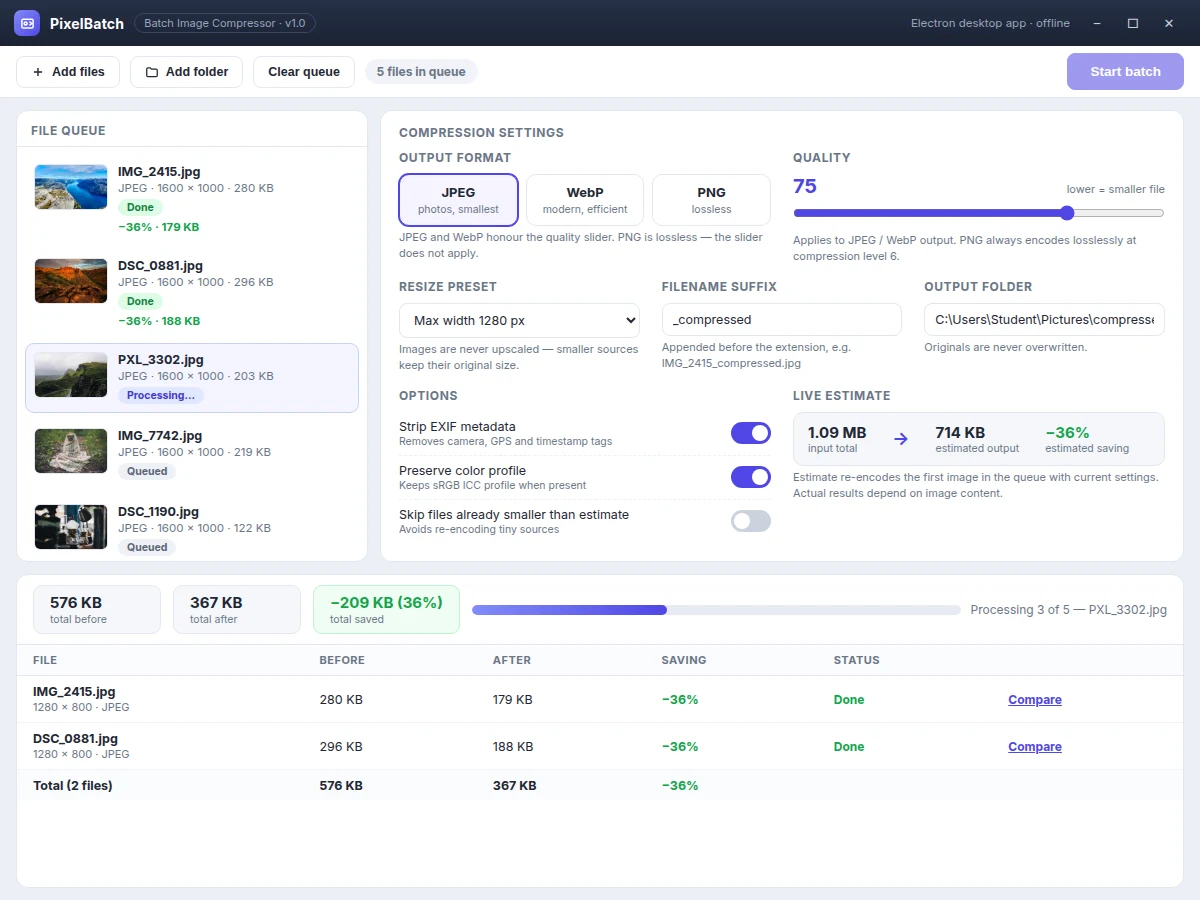
Drops in an image folder, sets quality and format, then starts the batch.
Follow the working sequence
How it works
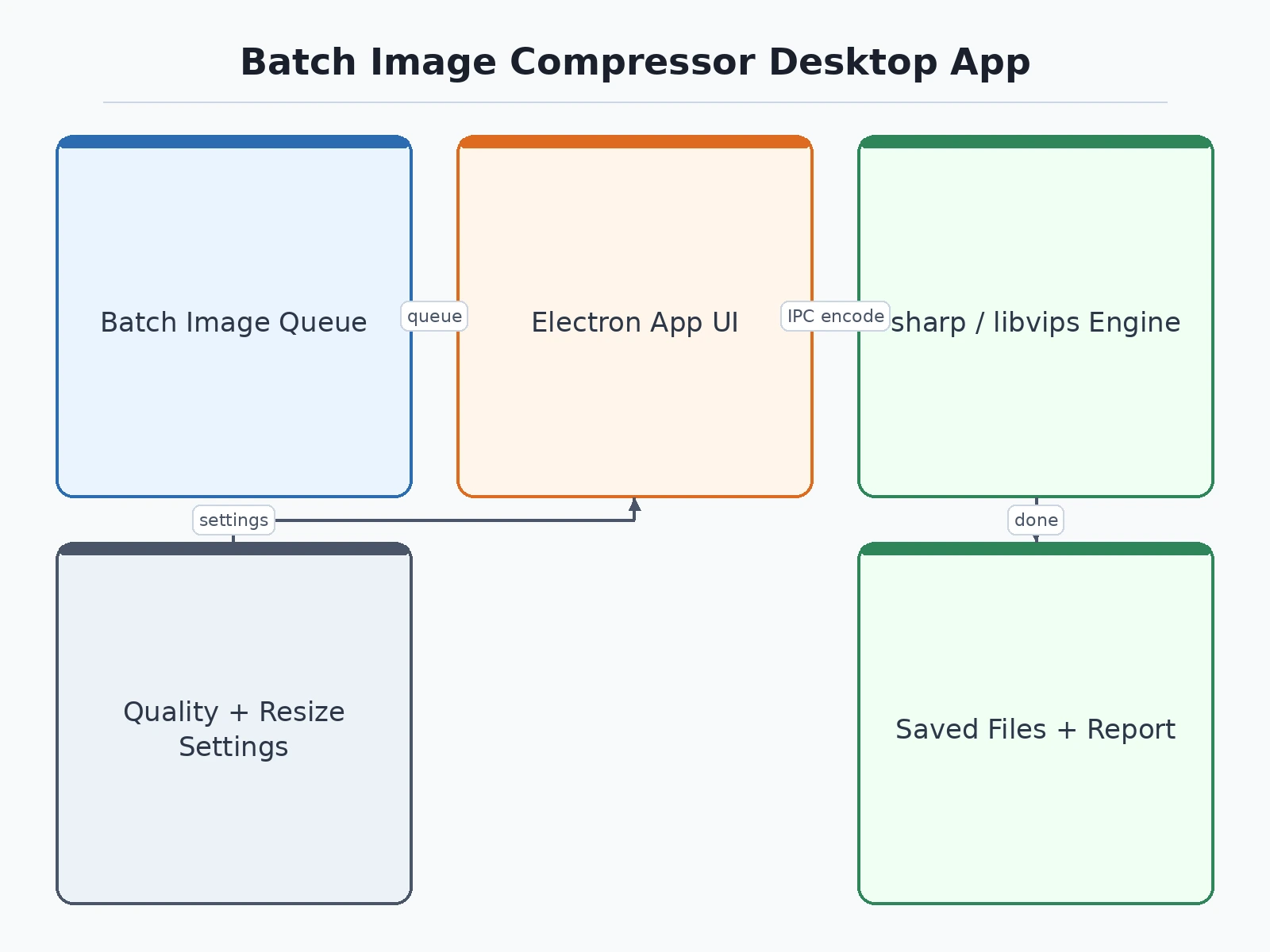
- The user adds files or selects a folder; Electron's main process walks the selection, filters supported image formats, and registers each file in the queue with its thumbnail, dimensions and size.
- The renderer applies the chosen settings — output format, quality, resize preset, suffix, metadata toggles — and computes a live size estimate by re-encoding the first image in the queue.
- On Start, the main process hands the queue to a worker pool so encoding never blocks the interface; each image is decoded, resized (never upscaled) and re-encoded through the sharp pipeline.
- Metadata handling runs per the toggles: EXIF is stripped when selected, and the sRGB color profile is preserved by default.
- Compressed files are written to the output folder with the configured suffix; the originals stay untouched in place.
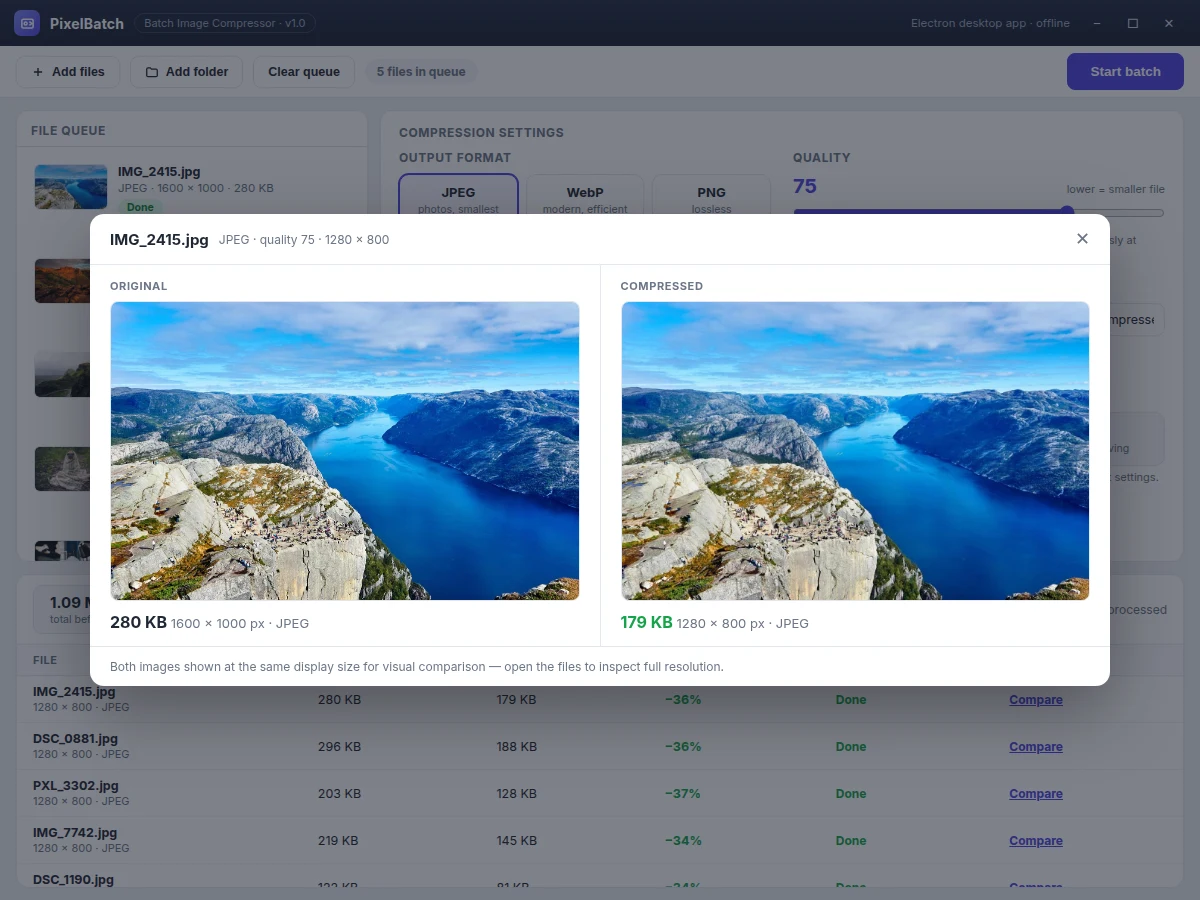
- The results table renders per-file before/after sizes with saving percentages and batch totals, and the compare view lets the user visually verify any file.
Tech stack:
- Electron (desktop shell)
- Node.js
- sharp (libvips-based image processing)
- HTML · CSS · JavaScript (renderer UI)
- Electron main/renderer IPC
- electron-builder (Windows/macOS installers)
- Git
| Parameter | Value |
|---|---|
| Input formats | JPEG, PNG, WebP, TIFF, BMP, AVIF (read support) |
| Output formats | JPEG, PNG, WebP (user-selected) |
| Quality control | 1–100 slider for JPEG/WebP; PNG encodes losslessly at compression level 6 |
| Resize presets | Original, 1920 px, 1280 px, 800 px, 640 px max-width; 50% / 25% scale (configurable) |
| Upscaling policy | Never upscales — smaller images keep original size (design rule) |
| Typical size reduction | Approximately 40–70% for JPEG photos at quality 70–80 (expected; depends on source images) |
| Batch capacity | Up to 500 files per run (design target) |
| Processing speed | Approximately 20–60 images per minute on a mid-range laptop (expected; resolution-dependent) |
| Output naming | Original name + suffix, e.g. photo_compressed.jpg (configurable) |
| Platforms | Windows 10/11 64-bit installer; macOS 12+ build (via electron-builder) |
Project features
- [Batch file queue with thumbnails] Add individual files or a whole folder; each queued image shows a thumbnail, its format, dimensions and size, and its status chip moves from Queued to Done as the batch runs.
- [Quality slider with live estimate] A 1–100 quality slider for JPEG and WebP output. The app re-encodes the first image on every change and shows an estimated output total, so the quality-vs-size trade-off is visible before the batch starts.
- [JPEG / PNG / WebP format conversion] Any supported input converts to the chosen output format. PNG always encodes losslessly at compression level 6, and the app warns when converting images with transparency to JPEG.
- [Resize presets with a no-upscale rule] Max-width presets of 1920, 1280, 800 and 640 px plus 50% and 25% scaling. Images smaller than the preset keep their original size — nothing is ever upscaled.
- [Per-file savings report] After each batch, a results table shows the before/after size and saving percentage for every file, with batch totals. A one-click compare view shows the original and compressed image side by side.
- [Batch progress tracking] A live progress bar and per-file status keep long queues transparent while the batch runs, since encoding happens off the UI thread.
- [Safe output handling] Originals are never overwritten: compressed files take a configurable suffix (e.g. _compressed) in a chosen output folder, and an EXIF-strip toggle removes camera and GPS metadata.
Optional add-ons (quoted separately, not in the base build): watermark stamping, HEIC/AVIF input support, PDF report export, duplicate-image detection, and right-click Explorer context-menu integration.
What is included
- Complete Electron app source code (main process, renderer UI, worker batch module)
- sharp-based compression, conversion and resize pipeline
- Batch queue UI with live estimates, progress bar and savings report
- Windows installer build script (electron-builder configuration)
- Sample image set for testing and demonstration
- Setup and build guide (Node.js setup, packaging, signing notes)
- Project report PDF (problem, design, sharp pipeline, methodology)
- PPT presentation for final review
- Viva Q&A preparation document (Electron architecture, image codecs, compression trade-offs)
Limitations & prerequisites
- Compression results depend on the source image: already-compressed or noisy photos shrink less, so typical savings are stated as expected, not guaranteed.
- PNG output is lossless and can end up larger than a JPEG original when converting photographic content; the live estimate shows this before the batch runs.
- The quality slider applies to JPEG and WebP only — PNG ignores it by design.
- Converting images with transparency to JPEG flattens the alpha channel against a background; this is a format limitation, not an app bug.
- HEIC/AVIF output is not in the base build (listed under optional add-ons).
- Very large images (for example 50+ MP panoramas) raise memory use and slow the batch; the app still processes them, just more slowly.
Frequently Asked Questions
Which technology stack does the app use?
Electron plus Node.js plus sharp, which is built on libvips. Electron provides the desktop shell, native file dialogs and installers; sharp performs all decoding, resizing and encoding in the main process; the interface is plain HTML, CSS and JavaScript in the renderer, talking to the main process over IPC. The finished app is packaged with electron-builder into a Windows installer.
Does the app need the internet?
No. Reading files, resizing, encoding and the savings report all run on the machine, so every function works fully offline. The installer is downloaded once; after that, no image is ever uploaded anywhere. That is also the privacy argument for a desktop tool over a web compressor.
What file-size reduction can I realistically expect?
It depends on the source image. A typical phone photo at quality 75 with a 1280 px resize shrinks roughly 40–70 percent (expected, not guaranteed). Already-compressed images shrink less, and screenshots behave differently from photographs. The live estimate previews the result on your own images before the full batch runs.
Can this project be customized?
Yes. Realistic add-ons include watermark stamping, HEIC/AVIF support, PDF report export, duplicate-image detection and a right-click Explorer integration. Each changes the build scope, so it is quoted and scheduled separately; the base build stays focused on compression, format conversion and resizing, which keeps the standard delivery timeline intact.
Is this project suitable for a final-year project?
Yes — for Computer Science, IT and Software Engineering programs. It demonstrates desktop application architecture (Electron main process, renderer and IPC), image-processing pipelines, codec trade-offs between quality and size, and performance thinking through worker-based batch processing — all defensible in a viva.
Components & software requirements
- Electron (desktop shell)
- Node.js
- sharp (libvips-based image processing)
- HTML · CSS · JavaScript (renderer UI)
- Electron main/renderer IPC
- electron-builder (Windows/macOS installers)
- Git
Delivery information
Built-to-order project. Delivery timeline is shared after order confirmation based on current queue.
Support terms
Complete documentation, setup guide, and viva preparation included. Support for setup and explanation provided.
Download free synopsis (PDF)
Enter your name and email — the synopsis PDF downloads immediately. We may send occasional project updates; no spam, unsubscribe anytime.