
More project photos (2)
The problem
Anyone who has returned from a trip with 400 photos named IMG_20240915_134522.jpg, or inherited a project folder full of "final", "final2" and "COPY" files, knows that renaming files one by one is slow and error-prone — and a single bad bulk rename can destroy a folder's organization beyond easy repair. Existing free renamers either hide their logic behind confusing dialogs or apply changes blindly with no way back. This project builds a desktop batch file renamer that fixes both problems: a rule stack (regex find-and-replace, plain find-and-replace, sequential numbering, case conversion, prefix/suffix insertion, character stripping) whose combined effect is shown as a live old-to-new preview for every file before anything is applied. Duplicate target names are flagged as conflicts that block the apply step, and every applied batch is recorded in an undo history so mistakes are reversible in one click. The result is a genuinely useful utility with a clean desktop interface, and a codebase that demonstrates string processing, regular expressions, filesystem safety and UI design — all strong viva material.
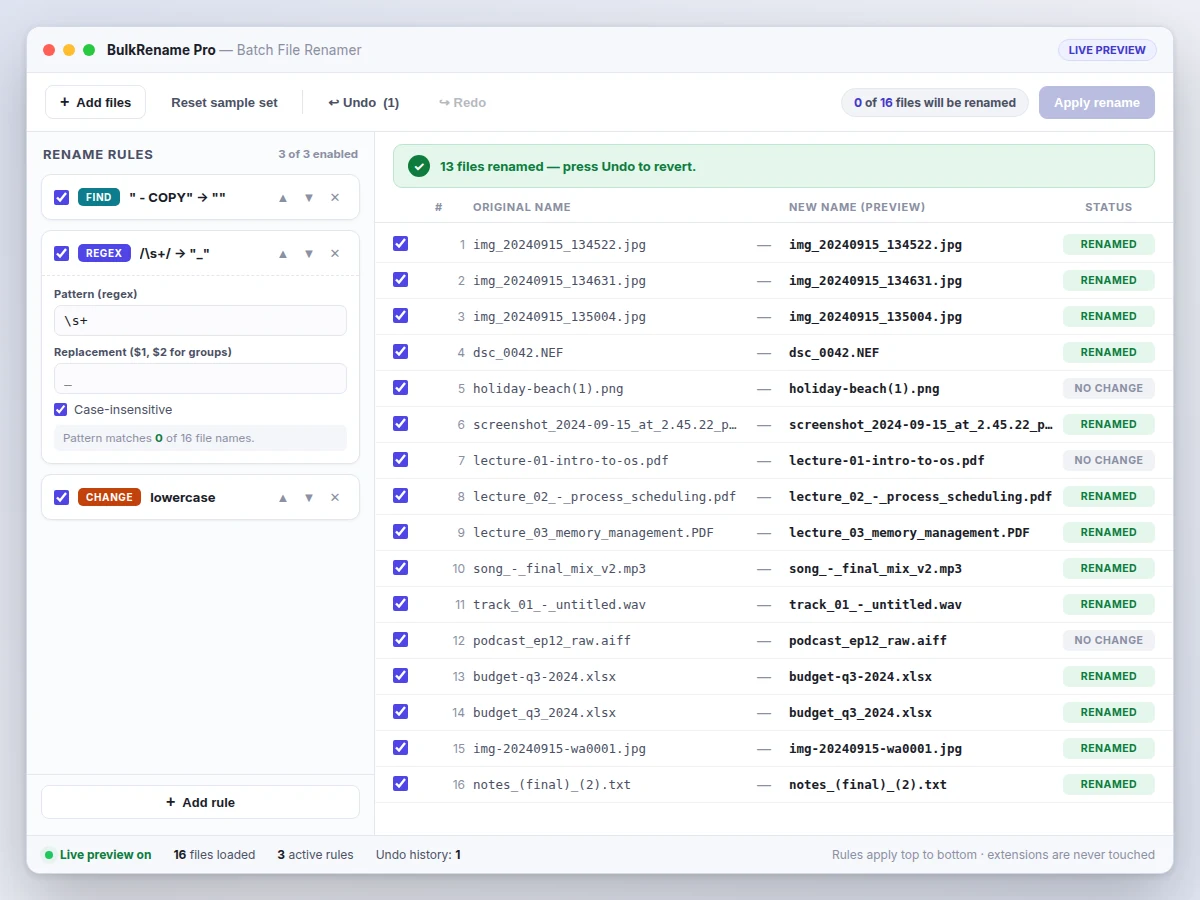
Loads files via the picker or drag-and-drop, configures rename rules and presses Apply.
Follow the working sequence
How it works
- The user loads files via the Add files picker or drag-and-drop; the app records each file's current name, size and modification date in an internal table.
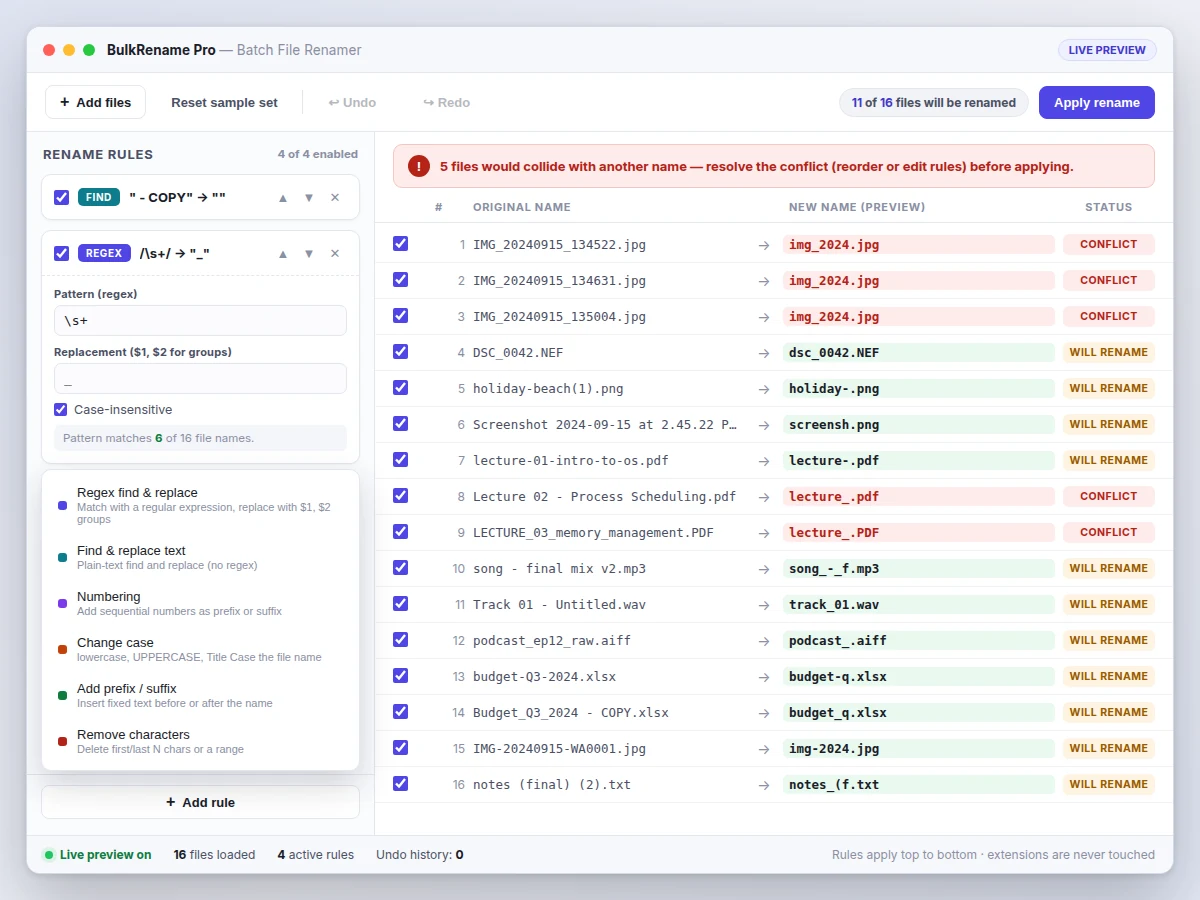
- Rename rules are added from the rule palette and configured in the left panel; each rule carries its type, parameters and an enable toggle.
- On every keystroke or toggle, the preview engine runs the enabled rules top-to-bottom over each file's base name (extension preserved), producing the proposed new names in under 100 ms for 1,000 files (expected).
- The engine then scans proposed names case-insensitively for duplicates; any collision marks the rows as conflicts and disables Apply until resolved.
- When the user presses Apply, the current names are pushed onto the undo stack and the filesystem renames are executed file by file with per-file error capture.
- The table updates to show RENAMED status per file; Undo restores the previous names from the snapshot, and Redo re-applies them.
Tech stack:
- Electron (Chromium + Node.js desktop runtime)
- JavaScript (preview engine, rule system, undo stack)
- HTML5 · CSS3 (application UI)
- ECMAScript RegExp engine (regex rules)
- electron-builder (packaging)
- Jest (unit tests for the rename engine)
- Git (version control)
| Parameter | Value |
|---|---|
| Supported platform | Windows 10/11 64-bit via installer (design target) |
| Files per batch | Up to 10,000 files per batch (design target) |
| Rule types | 6 (regex, find-replace, numbering, case, prefix/suffix, strip) |
| Preview latency | Under 100 ms for 1,000 files on a mid-range laptop (expected) |
| Undo history depth | 50 apply-steps (configurable) |
| Installer size | Approximately 65–85 MB (expected) |
| Regex dialect | ECMAScript (JavaScript RegExp), validated live |
| Max filename length | 255 characters (operating-system limit) |
| Conflict handling | Case-insensitive duplicate detection; apply blocked until resolved |
| Engine test coverage | Rename-engine unit tests included (Jest) |
Project features
- [Live old-to-new preview] Every rule edit instantly recomputes the full file table, showing each original name beside its proposed new name with changed names highlighted — nothing is renamed until Apply is pressed.
- [Regex find-and-replace] Full ECMAScript regular expressions with capture-group replacements ($1, $2), case-insensitive option, live syntax validation and a per-rule match count across the loaded files.
- [Six composable rule types] Regex, plain find-and-replace, sequential numbering (prefix/suffix, custom start, step and zero-padding), case conversion, prefix/suffix text and character stripping — stacked and reordered freely.
- [Duplicate-name conflict detection] Target names are checked case-insensitively before apply; colliding rows are flagged red and the Apply button stays disabled until the conflict is resolved by editing or reordering rules.
- [Full undo/redo history] Every applied batch is snapshotted, so any rename — even across thousands of files — can be reverted or re-applied; history depth is configurable up to 50 steps.
- [Extension safety] Rules operate on the base name only; extensions are never modified, and files can be individually included or excluded with checkboxes.
- [Windows installer] Packaged with a proper installer (start-menu entry, uninstaller) so the app can be demonstrated on any examiner's machine without a development setup.
What is included
- Complete desktop application source code (Electron + JavaScript)
- Windows installer with start-menu entry and uninstaller
- User manual (rule reference, regex cheat-sheet, worked examples)
- Unit-test suite for the rename engine with documented cases
- Project report PDF (problem analysis, regex design, engine architecture, testing)
- PPT presentation for final review
- Viva Q&A preparation document (regular expressions, filesystem operations, undo-stack design, Electron architecture)
Limitations & prerequisites
- Renaming is limited to file names; the app does not move files between folders or edit file contents.
- Regex follows the ECMAScript dialect — patterns written for other flavors (e.g. PCRE lookbehind nuances) may behave differently, noted in the manual.
- Network drives and very long paths (near the 255-character OS limit) can slow or block renames; per-file errors are reported, not silently skipped.
- The 10,000-file batch figure is a design target; the report documents the actually measured batch size on the build machine.
- macOS/Linux builds are possible from the same codebase but the shipped installer targets Windows only.
Frequently Asked Questions
How is this different from free bulk renamers?
Most free tools apply renames blindly or bury the logic in dialogs. This app shows a live old-to-new preview for every file, blocks the apply step on duplicate-name conflicts, and keeps a full undo history — the three safety features examiners ask about first.
What regex features are supported?
The full ECMAScript set: character classes, quantifiers, groups and back-references ($1, $2), alternation, anchors and lookaheads. Patterns are validated as you type and each rule shows how many file names it matches.
Can a rename be undone after closing the app?
Undo history covers the current session. For safety, the manual recommends a backup before very large batches — the app also offers a dry-run preview mode that writes a rename plan to CSV without touching files.
Does it touch file extensions?
Never. All rules operate on the base name; the extension column is display-only and preserved byte-for-byte through every rename.
What happens if two files would get the same new name?
Both rows are flagged as conflicts in red, a warning banner explains the collision, and Apply is disabled until you edit or reorder the rules to resolve it.
Is this project suitable for a final-year project?
Yes — for Computer Science, IT and Computer Applications programs. It demonstrates regular expressions, string-processing engine design, filesystem safety, undo-stack architecture and desktop UI development.
Components & software requirements
- Electron (Chromium + Node.js desktop runtime)
- JavaScript (preview engine, rule system, undo stack)
- HTML5 · CSS3 (application UI)
- ECMAScript RegExp engine (regex rules)
- electron-builder (packaging)
- Jest (unit tests for the rename engine)
- Git (version control)
Delivery information
Built-to-order project. Delivery timeline is shared after order confirmation based on current queue.
Support terms
Complete documentation, setup guide, and viva preparation included. Support for setup and explanation provided.
Download free synopsis (PDF)
Enter your name and email — the synopsis PDF downloads immediately. We may send occasional project updates; no spam, unsubscribe anytime.