
More project photos (2)
The problem
Every semester, department coordinators lose days — sometimes weeks — to hand-built timetables: matching faculty availability against room capacity, keeping lab sessions in contiguous blocks, and redoing the entire grid whenever one input changes. Manual grids routinely hide clashes that surface only after classes begin: a faculty member in two rooms at once, or a lab split across non-adjacent periods. Underneath, timetable construction is a classic constraint-satisfaction problem — sessions must be assigned to (day, period, room) triples so that a set of hard constraints holds and soft preferences are optimised. This project implements that formulation as a real working system: a web app where the department enters faculty, subjects, rooms and the weekly slot structure, and a solver produces a verified timetable with a conflict report and CSV/PDF export. Because the constraint model and the solving algorithm are separate, the student can explain exactly what "valid" means and exactly how the timetable was found — the kind of depth that carries a viva.
Enters faculty, subjects, rooms and the weekly slot structure.
Follow the working sequence
How it works
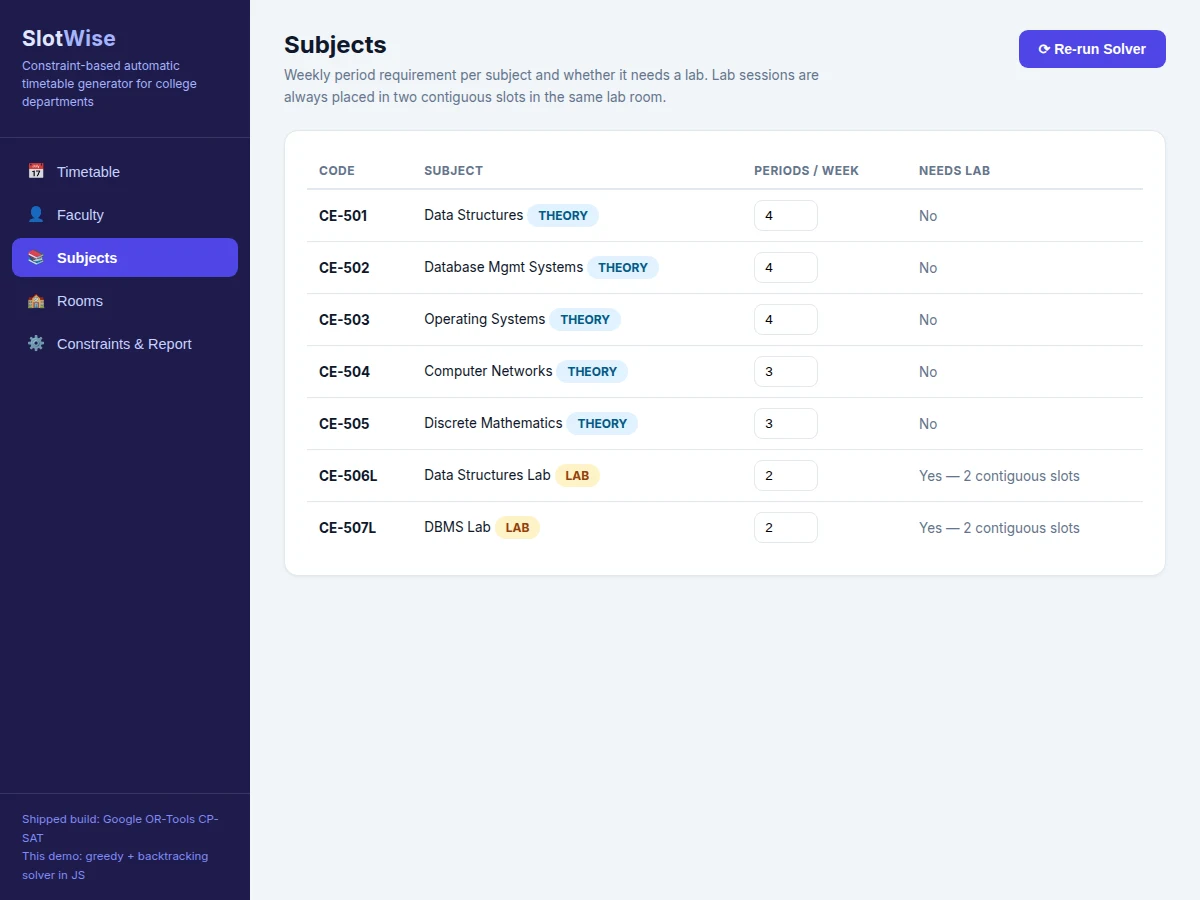
- The department enters faculty (teachable subjects, max periods per day, blocked slots), subjects (weekly period requirement, lab flag), rooms (classroom or lab, capacity) and the weekly slot structure.
- Subjects are expanded into sessions: lab subjects become double-period contiguous blocks, theory subjects become single periods; sessions are ordered by constrainedness (labs first, then fewest faculty options).
- The shipped build encodes the model in Google OR-Tools CP-SAT; the web demo runs the same constraint set with greedy seeding followed by chronological backtracking search.
- Placement tries day, period and room assignments, rejecting any that violate an enabled hard constraint, until every session is placed or the search is exhausted.
- Soft constraints are scored on the result — slot preferences, load balance against the weekly target, and empty gaps between classes.
- An independent post-solve scan re-validates the final grid against every hard constraint; unplaceable sessions are listed in the conflict report with likely causes.
- The verified timetable renders as a weekly grid with CSV export and print/PDF output for departmental circulation.
Tech stack:
- Python 3, Google OR-Tools (CP-SAT) — shipped solver backend
- Flask backend, SQLite (PostgreSQL on request)
- HTML, CSS, JavaScript — frontend and the greedy + backtracking demo solver
- CSV export, print/PDF via browser
| Parameter | Value |
|---|---|
| Weekly slot structure | 5 days × 7 teaching periods = 35 slots (demo instance) |
| Demo instance size | 5 faculty, 7 subjects, 4 rooms (Computer Engineering, Semester 5) |
| Sessions solved | 22 periods per week (demo instance, measured) |
| Demo solver | Greedy seeding + backtracking, hardest sessions first (measured) |
| Demo solve time | A few milliseconds on a standard laptop (measured on demo hardware) |
| Shipped solver | Google OR-Tools CP-SAT (real library, in the delivered backend) |
| OR-Tools solve target | Within seconds for instances up to several hundred sessions (design target) |
| Lab block size | 2 contiguous periods in the same lab room (fixed) |
| Lunch break | 1 slot per day, excluded from allocation |
| Faculty daily cap | 3–4 periods per day (configurable per faculty member) |
| Export formats | CSV download and print/PDF |
Project features
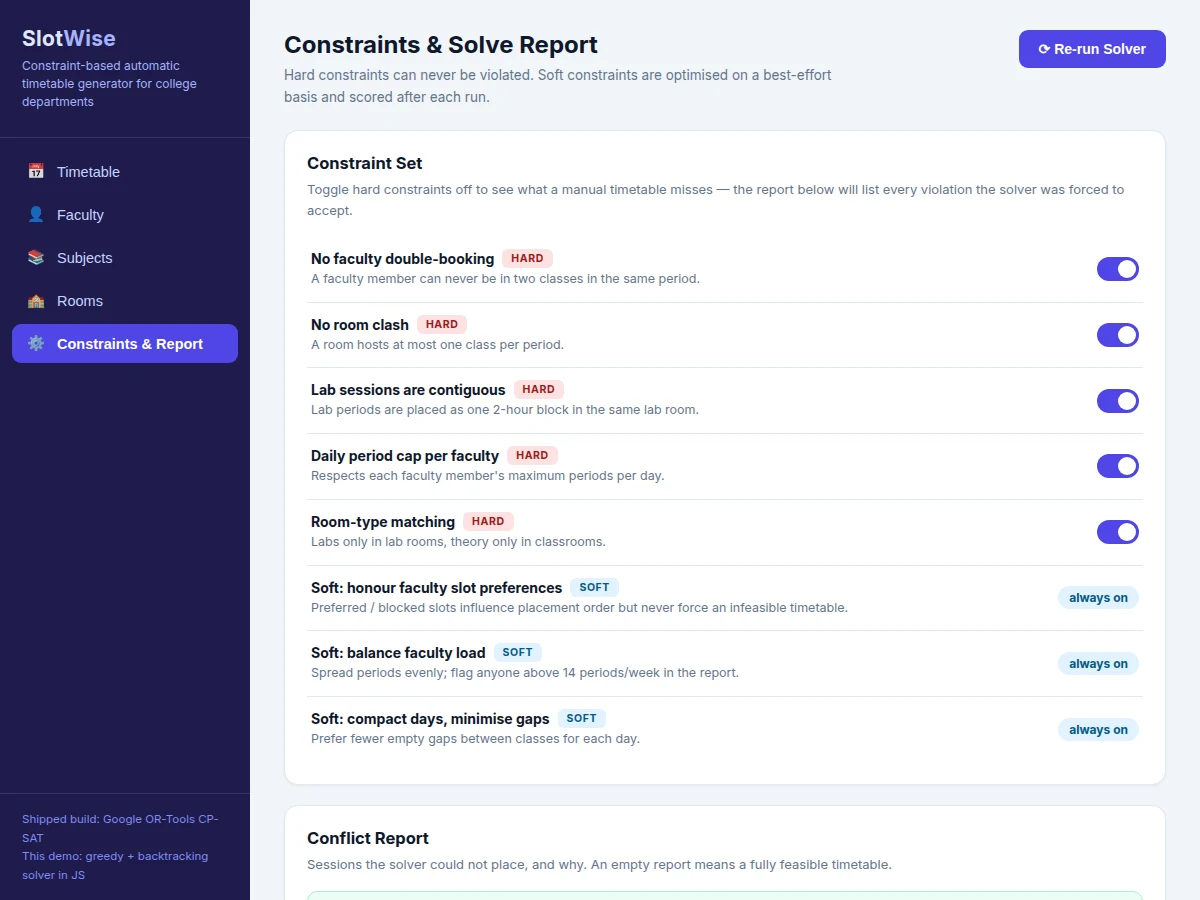
- [Hard-constraint solver] Every generated timetable respects all enabled hard constraints by construction: no faculty double-booking, no room clash, lab sessions in contiguous blocks, daily period caps per faculty, and lab/classroom room-type matching.
- [Soft-constraint optimisation] Faculty slot preferences, balanced teaching loads and compact days (minimal gaps) are scored after each run — the report shows a soft-constraint score out of 100 with reasons for every deduction.
- [Conflict report] When the inputs are infeasible, the system lists exactly which sessions could not be placed and the likely cause (overloaded faculty, insufficient lab windows, demand exceeding capacity) instead of silently producing a broken timetable.
- [Weekly grid + faculty load views] Colour-coded timetable grid, per-faculty weekly load bars with an overload flag above the department target, and a solver log that traces the search for transparency.
- [Editable department model] Add faculty with teachable subjects, daily caps and blocked slots; subjects with weekly periods and lab flags; rooms with type and capacity — then re-solve in one click.
- [CSV and print/PDF export] One-click CSV download of the solved timetable and a print stylesheet for notice-board circulation.
- [Multi-department solving (optional)] Extends the model to shared faculty and room pools across departments, solved jointly instead of per-division.
- [Elective clash handling (future scope)] Student-choice electives with student-level clash avoidance — documented as a roadmap item, not shipped in the base build.
What is included
- Complete solver backend source code (Python + Google OR-Tools CP-SAT)
- Web application: department data management, one-click solve, weekly grid, faculty load dashboard, constraint toggles, conflict report and solver log
- Working JavaScript demo with realistic sample data (Computer Engineering semester: 6 subjects + 2 labs, 5 faculty, 4 rooms)
- CSV export and print/PDF output
- Admin workflow documentation (how a coordinator enters data and runs the scheduler)
- Project report PDF (constraint modelling, solver design, methodology, results)
- PPT presentation for final review
- Viva Q&A preparation document (CSP formulation, CP-SAT, backtracking, hard vs soft constraints)
Limitations & prerequisites
- The web demo's solver is greedy + backtracking in JavaScript, stated honestly — the shipped backend uses Google OR-Tools CP-SAT, which handles larger instances.
- The base build schedules one division at a time; departments sharing faculty or rooms need the optional multi-department extension.
- Student electives are not modelled — there is no student-level clash detection in the base build (listed as future scope).
- Infeasible inputs (e.g. faculty loaded beyond every feasible window) produce a conflict report, not a timetable — the department must adjust its inputs.
- Soft constraints are best-effort: a fully valid timetable can still contain empty gaps in a day, which the report flags but does not force away.
- Solve-time figures for the OR-Tools build are design targets, stated honestly — the report documents the measured figure on the delivered build.
Frequently Asked Questions
How does the solver actually work?
Subjects are expanded into sessions (labs become contiguous double-period blocks), ordered by constrainedness, then assigned to day/period/room triples by search. The shipped build encodes this as a constraint model solved by Google OR-Tools CP-SAT; the web demo runs the same constraint set with greedy seeding plus backtracking so you can trace every decision in the solver log.
What is the difference between hard and soft constraints?
Hard constraints can never be violated — faculty double-booking, room clashes, split labs, daily caps, room-type mismatches. Soft constraints (slot preferences, balanced loads, compact days) are optimised best-effort and scored out of 100 after each run. You can toggle hard constraints off in the demo to see exactly what a manual timetable misses.
Is OR-Tools really used, or is it just a JavaScript demo?
Both, honestly labelled. The web demo you can run in the browser uses a transparent greedy + backtracking solver in JavaScript. The built-to-order delivery includes a Python backend that solves the same model with Google OR-Tools CP-SAT — the real library — behind the same UI.
What happens if the inputs cannot be scheduled?
The solver reports instead of guessing. The conflict report lists each unplaced session with the likely cause — overloaded faculty, no contiguous lab window, or demand exceeding capacity — so the coordinator knows exactly which input to change.
Can it schedule our entire college?
The base build schedules one division per run. Multi-department solving with shared faculty and room pools is an offered optional extension, priced with the order.
Is this project suitable for a final-year project?
Yes — for Computer Science, IT and Software Engineering programs. It demonstrates constraint modelling, search algorithms (CP-SAT and backtracking), full-stack web development and independent verification of results. Suitable for B.E./B.Tech final-year projects in Computer Science, IT and Software Engineering.
Components & software requirements
- Python 3, Google OR-Tools (CP-SAT) — shipped solver backend
- Flask backend, SQLite (PostgreSQL on request)
- HTML, CSS, JavaScript — frontend and the greedy + backtracking demo solver
- CSV export, print/PDF via browser
Delivery information
Built-to-order project. Delivery timeline is shared after order confirmation based on current queue.
Support terms
Complete documentation, setup guide, and viva preparation included. Support for setup and explanation provided.
Download free synopsis (PDF)
Enter your name and email — the synopsis PDF downloads immediately. We may send occasional project updates; no spam, unsubscribe anytime.