
More project photos (2)
The problem
The Travel Planner Android App is an Android application for planning a trip day by day and keeping its spending under control. A traveller creates a trip with its dates and total budget, then fills each day with timed stops such as a beach morning or a fort visit, each carrying a note and expected cost. As real expenses are added during the trip, the app compares what has been spent against the trip budget and against separate caps for stay, food, transport, activities and shopping, so overspending in one category shows up before the trip ends rather than after it. Everything is stored in an on-device database, so a plan opened on a beach with no signal still shows the full itinerary and the running totals. The project suits students who want a complete, demonstrable Android build: screens, local storage, list handling, input validation and simple arithmetic, all tied to a use case anyone can understand and test.
Most trips fall apart in two quiet ways: the plan lives in scattered notes and chat messages, and nobody knows the running cost until the money is already spent. This app answers both problems in one place. The itinerary view turns a vague trip idea into a timed day plan, and the budget view turns a single budget figure into per-category limits with live progress. Because the demo build carries a full sample trip, the behaviour can be shown end to end in a review: create or open a trip, switch days, add an expense, and watch the remaining budget and category bars move.
The traveller creates a trip with dates and a total budget.
Follow the working sequence
How it works
A traveller opens the app, creates a trip with its dates and total budget, and the app sets up one empty day plan for each day of the trip. The traveller then fills each day with timed stops, giving every stop a title, note and expected cost, and the app totals the expected cost per day so an overloaded day is visible while planning. When the trip starts, real expenses are logged against a category as they happen, and the budget view subtracts each expense from both the trip total and its category cap, updating remaining amounts and progress bars. The traveller can open a day to see what is planned next, or the budget view to see which category is closest to its cap, and when the trip ends the summary compares the planned cost with the actual spend. All of this runs on data stored in the phone's local database, with no sign-in in the core flow.
- The traveller creates a trip by entering its name, start and end dates, number of travellers and total budget in rupees.
- The app generates one day plan per trip day, each starting empty and ready to receive timed stops.
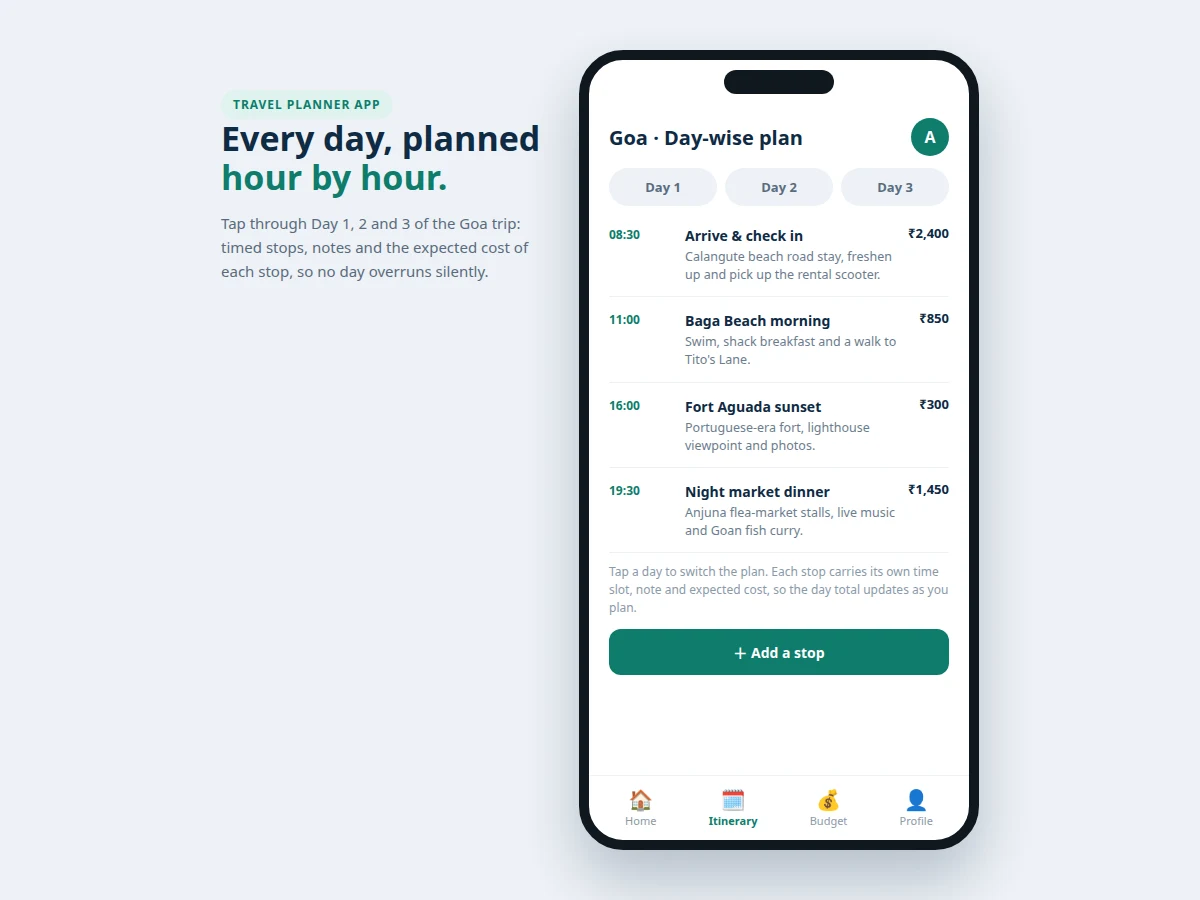
- The traveller adds stops to a day with a time slot, title, note and expected cost, and the app totals the expected cost for that day.
- Budget caps are set per category — stay, food, transport, activities and shopping — within the trip's total budget.
- During the trip, each real expense is logged with a description, amount and category, and the app deducts it from the trip total and its category cap at once.
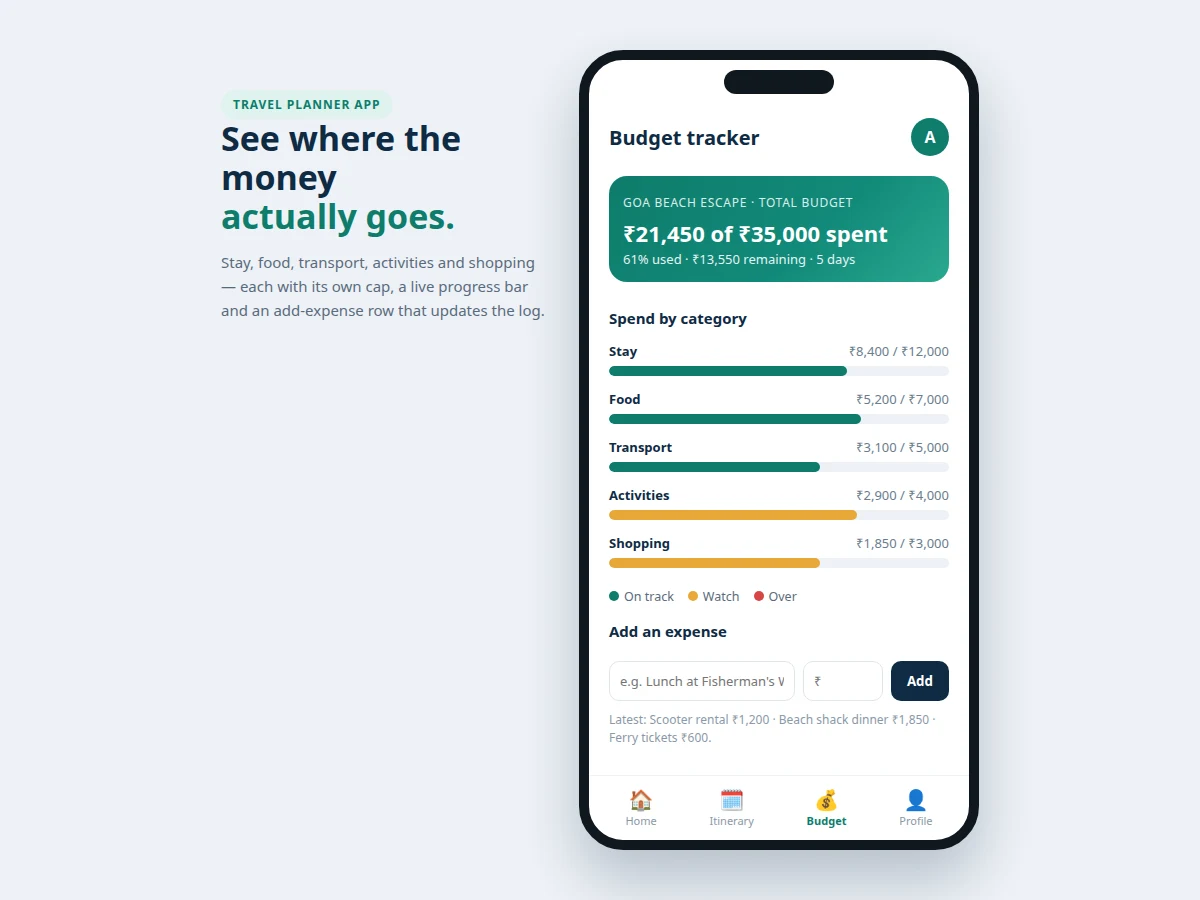
- The budget view shows spent, remaining and usage share per category, with progress bars that update on every new expense.
- When the trip ends, the summary view places planned cost beside actual spend per category for a simple end-of-trip review.
Tech stack:
- Kotlin (Android app language)
- Android Studio (development environment)
- Jetpack Room · on-device database
- Material components · Android UI
- RecyclerView · trip and stop lists
- MVVM structure · app architecture
- XML layouts · screen design
- Gradle · build tooling
| Parameter | Value |
|---|---|
| Platform | Android phones (target device class) |
| Minimum OS version | Android 8.0 (minimum supported version) |
| App language | Kotlin (implementation language) |
| Local storage | Jetpack Room on-device database (storage mechanism) |
| Demo trip length | 5 days (sample trip duration) |
| Demo trip budget | ₹35,000 (sample trip budget) |
| Demo spend shown | ₹21,450 spent · 61% of budget used (sample trip figures) |
| Expense categories | 5 categories (demo build count: stay · food · transport · activities · shopping) |
| Demo itinerary stops | 12 stops across 3 demo days (demo build count) |
| Demo screens | 3 screens (home · day-wise plan · budget tracker) |
| Network requirement | None for core use (offline-capable design) |
| Accounts | None required (no sign-in in core build) |
Project features
The app's strongest capabilities are its day-wise itinerary builder, its per-category budget tracking, and its on-device storage, with trip management tying them together. The itinerary builder gives every day its own timed list of stops, so a trip reads as a sequence of days rather than one long unstructured list, and each stop's expected cost feeds the day's planning total. The budget tracker splits one trip budget into caps for stay, food, transport, activities and shopping, and shows spent, remaining and usage share for each category as expenses are added. On-device storage keeps trips, days, stops and expenses in a local database, so the app works offline and never depends on a server account. Around that core, the app offers trip creation with dates and budgets, an expense log with a running history, and a trip summary that compares planned cost with actual spend once a trip is complete.
- [Day-wise itinerary builder — Implemented] Each trip day holds timed stops with a title, note and expected cost in rupees, and switching days swaps the whole stop list so multi-day trips stay readable.
- [Per-category budget tracking — Implemented] A trip budget splits into caps for stay, food, transport, activities and shopping, each shown with spent amount, remaining amount and a progress bar that changes as expenses are added.
- [Expense log — Implemented] Expenses are added with a description, amount and category, and appear in a running log so the traveller can trace where the money went.
- [Trip management — Implemented] Trips carry a name, dates, traveller count and total budget, with a status of planning, draft or done, and a home screen listing every trip in one place.
- [On-device storage — Implemented] Trips, days, stops and expenses live in a local database on the phone, so plans and totals open without an internet connection.
- [Trip summary — Implemented] A finished trip shows planned cost beside actual spend per category, giving a simple before-and-after view of the budget.
- [Daily spend alerts — Optional] A threshold warning when a category passes a chosen share of its cap; included as an optional add-on, not in the core build.
- [Shared trips and cloud sync — Future scope] Multi-user editing and cloud backup are documented as future work only and are not part of the delivered app.
What is included
- Complete Android app source code (Kotlin, MVVM structure, Room database)
- Working demo build with a sample 5-day Goa trip, day-wise stops and budget data
- Day-wise itinerary screens, budget tracker screens and expense log screens
- Project report PDF (problem, design, database schema, screens, testing notes)
- PPT presentation for final review
- Viva Q&A preparation document (Android lifecycle, Room, RecyclerView, MVVM, offline storage)
Limitations & prerequisites
- The core build stores everything on one device; there is no cloud sync and no sharing between travellers, which are documented future scope only.
- The app tracks planned and logged costs only; it does not book hotels, transport or tickets, and it does not fetch live prices.
- Budget figures in the demo are sample data for demonstration, not real trip prices, and the report says so explicitly.
- Expense entries are manual; the app does not read bank messages or receipts, so accuracy depends on the traveller logging expenses.
- The app is a student project build, not a published store app, and it makes no claim about store availability.
Frequently Asked Questions
How does day-wise planning work in this app?
Each trip is divided into one plan per day, and each day holds timed stops with a title, a note and an expected cost in rupees, so a multi-day trip reads as a sequence of days rather than one long list. A traveller opens a day, sees its stops in time order, and can add, edit or remove stops as the plan changes. The expected costs on a day add up to a visible day total while planning.
How does the budget tracking work?
The trip budget is split into caps for stay, food, transport, activities and shopping, and every logged expense is deducted from both the trip total and its own category cap at once, so overspending shows up while the trip is still running. The budget view shows spent amount, remaining amount and usage share for each category with a progress bar that updates on every expense. A category approaching its cap is visible at a glance, so spending can be adjusted before the trip ends.
Does the app work without the internet?
Yes, the core app works offline because trips, days, stops and expenses are stored in an on-device Room database on the phone, with no account sign-in required and no connection needed for any core screen, even in places with no signal at all. Opening a saved trip, switching days, adding a stop or logging an expense needs no connection at all. The offline design is deliberate, since travellers often plan and spend in places with weak or expensive connectivity, and cloud sync is future scope only.
What does the demo build show?
The demo build ships with a complete sample trip: a 5-day Goa trip with a ₹35,000 budget, day-wise stops across three planned days, and a budget view showing ₹21,450 spent across five categories, so every core screen can be tested without entering data first. The loop it demonstrates covers opening a trip, switching days, viewing timed stops and adding an expense. The demo figures are sample data, clearly labelled as such in the report.
Can this app book hotels or transport?
No, booking is outside the scope of this project, and the app does not fetch live prices or connect to any booking service, because its job is planning and cost tracking only, covering what happens each day, what each stop should cost, and what has actually been spent. That boundary keeps the build focused: the itinerary, the budget caps and the expense log are the whole product, and booking would need third-party integrations and payment handling, listed as future scope.
Is this project suitable for a final-year project?
Yes, it fits Computer Science, IT and Electronics programmes because it combines a complete Android build with a real data problem students can explain and defend in review, covering UI design, local database storage, list handling, input validation and budget arithmetic in one demonstrable app. The demo gives reviewers a working app to open rather than slides alone. The report documents the database schema, screen flow and testing notes for the review.
Components & software requirements
- Kotlin (Android app language)
- Android Studio (development environment)
- Jetpack Room · on-device database
- Material components · Android UI
- RecyclerView · trip and stop lists
- MVVM structure · app architecture
- XML layouts · screen design
- Gradle · build tooling
Delivery information
Built-to-order project. Delivery timeline is shared after order confirmation based on current queue.
Support terms
Complete documentation, setup guide, and viva preparation included. Support for setup and explanation provided.
Download free synopsis (PDF)
Enter your name and WhatsApp number — the synopsis PDF downloads immediately. We may send occasional project updates on WhatsApp; no spam.