
More project photos (2)

The problem
GradeLens is an Android CGPA calculator app built with Kotlin and Jetpack Compose that turns semester results into a plan instead of a surprise. Students enter each semester's SGPA and credits; the app computes the credit-weighted CGPA, shows how it moves semester by semester, and — the part spreadsheets handle badly — solves the inverse problem: given a target CGPA, what SGPA is still required in the remaining semesters. A what-if planner lets students assign expected grades to upcoming subjects and watch the projected CGPA update live, so effort goes where the credits are. Trend charts make progress visible at a glance, backlog and grade-improvement entries follow configurable repeat rules, and everything is stored offline in a Room database with no account and no internet needed. A one-tap report export compiles the record for mentoring sessions.
Worked example
The demo ships with six completed semesters of a sample student: (7.8×22) + (8.2×24) + (7.5×22) + (8.6×24) + (8.0×22) + (8.4×24) = 171.6 + 196.8 + 165.0 + 206.4 + 176.0 + 201.6 = 1117.4 grade points over 138 credits, so CGPA = 1117.4 ÷ 138 = 8.10. Aiming for 8.40 after two more semesters (22 + 24 credits) needs (8.40 × 184 − 1117.4) ÷ 46 = 428.2 ÷ 46 = 9.31 average SGPA — demanding, but mathematically possible. Every number in the app traces back to this same credit-weighted arithmetic.
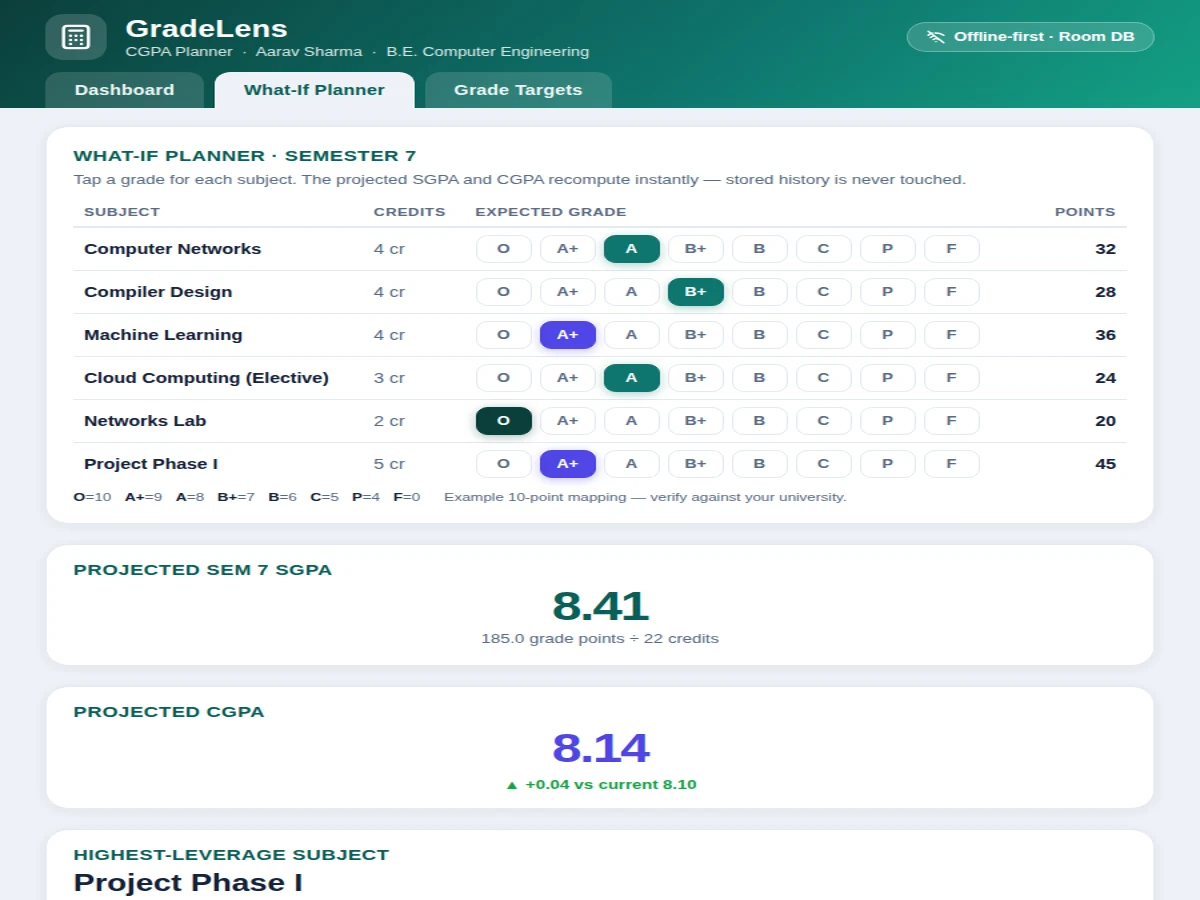
The student enters each semester's SGPA and credits, or taps grades in the planner.
Follow the working sequence
How it works
The student opens the app and records each completed semester as an SGPA–credits pair, or switches to planner mode and enters upcoming subjects with their individual credits. Every entry is written to the Room database, which acts as the single source of truth for the credit-weighted CGPA engine: each semester's SGPA is multiplied by its credits, the products are summed, and the total is divided by total credits. The dashboard reads this state to render the CGPA ring, the semester list and the trend chart. For planning, the target solver rearranges the same formula to compute the SGPA still required for a chosen target across the remaining semesters, while the what-if planner recomputes the projection on every grade tap without touching stored history. Backlog subjects are re-entered under the configured repeat rule so cleared failures update the record cleanly. The report export compiles semesters, charts and projections into a PDF — entirely on-device, without a network call.
- The student creates a profile and adds completed semesters as SGPA–credit pairs (the demo ships with six semesters of sample data).
- The CGPA engine computes Σ(SGPA × credits) ÷ Σ(credits) — for the sample data, 1117.4 ÷ 138 = 8.10 — and the dashboard ring, list and chart update from the Room database.
- To plan ahead, the student enters a target CGPA and the credits of each remaining semester; the solver inverts the formula: required SGPA = (target × total credits − earned points) ÷ remaining credits.
- If the required SGPA exceeds 10.0, the app states plainly that the target is mathematically impossible with the credits left, rather than showing a misleading number.
- In what-if mode, the student taps grade pills (O through F) for each upcoming subject; projected SGPA and CGPA recompute instantly so scenarios can be compared.
- Backlog or improvement subjects are logged under the chosen repeat rule, and the engine adjusts earned points and credits accordingly.
- One tap exports the full record — semesters, trend chart, projection — as a PDF via the Android print framework.
Tech stack:
- Kotlin
- Jetpack Compose · Material 3
- Room database (offline-first)
- MPAndroidChart
- Kotlin Coroutines
- Android Studio
- Git · Gradle
| Parameter | Value |
|---|---|
| CGPA formula | Σ(SGPA × credits) ÷ Σ(credits) — credit-weighted mean (verified) |
| Sample record | 6 completed semesters · 138 credits · CGPA 8.10 (demo data) |
| Grading scale | 10-point example: O=10, A+=9, A=8, B+=7, B=6, C=5, P=4, F=0 — verify against your university |
| Target solver | Required SGPA = (target × total credits − earned points) ÷ remaining credits (verified) |
| Minimum Android | API 26 (Android 8.0) and above (design target) |
| Installed size | Approximately 12–18 MB (expected) |
| Storage | Room (SQLite) on-device; no account, no cloud in the base build |
| Report export | PDF via the Android print framework (implemented) |
Project features
The app's four strongest capabilities are the target-CGPA solver, the what-if grade planner, the semester trend visualisation, and the offline-first Room database. The solver inverts the CGPA formula to report the exact SGPA required across the remaining semesters for any target, and it flags mathematically impossible goals honestly instead of displaying a number above 10. The what-if planner turns each upcoming subject into a tappable grade selector so a student can test scenarios — for example, an A in a 4-credit subject but a B in a 3-credit one — and watch the projected CGPA move in real time. A clean trend chart plots SGPA against the running CGPA so slumps and recoveries are visible instantly. Underneath, Room persists every semester, subject and grade locally with full create-read-update-delete, so the app works in airplane mode and the student's data never leaves the device unless they choose to export it.
- [Semester SGPA log with credit weighting] Add each semester's SGPA and total credits; the app keeps the running CGPA as a true credit-weighted mean, never a simple average of SGPAs.
- [Target-CGPA solver] Enter a target CGPA and the credits of the remaining semesters; the app inverts the CGPA formula and reports the exact average SGPA still required, with an honest achievable/impossible verdict.
- [What-if grade planner] Assign expected grades to each upcoming subject with tappable grade pills; the projected SGPA and CGPA recompute instantly, showing which subjects move the needle most.
- [Semester trend charts] SGPA bars and the running-CGPA line on one chart, so progress, dips and recoveries are visible at a glance across all semesters.
- [Backlog and grade-improvement rules] Repeat subjects follow configurable rules (replace old grade, average, or keep best) so cleared backlogs update the record without silently distorting history.
- [Offline-first Room database] All semesters, subjects and grades live in on-device Room storage — no account, no internet, no sync dependency in the base build.
- [One-tap report export] Generates a PDF summary of semesters, the trend chart and the current projection, shareable with mentors or faculty.
What is included
- Complete Kotlin + Jetpack Compose Android source code
- Room database schema with semester, subject and grade tables plus sample data
- Target-CGPA solver and what-if planner logic with the worked arithmetic documented
- Trend charts built on MPAndroidChart wired to local data
- PDF report export wired to the Android print framework
- Project report PDF (background, CGPA mathematics, architecture, methodology, results)
- PPT presentation for final review
- Viva Q&A preparation document (credit weighting, Room, Compose state, solver derivation)
Limitations & prerequisites
- Grade-point mappings differ across universities — the 10-point example in the demo must be checked and reconfigured against the student's official grading table.
- A projected CGPA is credit-weighted arithmetic, not a guarantee; actual grades decide the outcome.
- Backlog, carry-over and grade-improvement credit rules vary by university; the app ships with configurable defaults, not any single official rulebook.
- The target solver assumes the remaining semesters carry the entered credits — curriculum or credit changes shift the required SGPA.
- Library versions (Compose, Room, MPAndroidChart) are pinned at build time; future Android Gradle Plugin updates may need small migrations.
- The base build has no cloud sync — all data lives on the device, so the student is responsible for backups until sync is added.
- The demo ships with six semesters of sample data that the student replaces with their own record.
Frequently Asked Questions
Is this project suitable for a final-year project?
Yes — for Computer Science, IT and mobile-application development programs. It demonstrates genuine Android engineering: Kotlin with Jetpack Compose, an offline Room database, applied mathematics in the target-CGPA solver, and data visualisation with MPAndroidChart. Every screen has a clear technical story — the credit-weighted formula, the inverted solver, the repeat-rule handling — so the student can defend the build confidently in a viva.
Which formula does the app use for CGPA?
The credit-weighted mean: each semester's SGPA is multiplied by its credits, the products are summed, and the total is divided by the total credits. The demo's sample record works out step by step to 1117.4 ÷ 138 = 8.10, and every screen — the ring, the semester list, the trend chart, the planner — reads from the same Room-backed computation, so the number stays consistent everywhere in the app.
How does the target-CGPA solver work?
It inverts the CGPA formula: required SGPA = (target × total credits − earned points) ÷ remaining credits. Enter a target and the credits of the semesters still ahead, and the app returns the exact average SGPA those semesters must deliver. If the answer exceeds 10.0, the app states plainly that the goal is mathematically impossible rather than showing a misleading number.
Does the app work without internet?
Yes, completely. Every semester, subject and grade is stored in an on-device Room database, so logging, the target solver, the what-if planner, the trend charts and the PDF export all work with no internet connection and no user account. There is no cloud sync in the base build, which keeps the architecture simple and the student's academic data on their own device.
Can it handle backlogs and grade improvements?
Yes, through configurable repeat rules chosen once in settings: replace the old grade entirely, average the old and new attempts, or keep the best attempt. The engine then adjusts earned grade points and credits accordingly, so a cleared backlog updates the CGPA without silently distorting the earlier record. The selected rule and its effect are documented in the report, giving the student a ready viva answer.
What will I receive with the project?
You receive the complete Kotlin and Jetpack Compose source code, the Room database schema preloaded with six semesters of sample data, the target-solver and what-if planner logic with the arithmetic fully documented, the MPAndroidChart trend integration, and the PDF report export. Documentation includes the project report PDF, the final-review PPT, a viva Q&A preparation document and the formatted project abstract.
Components & software requirements
- Kotlin
- Jetpack Compose · Material 3
- Room database (offline-first)
- MPAndroidChart
- Kotlin Coroutines
- Android Studio
- Git · Gradle
Delivery information
Built-to-order project. Delivery timeline is shared after order confirmation based on current queue.
Support terms
Complete documentation, setup guide, and viva preparation included. Support for setup and explanation provided.
Download free synopsis (PDF)
Enter your name and WhatsApp number — the synopsis PDF downloads immediately. We may send occasional project updates on WhatsApp; no spam.