
More project photos (2)
The problem
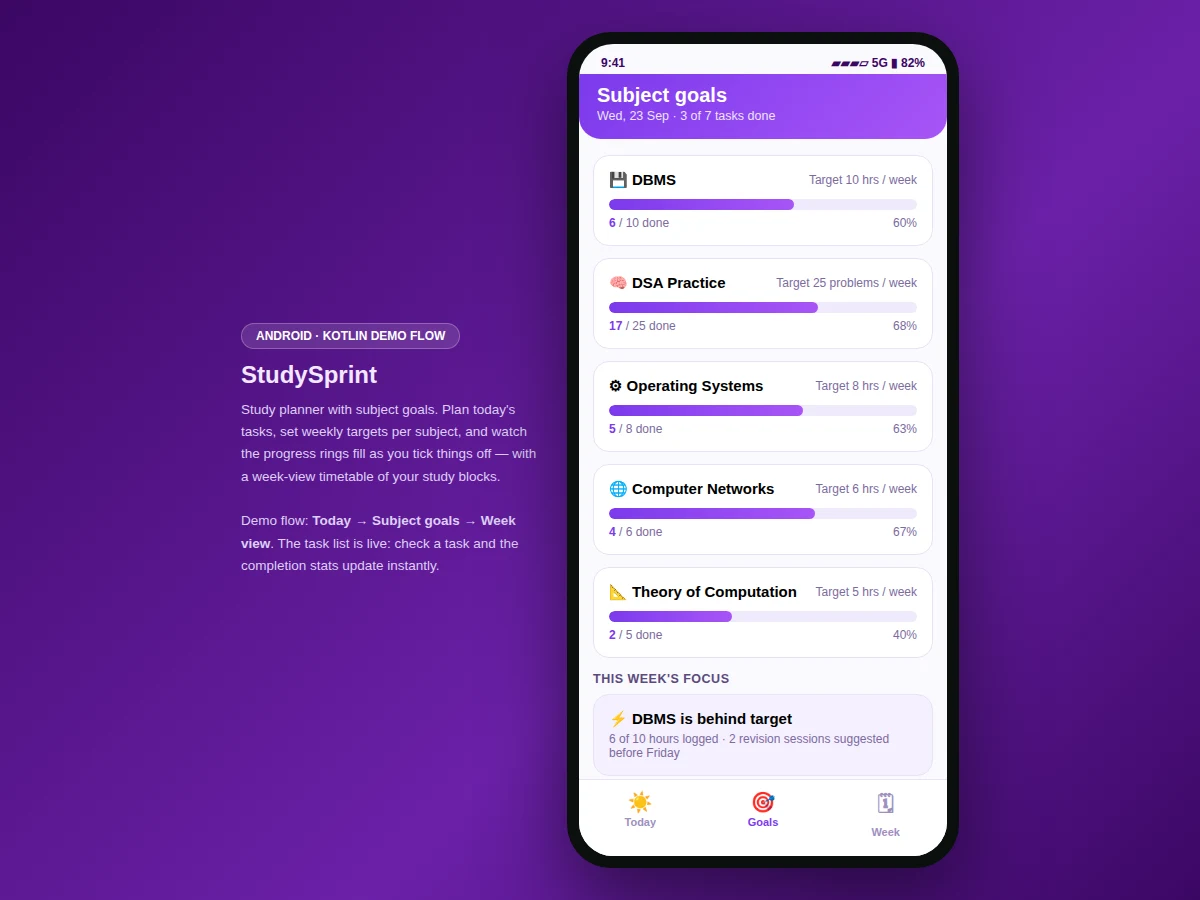
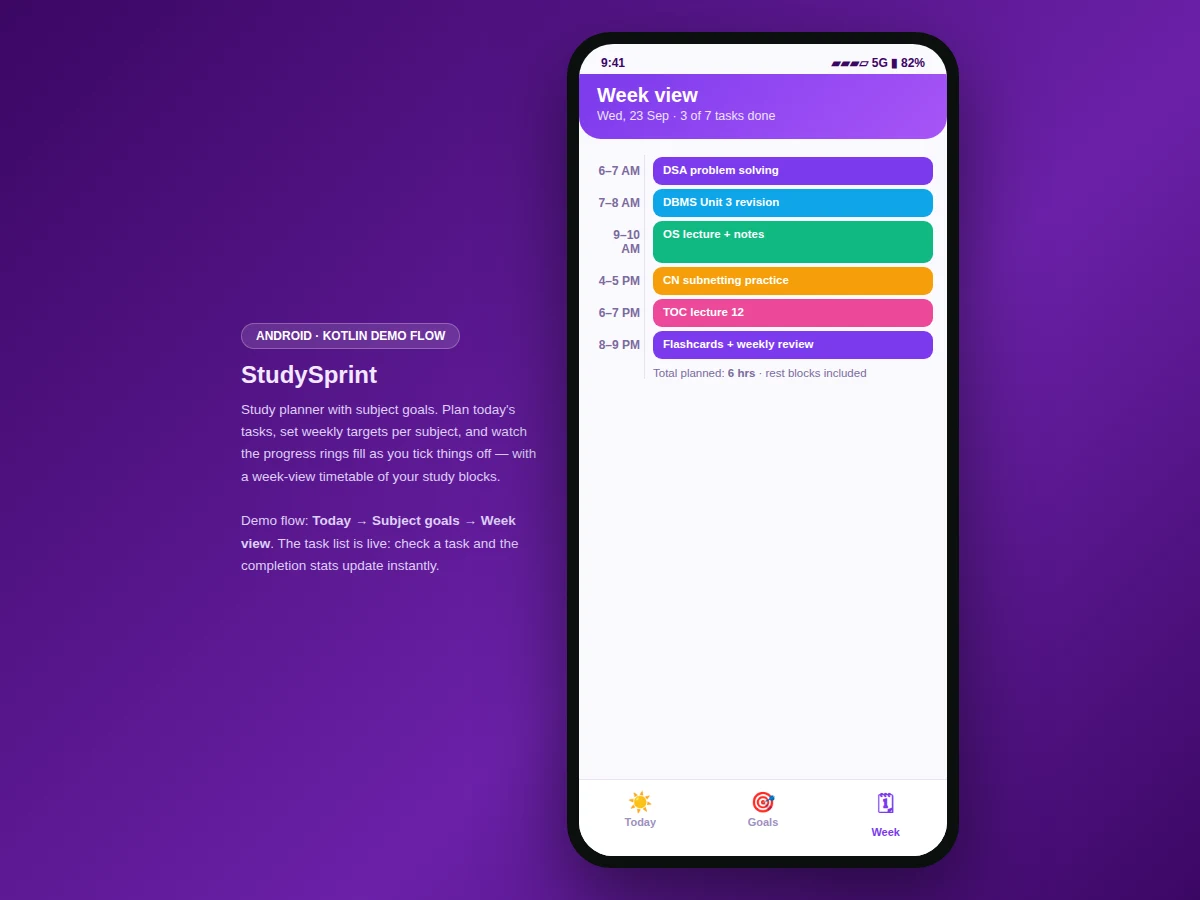
To-do lists fail students because they track tasks, not subjects: a student can tick off ten items and still neglect the one subject that needed the hours. This project plans study the way exams test it — by subject. The Today view lists the day's tasks with subject, duration and priority; checking one off updates the done/left counters and the planned-hours total instantly. The Goals view sets a weekly target per subject — 10 hours of DBMS, 25 DSA problems, 8 hours of Operating Systems — with progress bars that fill as the week advances. The Week view blocks study sessions across the day (6 hours planned in the demo), and a focus callout names the subject furthest behind target with a concrete catch-up suggestion. It is a planner that answers "what should I study next?" instead of just "what did I do?"
How it works
- The student opens the Today view and sees the day's tasks with subject, duration and priority labels.
- Tapping a task's checkbox marks it done; the done/left counters update immediately.
- The Goals view shows each subject's weekly target with a progress bar reflecting completed work.
- The Week view lays out study blocks across the day with a total-hours summary.
- The focus callout compares each subject's progress against its target and flags the furthest behind.
- As the week advances, bars fill and the callout shifts to whichever subject needs attention next.
Tech stack:
- Kotlin, Android SDK (delivered app)
- Material-style mobile UI components
- Task and goal state model with live progress computation
- Interactive web prototype of the app flow (HTML/CSS/JS) for demonstration
| Parameter | Value |
|---|---|
| Platform | Android app in Kotlin (design target) |
| Demo screens | 3 (today, goals, week view) |
| Demo tasks | 7 tasks (3 done, 4 left, 4.6 planned hours) |
| Subject goals | 5 subjects with weekly targets (hours or problem counts) |
| Week view | Study blocks across the day, 6 planned hours in the demo |
| Task fields | Title, subject, duration, priority (high/medium/low) |
| Progress model | Done/left counters, per-subject bars, behind-target callout |
| Demo views | Interactive web prototype of the Android flow |
| Data persistence | In-memory session store in the demo; local database in the delivered app (design target) |
| Device support | Android phones (demo prototype runs in any modern browser) |
Project features
- [Today's task list] Seven demo tasks with subject, duration and priority; tapping a checkbox updates the done/left counters live.
- [Weekly subject goals] Five subjects with weekly targets in hours or problem counts and progress bars that fill as tasks complete.
- [Week-view timetable] Study blocks laid out across the day with a total-planned-hours summary.
- [Behind-target callout] A focus card that identifies the subject furthest from its weekly target and suggests catch-up sessions.
- [Week strip navigation] A Monday-to-Sunday strip anchored on the current day for moving between days.
- [Bottom navigation] Today, Goals and Week tabs in a standard Android pattern.
What is included
- Complete Android app source code (Kotlin) implementing tasks, goals and the week view
- Interactive web prototype of the app flow (the demo shown in the screenshots)
- Task/goal data model with the progress-computation logic
- Project report PDF (background, methodology, architecture, screens, testing notes)
- PPT presentation for final review
- Viva Q&A preparation document (goal-tracking design, progress models, UI decisions)
Limitations & prerequisites
- The demo uses fixed sample tasks and goals; the delivered app lets students create their own.
- The demo prototype keeps data in memory; the delivered app persists tasks and goals locally.
- No reminder notifications in the demo; local notification scheduling is documented as future scope.
- The behind-target logic compares against static weekly targets, not adaptive ones.
- Week-view blocks are planned sessions, not synced with the phone's calendar.
Frequently Asked Questions
What does the app actually do?
It plans study by subject: today's tasks with priorities, weekly targets per subject with progress bars, and a week-view timetable — plus a callout naming whichever subject is behind target.
How do the goals work?
Each subject gets a weekly target (hours or problem counts). Completing tasks fills its progress bar; the focus card flags the subject furthest behind.
Is the demo a real Android app?
The screenshots show an interactive web prototype of the Android flow. The delivered project is the full Android app in Kotlin; the prototype demonstrates every screen and interaction.
Can students add their own tasks?
Yes — the delivered app supports creating, editing and deleting tasks and goals; the demo ships with sample data.
What does the report include?
A background on study planning, the app's data model and progress logic, screen walkthroughs, and testing notes.
Is this project suitable for a final-year project?
Yes — for Computer Science, IT and Android-focused programs. It demonstrates mobile UI design, state-driven progress tracking, and a genuine student problem. Suitable for B.E./B.Tech final-year projects in Computer Science, IT and Android development.
Components & software requirements
- Kotlin, Android SDK (delivered app)
- Material-style mobile UI components
- Task and goal state model with live progress computation
- Interactive web prototype of the app flow (HTML/CSS/JS) for demonstration
Delivery information
Built-to-order project. Delivery timeline is shared after order confirmation based on current queue.
Support terms
Complete documentation, setup guide, and viva preparation included. Support for setup and explanation provided.