
More project photos (2)
The problem
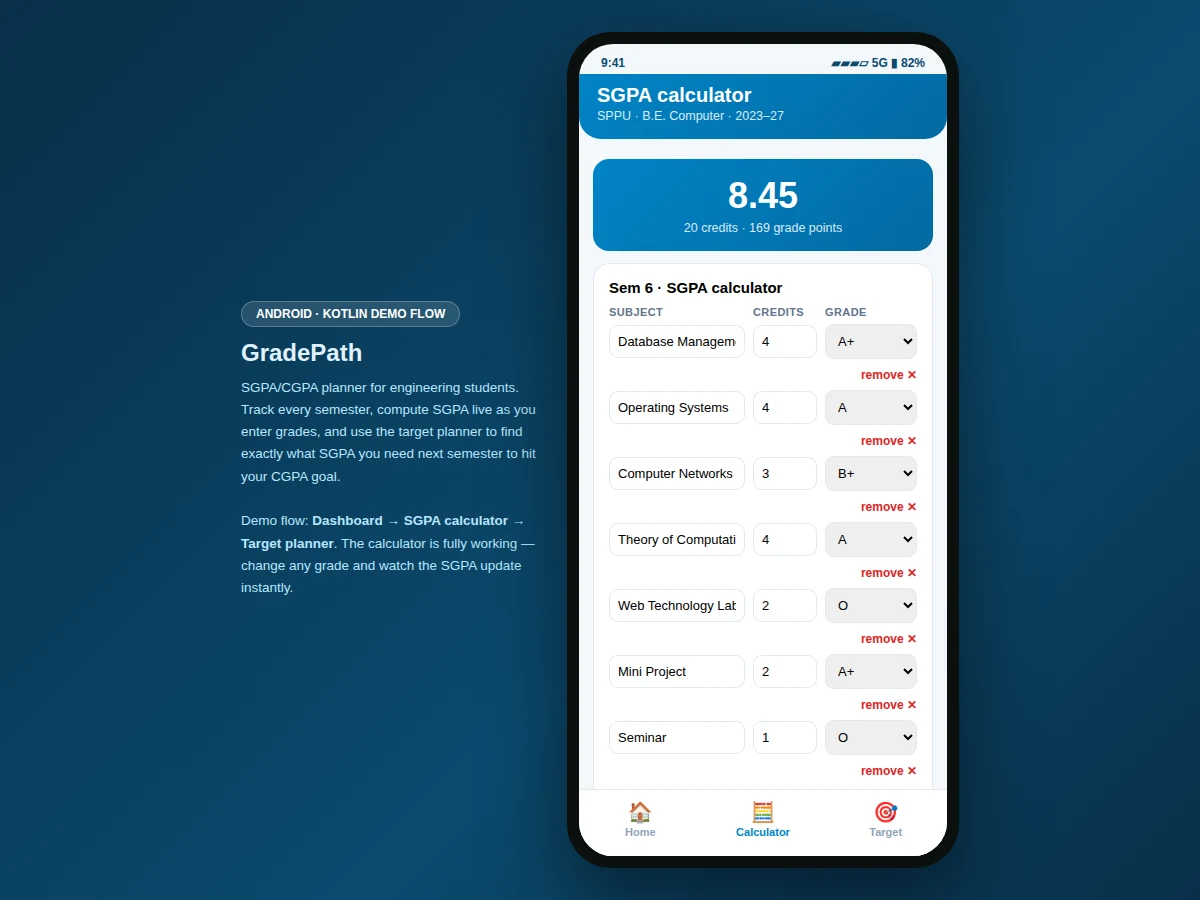
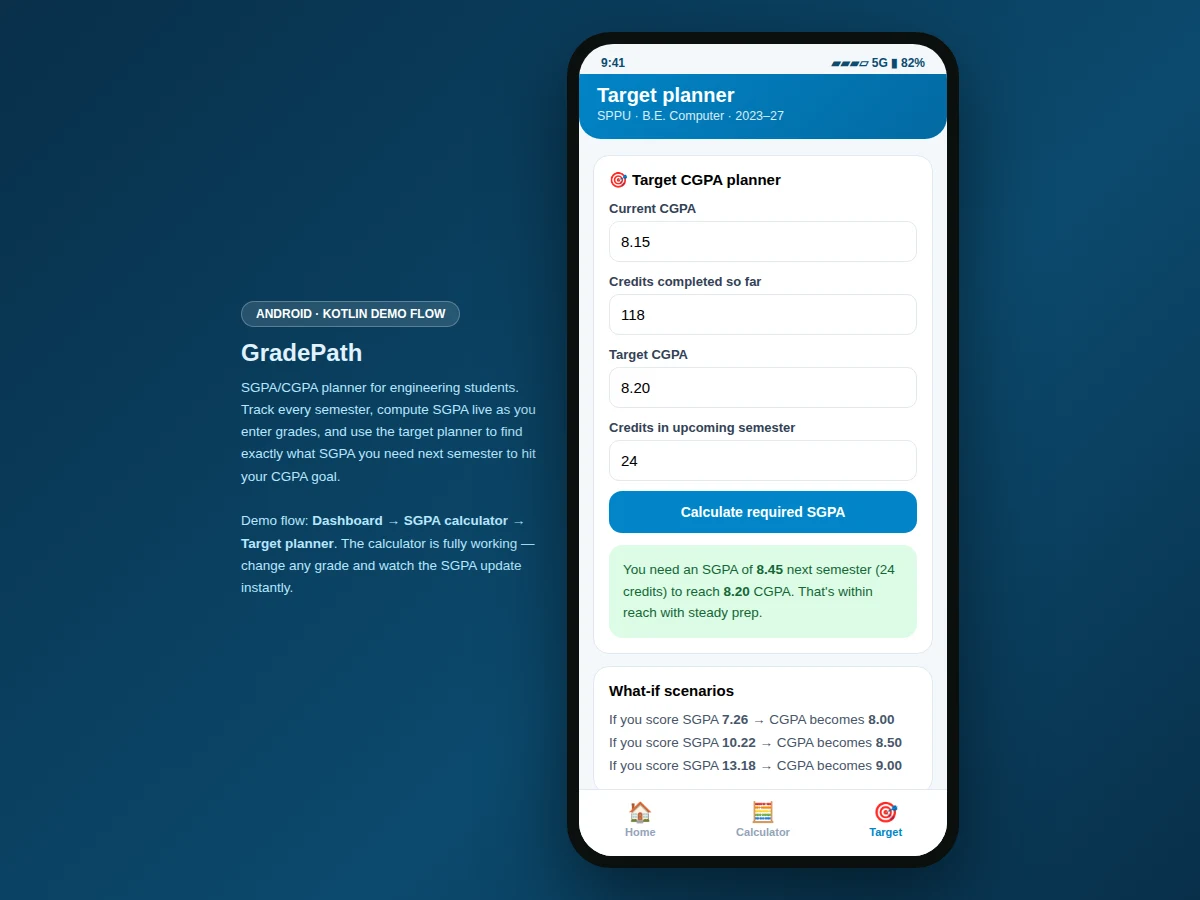
Every engineering student does the same anxious arithmetic before results: "if I get an A in this 4-credit subject, what happens to my SGPA — and can I still hit my CGPA target?" Most do it on a phone calculator, subject by subject, and guess at the planning question that actually matters. This project makes grade planning a proper tool. The dashboard shows CGPA across five semesters (8.15 over 118 credits in the demo) with a gauge and per-semester cards. The SGPA calculator accepts any subject list with credits and grades on the 10-point scale and recomputes instantly as values change — the demo semester totals 8.45 across 20 credits. The target planner inverts the math: given current CGPA, completed credits, a target CGPA and next semester's credits, it computes the exact SGPA required, flags impossible or stretch targets, and runs what-if scenarios. It turns grade anxiety into a plan.
How it works
- The student opens the dashboard and sees CGPA, the gauge and semester-wise SGPA cards.
- In the calculator, the student adds subjects with credit values and picks grades on the 10-point scale.
- SGPA recomputes instantly: grade points (O=10 … F=0) weighted by credits, summed and divided by total credits.
- In the target planner, the student enters current CGPA, completed credits, target CGPA and next semester's credits.
- The app inverts the weighted-average formula to compute the required SGPA and labels the verdict.
- What-if scenarios show the CGPA outcome of several hypothetical next-semester SGPAs.
Tech stack:
- Kotlin, Android SDK (delivered app)
- Material-style mobile UI components
- Weighted grade-point computation engine
- Interactive web prototype of the app flow (HTML/CSS/JS) for demonstration
| Parameter | Value |
|---|---|
| Platform | Android app in Kotlin (design target) |
| Demo screens | 3 (dashboard, calculator, target planner) |
| Grading scale | 10-point (O=10, A+=9, A=8, B+=7, B=6, C=5, P=4, F=0) |
| Demo semesters | 5 completed, 118 credits, CGPA 8.15 (computed from demo data) |
| Demo calculator | 7 subjects, 20 credits, SGPA 8.45 (computed live) |
| Target formula | Required SGPA = (target×total credits − current×done credits) / next credits |
| Verdict bands | Within reach (≤9), stretch (9–10), impossible (>10) |
| Demo views | Interactive web prototype of the Android flow |
| Data persistence | In-memory session store in the demo; local database in the delivered app (design target) |
| Device support | Android phones (demo prototype runs in any modern browser) |
Project features
- [CGPA dashboard] Semester-wise SGPA cards, total credits and a CGPA gauge computed from the semester data — 8.15 across 5 semesters in the demo.
- [Working SGPA calculator] Add subjects with credits and grades on the 10-point scale (O through F); the SGPA recomputes live with every change.
- [Target CGPA planner] Enter current CGPA, completed credits, target CGPA and next semester's credits to get the exact required SGPA.
- [Honest verdicts] The planner labels targets "within reach", "stretch", or "impossible" (when the required SGPA exceeds 10.0) instead of silently showing a number.
- [What-if scenarios] One-tap scenarios showing what CGPA results from scoring 7.26, 10.22 or 13.18 SGPA next semester.
- [Bottom navigation] Home, Calculator and Target tabs in a standard Android pattern.
What is included
- Complete Android app source code (Kotlin) implementing the dashboard, calculator and target planner
- Interactive web prototype of the app flow (the demo shown in the screenshots)
- Grade computation engine with the 10-point scale and target-inversion formula
- Project report PDF (background, methodology, architecture, screens, testing notes)
- PPT presentation for final review
- Viva Q&A preparation document (weighted averages, target inversion math, UI design)
Limitations & prerequisites
- The demo uses fixed sample semester data; the delivered app lets students enter their own semesters.
- The grading scale follows the common 10-point scheme; universities with different schemes need the scale configured.
- The demo prototype keeps data in memory; the delivered app persists semesters locally.
- The planner assumes all remaining credits are earned next semester — multi-semester planning is future scope.
- "Impossible" verdicts are mathematical (required SGPA > 10.0), not predictions about the student.
Frequently Asked Questions
What does the app actually do?
It tracks CGPA across semesters, computes SGPA live as you enter grades, and tells you exactly what SGPA you need next semester to reach a target CGPA.
How is SGPA computed?
Grade points on the 10-point scale (O=10 down to F=0), weighted by each subject's credits, summed and divided by total credits — recomputed instantly on every change.
What does the target planner do?
It inverts the weighted-average formula: from your current CGPA, completed credits, target CGPA and next semester's credits, it computes the required SGPA — and labels it within reach, stretch, or impossible.
Is the demo a real Android app?
The screenshots show an interactive web prototype of the Android flow. The delivered project is the full Android app in Kotlin; the prototype demonstrates every screen and interaction.
What does the report include?
A background on grade planning, the computation engine's math, screen walkthroughs, and testing notes.
Is this project suitable for a final-year project?
Yes — for Computer Science, IT and Android-focused programs. It demonstrates mobile UI design, real-time computation, and a problem every student understands. Suitable for B.E./B.Tech final-year projects in Computer Science, IT and Android development.
Components & software requirements
- Kotlin, Android SDK (delivered app)
- Material-style mobile UI components
- Weighted grade-point computation engine
- Interactive web prototype of the app flow (HTML/CSS/JS) for demonstration
Delivery information
Built-to-order project. Delivery timeline is shared after order confirmation based on current queue.
Support terms
Complete documentation, setup guide, and viva preparation included. Support for setup and explanation provided.