
More project photos (3)
The problem
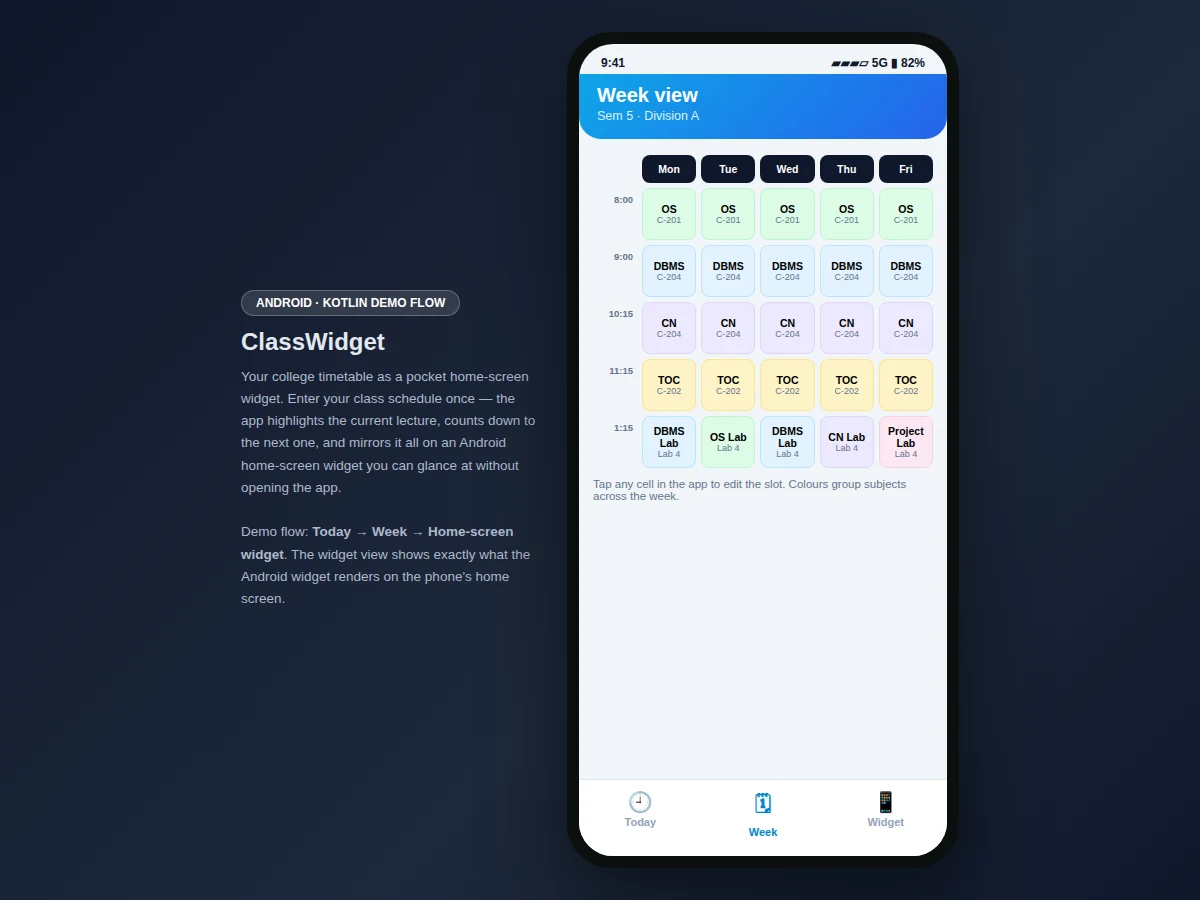
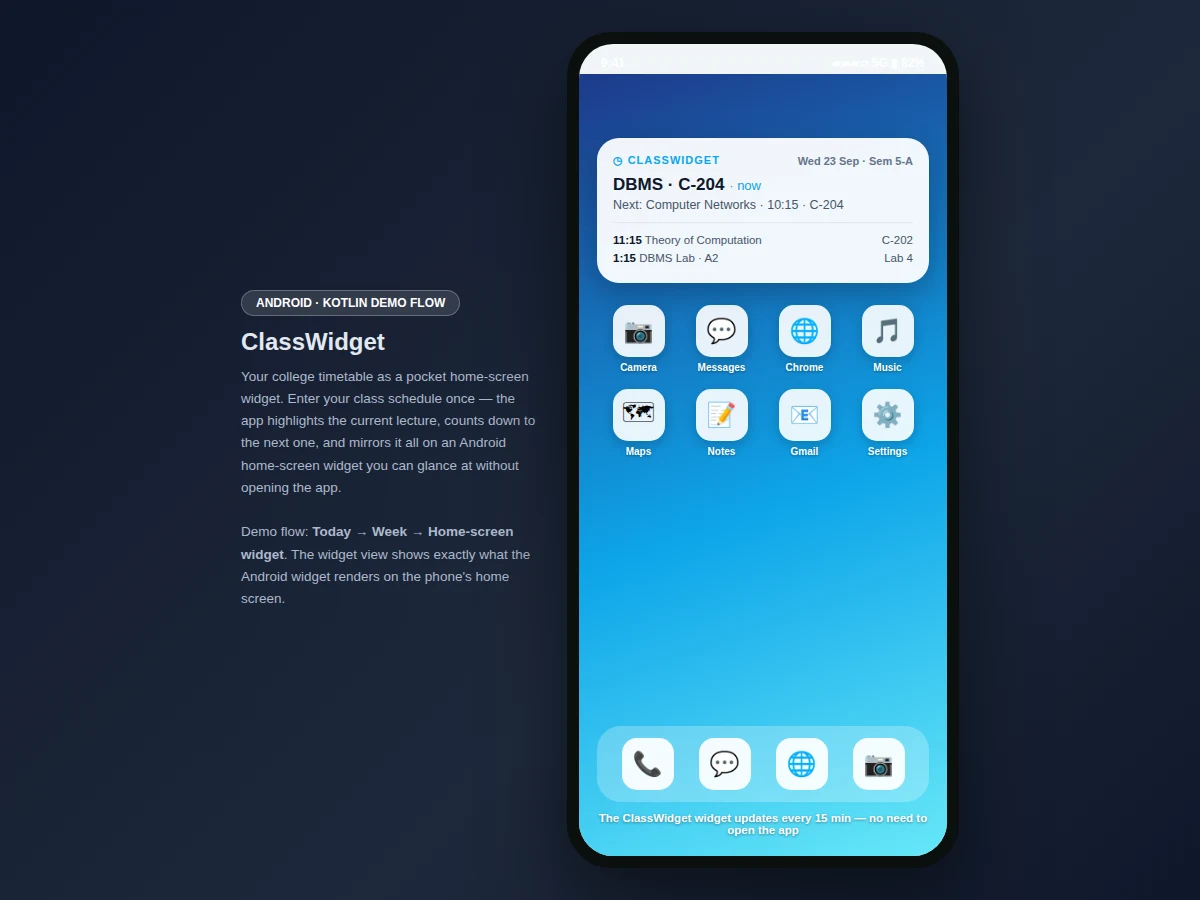
Students check their timetable dozens of times a week — which room, which professor, what comes next — usually by digging through a PDF or a photo of the notice board. This project puts the answer on the home screen. The student enters the class schedule once: subjects, professors, rooms and times. The Today view renders a timeline with the current lecture highlighted in a "happening now" card that counts down to the next class. The Week view shows a Monday-to-Friday grid with colour-coded subjects. And the Widget view simulates the actual Android home-screen widget: current class with room, next class with time, and the following hours — the same information the real widget updates on the phone's home screen, no app-opening required. It is the timetable, shrunk to a glance.
Enters the weekly class schedule once and taps week-grid cells to edit any slot.
Follow the working sequence
How it works
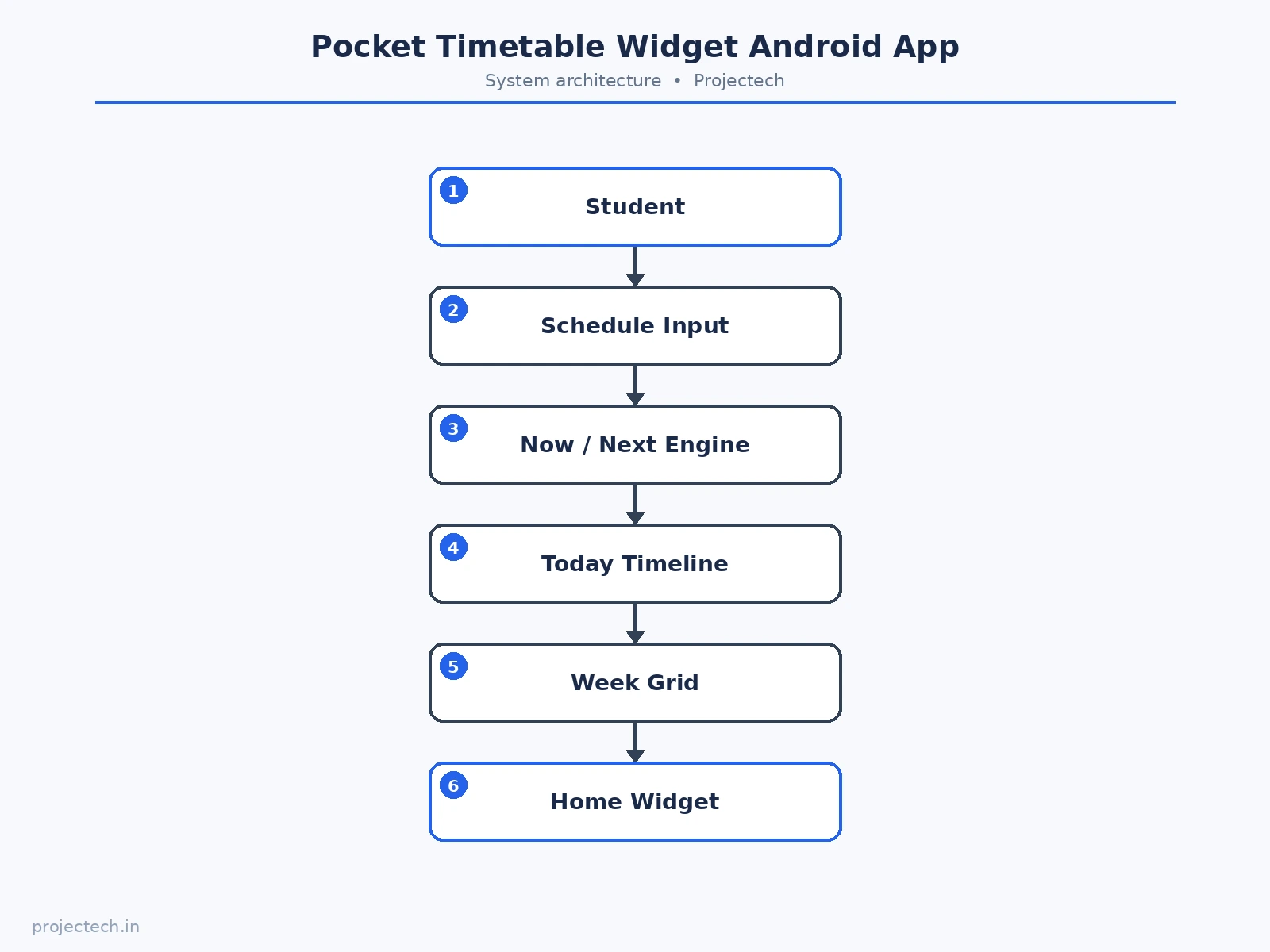
- The student enters the class schedule once: subjects, professors, rooms and times per weekday.
- The Today view builds a timeline for the current weekday and highlights the ongoing lecture.
- The now/next engine compares the schedule against the clock to pick the current and next class.
- The Week view renders the Monday-to-Friday grid with colour-coded subjects.
- The Widget view mirrors the home-screen widget content: current class, next class and the hours ahead.
- Tapping any week-grid cell opens the slot editor to update subject, professor or room.
Tech stack:
- Kotlin, Android SDK with AppWidgetProvider (delivered app)
- Material-style mobile UI components
- Schedule model with now/next computation
- Interactive web prototype of the app flow (HTML/CSS/JS) for demonstration
| Parameter | Value |
|---|---|
| Platform | Android app in Kotlin with home-screen widget (design target) |
| Demo screens | 3 (today timeline, week grid, widget simulation) |
| Demo schedule | Sem 5 · Division A, Wednesday: 5 classes (demo day) |
| Week grid | Monday–Friday, 5 slots per day, colour-coded subjects |
| Now/next engine | Current + next lecture derived from schedule vs clock |
| Widget update | Every 15 minutes in the delivered widget (design target) |
| Slot fields | Subject, professor, room, time |
| Demo views | Interactive web prototype of the Android flow |
| Data persistence | In-memory session store in the demo; local database in the delivered app (design target) |
| Device support | Android phones (demo prototype runs in any modern browser) |
Project features
- [Today timeline] Five Wednesday classes with professors and rooms, the current lecture highlighted and a "happening now" card with a countdown to the next class.
- [Now/next logic] The app determines the current and next lecture from the schedule and renders both prominently.
- [Week grid] A Monday-to-Friday grid with colour-coded subjects and room labels per slot.
- [Home-screen widget simulation] A view showing exactly what the Android widget renders: current class, next class and upcoming hours on a phone home screen.
- [Editable schedule] Tapping a week-grid cell opens an editor for that slot's subject, professor and room.
- [Bottom navigation] Today, Week and Widget tabs in a standard Android pattern.
What is included
- Complete Android app source code (Kotlin) including the AppWidgetProvider home-screen widget
- Interactive web prototype of the app flow (the demo shown in the screenshots)
- Schedule data model with the now/next computation logic
- Project report PDF (background, methodology, architecture, screens, testing notes)
- PPT presentation for final review
- Viva Q&A preparation document (widget lifecycle, schedule modeling, update scheduling)
Limitations & prerequisites
- The demo's clock is anchored for illustration; the delivered widget reads the real device time.
- The demo prototype keeps the schedule in memory; the delivered app persists it locally.
- Widget refresh intervals follow Android's update policies (approximately 15 minutes); instant updates need push or foreground triggers.
- The demo schedule covers one division; multi-division support is future scope.
- No automatic timetable import from the college ERP; entry is manual in the delivered build.
Frequently Asked Questions
What does the app actually do?
It turns your class timetable into an Android home-screen widget: current class, next class and upcoming hours, glanceable without opening the app — plus full today and week views.
How does the now/next logic work?
The schedule is compared against the clock to determine the ongoing lecture and the next one; the "happening now" card counts down to the changeover.
Is the demo a real Android app?
The screenshots show an interactive web prototype of the Android flow, including a simulation of the home-screen widget. The delivered project is the full Android app in Kotlin with a real AppWidgetProvider widget.
Can I edit the timetable?
Yes — tapping any week-grid cell opens an editor for that slot's subject, professor and room.
What does the report include?
A background on timetable UX, the schedule model and widget architecture, screen walkthroughs, and testing notes.
Is this project suitable for a final-year project?
Yes — for Computer Science, IT and Android-focused programs. It demonstrates the Android widget framework, time-based logic, and a daily-use student problem. Suitable for B.E./B.Tech final-year projects in Computer Science, IT and Android development.
Components & software requirements
- Kotlin, Android SDK with AppWidgetProvider (delivered app)
- Material-style mobile UI components
- Schedule model with now/next computation
- Interactive web prototype of the app flow (HTML/CSS/JS) for demonstration
Delivery information
Built-to-order project. Delivery timeline is shared after order confirmation based on current queue.
Support terms
Complete documentation, setup guide, and viva preparation included. Support for setup and explanation provided.
Download free synopsis (PDF)
Enter your name and WhatsApp number — the synopsis PDF downloads immediately. We may send occasional project updates on WhatsApp; no spam.