
More project photos (2)
The problem
Students preparing for semester examinations juggle three disconnected habits: timing their study sessions, keeping a weekly class schedule, and tracking how much they actually studied. A generic timer app knows nothing about the timetable, a calendar cannot measure focused study time, and spreadsheet trackers are abandoned within days. The result is familiar — students overestimate their study hours, avoid weak subjects, and walk into examinations on guesswork. This project solves the fragmentation by building one desktop application where the plan, the execution and the evidence share the same data. The timetable builder lays out weekly classes on a visual grid with overlap validation; the Pomodoro timer runs genuine 25-minute focus blocks with structured breaks and logs every completed session against its subject; the analytics dashboard turns that log into daily-hour comparisons, per-subject time distribution, a 12-week consistency heatmap and focus-versus-break statistics. Everything runs offline with local data storage.
Student planning classes, running focus sessions and reviewing progress.
Follow the working sequence
How it works
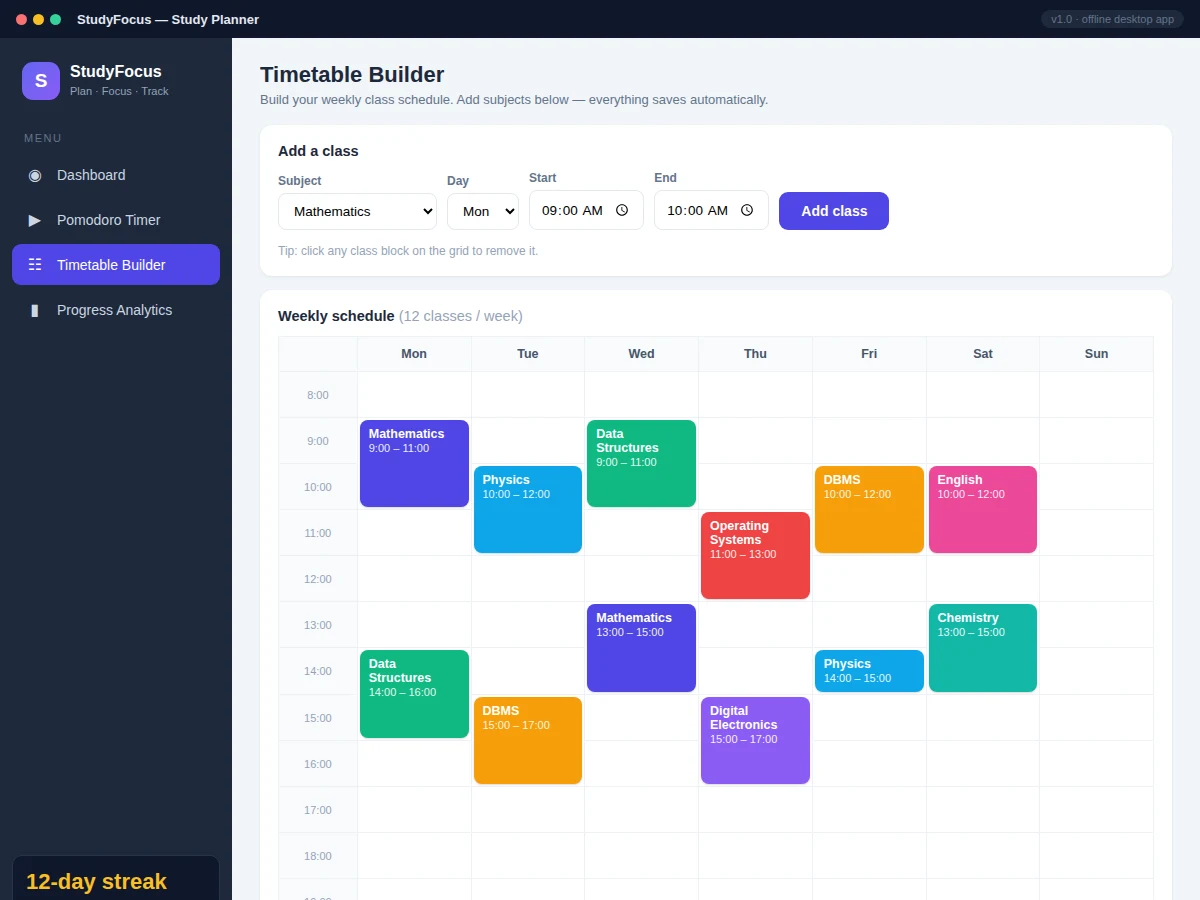
- The student builds the weekly class schedule in the timetable builder: subject, day, start and end time per class, with the app rejecting any entry that overlaps an existing class.
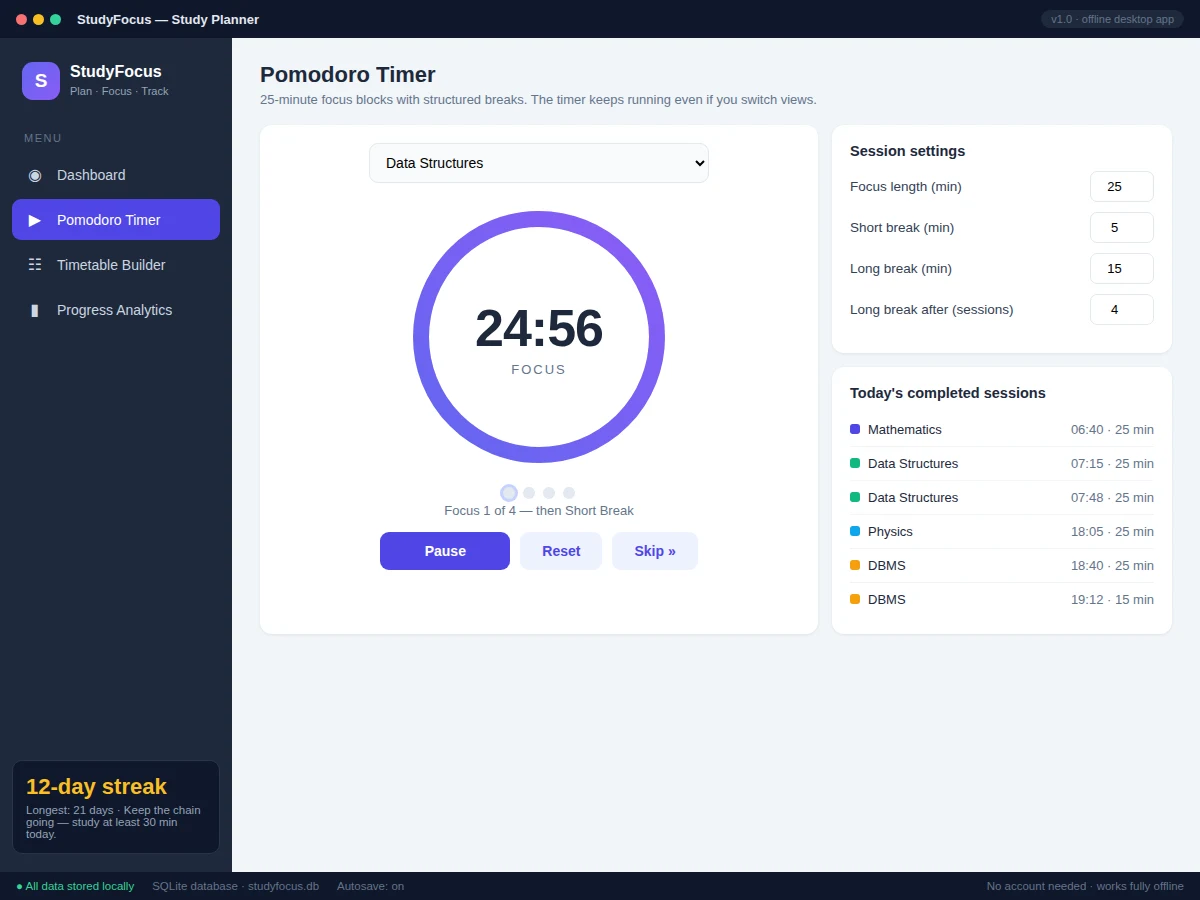
- In the Pomodoro view the student selects the subject for the current session and presses Start; the ring begins depleting over the configured focus duration.
- The timer counts down in real time; Pause, Reset and Skip remain available, and the engine automatically advances to a short break when the focus block completes.
- Each finished focus session is logged with its subject, start time and duration into the local session log.
- After every fourth completed focus session the engine schedules a long break instead of a short one; the cycle dots track progress through the set.
- The analytics dashboard reads the session log and recomputes every chart on load: daily hours against last week, the per-subject donut, the 12-week heatmap and focus-versus-break ratios.
Tech stack:
- HTML5, CSS3, JavaScript (ES6)
- Inline SVG charts (no external charting library)
- Electron (desktop packaging path)
- localStorage persistence with documented schema
- Node.js (packaging tooling only)
- SQLite schema design (packaged build)
| Parameter | Value |
|---|---|
| Application type | Single self-contained HTML/CSS/JS app; Electron packaging path for native installers |
| Timer resolution | Approximately 1 second (browser interval timing; expected, not precision-grade) |
| Default Pomodoro cycle | 25 min focus / 5 min short break / 15 min long break, long break after 4 sessions (all configurable) |
| Timetable grid | 7 days, 08:00–20:00, with overlap validation on every add |
| Analytics charts | 4 types, recomputed live from the session log on every view load |
| Data storage | Local only; a full academic year of sessions is expected to stay under 1 MB |
| Offline operation | Yes — no server, account or internet connection required |
| Supported platforms | Any modern browser; Windows/macOS/Linux via the Electron build step |
Project features
- [Working Pomodoro timer engine] A genuine countdown timer with start, pause, reset and skip, cycling through focus, short break and long break phases (default 25/5/15 minutes, long break after every 4 focus sessions), with a depleting progress ring and per-subject session selection.
- [Visual timetable builder] A 7-day weekly grid (08:00–20:00) where classes are added by subject, day and time slot; the add form validates against existing entries to prevent overlaps, and any class block can be removed with a click.
- [Progress analytics dashboard] Four chart types computed live from the session log: daily study hours versus last week, per-subject time distribution donut, a 12-week consistency heatmap, and a focus-versus-break stacked chart — all rendered as inline SVG with no external chart library.
- [Per-subject session log] Every completed focus session is recorded with its subject, timestamp and duration, forming the study record behind the analytics and the student's evidence of hours worked.
- [Streak and syllabus tracking] A day-streak counter with longest-streak record, plus per-subject syllabus-coverage progress bars the student updates as chapters complete.
- [Configurable session settings] Focus length, short-break length, long-break length and the sessions-per-cycle count are all adjustable from the settings panel, so the app adapts to the student's preferred rhythm.
- [Fully offline operation] All data is stored locally — no account, no server, no internet connection required at any point.
What is included
- Complete single-file application source code with inline comments
- Electron packaging configuration for building native desktop installers
- Project report PDF (background, problem statement, methodology, architecture, module details)
- Project abstract PDF (10-section structure)
- PPT presentation for the final review
- Viva Q&A preparation document (timer state machine, data model, chart computation, offline design)
- Setup and customization guide
Limitations & prerequisites
- The timer uses browser interval timing (approximately ±1 second per session) — it is a study aid, not a precision timepiece.
- In the browser build, data lives in local storage: clearing browser data wipes the session log; the SQLite migration belongs to the packaged Electron build.
- No cloud sync or multi-device support in the base build — one machine, one student profile.
- No user accounts, roles or admin panel — the app is designed for a single user per installation.
- Analytics reflect only logged timer sessions; study done without the timer is not captured.
- Native installers are produced by the Electron build step and are not part of the base browser deliverable.
Frequently Asked Questions
Does the app work without the internet?
Yes, completely. All three modules — timer, timetable and analytics — run locally in the browser or the packaged desktop app, and every byte of data is stored on the machine. There is no server component and no account to create.
What is the main technology used?
Plain HTML5, CSS3 and modern JavaScript in a single self-contained file — deliberately, so the student can read and explain every line in the viva. Charts are hand-built inline SVG with no charting library, and Electron provides the path to native desktop installers.
Can the Pomodoro durations be changed?
Yes. The settings panel exposes focus length, short-break length, long-break length and the number of sessions before a long break. The timer engine reads these values live, so a student who prefers 50-minute blocks can switch instantly.
Can this project be customized?
Realistic options include a dark mode, additional chart types (e.g. weekly goal rings), PDF export of the weekly report, cloud sync across devices, a companion mobile view, or a revision-scheduler module — quoted separately based on feasibility and timeline.
Is this project suitable for a final-year project?
Yes — for Computer Science and IT programs. It demonstrates state-machine design (the timer engine), data modeling and validation (timetable overlaps), data aggregation and visualization (the analytics layer), and offline-first application architecture, all in code the student can genuinely defend. Suitable for B.E./B.Tech final-year projects in Computer Science and Information Technology.
Components & software requirements
- HTML5, CSS3, JavaScript (ES6)
- Inline SVG charts (no external charting library)
- Electron (desktop packaging path)
- localStorage persistence with documented schema
- Node.js (packaging tooling only)
- SQLite schema design (packaged build)
Delivery information
Built-to-order project. Delivery timeline is shared after order confirmation based on current queue.
Support terms
Complete documentation, setup guide, and viva preparation included. Support for setup and explanation provided.
Download free synopsis (PDF)
Enter your name and email — the synopsis PDF downloads immediately. We may send occasional project updates; no spam, unsubscribe anytime.