
More project photos (2)
The problem
Trimming an audio clip — cutting a ringtone from a song, extracting a voice memo segment, preparing a sample for a podcast — usually means installing desktop software or uploading the file to a website that processes it on a remote server. Students learning web development rarely get to build a real media tool that works with actual audio data in the browser, because decoding, visualization and sample-level editing feel out of reach. This project closes that gap: a complete audio trimmer that runs entirely on the client. The app decodes uploaded files with the Web Audio API, draws a zoomable waveform with peak-accurate rendering, supports click-drag region selection, applies fade-in and fade-out envelopes with selectable curves, previews the selection with looping, and exports the result as a standard 16-bit WAV file — all without a backend, so files never leave the user's machine.
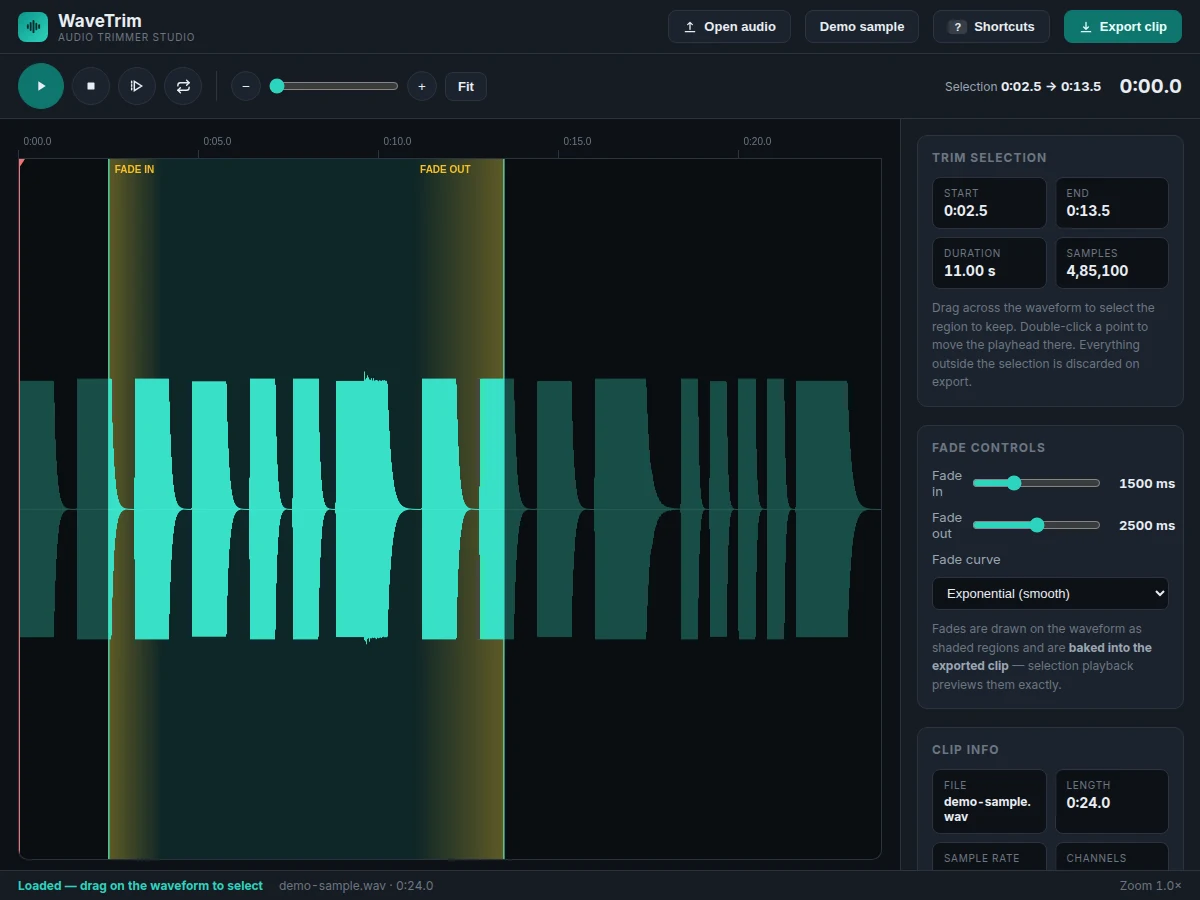
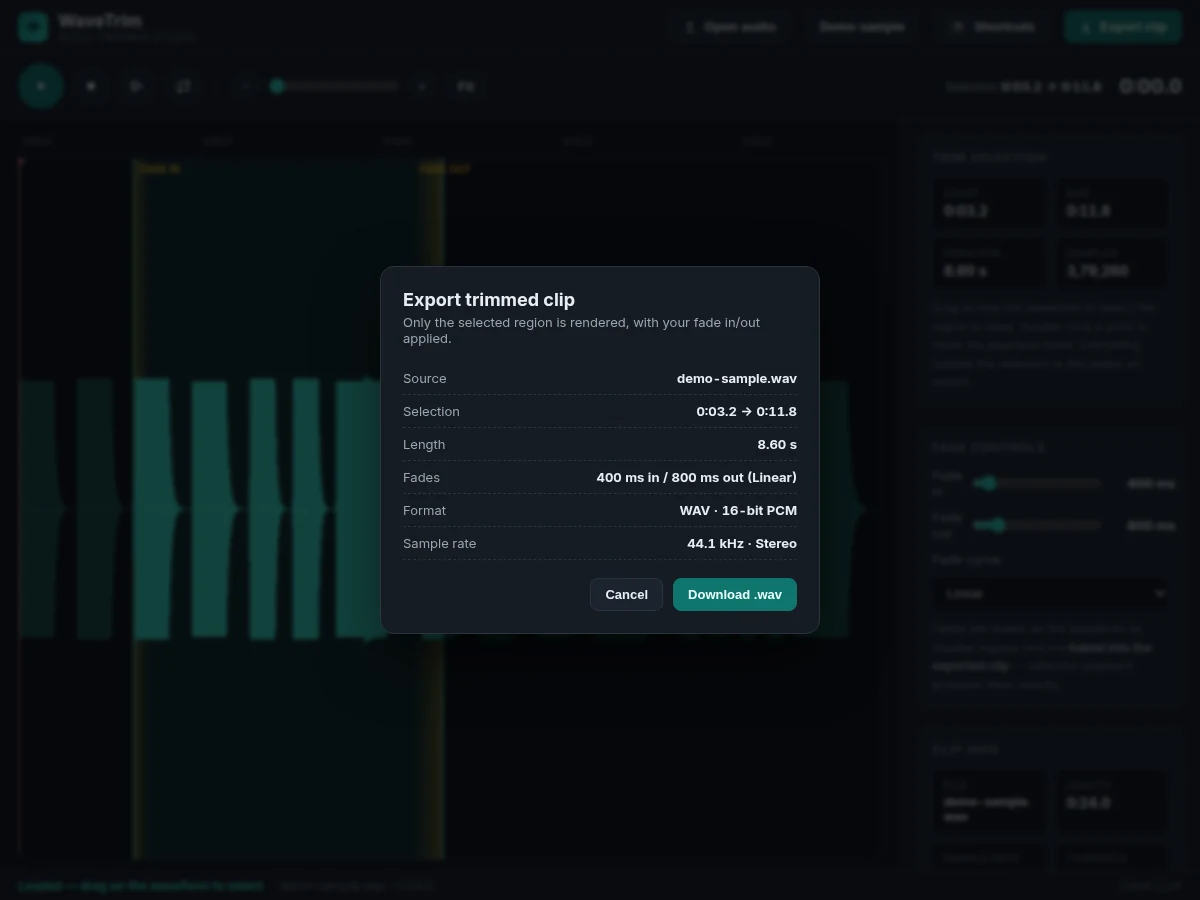
Loads an audio file, selects the trim region and exports the clip.
Follow the working sequence
How it works
- On load, the app synthesizes a 24-second demo clip with the OfflineAudioContext (layered oscillators plus a noise texture) so the waveform renders real audio data immediately; the user can also open or drop in their own audio file.
- The file is decoded with
decodeAudioDatainto an AudioBuffer; per-pixel min/max peaks are computed for the visible window and drawn as a waveform on canvas with a time ruler above it. - Clicking and dragging on the waveform sets the trim selection in seconds; double-clicking moves the playhead, and the I/O keys snap selection edges to the playhead position.
- The fade panel sets fade-in and fade-out durations and the curve type; the app draws the fade zones as shaded regions on the waveform so the effect is visible before it is heard.
- Playback uses AudioBufferSourceNode — full-file playback from the playhead, or a separately rendered buffer containing the trimmed region with fades applied, played with optional looping for selection preview.
- Zoom controls change the visible time window (down to 0.4 seconds) by recomputing peaks for the new range; the playhead auto-scrolls the view during playback.
- Export slices the selected samples, applies the fade gain envelopes per the chosen curve, packs 16-bit PCM into a WAV container entirely in JavaScript, and triggers a browser download.
Tech stack:
- HTML5 · CSS3 · JavaScript (ES6)
- Web Audio API (decodeAudioData · OfflineAudioContext · AudioBufferSourceNode)
- HTML5 canvas (waveform rendering)
- WAV PCM encoder (custom JS)
- File API · Drag-and-Drop API
- No backend — 100% client-side
| Parameter | Value |
|---|---|
| Supported input formats | WAV, MP3, OGG, M4A, FLAC (browser-dependent) |
| Export format | WAV, 16-bit PCM, source sample rate and channels preserved |
| Fade range | 0–5000 ms each for fade in/out (configurable) |
| Fade curves | Linear, exponential, logarithmic (implemented) |
| Minimum zoom window | Approximately 0.4 s (design target) |
| Demo sample | 24 s synthesized stereo clip at 44.1 kHz (generated on load) |
| Backend | None — fully client-side, runs offline after first load |
| Browser support | Any modern Chromium, Firefox or Safari with Web Audio API |
Project features
- [Click-drag trim selection] Drag across the waveform to mark the exact region to keep; the sidebar shows start, end, duration and sample count, and everything outside the selection is discarded on export.
- [Fade-in / fade-out controls] Adjustable fade durations (0–5 seconds each) with linear, exponential and logarithmic curves; fades are drawn as shaded regions on the waveform and are baked into the exported clip.
- [Selection playback with loop] Preview only the selected region — with fades applied exactly as they will export — and toggle looping to check the fade edges by ear.
- [Zoomable waveform display] Zoom from the full file down to sub-second detail with a slider, buttons or keyboard shortcuts, plus a time ruler and follow-playhead scrolling during playback.
- [16-bit WAV export] Renders the trimmed, faded selection to a standard WAV file in the browser and downloads it instantly — no server round-trip, no upload of the user's audio.
- [Full keyboard shortcut set] Space to play/pause, I/O to set in/out points at the playhead, L for selection playback, E for export, arrow keys to nudge, +/−/0 for zoom.
- [File import with drag-and-drop] Opens WAV, MP3, OGG, M4A and FLAC files by file picker or drag-and-drop anywhere on the page, decoded locally via the Web Audio API.
- [Built-in demo sample] A musically structured demo clip is synthesized on load with the OfflineAudioContext, so the waveform, selection and fades are explorable immediately without uploading anything. (Future scope: MP3 export encoding, multi-track layering and per-channel editing are not in the base build and can be developed on request.)
What is included
- Complete single-file web app source code (HTML/CSS/JS, no build step)
- Built-in demo audio sample synthesized on load
- Setup and usage documentation
- Project report PDF (background, Web Audio concepts, architecture, methodology)
- PPT presentation for final review
- Viva Q&A preparation document (Web Audio API, canvas rendering, PCM/WAV encoding, fades)
Limitations & prerequisites
- Export is WAV only in the base build — MP3/AAC export needs an encoder library and is listed as future scope.
- Very large files (roughly 30+ minutes, depending on device memory) can make decoding and peak computation slow, since the full buffer is held in memory.
- Input format support depends on the browser's own decoders — e.g. some browsers cannot decode every M4A variant.
- Editing is single-region: the app trims one selection per export; multi-region or multi-track editing is not implemented.
- The app is a client-side editing tool, not a DAW — there are no effects, EQ, mixing or undo history.
- Audio quality of the export matches the source file; the app does not enhance or restore degraded audio.
Frequently Asked Questions
How does the app work without a server?
Everything uses browser APIs: the Web Audio API decodes the file into raw samples, canvas draws the waveform from those samples, and a small JavaScript encoder packs the trimmed result into a WAV file for download. No audio ever leaves the user's machine.
What audio files can it open?
WAV, MP3, OGG, M4A and FLAC can be opened through the file picker or by dragging and dropping a file anywhere on the page. Files are decoded locally with the Web Audio API's decodeAudioData, so actual format support follows the browser's built-in decoders — which cover all of these formats in modern Chromium, Firefox and Safari. If you have nothing handy, the built-in demo sample is there to explore immediately.
What exactly do the fade controls do?
They ramp the volume up at the start (fade in) and down at the end (fade out) of the selected region over a duration you set (0–5 seconds), using a linear, exponential or logarithmic curve. The fade zones are drawn on the waveform, and selection playback lets you hear them before exporting.
Can it be extended with more features?
Yes — realistic extensions include MP3 export via an encoder library, an undo/redo stack, multi-region selection, volume normalization, silence detection for auto-trimming, and a touch-friendly mobile layout. These are optional customizations developed on request based on requirements, feasibility and timeline — they are not part of the base build.
Does it need the internet?
No. After the page loads once, the entire app runs offline in the browser: file decoding, waveform rendering, playback, fade processing and WAV export all use local browser APIs. There is no account, no upload step and no server, so the user's audio files never leave their own machine.
Is this project suitable for a final-year project?
Yes — for Computer Science, IT and Web Development programs. It demonstrates the Web Audio API end to end, canvas-based data visualization, digital audio fundamentals (sampling, PCM, fade envelopes), client-side file handling and binary export encoding, all inside one genuinely usable tool with a viva-ready report.
Components & software requirements
- HTML5 · CSS3 · JavaScript (ES6)
- Web Audio API (decodeAudioData · OfflineAudioContext · AudioBufferSourceNode)
- HTML5 canvas (waveform rendering)
- WAV PCM encoder (custom JS)
- File API · Drag-and-Drop API
- No backend — 100% client-side
Delivery information
Built-to-order project. Delivery timeline is shared after order confirmation based on current queue.
Support terms
Complete documentation, setup guide, and viva preparation included. Support for setup and explanation provided.
Download free synopsis (PDF)
Enter your name and email — the synopsis PDF downloads immediately. We may send occasional project updates; no spam, unsubscribe anytime.