
More project photos (2)
The problem
Every backend a student builds — Node.js, Django, Flask, Spring Boot, PHP — needs its endpoints tested before any frontend touches them. The usual options are painful: curl commands that cannot be reused, or cloud API tools that demand sign-ups, sync workspace data to someone else's servers, and refuse to work on flaky lab internet. This project takes a different route: a desktop-style API client that runs entirely offline, with everything a real testing workflow needs — a request builder for all five main HTTP methods, collections that persist between sessions, environment variables that switch the same request between dev, staging and production, and a response viewer that shows status code, round-trip time, payload size, highlighted body and headers. Because every byte stays in local storage, the tool is private by design and works anywhere. The included sample workspace (collections against the public JSONPlaceholder test API) means the app demonstrates itself the moment it opens.
Student composing requests and inspecting API responses.
Follow the working sequence
How it works
- The student picks a saved request from a collection or composes a new one: method, URL (with {{variables}}), query params, headers and JSON body.
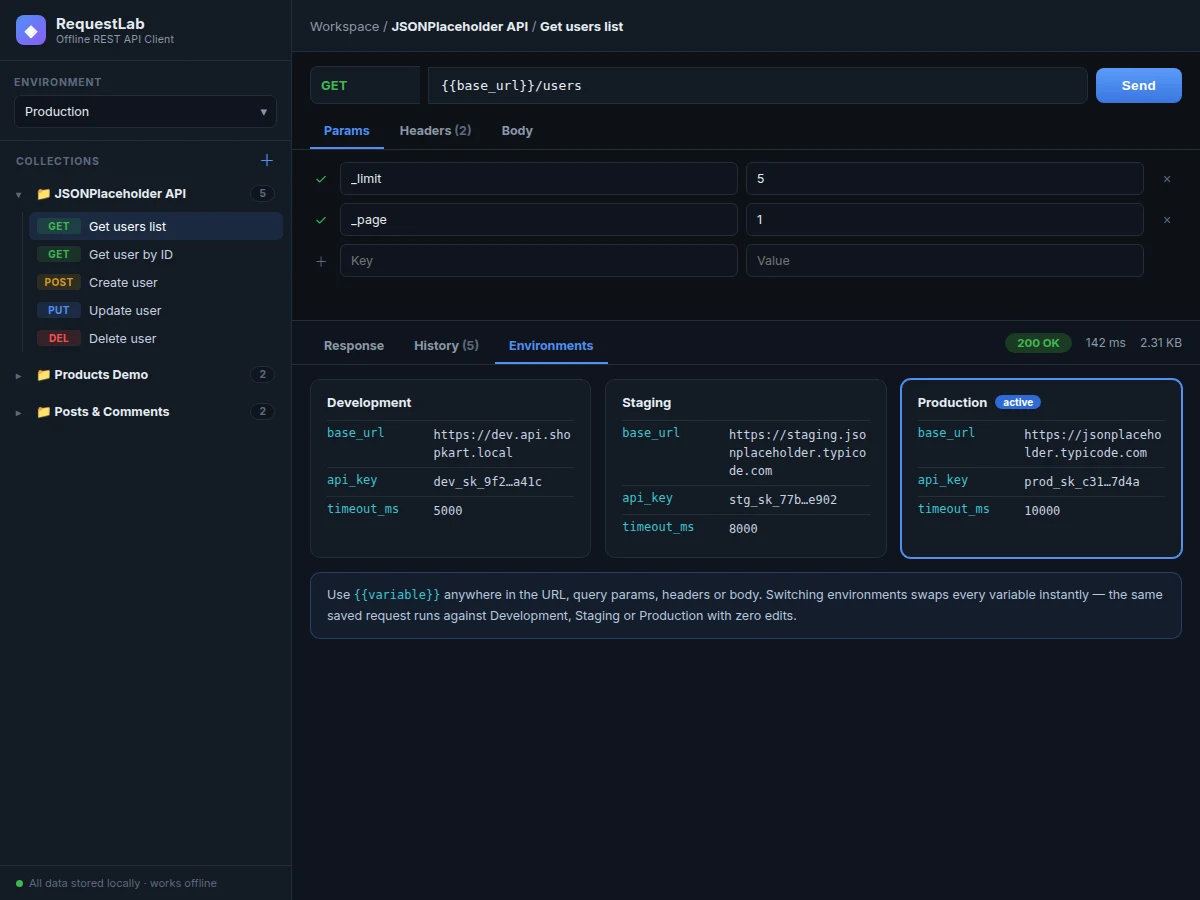
- The variable resolver substitutes every {{variable}} from the active environment (Development, Staging or Production) before the request leaves the machine.
- The request engine dispatches the call with the Fetch API under an abort-controller timeout taken from the environment's timeout_ms variable.
- A profiler records the round-trip: HTTP status code, elapsed milliseconds and payload kilobytes, using high-resolution timers.
- The response viewer pretty-prints and syntax-highlights the JSON body and lists every response header in a table.
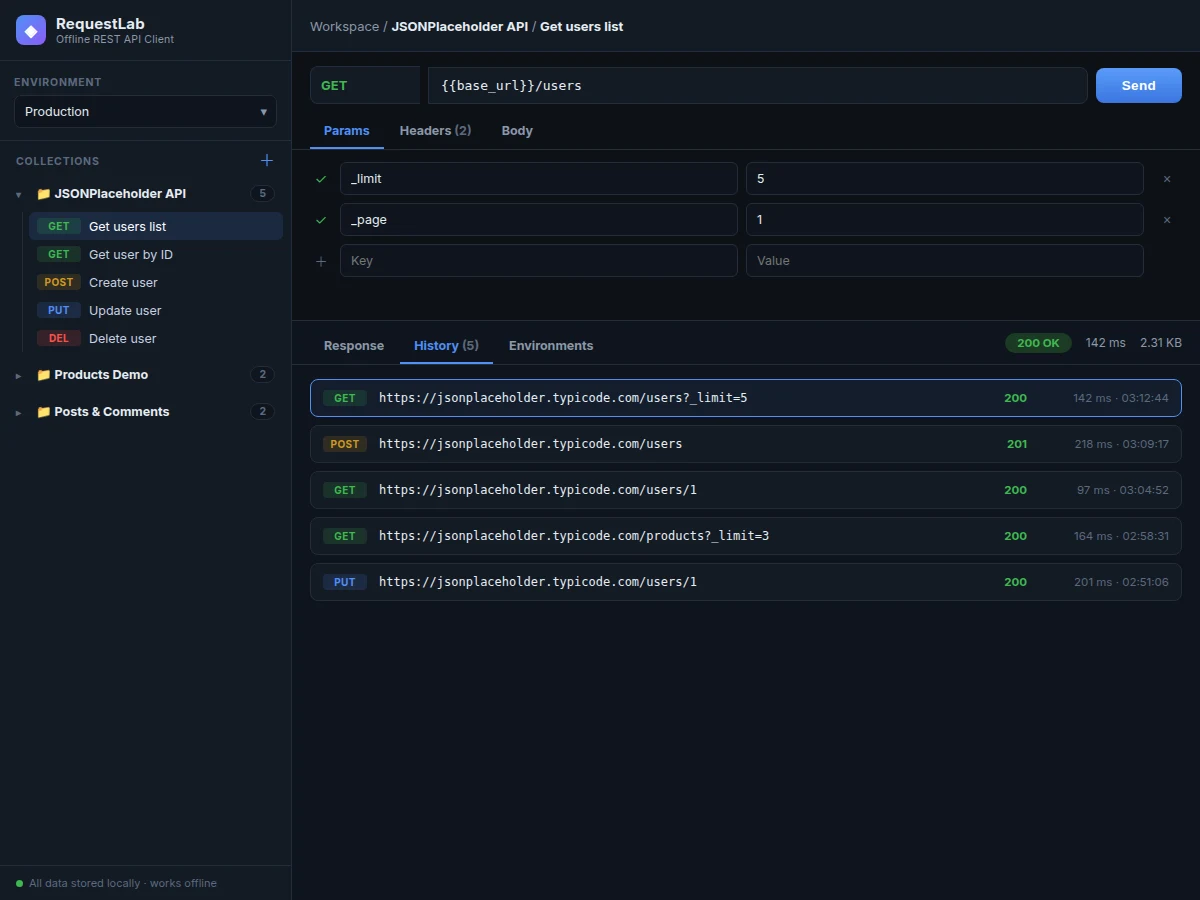
- The call is appended to the persistent history with its resolved URL, status, timing and timestamp — one click replays any past request.
- If the network is unreachable, the app serves the matching stored sample response and shows an explicit offline notice rather than an error.
Tech stack:
- HTML5 · CSS3 · vanilla JavaScript (single-file app)
- Fetch API with AbortController timeouts
- Web Storage API (localStorage persistence)
- JSONPlaceholder test API (sample workspace)
- Electron / Tauri wrapper (optional desktop packaging)
- Git
| Parameter | Value |
|---|---|
| HTTP methods | GET, POST, PUT, PATCH, DELETE |
| Environments | 3 preloaded (Development, Staging, Production), user-extensible |
| Variable substitution | URL, query params, headers and body |
| Response metrics | Status code, round-trip ms, payload KB (per call) |
| Persistence | Browser localStorage, no server or account (design) |
| Sample workspace | 3 collections, 9 saved requests, 5 seeded history entries |
| Packaging | Runs in any Chromium-based browser; Electron/Tauri wrapper optional |
| Typical local response display | Renders in well under a second after receipt (expected) |
Project features
- [Full request builder] Compose GET, POST, PUT, PATCH and DELETE requests with an editable method selector, URL bar, query-param table, headers table and a JSON body editor — the complete anatomy of an HTTP request in one screen.
- [Persistent collections] Save requests into named, collapsible collections (JSONPlaceholder API, Products Demo, Posts & Comments) that survive restarts via local storage — no account, no cloud sync.
- [Environment variables] Development, Staging and Production environments with variables like {{base_url}}, {{api_key}} and {{timeout_ms}}; switching environments re-points every saved request instantly with zero edits.
- [Response inspector] Every response shows a status pill, round-trip time in milliseconds, payload size, a syntax-highlighted JSON body and a full response-headers table.
- [Request history] Each sent call is recorded with method, resolved URL, status, timing and timestamp; clicking any entry reloads its response for comparison.
- [Offline-first by design] Collections, environments and history live in the browser's local storage. When a host is unreachable, the app falls back to its stored sample responses with a clear offline notice instead of failing silently.
- [Sample workspace included] Preloaded requests, three environments and seeded history against the public JSONPlaceholder test API, so the tool is demonstrable immediately after installation.
What is included
- Working offline REST API client app (single-file, runs in any modern browser)
- Preloaded sample workspace: 3 collections, 9 saved requests, 3 environments, seeded history
- Full source code with comments explaining the request engine and variable resolver
- Project report PDF (background, HTTP concepts, architecture, methodology)
- PPT presentation for final review
- Viva Q&A preparation document (HTTP methods, status codes, headers, REST vs SOAP, CORS, offline design)
Limitations & prerequisites
- This is an HTTP/REST client — it does not test WebSockets, gRPC or GraphQL subscriptions (a GraphQL query tab is listed as future scope).
- The app runs in the browser security sandbox, so it cannot bypass CORS restrictions of third-party APIs; the sample workspace uses CORS-friendly public test APIs.
- History and collections live in the browser's local storage — clearing site data wipes them; export/import is a planned extension.
- No automated test scripting or collection runner in this build; assertions per request are future scope.
- Round-trip figures in the demo are sample/expected values for illustration, not measured performance claims.
Frequently Asked Questions
How is this different from Postman?
Postman is a cloud product: it needs an account, syncs your workspaces to its servers and limits offline use. This client is offline-first — no account, no sync, no subscription. Collections, environments and history live in local storage on your machine, and it keeps working with zero internet. The trade-off is scope: it covers the core testing workflow (build, send, inspect, organize, replay) rather than Postman's enterprise collaboration features.
Does it work without internet?
Yes — that is the point of the design. Collections, environments, history and the app itself need no network. Sending to a local backend (localhost) works offline too. Calls to public test APIs need connectivity, and when a host is unreachable the app shows its stored sample response with an explicit offline notice instead of failing.
What do environment variables actually do?
They let one saved request run against multiple backends. Write the URL once as {{base_url}}/users, define base_url per environment (dev/staging/prod), and switching the environment dropdown re-points the request instantly — no find-and-replace across dozens of saved calls. Variables work in the URL, query params, headers and the JSON body.
Can I test my own college project's backend with it?
Yes — that is the primary use case. Point the base_url at your localhost server or deployed backend, save one request per endpoint in a collection, and you have a repeatable test suite for your own API that you can demo in the viva, including the exact status codes and response bodies your endpoints return.
How is the desktop app packaged?
The core is a single self-contained HTML/CSS/JS file that runs in any Chromium-based browser as-is. For the desktop deliverable it is wrapped in an Electron-style shell so it installs and launches like a native app with its own window and icon. The browser version and the packaged version share the identical codebase.
Is this project suitable for a final-year project?
Yes — for Computer Science and IT programs. It demonstrates HTTP protocol knowledge, frontend engineering, state persistence and offline-first design, and the viva can walk through a live request end-to-end, which makes the working of the system genuinely explainable. It is also a tool students keep using for their other backend projects. Suitable for B.E./B.Tech final-year projects in Computer Science and IT.
Components & software requirements
- HTML5 · CSS3 · vanilla JavaScript (single-file app)
- Fetch API with AbortController timeouts
- Web Storage API (localStorage persistence)
- JSONPlaceholder test API (sample workspace)
- Electron / Tauri wrapper (optional desktop packaging)
- Git
Delivery information
Built-to-order project. Delivery timeline is shared after order confirmation based on current queue.
Support terms
Complete documentation, setup guide, and viva preparation included. Support for setup and explanation provided.
Download free synopsis (PDF)
Enter your name and email — the synopsis PDF downloads immediately. We may send occasional project updates; no spam, unsubscribe anytime.