
More project photos (2)
The problem
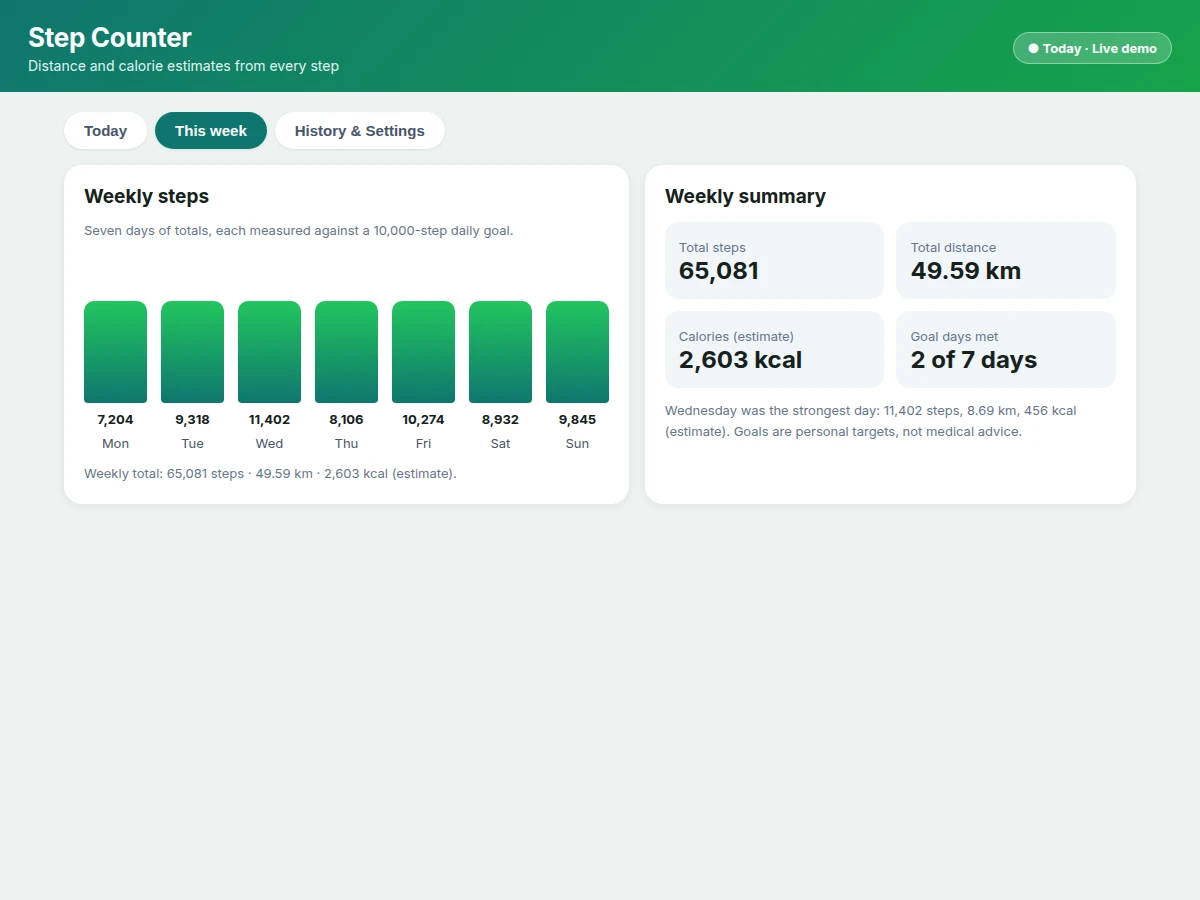
A step counter answers an everyday problem: people walk a lot, yet the phone in their pocket records none of it usefully. Without a count, there is no daily total to compare, no distance to make sense of the walk, and no calorie figure to relate the effort to. The step counter Android app built in this project solves that gap on the phone itself. It reads the phone accelerometer, detects each step, and turns the step count into two estimates the user can read at a glance: distance, from steps multiplied by stride length, and calories, from steps, stride length and body weight. A daily goal ring shows progress toward a step target, a weekly chart shows the pattern across seven days, and a history list keeps each past day total on the device. Nothing in the app measures health, and every figure it shows is an estimate from the inputs above, not a medical reading.
How it works
The step counter Android app works as a short chain from sensor to screen: the phone accelerometer reports motion, the app filters that signal for step peaks, each confirmed peak adds one step, the step total feeds two formulas for distance and calories, and the goal ring, weekly chart and history all redraw from the same totals. Because every screen reads the same stored day total, the ring, the chart and the history can never disagree with each other. A 0.4-second debounce between counted steps is the detail that keeps the count honest: a single footfall produces one peak, not several, so the total tracks footsteps rather than sensor noise. Settings sit at the end of the chain, not the start, so changing stride length or body weight recomputes the estimates from the stored step count without recounting anything.
- The user carries the Android phone in a pocket or hand while walking, and the app reads the phone accelerometer continuously.
- The app watches the accelerometer signal for peaks above a detection threshold, which mark the rhythmic motion of a footfall.
- A counted step is registered only when a peak crosses the threshold and at least 0.4 seconds (design choice) have passed since the previous counted step, so one footfall is never counted twice.
- Each confirmed step adds one step to the stored total for the current day, and the daily goal ring fills toward the daily goal.
- Distance is computed as steps multiplied by stride length, using the stride length set in settings, with a default stride length of 0.762 m (design default).
- Calories are computed as steps multiplied by 0.04 kcal per step, scaled by body weight divided by 70 kg, using the body weight set in settings.
- At day change, the finished day total moves into the on-device history with its distance figure, and a new day total starts from zero steps.
Tech stack:
- Android · Kotlin · step counter app
- Accelerometer sensor · peak detection step counting
- Room database · on-device history storage
- Custom chart views · weekly bars and goal ring
- Android Studio · app build and testing
- SharedPreferences · stride and goal settings
| Parameter | Value |
|---|---|
| Platform | Android phone with an accelerometer (design target) |
| Step detection | Accelerometer peak detection with a 0.4-second debounce (design choice) |
| Default stride length | 0.762 m (design default) |
| Distance formula | Steps multiplied by stride length in metres (design formula) |
| Calorie formula | Steps multiplied by 0.04 kcal per step, scaled by body weight divided by 70 kg (design formula) |
| Worked example | 10,000 steps multiplied by a 0.762 m stride length equals 7.62 km (computed example) |
| Daily goal | 10,000 steps (design default) |
| History storage | On-device storage for past day totals (design target) |
| Internet requirement | No internet connection and no account needed for the base app (design target) |
| Not included | GPS route tracking · cloud backup · medical measurement (not in this build) |
Project features
The step counter Android app is built around four capabilities that carry the whole demonstration: accelerometer step counting that needs no extra device, distance estimation from a stride length the user can set, calorie estimation from stride length and body weight, and a daily goal ring backed by a weekly chart and a day-by-day history. Step counting runs on the phone sensor alone, so the demonstration needs nothing beyond an Android phone. The estimates update with every counted step, which makes the mechanism visible during a viva walk: steps rise, distance grows, and calories follow the same formula. History stays on the device, so past days remain visible without an account or an internet connection, and the settings screen keeps stride length, body weight and the daily goal adjustable in one place.
- [Step counting] The app reads the phone accelerometer and counts steps with peak detection, so walking with the phone in a pocket produces a running daily total. Implemented in the base app.
- [Distance estimate] Distance is computed as steps multiplied by stride length, using a default stride length of 0.762 m (design default) that the user can change. Implemented in the base app.
- [Calorie estimate] Calories are computed as steps multiplied by 0.04 kcal per step, scaled by body weight divided by 70 kg, so the figure tracks the same inputs as the distance estimate. Implemented in the base app.
- [Daily goal ring] A ring fills as steps accumulate toward a daily goal of 10,000 steps (design default), with the remaining step count shown beside it. Implemented in the base app.
- [Weekly chart] A seven-day bar chart shows each day total against the daily goal, so weekly patterns are visible without opening each day separately. Implemented in the base app.
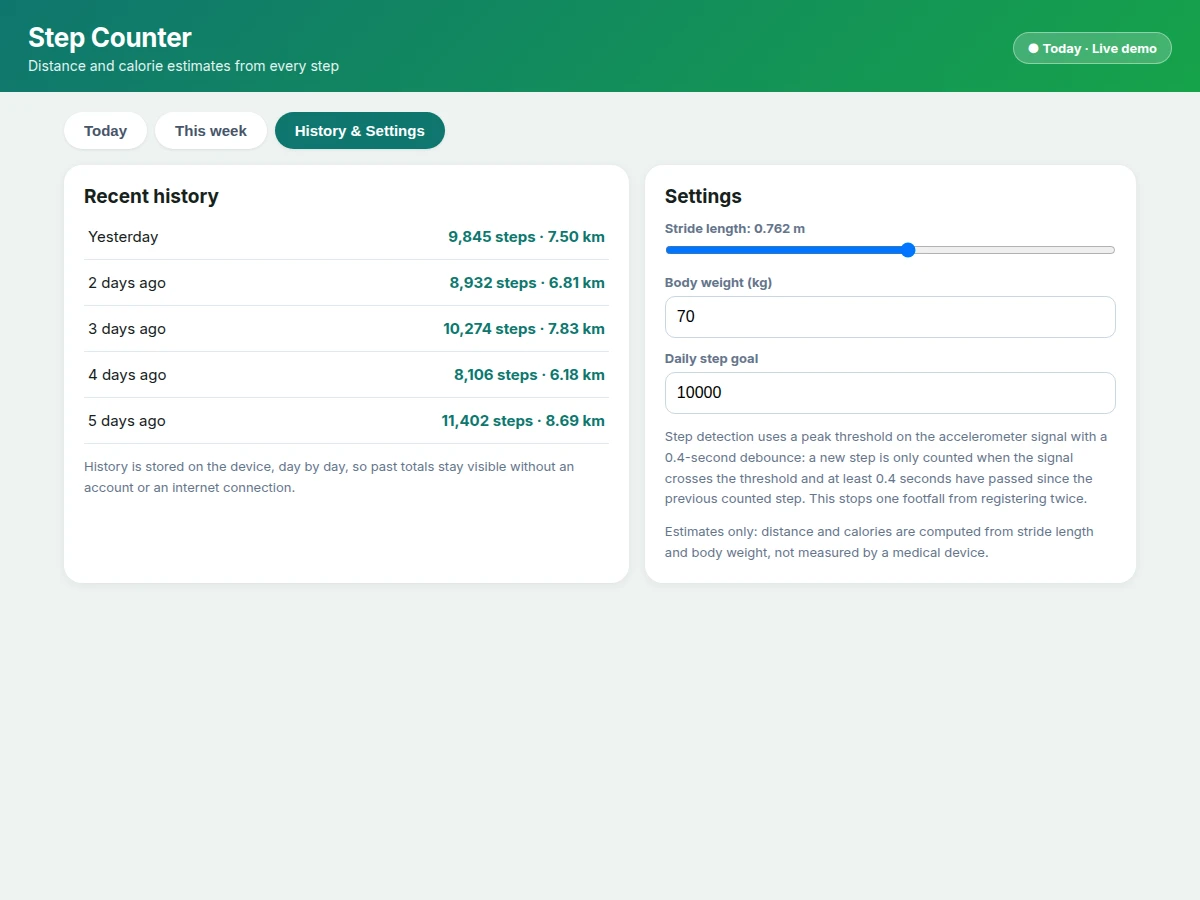
- [Day-by-day history] Past day totals are stored on the device and listed with their distance figures, so earlier totals stay available after the day changes. Implemented in the base app.
- [Adjustable settings] Stride length, body weight and the daily goal are editable from the settings screen, and every estimate updates from the new values immediately. Implemented in the base app.
- [Cloud sync] Backing up history to an online account is future scope, not in the base app, and would need an account system plus a backend service. Future scope only.
What is included
- Complete Android source code for the step counter app, including step detection, distance and calorie computation, goal ring, weekly chart, history and settings
- Build and run instructions for Android Studio, including how to install the app on a phone for the demonstration walk
- Step-detection note from the demo build, including the peak threshold approach and the 0.4-second debounce that stops one footfall from counting twice
- Demonstration procedure, including a short walk with the phone in a pocket and how to show the ring, chart and history updating
- Project report PDF (background, accelerometer step detection, estimation formulas, methodology, limitations)
- PPT presentation for final review
- Viva questions preparation document (step detection limits, stride-length error, estimation limits, on-device storage)
Limitations & prerequisites
- Distance and calories are estimates computed from stride length and body weight, not medical measurements: the app must never be presented as a health device or a diagnostic tool.
- Stride length varies between people and between slow and fast walking, so the distance figure carries the error of the stride length entered, and a wrong stride length gives a wrong distance.
- The phone must be carried while walking: steps taken while the phone sits on a table are not counted, and the count depends on where the phone is carried.
- Shaking, vehicle vibration and other rhythmic motion can add false steps, because the app detects motion peaks rather than observing the feet directly.
- The base app does not track routes: distance comes from steps multiplied by stride length, not from GPS, so no map or route is recorded.
- Battery use rises while the sensor runs through the day, and very old phones without a working accelerometer cannot run the step detection.
Frequently Asked Questions
Is this project suitable for a final-year project?
Yes, this app suits Computer Science, IT and Electronics final-year students, combining Android development, accelerometer signal handling, on-device storage and a complete working interface. The build gives a student sensor code to explain, two estimation formulas to derive and defend, and a visible result in a viva walk: a ring filling, a distance figure growing and a weekly chart forming over days. The scope is bounded to one phone and one sensor, so the work stays explainable without extra hardware.
How does the app count steps without extra hardware?
The app counts steps using only the accelerometer already inside an Android phone, by watching the sensor signal for peaks that match the rhythm of walking. Each peak above a detection threshold marks a footfall, and a 0.4-second debounce between counted steps stops one footfall from registering twice. No wearable, band or external sensor is needed for the base app, which keeps the demonstration to a single phone carried in a pocket.
How are distance and calories calculated?
Distance is calculated as steps multiplied by stride length, and calories as steps multiplied by 0.04 kcal per step, scaled by body weight divided by 70 kg. Both figures use the stride length and body weight entered in settings, with defaults of 0.762 m stride length and 70 kg body weight. A worked example makes the mechanism checkable: 10,000 steps multiplied by a 0.762 m stride length equals 7.62 km, and the same step count at 70 kg body weight gives 400 kcal (estimate).
Does the app need internet or an account?
No, the base app needs neither an internet connection nor an account, because step totals and history are stored on the device itself. A student can install the app, walk with the phone, and show the ring, chart and history entirely offline. Internet would only enter the picture for future scope such as cloud backup, which is not part of the base app and would need an account system of its own.
Can the app be customised?
Yes, realistic customisations include a GPS route view, a cloud backup option, a step-history export, and extra goal types such as a distance goal or a weekly goal. Stride length, body weight and the daily goal are already adjustable in the base app, so the simplest customisation is tuning those defaults for a particular user. Larger additions such as GPS tracking are scope changes that need location permission handling and extra testing, not free additions to the base build.
Components & software requirements
- Android · Kotlin · step counter app
- Accelerometer sensor · peak detection step counting
- Room database · on-device history storage
- Custom chart views · weekly bars and goal ring
- Android Studio · app build and testing
- SharedPreferences · stride and goal settings
Delivery information
Built-to-order project. Delivery timeline is shared after order confirmation based on current queue.
Support terms
Complete documentation, setup guide, and viva preparation included. Support for setup and explanation provided.
Download free synopsis (PDF)
Enter your name and WhatsApp number — the synopsis PDF downloads immediately. We may send occasional project updates on WhatsApp; no spam.