
More project photos (2)
The problem
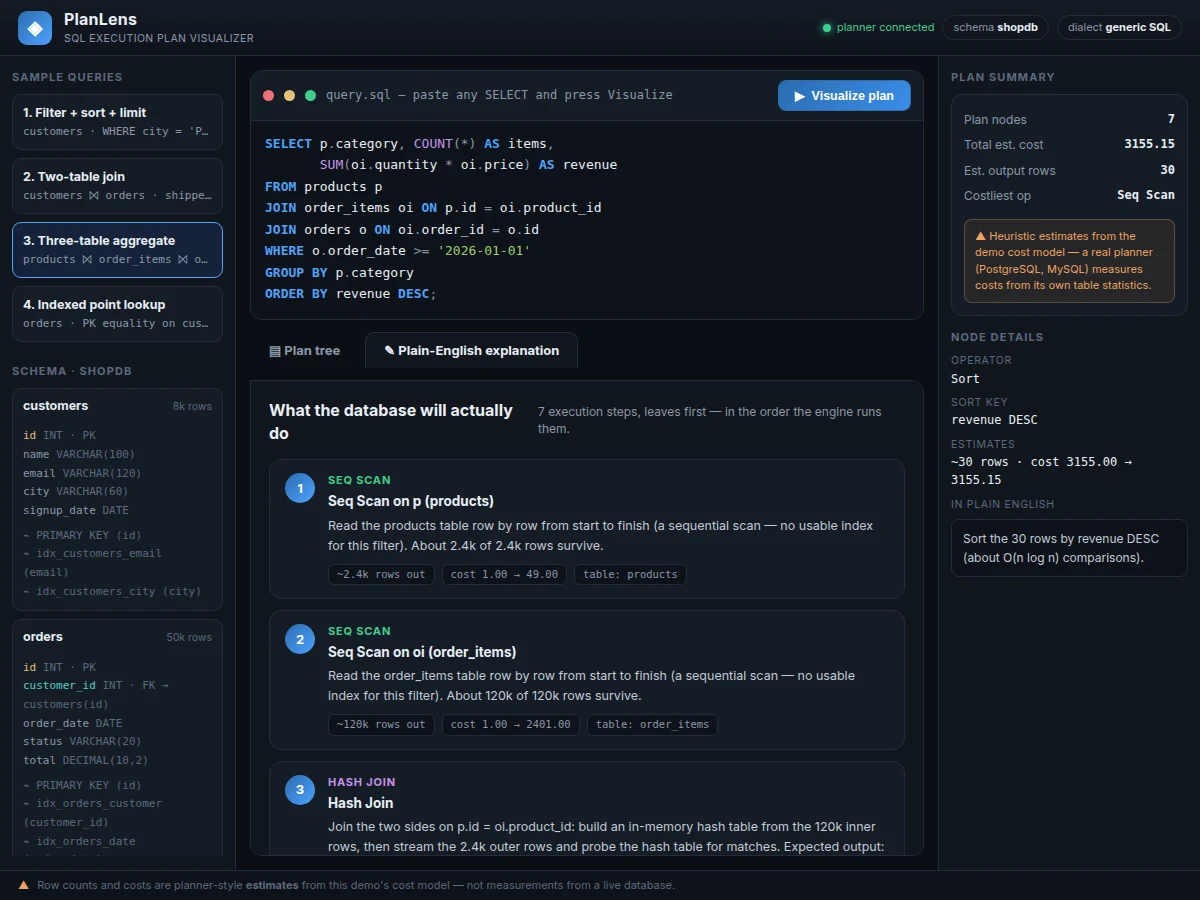
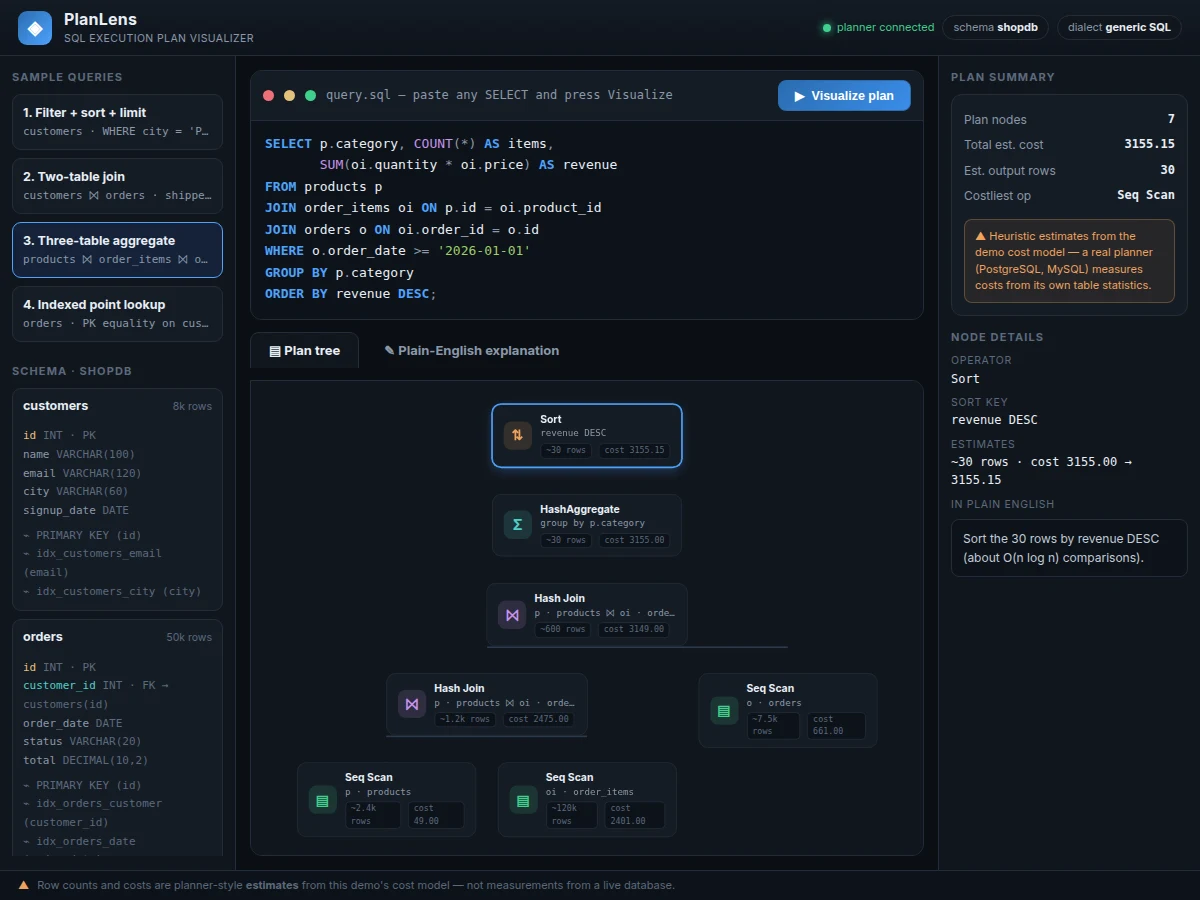
Every database runs queries through an execution plan — a tree of operators like sequential scans, index scans, hash joins, sorts and aggregates — but EXPLAIN output reads like machine code to most students. Learners can write SQL for years without ever understanding what the engine actually does with it, which makes query optimization feel like guesswork. This project closes that gap: a web app where you paste any SELECT query and immediately see its execution plan as a visual operator tree, with each node annotated by estimated rows and cost, plus a plain-English walkthrough of every step in the order the engine runs them. A hand-written SQL parser (tokenizer plus recursive-descent grammar) handles the common SELECT subset — joins, filters, grouping, sorting, limits — over a realistic e-commerce schema, and an index-aware planner picks scan strategies the way a real optimizer reasons. It turns an invisible internals topic into something you can click, read and explain.
Pastes a SELECT query or picks a guided sample, then reads the plan.
Follow the working sequence
How it works
- Paste a SELECT query into the editor (or pick one of the four guided samples) and press Visualize plan.
- The tokenizer splits the query into keywords, identifiers, strings, numbers and operators; the recursive-descent parser builds an abstract syntax tree for the SELECT statement.
- The planner walks the AST bottom-up: one scan node per table — Index Scan when a WHERE equality hits a known index, otherwise Seq Scan with the residual filter noted — then folds each JOIN into a Hash Join (equi-join) or Nested Loop node.
- Single-table WHERE predicates are pushed into their scans; GROUP BY and aggregates become a HashAggregate node; ORDER BY and LIMIT become Sort and Limit nodes.
- Every node receives estimated output rows (selectivity heuristics over the schema's row counts) and a startup/total cost from the demo's openly documented cost model.
- The tree renders with connector lines while the explainer panel narrates each step in plain English in execution order — click any node for its full operator details.
Tech stack:
- HTML5 + CSS3 (dark IDE-style UI)
- Vanilla JavaScript (ES6, zero dependencies)
- Hand-written recursive-descent SQL parser
- Heuristic cost-based plan estimation
- Tree layout with CSS connectors + auto-fit scaling
- Single-file app — runs offline in any modern browser
- Git
| Parameter | Value |
|---|---|
| SQL subset supported | SELECT, DISTINCT, FROM with aliases, JOIN (INNER/LEFT/RIGHT/FULL), WHERE, GROUP BY, HAVING, ORDER BY, LIMIT, OFFSET (design target) |
| Out of scope | Subqueries, UNION, window functions, CTEs, DDL/DML — rejected with a clear parse error (by design) |
| Demo schema | 4 tables: customers, orders, products, order_items |
| Demo schema rows | Approximately 180,000 total (8k + 50k + 2.4k + 120k) |
| Plan operators rendered | 9 (Seq Scan, Index Scan, Hash Join, Nested Loop, Filter, Sort, HashAggregate, Unique, Limit) |
| Parse + plan time | Under 50 ms for the sample queries on a typical laptop (expected) |
| Row/cost figures | Heuristic estimates from a documented model — never measured values |
| App size | Single HTML file, approximately 40 KB |
| Browser support | Any modern browser with ES6 JavaScript (expected) |
Project features
- [Hand-written SQL parser] A real tokenizer plus recursive-descent parser for the common SELECT subset — FROM/JOIN/WHERE/GROUP BY/ORDER BY/LIMIT, aliases, aggregate functions and expressions — with no parser-generator dependency, and every grammar rule documented for the viva.
- [Visual plan tree] The parsed query becomes an operator tree (Seq Scan, Index Scan, Hash Join, Sort, HashAggregate, Limit) drawn with connector lines; every node shows estimated rows and cost, and the tree auto-fits the viewport.
- [Plain-English explainer] Each plan node gets a step-by-step explanation in ordinary language, ordered the way the engine actually executes (leaves first) — so "Hash Join" becomes "build a hash table from the inner rows, then probe it".
- [Index-aware scan choice] The planner inspects WHERE clauses against the schema's indexes and picks Index Scan over Seq Scan when an equality matches a known index — the same reasoning a real optimizer applies.
- [Heuristic cost model] Row estimates use selectivity heuristics (indexed equality ≈ 2%, range ≈ 15%) and each operator carries a startup/total cost — every figure clearly labeled an estimate, never a measurement.
- [Click-to-inspect nodes] Selecting any node opens its operator details — join conditions, sort keys, group keys, index used — alongside its plain-English meaning.
- [Sample schema + queries] A realistic 4-table e-commerce schema (customers, orders, products, order_items) with row counts and indexes, plus four guided sample queries from simple filter to three-table aggregate.
- [Syntax-highlighted editor] A SQL editor with keyword/string/number highlighting, clear parse-error messages for unsupported syntax, and one-click visualization.
What is included
- Working single-file web demo (the plan visualizer app)
- Documented parser + planner JavaScript source with grammar notes
- Sample e-commerce schema definition with indexes and row counts
- Four guided walkthrough queries (filter, join, aggregate, indexed lookup)
- Project report PDF (parsing theory, planner design, cost model, methodology)
- PPT presentation for final review
- Viva Q&A preparation document (parsing, query planning, join algorithms, cost estimation)
Limitations & prerequisites
- Supports a SELECT-only subset — no subqueries, UNION, window functions, CTEs, or DML/DDL; queries outside the subset get a clear parse error, never a wrong plan.
- Row counts and costs are heuristic estimates from a teaching cost model, not measurements — they show how planners reason, not real PostgreSQL/MySQL numbers.
- The demo ships one fixed e-commerce schema; pointing it at an arbitrary live database schema is future scope.
- Selectivity figures (indexed equality ≈ 2%, range ≈ 15%) are textbook-style heuristics, stated as approximations throughout.
- The demo runs fully client-side with no backend execution engine — plans describe what a database would do, without running anything.
- Not a substitute for EXPLAIN ANALYZE on a real database, which reports measured timings this demo cannot produce.
Frequently Asked Questions
How is this different from running EXPLAIN in PostgreSQL?
EXPLAIN prints a text plan meant for people who already understand operators. This project is a teaching tool: it parses the query itself, draws the operator tree visually, and narrates each step in plain English. It is built for learning how planners think, not for tuning a production database.
Is the SQL parser real or faked?
Real. It is a hand-written tokenizer plus recursive-descent parser in vanilla JavaScript — no libraries, no mock plans. You can paste your own SELECT queries within the supported subset and watch a genuine plan get built; unsupported syntax returns an explicit parse error.
Are the row counts and costs accurate?
They are honest estimates, not measurements. The demo applies textbook selectivity heuristics to fixed schema statistics and labels every figure as an estimate. The report documents the cost model openly — which itself makes a strong viva discussion about how real optimizers use table statistics.
What SQL does it support?
The common SELECT subset: SELECT/DISTINCT, FROM with aliases, INNER/LEFT/RIGHT/FULL joins, WHERE with AND/OR, comparisons, LIKE, IN and BETWEEN, GROUP BY, HAVING, ORDER BY, LIMIT/OFFSET, and aggregate functions. Subqueries, UNION, window functions and CTEs are out of scope and reported as such.
Is this project suitable for a final-year project?
Yes — for Computer Science and IT programs. It combines compiler techniques (tokenizing, parsing, ASTs) with database internals (query planning, join algorithms, cost estimation) and ships a polished working demo, giving examiners concrete theory plus something real to click through. Suitable for B.E./B.Tech final-year projects in Computer Science and IT.
Components & software requirements
- HTML5 + CSS3 (dark IDE-style UI)
- Vanilla JavaScript (ES6, zero dependencies)
- Hand-written recursive-descent SQL parser
- Heuristic cost-based plan estimation
- Tree layout with CSS connectors + auto-fit scaling
- Single-file app — runs offline in any modern browser
- Git
Delivery information
Built-to-order project. Delivery timeline is shared after order confirmation based on current queue.
Support terms
Complete documentation, setup guide, and viva preparation included. Support for setup and explanation provided.
Download free synopsis (PDF)
Enter your name and email — the synopsis PDF downloads immediately. We may send occasional project updates; no spam, unsubscribe anytime.