
More project photos (3)
The problem
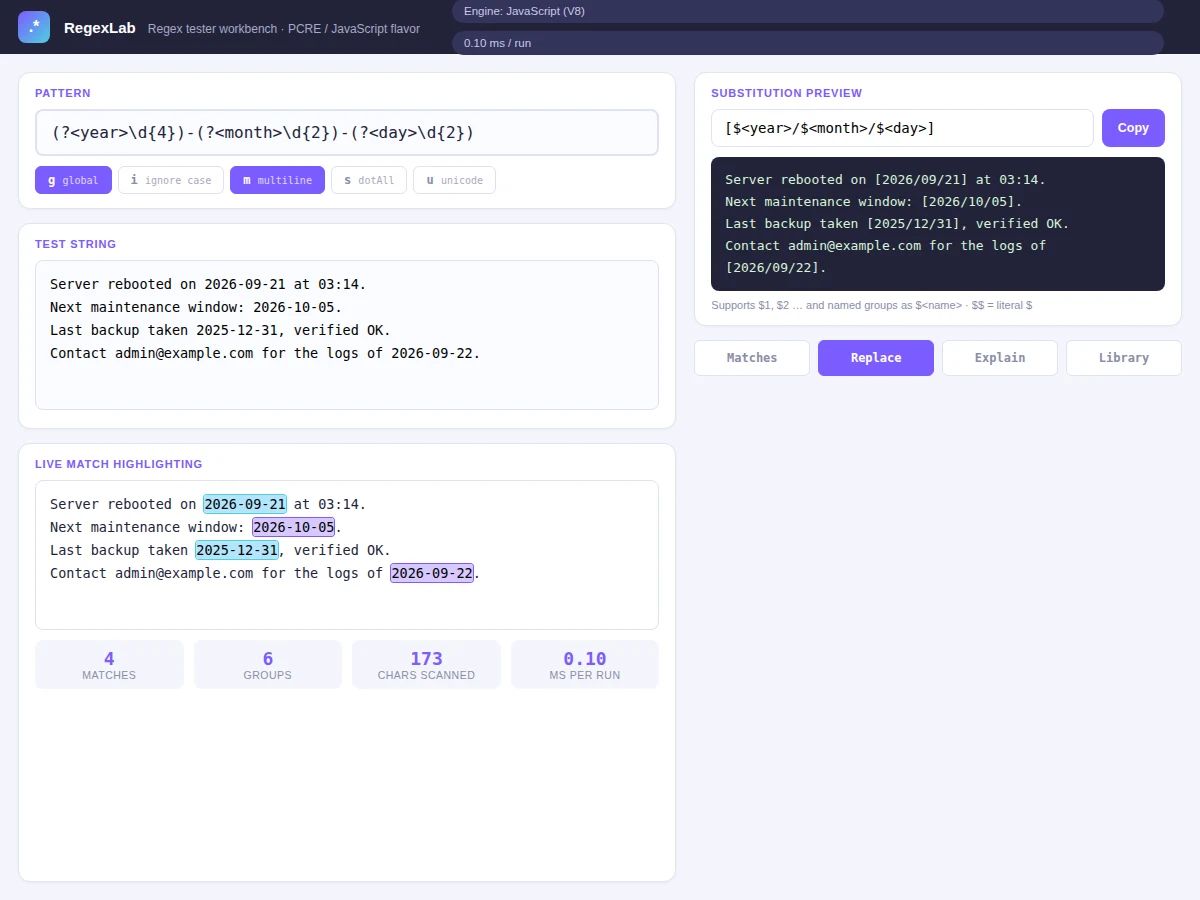
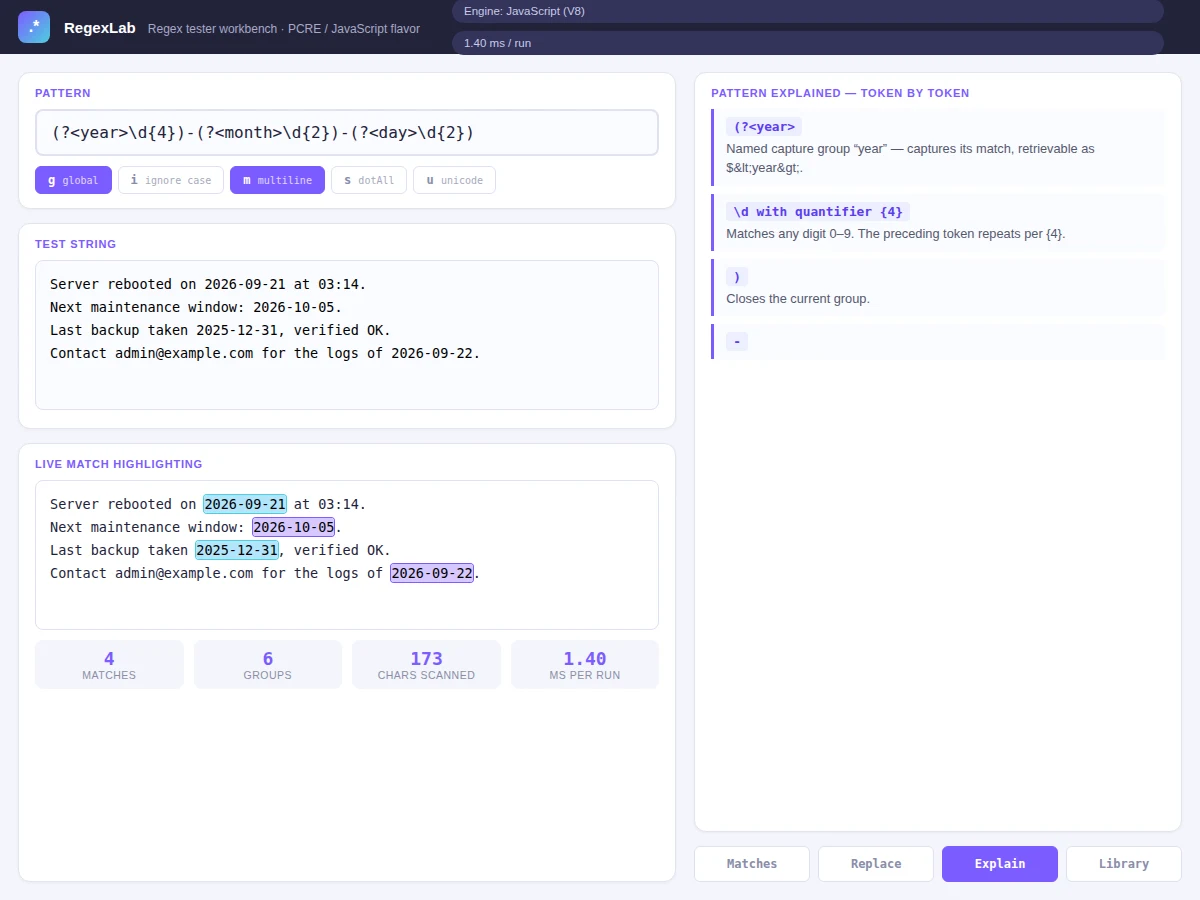
Regular expressions are one of those tools every programmer needs and almost nobody learns properly — most students copy patterns from the internet without understanding what each token does, then spend hours debugging why a pattern fails. Existing online testers show matches but rarely explain the pattern itself, and none combine testing, substitution preview and teaching in one place. This workbench closes that gap. As you type, matches are highlighted live in the test string with per-match timing, a match inspector breaks out every capture group (numbered and named), a substitution panel previews replacements with $1/$2 and named-group syntax, and an explainer pane translates each token of the pattern into plain English. A curated pattern library (email, IPv4, URL, Indian mobile numbers, strong passwords, hex colours, quoted strings) gives starting points, and a cheat sheet covers the full syntax. The whole thing runs as a single-file web app with zero dependencies.
Types patterns and test text, picks tools and library entries.
Follow the working sequence
How it works
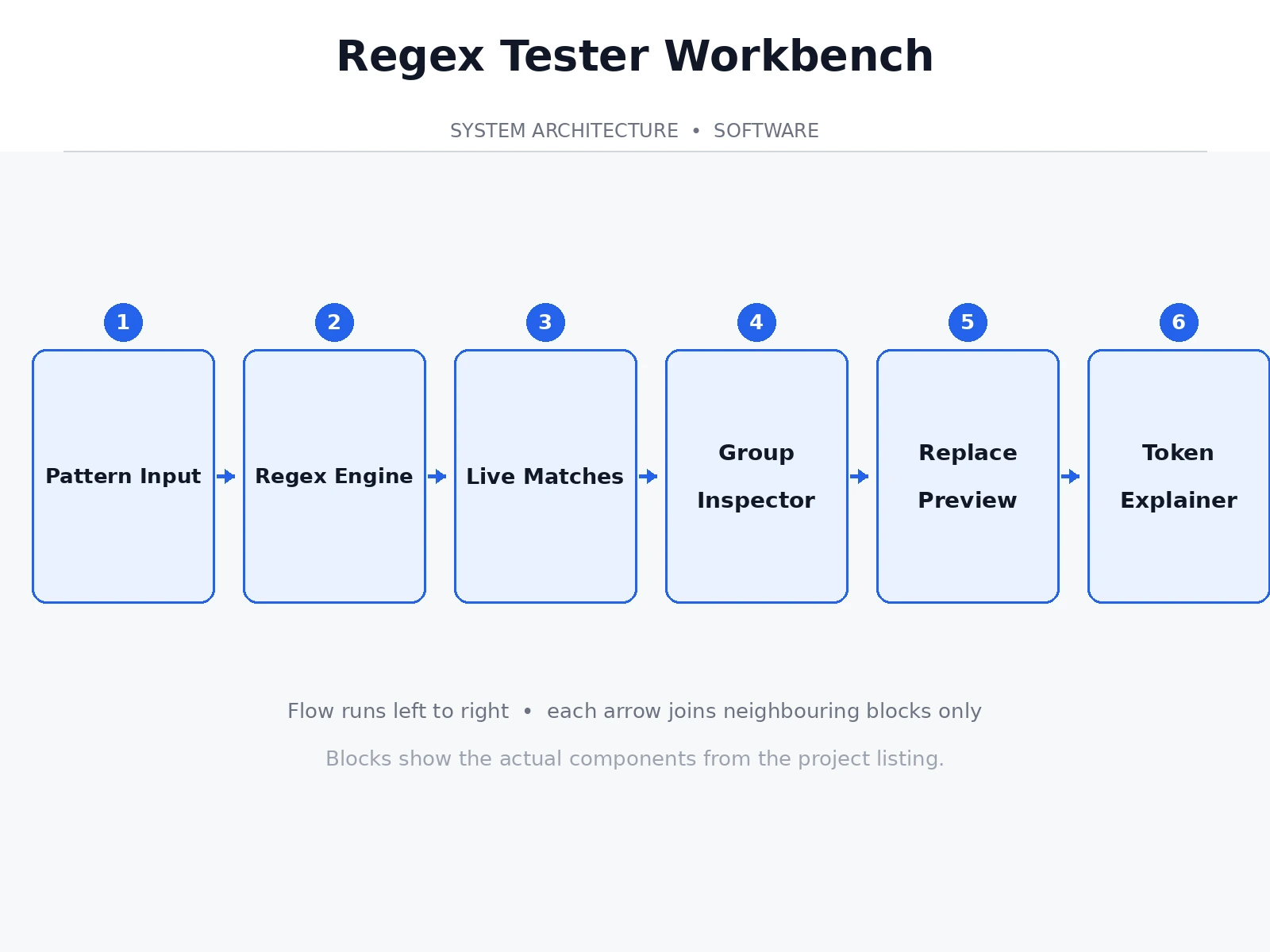
- The user types a pattern and test text; the app compiles the pattern with the selected flags using the JavaScript regex engine.
- On every keystroke, the engine runs a match-all pass over the test string and records each match's index, text and groups.
- Match spans are re-rendered as highlighted segments in the test-text view, alternating two highlight colours.
- The inspector lists each match with its character span and expands every capture group, including named groups.
- The substitution panel applies the user's replacement string to the same match set and previews the result with changed regions marked.
- The explainer tokenizes the pattern (escapes, classes, groups, quantifiers, anchors, lookarounds) and renders a plain-English card per token.
- Library entries load a vetted pattern plus matching sample text so each one demonstrates its use immediately.
Tech stack:
- HTML5 · CSS3 · JavaScript (ES6)
- JavaScript RegExp engine (V8)
- matchAll with capture-group introspection
- Custom pattern tokenizer for the explainer
- Single-file app, zero dependencies
- Git
| Parameter | Value |
|---|---|
| Regex flavor | JavaScript (V8) — documented per-feature (design target) |
| Match latency | Sub-millisecond per run on typical inputs (expected) |
| Library patterns | 8 curated patterns with sample text (design target) |
| Highlighting | Alternating per-match colours, group-aware (design target) |
| Substitution syntax | $1…$n, $ |
| Dependencies | None — single HTML file (design target) |
| Offline | Fully offline after download (design target) |
Project features
- [Live match highlighting] Matches light up in the test text as you type, with alternating colours per match and a per-run timing readout.
- [Match inspector] Every match expands to show its span, full text and all capture groups — numbered ($1, $2) and named ($
) — with their values. - [Substitution preview] Type a replacement with $1/$2 or $
references and see the transformed text instantly, before copying it. - [Token-by-token explainer] The pattern is parsed and each token (character classes, quantifiers, groups, lookaheads, anchors) is explained in plain English.
- [Pattern library] Eight ready-made, tested patterns — ISO dates, emails, IPv4, URLs, Indian mobiles, strong passwords, hex colours, quoted strings — each loading its own sample text.
- [Cheat sheet] A quick-reference grid of regex syntax always one click away inside the app.
- [Flag toggles] Global, ignore-case, multiline, dotAll and unicode flags toggle live with one click.
- [Syntax error reporting] Invalid patterns show the engine's exact error message instead of failing silently.
What is included
- Complete single-file regex workbench application
- Curated pattern library (8 patterns with documentation)
- User guide (regex tutorial chapter using the workbench)
- Project report PDF (background, regex theory, engine notes, methodology)
- PPT presentation for final review
- Viva Q&A preparation document (automata basics, greedy vs lazy, backtracking, groups)
Limitations & prerequisites
- Uses the JavaScript regex flavor — PCRE-only features (recursion, atomic groups) are not supported.
- The explainer covers common syntax; highly exotic constructs get a generic description.
- Performance figures are expected ranges on typical inputs, not measured benchmarks — pathological patterns (catastrophic backtracking) can still hang the tab, which the report documents honestly.
- Not a regex engine implementation — it is a tester/teaching tool built on the browser's engine.
Frequently Asked Questions
Which regex flavor does it use?
JavaScript (the V8 engine in the browser). The report documents exactly which features that includes and where it differs from PCRE or Python's re module.
How does the pattern explainer work?
A small tokenizer walks the pattern character by character — escapes, character classes, groups, quantifiers, anchors, lookarounds — and renders a plain-English card for each token it finds.
Can I test replacements, not just matches?
Yes — the substitution panel takes a replacement string with $1, $2 or $
Does it work offline?
Yes. It is a single HTML file with no libraries or network calls, so it runs from a pen drive in the viva room.
What makes this better than existing online regex testers?
The combination of live group inspection, substitution preview and the token-by-token explainer in one offline file — most testers do only the first.
Is this project suitable for a final-year project?
Yes — for Computer Science and IT programs. It demonstrates parsing, string algorithms, UI engineering and technical writing, with a tool people genuinely use. Suitable for B.E./B.Tech final-year projects in Computer Science and IT.
Components & software requirements
- HTML5 · CSS3 · JavaScript (ES6)
- JavaScript RegExp engine (V8)
- matchAll with capture-group introspection
- Custom pattern tokenizer for the explainer
- Single-file app, zero dependencies
- Git
Delivery information
Built-to-order project. Delivery timeline is shared after order confirmation based on current queue.
Support terms
Complete documentation, setup guide, and viva preparation included. Support for setup and explanation provided.
Download free synopsis (PDF)
Enter your name and WhatsApp number — the synopsis PDF downloads immediately. We may send occasional project updates on WhatsApp; no spam.