
More project photos (2)
The problem
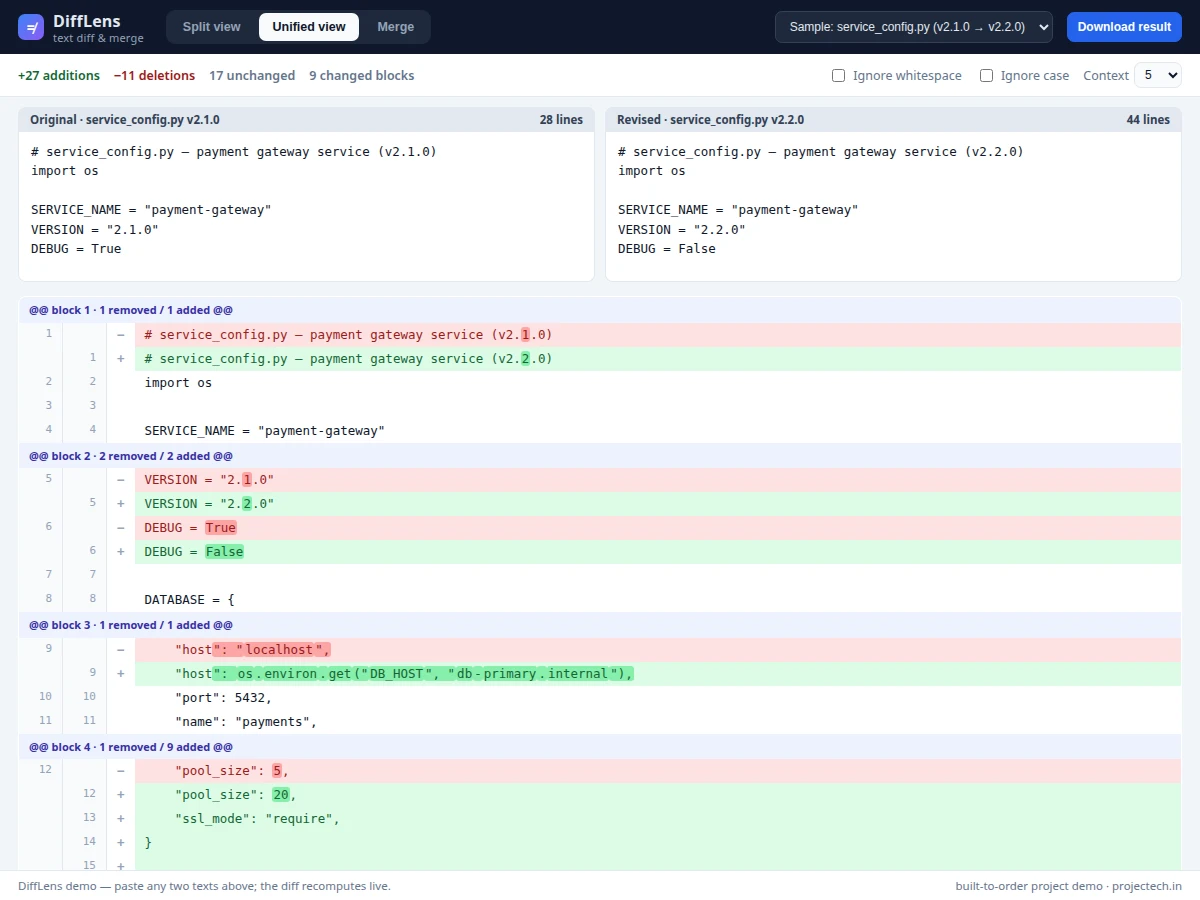
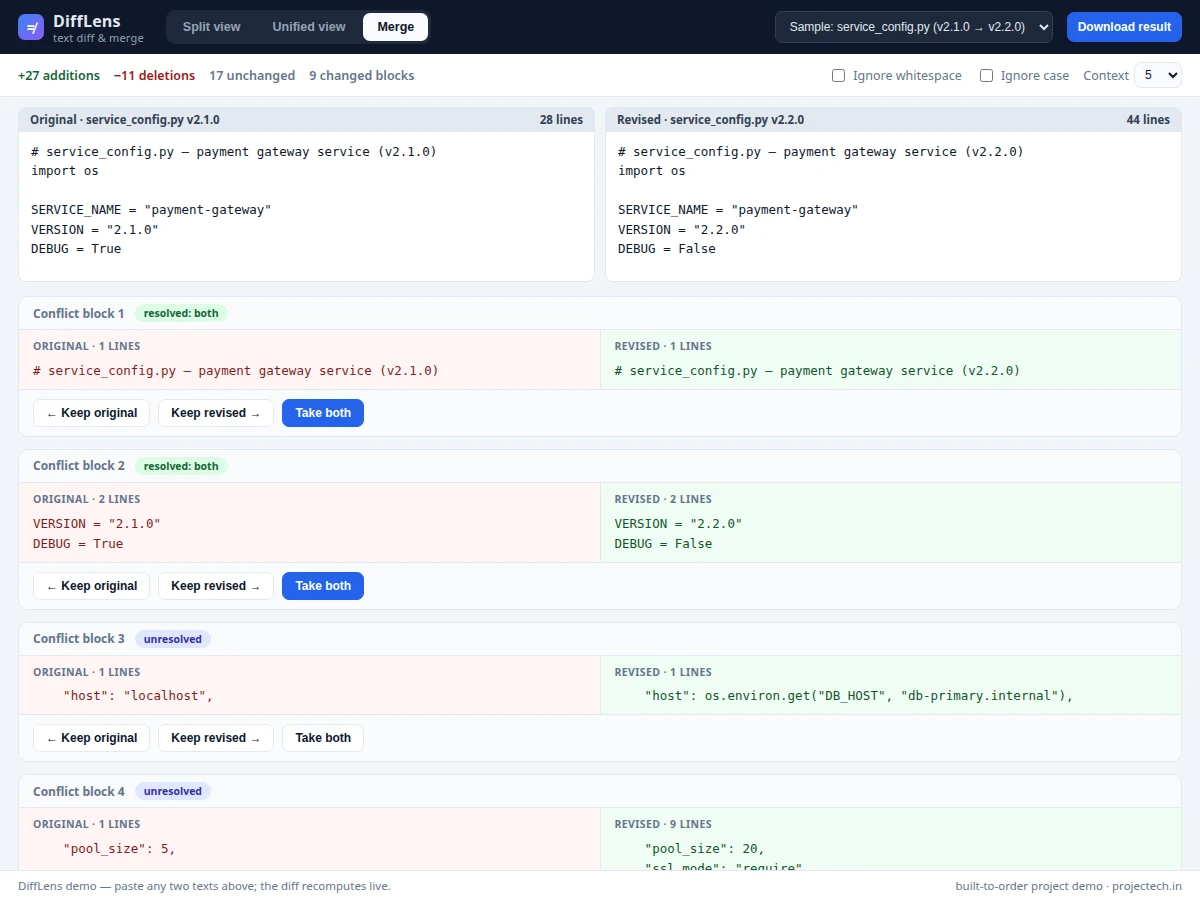
Comparing two versions of a file is a daily task in software work: reviewing a pull request, auditing a config change before deployment, or reconciling two edited copies of a document. Plain text editors cannot show what changed between versions, and while command-line diff exists, its output is hard to read for students and its merge workflows are intimidating. This project builds a visual diff and merge tool that runs entirely in the browser: paste two texts (or load the included sample pairs — a Python service config across two releases, an nginx staging-vs-production config, or a changelog), and the tool computes a line-level diff with word-level highlighting of exactly which tokens changed. A split side-by-side view aligns both versions row by row; a unified view shows a single-column +/- listing with collapsible unchanged regions. Each changed block becomes a merge card where you keep the original, keep the revised, or take both, and the merged preview updates live. The whole tool is one self-contained HTML file with no server, so it runs offline and demonstrates a complete string-algorithms application.
How it works
- You paste the original text into the left editor and the revised text into the right editor (or pick one of the three sample pairs); the diff recomputes live as you type.
- The engine runs a line-level longest-common-subsequence comparison on the two line arrays (with optional whitespace/case normalization) and groups the result into equal runs and changed blocks.
- For each changed block, a word-level comparison on paired lines marks exactly which tokens were added, removed or altered, rendered as inline highlights.
- In split view the block's lines are row-aligned (the shorter side padded with blanks); in unified view the block is shown as -/+ lines with an @@ header and long unchanged runs collapsed behind a click-to-expand gap row.
- Switching to the merge tab turns every changed block into a conflict card; clicking keep-original / keep-revised / take-both records the resolution for that block.
- The merged output is assembled from unchanged lines plus each block's chosen content (unresolved blocks get standard conflict markers) and can be copied or downloaded.
Tech stack:
- HTML5, CSS3 (single-file app, no build step)
- Vanilla JavaScript (diff engine, merge state, live rendering)
- LCS-based line diff with word/token-level refinement
- Browser Clipboard API + Blob download (result export)
- Chromium/any modern browser (runs fully offline)
| Parameter | Value |
|---|---|
| App format | Single self-contained HTML file (no backend, no dependencies) |
| Diff algorithm | Line-level longest common subsequence + word-level refinement |
| Views | Split side-by-side, unified +/-, merge/conflict resolution |
| Merge actions per block | Keep original / keep revised / take both |
| Unresolved blocks | Standard <<<<<<< / ======= / >>>>>>> conflict markers |
| Compare options | Ignore whitespace, ignore case, context 3/5/10/all |
| Sample pairs included | 3 (Python config, nginx config, changelog) |
| Export | Copy to clipboard, download merged result as .txt |
| Runtime | Any modern browser; works offline after download (expected) |
Project features
- [Split side-by-side diff view] The two versions are shown in aligned columns with per-line numbering, changed blocks grouped with headers, and word-level highlighting so you see exactly which tokens differ inside a modified line.
- [Unified +/- view] A single-column diff with -/+ markers and @@ block headers, collapsible unchanged regions with adjustable context lines (3, 5, 10 or all), and the same word-level highlighting.
- [Block-by-block merge] Every changed block becomes a conflict card with three resolution actions — keep original, keep revised, or take both — and a badge showing whether the block is resolved.
- [Live merged-output preview] The merged result recomputes on every resolution; unresolved blocks render with standard <<<<<<</=======/>>>>>>> conflict markers, and the result can be copied to the clipboard or downloaded as a .txt file.
- [Compare options] Ignore-whitespace and ignore-case modes change the comparison semantics, useful for diffing reformatted code or case-insensitive text.
- [Live diff statistics] Additions, deletions, unchanged lines and changed-block counts update as you type, giving an instant summary of how much actually changed.
- [Three realistic sample pairs] Preloaded comparisons — a Python service config across two releases, an nginx staging-vs-production config, and a changelog — so the tool is demonstrable in seconds.
- [Fully offline single file] The entire app, including the diff engine and UI, is one HTML file with no backend and no build step — it opens in any modern browser.
What is included
- Single-file diff and merge web app (DiffLens) with all three views
- Diff engine source (line LCS + word-level highlighting) with comments
- Three realistic sample file pairs for demonstration
- Project report PDF (background, diff-algorithm explanation, methodology, usage guide)
- PPT presentation for final review
- Viva Q&A preparation document (diff algorithms, LCS complexity, merge strategies, conflict markers)
Limitations & prerequisites
- The comparison is text-based: it diffs lines and words, not syntax trees, so moved code blocks appear as delete+insert rather than "moved".
- Very large files (tens of thousands of lines) will feel slow because the LCS table is O(n*m) memory — the tool is designed for config/code files of a few hundred lines, typical of student use.
- Three-way merge (common ancestor + two branches) is out of scope; the tool merges two versions pairwise.
- Merge resolution is manual per block — there is no automatic conflict resolution or AI suggestion.
- The app compares text only; binary files, images and formatted documents are not supported.
Frequently Asked Questions
How does the diff actually work?
The engine compares the two texts line by line using a longest-common-subsequence algorithm, then groups the differences into changed blocks. Inside each block, paired lines get a word-level comparison so exactly the changed tokens are highlighted, not just the whole line.
What is the difference between the split and unified views?
Split view shows both versions in aligned side-by-side columns with line numbers — best for reading two code versions together. Unified view shows one column with - and + markers like classic patch output, with long unchanged stretches collapsed — best for scanning many small changes quickly.
How does merging work?
Each changed block becomes a conflict card. You resolve it by keeping the original version, keeping the revised version, or taking both. The merged preview updates live; any block you skip appears with standard conflict markers (<<<<<<< / ======= / >>>>>>>), which you can copy out and resolve elsewhere.
Does it need a server or internet connection?
No. The entire app is one HTML file — the diff engine, merge logic and UI all run in the browser. It works fully offline once downloaded, which also means pasted text never leaves your machine.
Can it compare files, or only pasted text?
The demo compares text pasted into the two editors (or the included samples). Extending it to file upload via the FileReader API is listed as future scope in the report.
Is this project suitable for a final-year project?
Yes — for Computer Science and IT programs. It demonstrates string algorithms (LCS), real UI engineering, and a genuinely useful developer tool with a working demo. Suitable for B.E./B.Tech final-year projects in Computer Science and IT.
Components & software requirements
- HTML5, CSS3 (single-file app, no build step)
- Vanilla JavaScript (diff engine, merge state, live rendering)
- LCS-based line diff with word/token-level refinement
- Browser Clipboard API + Blob download (result export)
- Chromium/any modern browser (runs fully offline)
Delivery information
Built-to-order project. Delivery timeline is shared after order confirmation based on current queue.
Support terms
Complete documentation, setup guide, and viva preparation included. Support for setup and explanation provided.