
More project photos (3)
The problem
Every college print shop runs the same messy ritual at submission time: students crowd the counter with pen drives, shout page counts across the noise, argue about colour-versus-black-and-white rates, and pay in crumpled cash while the operator scribbles jobs in a register. Jobs get printed before payment, regulars run informal tabs nobody tracks, and at the end of the day the owner has no reliable record of what was printed or what was collected. Existing print-management tools are built for corporate offices with badge readers and Active Directory — overkill and overpriced for a campus counter. This project builds a print queue manager designed for exactly that counter: a web app where students submit documents, see the exact cost before paying, and get a short release code; and a print-desk console where the operator watches a live queue, verifies the code to unlock each job, and closes the day with a per-job cost ledger and collection summaries.
Selects a document, enters page count and copies, picks B&W or colour and duplex, then submits the job.
Follow the working sequence
How it works
- The student opens the web app, selects a document (PDF, DOCX or PPTX), enters the page count and copies, and chooses B&W or colour, paper size and duplex.
- The estimate engine multiplies pages x copies x the desk's configured per-page rate, applies the 10% duplex discount, and displays the exact total before anything is paid.
- On submit, the total is deducted from the student's wallet, the system generates a 6-character release code valid for 24 hours, and the job enters the queue in WAITING state.
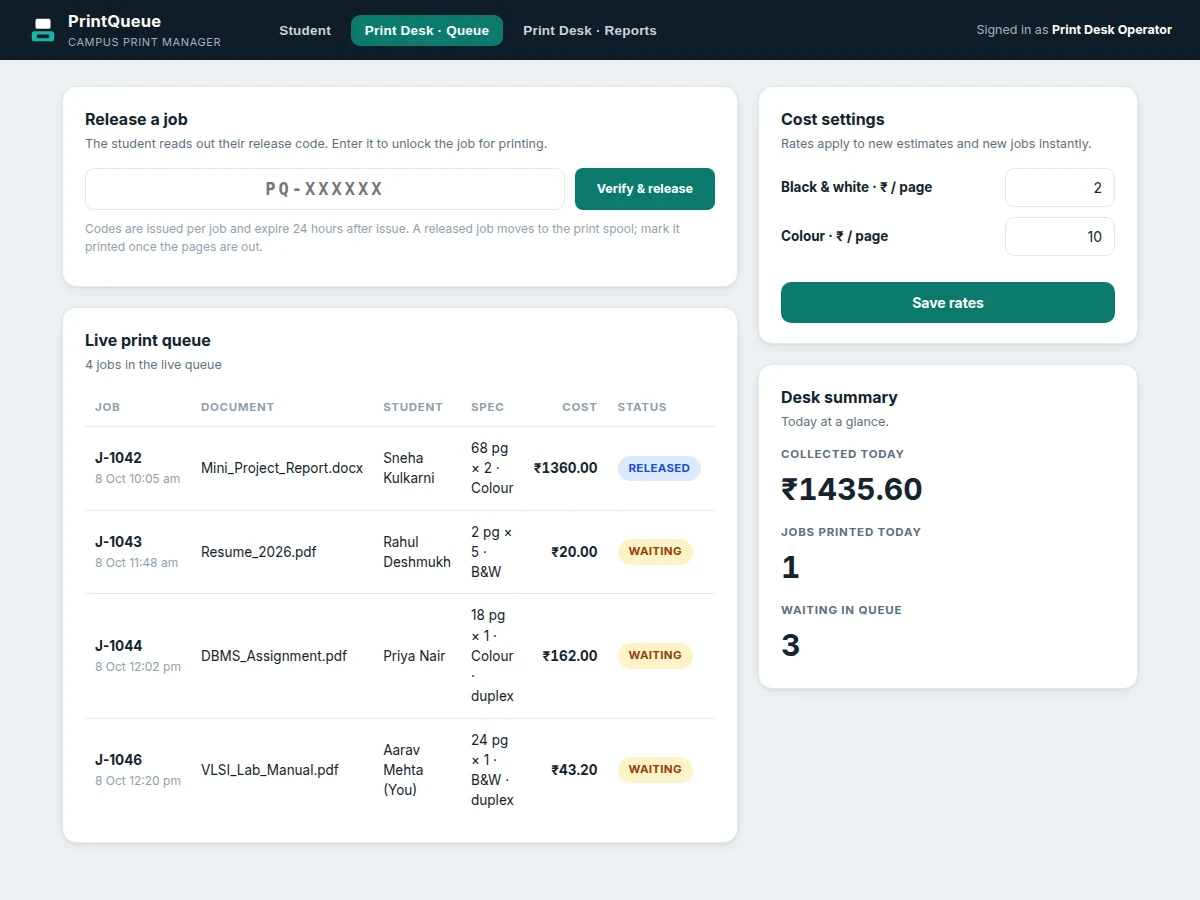
- At the counter the student reads out the code; the operator enters it, the system verifies code, job state and expiry, and the job moves to RELEASED — unlocked for printing.
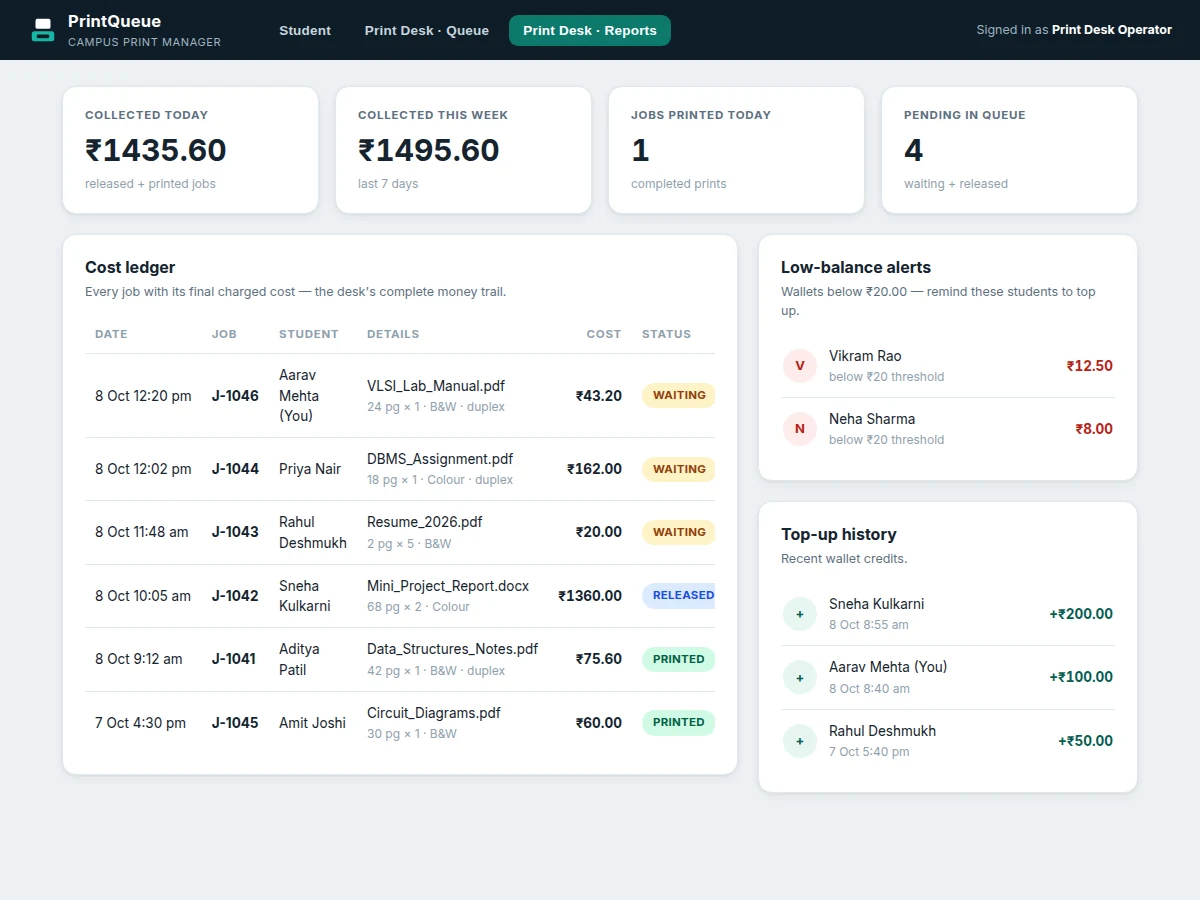
- Once the pages are out, the operator marks the job PRINTED; the cost lands in the per-job ledger and the daily and weekly collection summaries update.
- The desk can change the B&W and colour per-page rates at any time — new estimates and new jobs use the updated rates immediately, while already-submitted jobs keep the rate they were charged at.
Tech stack:
- HTML5 · CSS3 (responsive web UI for student and desk views)
- Vanilla JavaScript (ES6) — estimate engine, queue logic, wallet and ledger
- Browser localStorage (client-side datastore for the working demo)
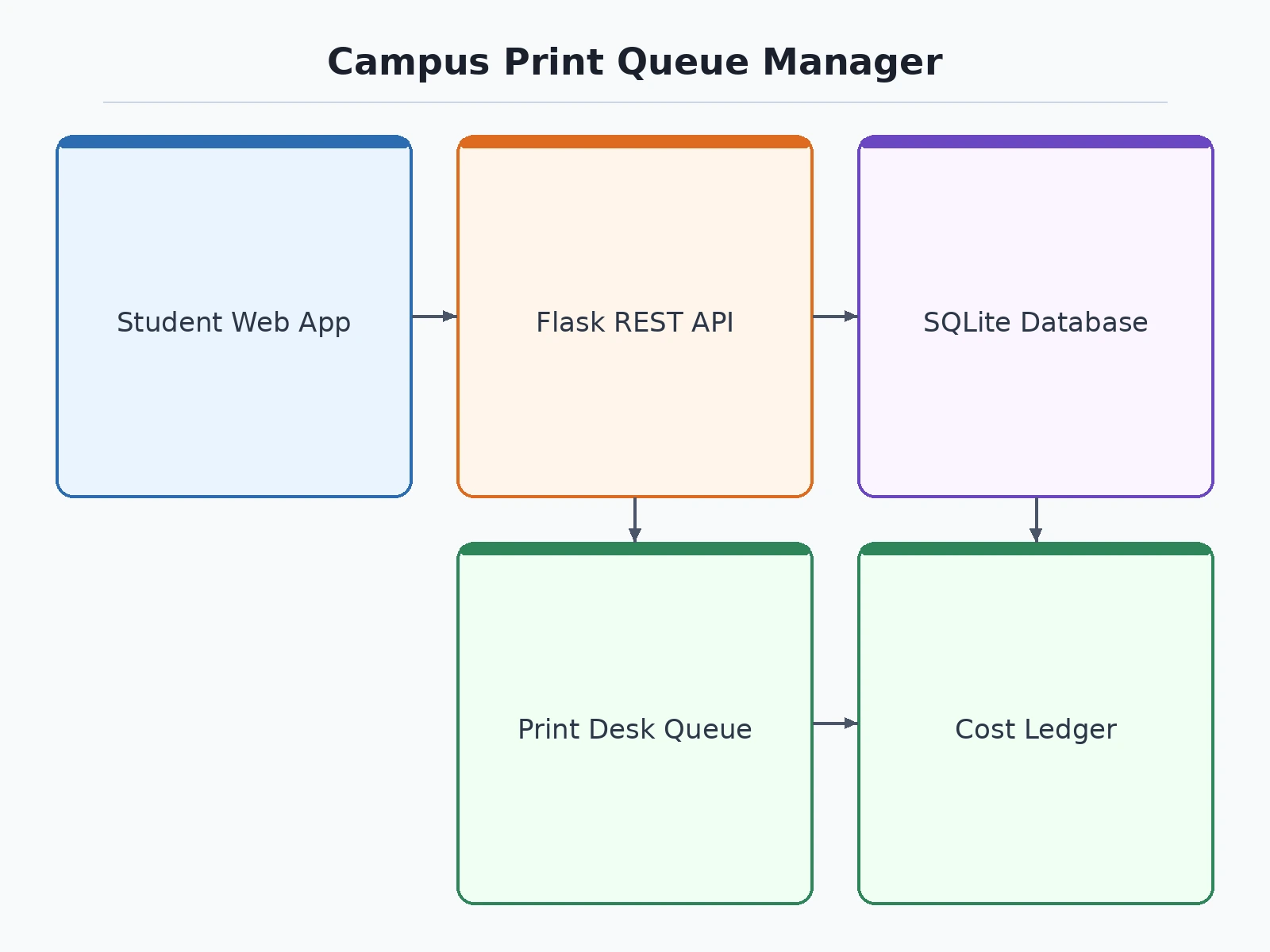
- Python · Flask (REST API for the deployed multi-user build)
- SQLite (jobs, wallets, ledger and top-up tables)
- Git (version control)
| Parameter | Value |
|---|---|
| User roles | Student + print-desk operator (design) |
| Release code format | 6 characters from an unambiguous alphabet (design) |
| Code validity | 24 hours from issue (configurable) |
| Cost model | Pages x copies x per-page rate, minus duplex discount (design) |
| Demo default rates | B&W ₹2.00/page · Colour ₹10.00/page (configurable defaults, not measured) |
| Duplex discount | 10% (configurable) |
| Wallet top-up minimum | ₹10.00 (design) |
| Low-balance alert threshold | ₹20.00 (configurable) |
| Open-queue capacity | 500 jobs (design target) |
| Ledger history | 12 months of job records (design target) |
| Supported platform | Modern desktop and mobile browsers (design target) |
| Demo datastore | Browser localStorage; deployed build uses SQLite via Flask API |
Project features
- [Live per-page cost estimate] The student picks pages, copies, B&W or colour, paper size and duplex, and the app shows the exact total instantly — pages x copies x the desk's configured rate, with the duplex discount applied — before a single rupee is deducted.
- [Release-code job locking] Every submitted job issues a 6-character release code valid for 24 hours. The document stays locked in the queue until the code is verified at the counter, so nothing prints unpaid.
- [Print-desk live queue] The operator sees every job in one live table — document, student, spec, cost, status — with waiting jobs clearly separated from released ones ready for the printer.
- [Code verification and release] The student reads out the code, the operator enters it, and the system checks the code, the job state and the expiry before unlocking the job; wrong or expired codes are rejected with a clear reason.
- [Student wallet and instant top-up] Each student holds a campus print wallet. Top-ups apply instantly, the job cost is deducted on submit, and an insufficient balance blocks submission with a prompt to top up.
- [Per-job cost ledger and collection reports] Every released and printed job is written to a ledger with timestamp and final cost, feeding daily and weekly collection totals plus jobs-printed and pending counts.
- [Low-balance alerts] Wallets that fall below the configurable ₹20 threshold surface in an alert list so the desk can nudge students to top up before the next submission rush.
- [Optional add-on: SMS/WhatsApp release notification] As a priced add-on, the release code can be pushed to the student's phone via SMS or WhatsApp Business API instead of only on-screen — the base build shows the code in the app.
What is included
- Complete web application source code (student view + print-desk queue and reports views)
- Working single-file demo with seeded campus data (jobs, wallets, ledger, alerts)
- Flask REST API backend with SQLite schema for the deployed multi-user build
- Admin guide (rate configuration, release-code policy, ledger export)
- User manual (student submission and operator workflows, with screenshots)
- Project report PDF (problem analysis, cost-model design, queue architecture, testing)
- PPT presentation for final review
- Viva Q&A preparation document (queue design, release-code security, cost accounting, deployment)
Limitations & prerequisites
- The demo runs fully in the browser on localStorage; multi-device sync, real payment collection and printer-hardware integration need the deployed Flask + database build.
- Release codes are verified against the job record, not against a payment gateway — the wallet is a campus-credit ledger, not real money, unless a gateway is integrated.
- The demo does not send documents to a physical printer; in the deployed build the RELEASED state hands the file to the print spooler.
- The ₹2/₹10 per-page figures are configurable demo defaults — real campus rates are set by the print desk in the cost settings.
- Future scope (not in this build): SMS/WhatsApp code delivery, UPI top-ups, multi-shop support, automatic print-spooler integration.
Frequently Asked Questions
How do release codes stop unpaid printing?
The document is never printable until its code is verified. When a student submits a job, the cost is deducted from their wallet first and the job sits in the queue in a WAITING state. Only when the operator enters the matching, unexpired code does the job move to RELEASED and unlock for printing — so the desk never prints a page it has not already been paid for.
How is a job's cost calculated?
Cost = pages x copies x the desk's per-page rate for the chosen mode (B&W or colour), minus a 10% discount when duplex is selected. The student sees this exact figure live before submitting, and the desk can change the per-page rates at any time; new jobs always use the current rates.
What if a student loses the code or it expires?
Codes are valid for 24 hours from issue. An expired code is rejected at verification with the issue time shown, and the job expires automatically — the wallet is refunded for the unprinted job. The student can simply resubmit. The operator can also look up the student's waiting jobs and re-issue the code.
How does the shopkeeper use the queue day to day?
The queue view lists every job with its document, student, spec, cost and status. Waiting jobs show "awaiting code"; once a code is verified the job shows RELEASED with Mark printed and Cancel actions. The desk summary and reports views show today's collection, jobs printed, pending count and the full cost ledger.
Can the print desk change rates after going live?
Yes. The cost-settings panel lets the operator update the B&W and colour per-page rates, and every new estimate and new job uses them instantly. Jobs already submitted keep the rate they were charged at, so the ledger always matches what each student actually paid.
Is this project suitable for a final-year project?
Yes — for Computer Science, IT and Computer Applications programs. It demonstrates queue and state-machine design, a cost-accounting model, wallet ledger logic, role-based views, and a clear deployment path from a single-file working demo to a Flask + SQLite multi-user build.
Components & software requirements
- HTML5 · CSS3 (responsive web UI for student and desk views)
- Vanilla JavaScript (ES6) — estimate engine, queue logic, wallet and ledger
- Browser localStorage (client-side datastore for the working demo)
- Python · Flask (REST API for the deployed multi-user build)
- SQLite (jobs, wallets, ledger and top-up tables)
- Git (version control)
Delivery information
Built-to-order project. Delivery timeline is shared after order confirmation based on current queue.
Support terms
Complete documentation, setup guide, and viva preparation included. Support for setup and explanation provided.
Download free synopsis (PDF)
Enter your name and email — the synopsis PDF downloads immediately. We may send occasional project updates; no spam, unsubscribe anytime.