
More project photos (2)
The problem
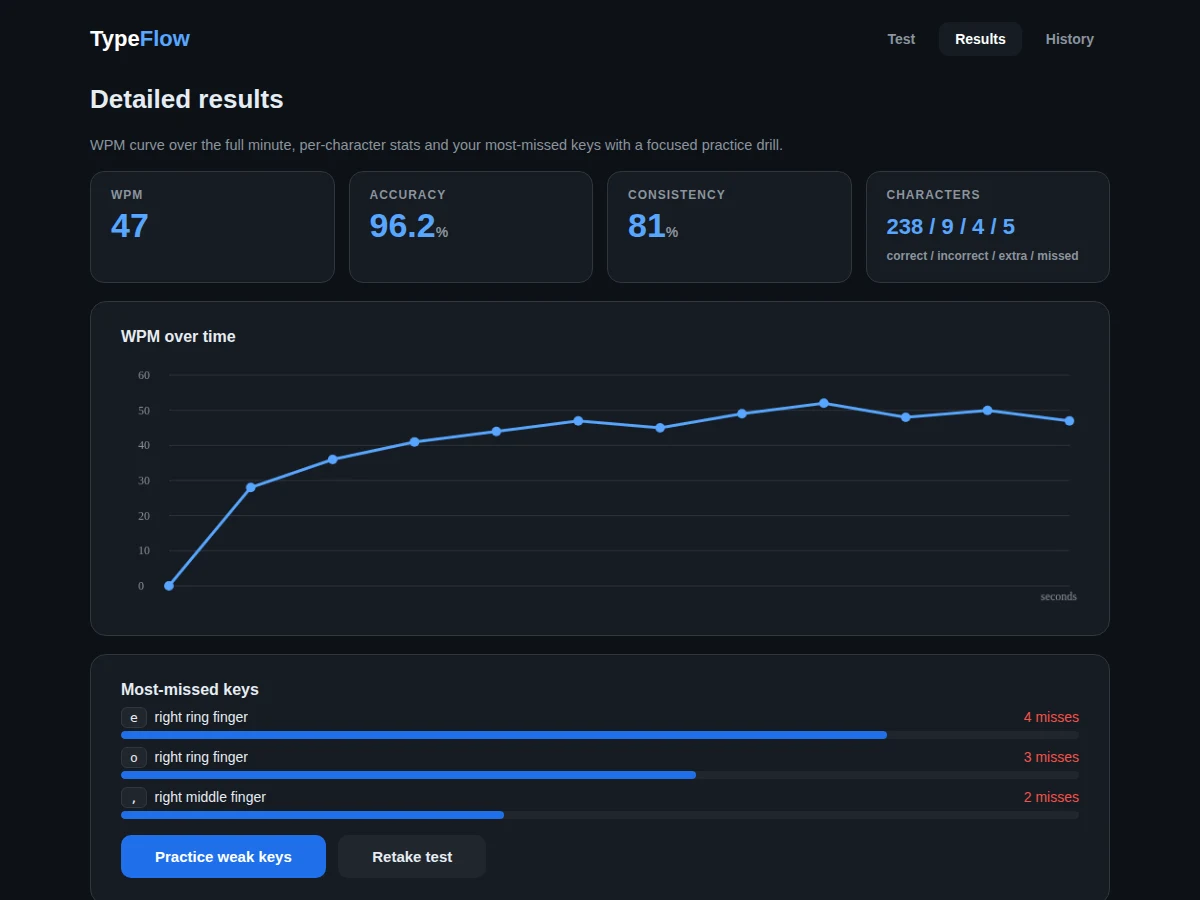
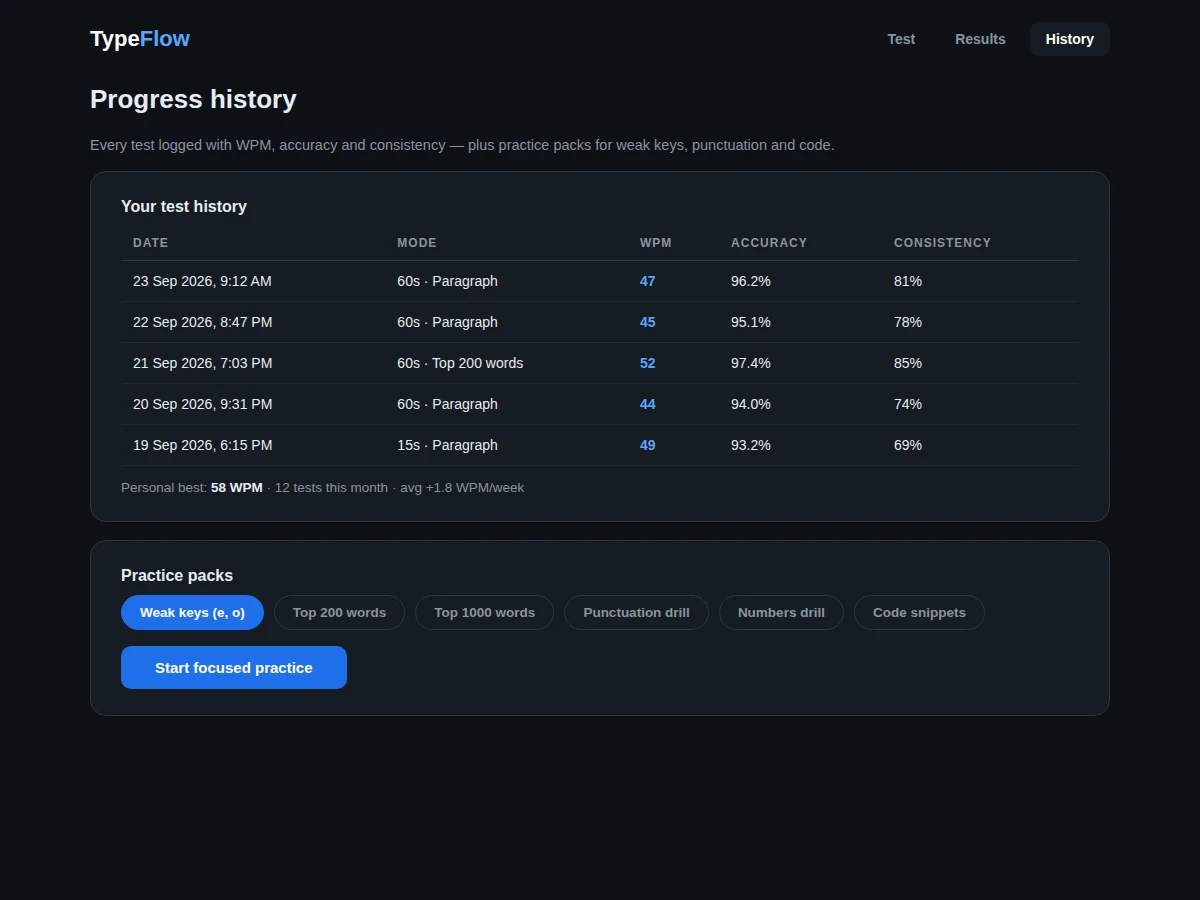
Typing speed is a quietly decisive skill for programmers — viva typing, coding rounds and documentation all reward it — yet most students have never measured theirs beyond a vague guess. This project builds a complete typing-test web app: timed tests (15, 60 or 120 seconds) over curated passages, live character-level feedback as you type, and honest metrics computed the standard way (words per minute as characters typed divided by five, per elapsed minute; accuracy as correct keystrokes over total). The results screen goes beyond a single number: a WPM curve across the test, character-level correct/incorrect/extra/missed counts, consistency scoring, and the most-missed keys mapped to fingers. A history view logs every attempt so progress is visible week over week, and the practice mode generates drills from the user's own weak keys. The demo runs the real scoring engine in the browser, so the viva can take a live test on the spot.
How it works
- The user picks a duration and passage type; the app renders the passage with a blinking caret.
- The first keystroke starts the timer; each keystroke is compared against the expected character.
- Correct and incorrect characters are highlighted live; backspace is allowed and updates the error accounting.
- WPM is computed continuously as (characters typed / 5) / elapsed minutes; accuracy as correct keystrokes / total keystrokes.
- At time-up the app records the attempt and renders the results: WPM curve, character stats, consistency and missed keys.
- The history view appends the attempt to the log; the practice mode builds drills from the keys the user misses most.
Tech stack:
- HTML5, CSS3, JavaScript (ES6)
- Canvas API (WPM curve rendering)
- Web Storage API (test history)
- No build step — single-file deployable
| Parameter | Value |
|---|---|
| WPM definition | (characters typed / 5) / minutes — industry standard (implemented) |
| Test durations | 15 s, 60 s, 120 s (configurable) |
| Passage corpus | 50+ curated passages + top-200/1000 word lists (included) |
| Metrics | WPM, raw WPM, accuracy, consistency, char-level breakdown (implemented) |
| History | Unlimited local attempts via Web Storage (expected) |
| Latency | Keystroke-to-paint under 16 ms on a laptop browser (expected) |
| Deployment | Single HTML file; runs offline after download (design target) |
| Documentation | Report PDF, PPT, viva Q&A (included) |
Project features
- [Live typing test] Timed passages with per-character highlighting (correct, incorrect, current caret); the timer starts on the first keystroke.
- [Real-time metrics] WPM, accuracy, elapsed time and error count update live using the standard (chars/5)/minutes WPM definition.
- [Results analytics] WPM-over-time curve, character breakdown (correct/incorrect/extra/missed) and a consistency score for the full test.
- [Weak-key detection] Most-missed keys identified and mapped to fingers, with a one-click focused practice drill.
- [Test history] Every attempt logged with date, mode, WPM, accuracy and consistency; personal best and weekly trend surfaced.
- [Practice packs] Curated drills — top-200 words, punctuation, numbers, code snippets — plus auto-generated weak-key sets.
- [Multiple test modes] 15s, 60s and 120s durations across paragraph, common-words and code passages.
What is included
- Complete web app source code (single-file, no dependencies)
- Curated passage and word-list datasets
- Scoring engine with documented metric definitions
- Results analytics (canvas charts, weak-key detection)
- Project report PDF (background, metric design, UX decisions, testing)
- PPT presentation for final review
- Viva Q&A preparation document (WPM definitions, event handling, canvas rendering, storage)
Limitations & prerequisites
- WPM follows the standard chars/5 convention, which under-counts for code and over-counts for short words — the report states the definition explicitly.
- History lives in the browser's local storage; clearing site data erases it (account-based cloud sync is future scope).
- The app measures typing on a physical keyboard; mobile touchscreen typing is not a supported mode.
- Anti-cheat (paste detection, tab-switch pausing) is basic: pasting is blocked during tests, but sophisticated automation is out of scope.
- Passage difficulty is not normalised across sets, so cross-passage WPM comparisons are approximate.
Frequently Asked Questions
How is WPM actually calculated?
The standard way: (all characters typed, including spaces, divided by 5) divided by elapsed minutes. Raw WPM counts every keystroke; net WPM penalises errors. The report defines both.
What does the consistency score mean?
It measures how evenly you typed across the test — the coefficient of variation of per-second WPM, inverted to a percentage. Steady typists score higher than bursty ones at the same average WPM.
How does weak-key practice work?
The app counts misses per key across your history, maps keys to fingers, and generates drill passages heavy in your worst keys.
Can I add my own passages?
Yes — passages are a plain JavaScript array; the report documents the format and the demo includes a commented example.
Does it work offline?
Yes. It is a single HTML file with no network calls; download it once and it runs anywhere, which also makes the viva demo bulletproof.
Is this project suitable for a final-year project?
Yes — for Computer Science, IT and Web Development programs. It demonstrates real-time input handling, data visualisation, metric design and a polished, genuinely usable product. Suitable for B.E./B.Tech final-year projects in Computer Science, IT and Web Development.
Components & software requirements
- HTML5, CSS3, JavaScript (ES6)
- Canvas API (WPM curve rendering)
- Web Storage API (test history)
- No build step — single-file deployable
Delivery information
Built-to-order project. Delivery timeline is shared after order confirmation based on current queue.
Support terms
Complete documentation, setup guide, and viva preparation included. Support for setup and explanation provided.