
More project photos (2)
The problem
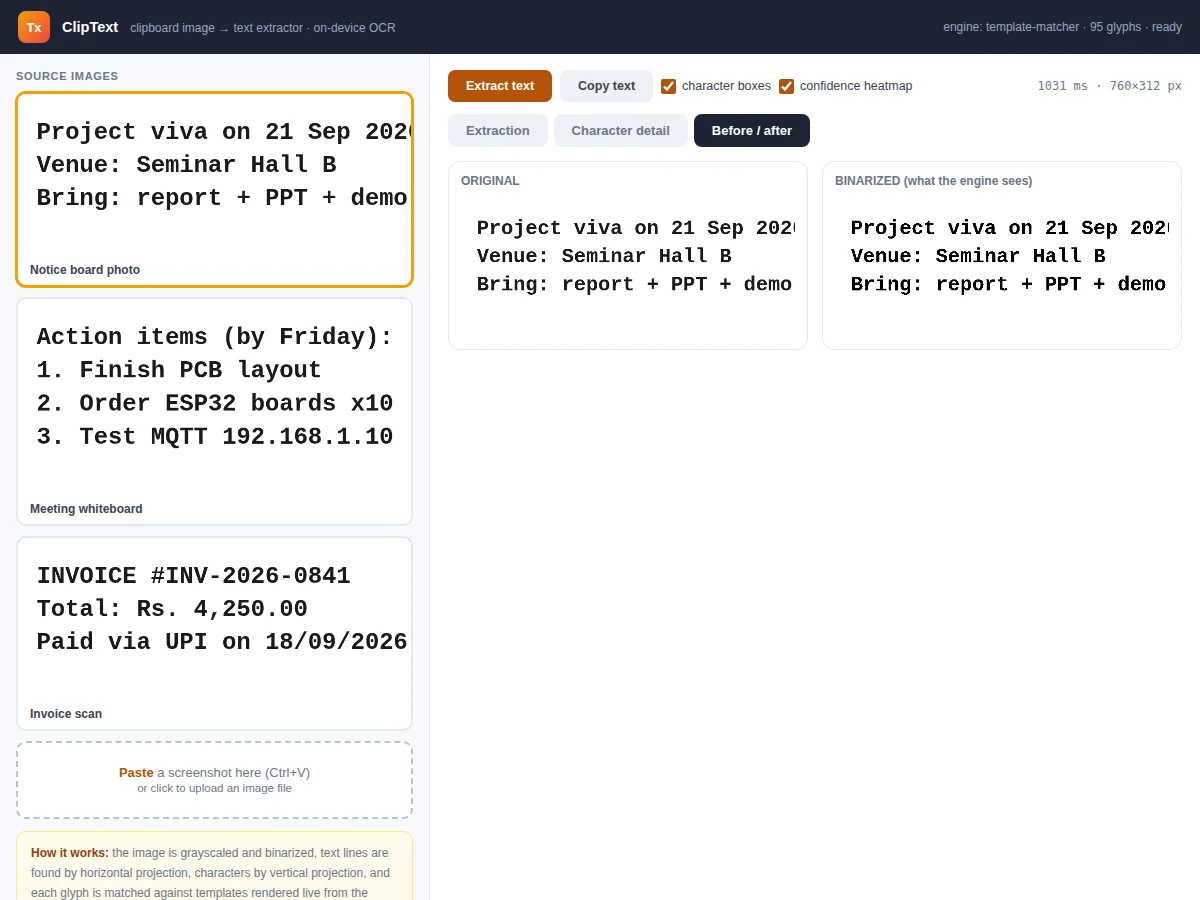
Students constantly need text trapped inside images — a notice-board photo, a scanned invoice, a whiteboard full of action items, a screenshot of an error message. Retyping is slow and error-prone, while cloud OCR tools upload your images to someone else's server. This utility keeps everything on the device: paste any image from the clipboard (or load a file), and a real OCR pipeline extracts the text. The pipeline is the honest, classical kind taught in image-processing courses — grayscale conversion and binarization, line segmentation by horizontal projection profile, character segmentation by vertical projection, then template matching where each glyph is compared against reference glyphs rendered live from the same font. Every recognized character carries a confidence score, low-confidence characters are flagged in red, and bounding boxes overlay the source image so you can verify each reading. A before/after view shows the binarized image exactly as the engine sees it.
How it works
- The user pastes a screenshot (clipboard API) or uploads an image file; it is drawn to a canvas.
- The image is converted to grayscale and binarized with a fixed threshold, producing a black-and-white bitmap.
- A horizontal projection profile (dark-pixel count per row) segments the bitmap into text lines.
- Within each line, a vertical projection profile segments characters; narrow gaps merge split glyphs and wide gaps mark word spaces.
- Each glyph is cropped, aspect-preserved into a 26×34 normalized bitmap and compared pixel-by-pixel against templates rendered live from the same monospace font (78 glyphs).
- The best-matching template wins; confidence comes from the agreement margin over the runner-up.
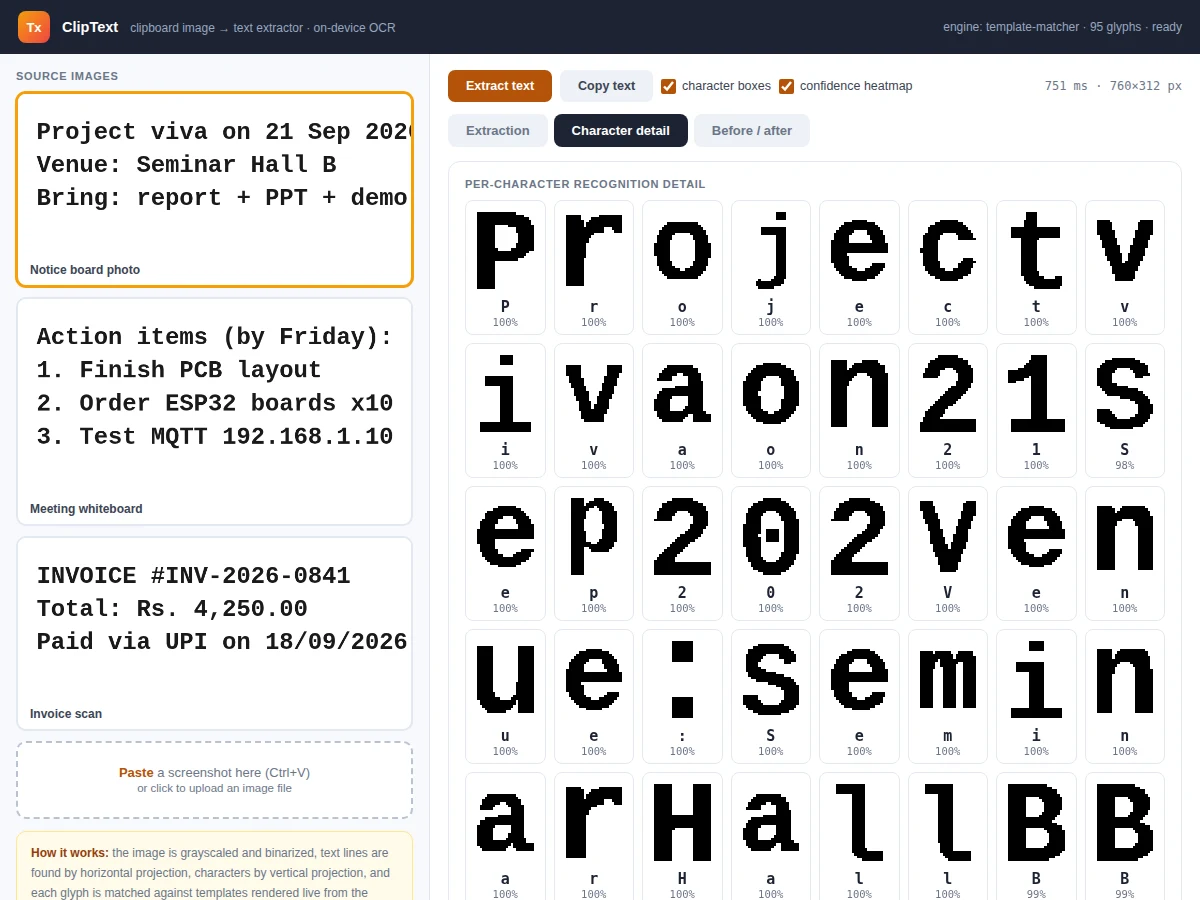
- Results render as text with a confidence heatmap, bounding boxes on the source, and the per-character detail grid.
Tech stack:
- HTML5 canvas · JavaScript (ES6)
- Clipboard API · FileReader
- Projection-profile segmentation
- Template matching (normalized bitmaps)
- Single-file app, zero dependencies
- Git
| Parameter | Value |
|---|---|
| OCR method | Binarization + projection segmentation + template matching (design target) |
| Glyph set | 78 glyphs: A–Z, a–z, 0–9, punctuation (design target) |
| Normalization | 26×34 aspect-preserved bitmaps (design target) |
| Input | Clipboard paste, file upload, built-in samples (design target) |
| Privacy | 100% on-device, zero network calls (design target) |
| Scope | Clean printed/monospace-style text; handwriting out of scope (design target) |
Project features
- [Paste-from-clipboard input] Press Ctrl+V with any screenshot copied — the image loads instantly; file upload works too.
- [Real OCR pipeline] Binarization, projection-based line and character segmentation, and template matching against live-rendered glyphs — all on-device, no cloud.
- [Per-character confidence] Every character is scored; the text view heatmaps high-confidence in amber and flags low-confidence characters in red.
- [Character bounding boxes] Toggleable boxes overlay each recognized character on the source image for visual verification.
- [Character detail grid] A per-glyph panel shows the normalized 26×34 bitmap the matcher actually compared, with its confidence.
- [Binarized preview] A before/after view shows the original next to the thresholded image the engine segments — the key debugging view for OCR.
- [One-click copy] The extracted text copies to the clipboard for pasting into reports and documents.
- [Sample images] Three built-in samples (notice board, whiteboard, invoice) demonstrate the pipeline immediately.
What is included
- Complete single-file OCR utility application
- OCR engine documentation (segmentation math, matching, confidence)
- Three built-in sample images with expected outputs
- Project report PDF (background, image-processing theory, methodology, test procedure)
- PPT presentation for final review
- Viva Q&A preparation document (binarization, projections, template matching, OCR limits)
Limitations & prerequisites
- Built for clean printed text in a monospace-style font — handwriting, cursive and heavily stylized fonts are out of scope, stated honestly.
- Recognition quality depends on image clarity; skewed, blurry or low-contrast photos degrade results — the binarized preview shows why.
- Confidence scores are agreement-based heuristics from template matching, not calibrated probabilities.
- This is a classical template-matching OCR, not a neural-network recognizer — the report explains the tradeoff explicitly.
Frequently Asked Questions
How does the OCR actually work?
The image is binarized, text lines are found by counting dark pixels per row (horizontal projection), characters by counting per column (vertical projection), and each character bitmap is matched against reference glyphs rendered from the same font.
Does it upload my screenshots anywhere?
No. The entire pipeline runs in the browser on your device — there are no network calls at all, so sensitive screenshots never leave the machine.
What text does it handle best?
Clean printed text — screenshots, notice-board photos, invoices, whiteboards. Handwriting and decorative fonts are out of scope for template matching.
What do the confidence colours mean?
Each character gets an agreement score against the glyph templates; high-confidence characters highlight amber, low-confidence ones red, so you know exactly which characters to double-check.
Why show the binarized image?
It is the standard OCR debugging view — if the thresholded image looks wrong (broken characters, merged lines), you can see exactly why recognition failed.
Is this project suitable for a final-year project?
Yes — for Computer Science and IT programs. It demonstrates image processing, algorithm design and a privacy-respecting tool with a visible, testable pipeline. Suitable for B.E./B.Tech final-year projects in Computer Science and IT.
Components & software requirements
- HTML5 canvas · JavaScript (ES6)
- Clipboard API · FileReader
- Projection-profile segmentation
- Template matching (normalized bitmaps)
- Single-file app, zero dependencies
- Git
Delivery information
Built-to-order project. Delivery timeline is shared after order confirmation based on current queue.
Support terms
Complete documentation, setup guide, and viva preparation included. Support for setup and explanation provided.