
More project photos (2)
The problem
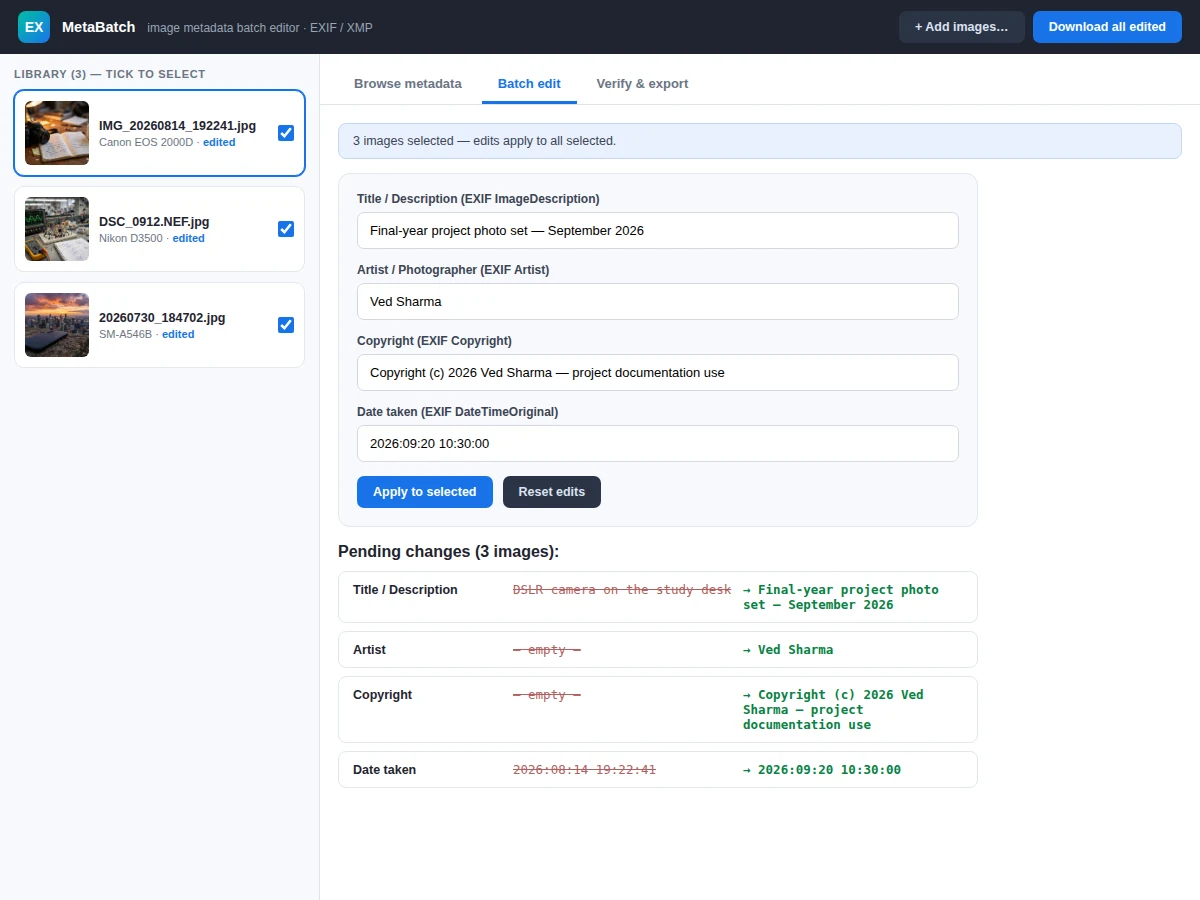
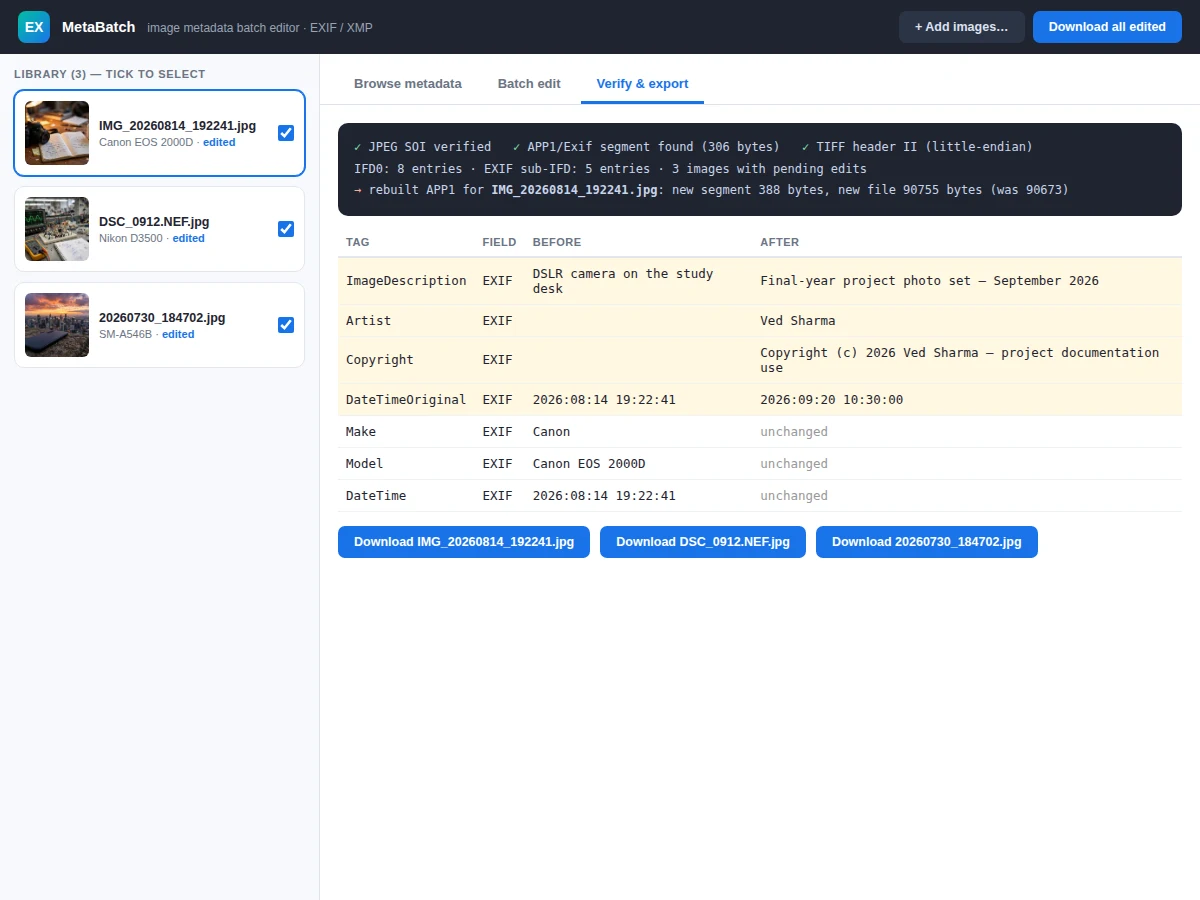
Every JPEG from a camera or phone carries EXIF metadata: the camera model, exposure settings, the date the photo was taken — and usually empty or wrong fields for title, photographer and copyright. Photographers, college project teams and archivists need to fix these across hundreds of photos, but most tools edit one image at a time or hide what they actually change in the file. This utility does batch metadata properly: it parses the JPEG's APP1/EXIF segment at the binary level (TIFF header, IFD entries, ASCII and rational tag values), displays every tag in a readable table, applies new values for title, artist, copyright and date-taken across all selected images, and rebuilds the EXIF segment byte-for-byte — preserving the tags it doesn't touch (camera make/model, exposure, ISO, focal length). A verify panel shows the segment structure before and after, with changed tags highlighted, and edited files download as real JPEGs with the new metadata embedded. The demo ships with three real photographs carrying genuine EXIF data.
How it works
- Each JPEG is scanned for the APP1 marker; the "Exif\0\0" header identifies the metadata segment.
- The TIFF header reveals the byte order, and IFD0 is walked entry by entry — tag, type, count and value/offset.
- ASCII tags (title, artist, copyright), the EXIF sub-IFD pointer and rational tags (exposure, f-number, focal length) are decoded into readable values.
- The user selects images and enters new values for the editable fields; a diff table previews old vs new per field.
- On export, a new EXIF segment is built: edited tags get fresh values, all other tags are copied byte-for-byte from the original.
- The old APP1 segment is removed and the rebuilt one inserted after the SOI marker, producing a valid JPEG.
- The file downloads with the original name, and any EXIF viewer confirms the new metadata.
Tech stack:
- JavaScript (ES6) · DataView binary parsing
- JPEG/EXIF/TIFF format handling
- HTML5 canvas thumbnails
- Blob download for rebuilt files
- Single-file web demo, zero dependencies
- Git
| Parameter | Value |
|---|---|
| Formats | JPEG with APP1/EXIF (design target) |
| Editable tags | ImageDescription, Artist, Copyright, DateTimeOriginal (design target) |
| Preserved tags | Make, Model, exposure, ISO, focal length, orientation (design target) |
| Byte order | Little-endian TIFF ("II") read/write (design target) |
| Batch size | Unlimited selection, one action (design target) |
| Output | Valid rebuilt JPEG, original filename (design target) |
| Dependencies | None — single HTML file (design target) |
Project features
- [Real EXIF parsing] The JPEG APP1 segment is parsed at binary level — TIFF header, IFD0, EXIF sub-IFD — with ASCII, short and rational tag decoding, all in dependency-free code.
- [Batch editing] Select any subset of images and apply title, artist, copyright and date-taken to all of them in one action.
- [Safe segment rebuild] The EXIF segment is reconstructed with new values while untouched tags (camera, exposure, ISO) are preserved byte-for-byte.
- [Verify & export panel] See the APP1 segment size, entry counts and a before/after tag table with changed rows highlighted before downloading.
- [Real JPEG output] Edited images download as genuine JPEG files with rewritten EXIF — verifiable in any metadata viewer.
- [Before/after diff] Every pending edit shows old vs new values per field before it is applied.
- [Add your own photos] Upload any JPEG and its real EXIF appears instantly in the library.
- [Camera/exposure display] Exposure time, aperture, ISO and focal length decode from rational tags into photographer-friendly values.
What is included
- Complete single-file metadata editor application
- EXIF/TIFF format documentation (segment layout, tag table, rebuild algorithm)
- Three sample photographs with genuine EXIF data
- Project report PDF (background, file-format theory, methodology, test procedure)
- PPT presentation for final review
- Viva Q&A preparation document (JPEG markers, TIFF/IFD structure, tag types, endianness)
Limitations & prerequisites
- JPEG/EXIF only — PNG, HEIC and RAW formats are out of scope for the base build.
- XMP/IPTC blocks are listed as future scope; the shipped build handles EXIF.
- Files without an EXIF segment show "no EXIF" — the tool does not invent metadata.
- Date validation is format-level; the tool trusts the date the user enters.
Frequently Asked Questions
What is EXIF?
Exchangeable Image File Format — the metadata standard that stores camera settings, date taken and descriptive fields inside JPEG files, in a TIFF-structured APP1 segment.
Does editing damage the photo?
No. Only the APP1 metadata segment is rebuilt; the compressed image data is copied untouched, so pixels never change.
Which fields can I batch-edit?
Title/description, artist/photographer, copyright and date taken — the fields photographers and archivists actually need to fix across shoots.
What happens to the fields I don't edit?
They are preserved byte-for-byte — camera make/model, exposure time, aperture, ISO and focal length survive the rebuild exactly.
How can I verify the edit really worked?
Download the file and open it in any EXIF viewer, or check the verify panel's before/after tag table which shows the segment-level changes.
Is this project suitable for a final-year project?
Yes — for Computer Science and IT programs. It demonstrates binary file formats, parsing, data preservation and a genuinely useful photographer/archivist tool. Suitable for B.E./B.Tech final-year projects in Computer Science and IT.
Components & software requirements
- JavaScript (ES6) · DataView binary parsing
- JPEG/EXIF/TIFF format handling
- HTML5 canvas thumbnails
- Blob download for rebuilt files
- Single-file web demo, zero dependencies
- Git
Delivery information
Built-to-order project. Delivery timeline is shared after order confirmation based on current queue.
Support terms
Complete documentation, setup guide, and viva preparation included. Support for setup and explanation provided.