
More project photos (2)

The problem
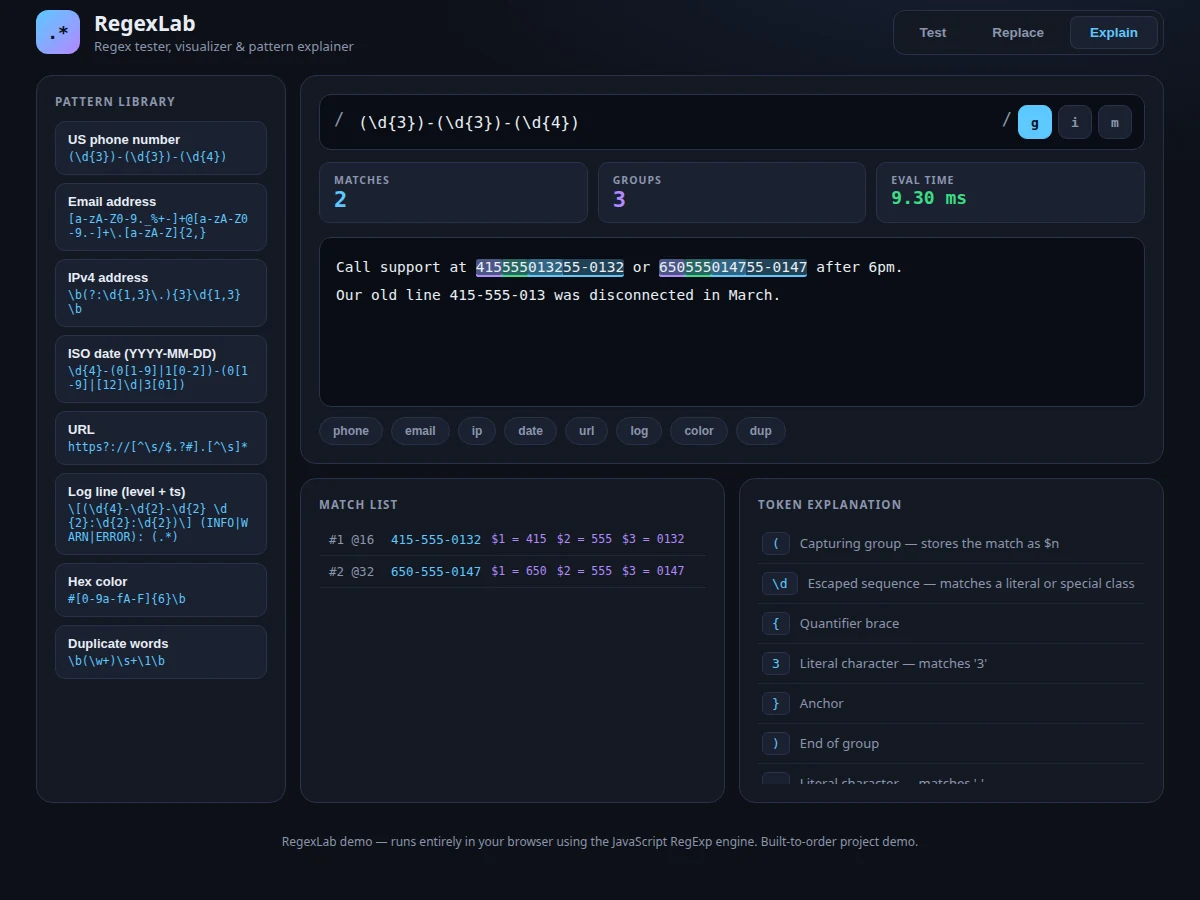
Regular expressions power validation, parsing and search across nearly every software system, yet most students learn them by pasting patterns they do not understand. Online testers show matches but never explain why a pattern behaves the way it does — the difference between greedy and lazy quantifiers, what each capture group actually grabbed, or why an anchor silently fails. RegexLab closes that gap: a single-file web app where patterns are tested live against realistic sample text, every match is highlighted with its capture groups in distinct colors, and the pattern itself is explained token by token in plain language. An 8-pattern library (email, phone, IPv4, URL, date, log line, hex color, password) with matching sample corpora gives real-world material to experiment with, and a replace mode demonstrates capture-group substitution. Because everything runs client-side in one HTML file, the student can read, study and extend the source code.
How it works
- The user types a pattern into the pattern bar and toggles the g, i and m flags; the app compiles it with the browser's native RegExp engine.
- The test text is scanned with matchAll, and every match is recorded with its index, full text and captured groups.
- The text pane is re-rendered with matches wrapped in highlight spans; capture groups get their own colored spans inside each match.
- A match list below shows each match's position and captured groups, so results can be inspected without re-reading the text.
- In parallel, the tokenizer walks the pattern source and maps each token to a plain-language explanation shown in the explainer panel.
- Replace mode runs String.replace with the user's substitution template, previewing the transformed text with group references resolved.
Tech stack:
- HTML5, CSS3, JavaScript (ES6)
- Browser RegExp engine (matchAll, String.replace)
- contenteditable editing panes
- Performance API for evaluation timing
- Single-file build, zero dependencies
| Parameter | Value |
|---|---|
| Delivery | Single HTML file, runs offline after download |
| Regex engine | Native browser JavaScript RegExp (no custom parser) |
| Library patterns | 8, each with a matching sample corpus |
| Modes | Test, Replace, Explain |
| Live metrics | Match count, capture-group count, evaluation time |
| Flags supported | g (global), i (case-insensitive), m (multiline) |
| Browsers | Any modern browser (Chrome, Firefox, Edge) |
Project features
- [Live match highlighting] Every match lights up in the test text the instant the pattern or flags change, with match count, group count and evaluation time shown beside the pattern bar.
- [Capture-group visualization] Groups are tinted in distinct colors both in the highlighted text and in the match list, so it is always clear which part of a match each group captured.
- [Token-by-token explainer] The pattern is tokenized and each piece — character classes, quantifiers, groups, anchors, alternations — is described in plain language, turning cryptic patterns into readable logic.
- [8-pattern library] A sidebar of real-world patterns (email, phone, IPv4, URL, date, log line, hex color, duplicate words); one click loads both the pattern and a matching sample corpus.
- [Replace mode] A substitution field applies $1-style group references to every match with a live preview of the transformed text, demonstrating capture-based rewriting.
- [Flag toggles] Global, case-insensitive and multiline flags toggle the RegExp engine's behavior live, showing exactly how each flag changes the match set.
- [Realistic sample corpora] One-click corpora — server logs, contact lists, config text — give every library pattern something genuine to test against.
What is included
- Working RegexLab web app (single HTML file)
- Complete commented source code
- User guide: patterns, flags, replace syntax, library walkthrough
- Project report PDF (regex theory, app architecture, design decisions)
- PPT presentation for final review
- Viva Q&A preparation document (quantifiers, groups, anchors, backtracking)
Limitations & prerequisites
- Uses JavaScript regex semantics — lookbehind and some PCRE-only constructs are not supported.
- Very large texts (multi-megabyte) can slow highlighting; the app is designed for sample-size inputs.
- The explainer covers common tokens; exotic constructs fall back to a generic description.
- No backend, so patterns and edits are not persisted between sessions.
Frequently Asked Questions
How is this different from online regex testers?
It pairs live matching with a token-by-token explanation of the pattern itself, adds a curated library with realistic corpora and a replace mode — and you own the complete source code to study and extend.
Which regex flavor does it use?
JavaScript's — the same engine that runs in every browser, so every pattern you build transfers directly to web development work.
Does it work offline?
Yes. It is a single HTML file with no server and no network calls after download.
Can I add my own patterns to the library?
Yes — the library is a plain JavaScript array, and the user guide shows exactly how to add entries with their own sample corpora.
Is this project suitable for a final-year project?
Yes — for Computer Science and IT programs. It demonstrates text processing, tokenizer design, DOM rendering and a genuinely useful developer tool. Suitable for B.E./B.Tech final-year projects in Computer Science and IT.
Components & software requirements
- HTML5, CSS3, JavaScript (ES6)
- Browser RegExp engine (matchAll, String.replace)
- contenteditable editing panes
- Performance API for evaluation timing
- Single-file build, zero dependencies
Delivery information
Built-to-order project. Delivery timeline is shared after order confirmation based on current queue.
Support terms
Complete documentation, setup guide, and viva preparation included. Support for setup and explanation provided.