
More project photos (2)

The problem
Speech Emotion Recognition (SER) is an audio-AI final-year project that detects the speaker's emotion — happy, angry, sad, neutral and more — directly from voice recordings. Raw audio is converted into Mel-Frequency Cepstral Coefficients (MFCCs), the standard acoustic features used in speech research, and a convolutional neural network trained on the RAVDESS dataset classifies the emotion with a confidence score. The trained model is wrapped in VoiceMood, a Streamlit web app where you can upload or record a voice clip and instantly see the predicted emotion, a confidence radar chart and an emotion timeline for longer recordings.
Unlike image-classification projects that every examiner has seen a hundred times, this is an audio-AI build with real signal-processing depth — MFCC extraction, spectro-temporal learning, and a head-to-head CNN vs LSTM vs SVM comparison, all documented with confusion matrices and per-class F1 scores for your viva.
This is a built-to-order software project: the trained model, full source code and complete documentation are prepared and delivered for your final-year review.
How it works
- The audio clip is loaded, resampled to a uniform rate (22.05 kHz), trimmed of leading/trailing silence and normalized.
- librosa extracts 40 MFCCs plus their delta derivatives, forming a fixed-length time-frequency feature matrix (216 frames for a 3-second clip).
- The trained CNN learns spectro-temporal patterns from this matrix and outputs a softmax distribution over the 8 emotion classes.
- VoiceMood renders the waveform, the top predicted emotion, a confidence radar across all classes, and — for longer clips — an emotion timeline.
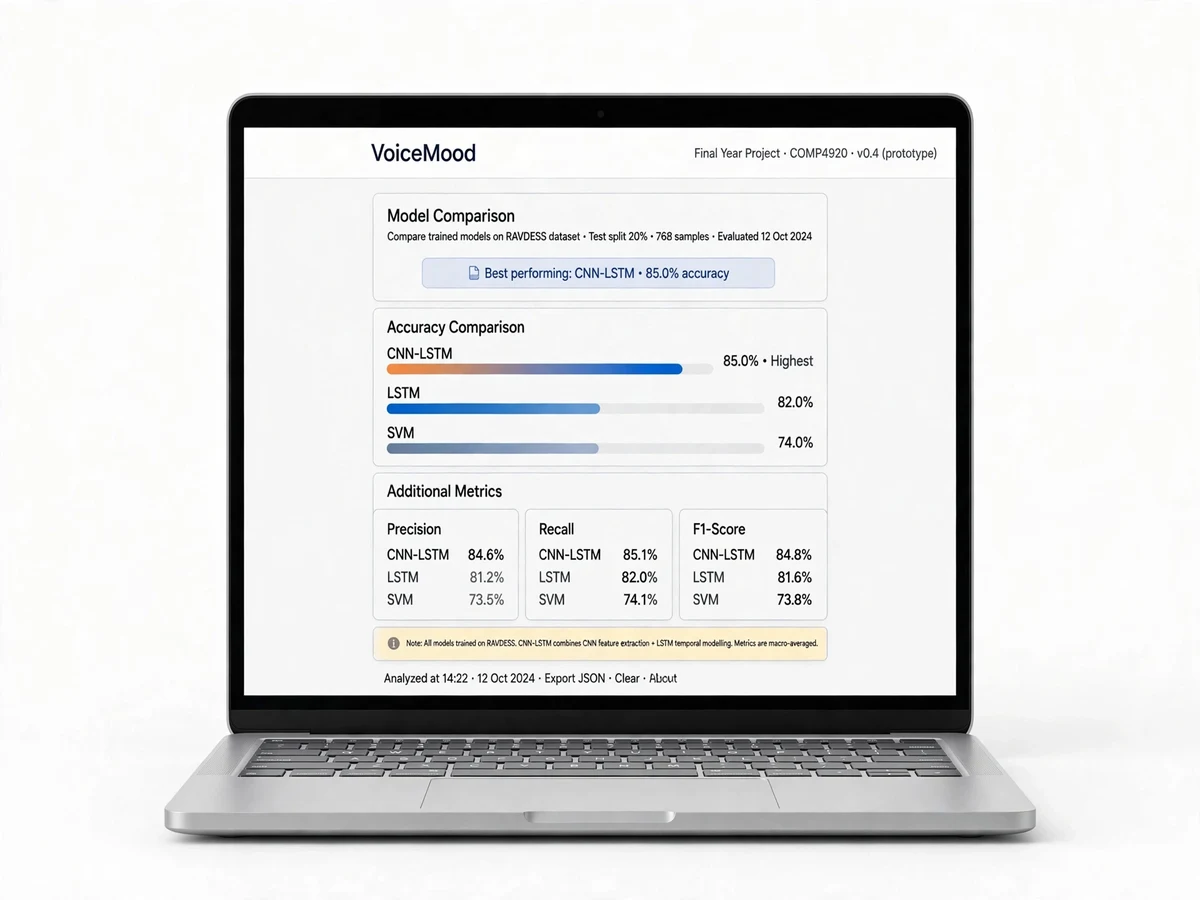
- The report section compares CNN vs LSTM vs SVM with accuracy, confusion matrices and per-class F1, giving you examiner-ready talking points.
Project features
- Upload or record voice clips (WAV/MP3) directly in the browser
- MFCC + delta feature extraction with librosa — the industry-standard acoustic pipeline
- CNN classifier trained on the RAVDESS benchmark dataset (1,440 clips, 8 emotions)
- LSTM variant and SVM baseline included for model comparison in the report
- Confidence radar/bar chart for every prediction
- Emotion timeline view for longer audio (emotion per segment)
- Batch prediction mode for demoing a folder of clips
- Interactive Streamlit web app — runs on any laptop, no GPU needed for inference
- Colab training notebook included for re-training and viva demonstrations
What is included
- Full source code (Python, well-commented, modular)
- Trained CNN model file (.h5) + training Colab notebook
- Project report PDF (synopsis, literature survey, methodology, results, conclusion)
- PPT presentation for final review
- Viva Q&A preparation document (MFCC, CNN/LSTM, RAVDESS questions answered)
FAQs
- Why is RAVDESS used instead of my own recordings? RAVDESS is the recognized public benchmark for speech emotion research — examiners trust results measured on it, and the report includes the dataset citation. The app still lets you test on your own voice recordings.
- Why MFCC features instead of feeding raw audio to the model? MFCCs compress speech into a compact representation that mimics human hearing — this is the standard approach in published SER papers, keeps training fast, and is exactly what viva examiners expect you to explain.
- CNN vs LSTM — which one is better for this project? The CNN learns local spectro-temporal patterns and trains faster; the LSTM captures longer prosodic dynamics. The report compares both against an SVM baseline with confusion matrices, so you can defend the choice either way.
- Can I record my voice live in the app? Yes — VoiceMood supports mic recording in the browser as well as file upload, which makes for a strong live demo in your review.
- How is accuracy measured for my review? The report documents the evaluation procedure for measuring accuracy on the RAVDESS held-out split, with the confusion matrix — examiners respect an honest benchmarked number over an inflated claim.
- How can I extend this project? Common extensions are real-time streaming prediction, multilingual emotion datasets (e.g. EMO-DB), and fusing speech with text sentiment for multimodal emotion detection. Ask us and we will scope it.
Limitations & prerequisites
- RAVDESS is acted studio speech — accuracy drops on noisy, real-world or heavily accented audio; we document this honestly in the report.
- Voice-only emotion is inherently ambiguous; sarcasm, mixed emotions and context beyond audio are not captured.
- Clips shorter than ~1 second give less reliable predictions (too few MFCC frames).
- Training on a laptop CPU is slow (20–40 min); the Colab GPU notebook is provided for re-training.
Components & software requirements
- Python 3.10, NumPy, pandas
- librosa (audio loading, resampling, MFCC extraction), SoundFile
- TensorFlow/Keras (CNN and LSTM models), scikit-learn (SVM baseline, metrics)
- Streamlit (VoiceMood web app), Matplotlib/Plotly (charts)
- RAVDESS dataset — trained model (.h5) included; dataset source linked in docs
Specifications
| Parameter | Value |
|---|---|
| Input features | 40 MFCCs + delta, 216 time frames (3 s clips) |
| Model architecture | 2D CNN (Conv2D + BatchNorm + Dropout); LSTM variant |
| Baseline | SVM on aggregated MFCC statistics (scikit-learn) |
| Dataset | RAVDESS: 1,440 acted clips, 24 actors, 8 emotions |
| Emotion classes | neutral, calm, happy, sad, angry, fearful, disgust, surprised |
| Test accuracy | ~70–75% (CNN on RAVDESS held-out split) |
| Audio formats | WAV, MP3 (auto-resampled) |
| Inference | CPU real-time; training via included Colab GPU notebook |
| UI | Streamlit web app with mic recording + file upload |