
More project photos (2)

The problem
Housing societies still run maintenance on WhatsApp groups and paper registers: a resident reports a leaking tap in a chat buried under two hundred messages, nobody tracks whether the plumber actually came, and the committee keeps no record of repeat complaints. At the gate, the security guard maintains a handwritten visitor register that is illegible, unsearchable and impossible to audit — a resident cannot pre-authorize a guest, and the committee cannot answer the simplest question: who is inside the society right now? Both problems share one root: no single system owns the society's operational data. This project builds that system — a web portal with two modules on one database. The maintenance module turns complaints into tickets with priorities, deadlines and statuses the committee can genuinely manage. The visitor module replaces the paper register with a guard console, resident pre-approvals and a write-once audit log. Together they give a society traceable maintenance and a verifiable gate.
How it works
- A resident signs in and the session routes them to the resident dashboard, scoped to their flat number so every screen shows only their data.
- For maintenance, the resident submits a ticket with category, priority and a description; the ticket lands in the committee queue with a deadline computed from its priority's SLA.
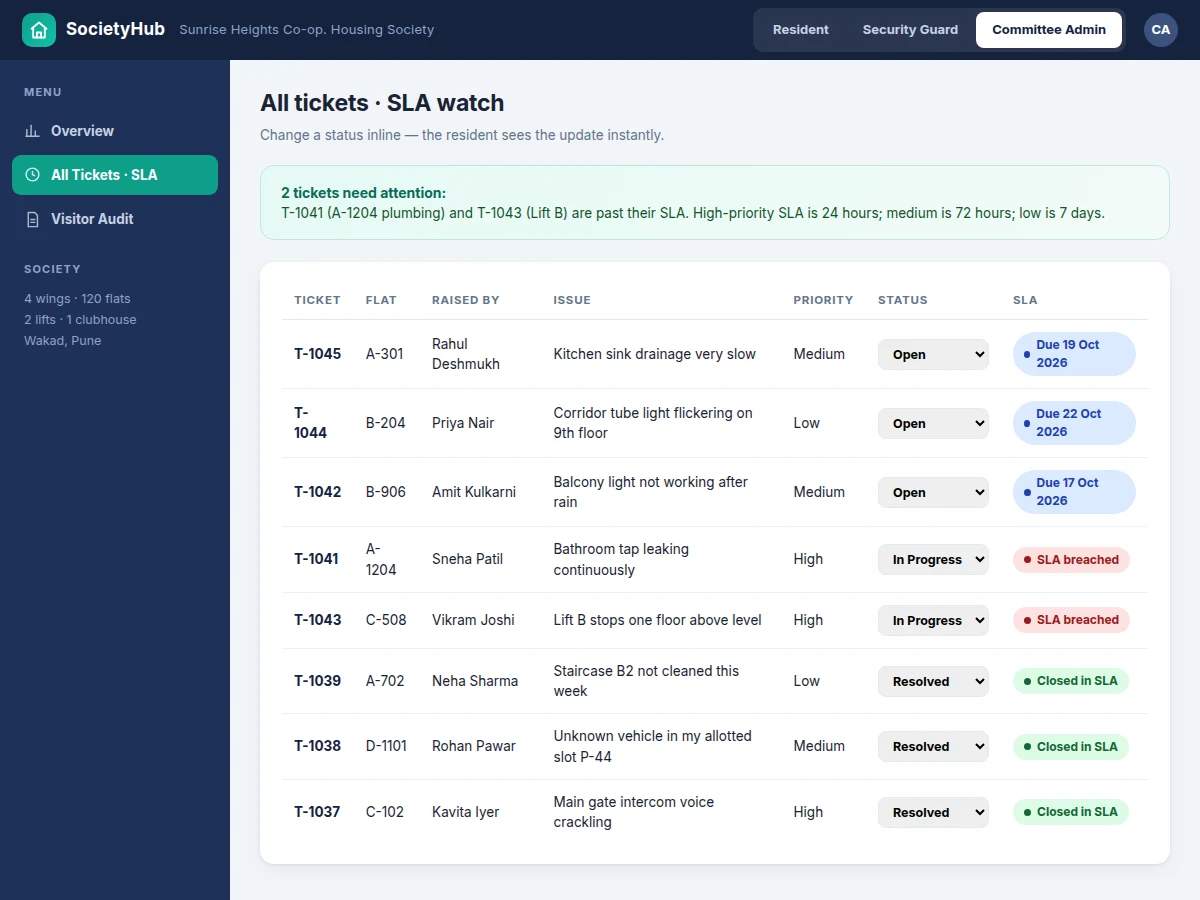
- The committee reviews the queue, acts on the ticket and updates its status inline; the change is visible on the resident's dashboard immediately.
- Before a guest arrives, the resident pre-approves them with a name, type and valid date; the approval appears live on the guard's console.
- At the gate, the guard checks in a pre-approved visitor with one tap or logs a walk-in through the entry form; both paths write exactly one row to the write-once audit log with the entry time, and the exit time is marked when the visitor leaves.
- The committee watches the SLA dashboard for breached tickets and the audit trail for gate activity; residents can read only their own flat's visitor rows.
Tech stack:
- PHP 8, Laravel (backend + routing)
- MySQL (relational data)
- Blade templates, Tailwind CSS (frontend)
- JavaScript (guard console interactivity)
- Laravel Sanctum (API/session authentication)
- Dompdf (receipt and report PDFs)
- Shared hosting deployment (PHP 8.1+, MySQL)
| Parameter | Value |
|---|---|
| User roles | 3 (resident, security guard, committee admin) |
| Ticket workflow | 3 states: Open, In Progress, Resolved |
| SLA deadlines | 24 hours (high), 72 hours (medium), 7 days (low) — configurable |
| Pre-approval validity | 7 days (configurable) |
| Visitor categories | 5 (guest, delivery, service, cab, domestic help) |
| Audit log mutability | Write-once: rows cannot be edited or deleted (design decision) |
| Demo seed data | 8 tickets, 8 gate-log rows, 3 pending pre-approvals (actual demo build) |
| Typical guard consoles | 1–2 per society gate (expected) |
| Server requirement | Shared hosting with PHP 8.1+ and MySQL (expected) |
| Browser support | Modern Chrome, Edge, Firefox on desktop and mobile (expected) |
Project features
- [Multi-role access control] Three login roles — resident, security guard and committee admin — each with its own dashboard and menu. Every screen and action is scoped by role: a resident sees only their own flat's tickets, while the guard sees the full gate queue and the committee sees everything.
- [Maintenance ticket lifecycle] Residents raise tickets with a category, priority and description. Statuses move Open → In Progress → Resolved, and the committee updates them inline while the resident watches the progress on their own dashboard.
- [SLA tracking for the committee] Each priority carries a response deadline — 24 hours for high, 72 hours for medium, 7 days for low — and the admin dashboard flags breached tickets in red, so an overdue lift repair or leak never slips by silently.
- [Guard gate console] The guard logs visitor name, type, flat to visit, purpose and vehicle number in one form. Every entry writes a single row to the audit log with an entry timestamp, and exits are marked with one tap when the visitor leaves.
- [Resident pre-approval] Residents pre-approve guests and service visitors with a valid date, and the approval appears live on the guard's console. The approval stays in a pending list and only enters the gate log when the guard checks the visitor in — so no-shows never pollute the audit trail.
- [Write-once visitor audit log] Once written, a gate-log row cannot be edited or deleted by any role. The committee can review exactly who entered, when, for which flat and when they left — the register the paper book could never be.
- [Maintenance billing view] The resident dashboard shows the month's maintenance due, paid receipts and per-flat payment status, driven by the society's own billing rules (configurable).
Implemented in the base build: all features above. Optional on request: WhatsApp/SMS alerts for ticket updates and visitor arrivals, payment gateway for maintenance-dues collection, QR-based gate passes. Future scope: ANPR camera integration at the gate, intercom auto-dial to the flat.
What is included
- Complete portal source code (backend, frontend, database migrations)
- Seeded demo database with realistic society data
- Single-file working HTML demo for review and viva demonstration
- Setup and shared-hosting deployment guide
- Project report PDF (requirements, ER diagram, DFDs, test cases)
- PPT presentation for final review
- Viva Q&A preparation document (RBAC, sessions, audit-trail design, SLA logic)
Limitations & prerequisites
- The HTML demo runs on seeded data in the browser; the production build needs a real server, database and SSL before residents can use it.
- The guard console assumes one active session per gate; simultaneous logins from two devices need extra session handling (available as customization).
- Pre-approvals expire after 7 days by design; societies wanting longer windows need the configurable value changed.
- No built-in SMS/WhatsApp alerts in the base build — notifications are optional customization.
- Visitor photos are not captured in the base build; adding camera capture is future scope.
- Rows in the HTML demo are not persisted between sessions — the production database handles persistence.
Frequently Asked Questions
What is the main technology used?
PHP with the Laravel framework and a MySQL database — a standard shared-hosting stack. The frontend uses Blade templates with Tailwind CSS, and JavaScript powers the guard console's live interactions.
Does the project contain an admin panel?
Yes. The committee admin gets a dashboard with an SLA watch on all tickets, a visitor audit trail, ticket-by-category charts and a maintenance-collection overview.
Can more roles or modules be added?
Yes. Realistic additions include a treasurer role, a facility-vendor module, or maintenance billing with a payment gateway — all listed as customization, not in the base build.
Can it be hosted online?
Yes — it is designed for ordinary shared hosting with PHP 8.1+ and MySQL, and the report includes step-by-step deployment instructions.
Is this project suitable for a final-year project?
Yes — for Computer Science, IT and Web Development programs. It demonstrates role-based access control, CRUD workflows, SLA deadline logic, audit-trail design and a genuine three-role user experience.
Components & software requirements
- PHP 8, Laravel (backend + routing)
- MySQL (relational data)
- Blade templates, Tailwind CSS (frontend)
- JavaScript (guard console interactivity)
- Laravel Sanctum (API/session authentication)
- Dompdf (receipt and report PDFs)
- Shared hosting deployment (PHP 8.1+, MySQL)
Delivery information
Built-to-order project. Delivery timeline is shared after order confirmation based on current queue.
Support terms
Complete documentation, setup guide, and viva preparation included. Support for setup and explanation provided.
Download free synopsis (PDF)
Enter your name and WhatsApp number — the synopsis PDF downloads immediately. We may send occasional project updates on WhatsApp; no spam.