
More project photos (2)
The problem
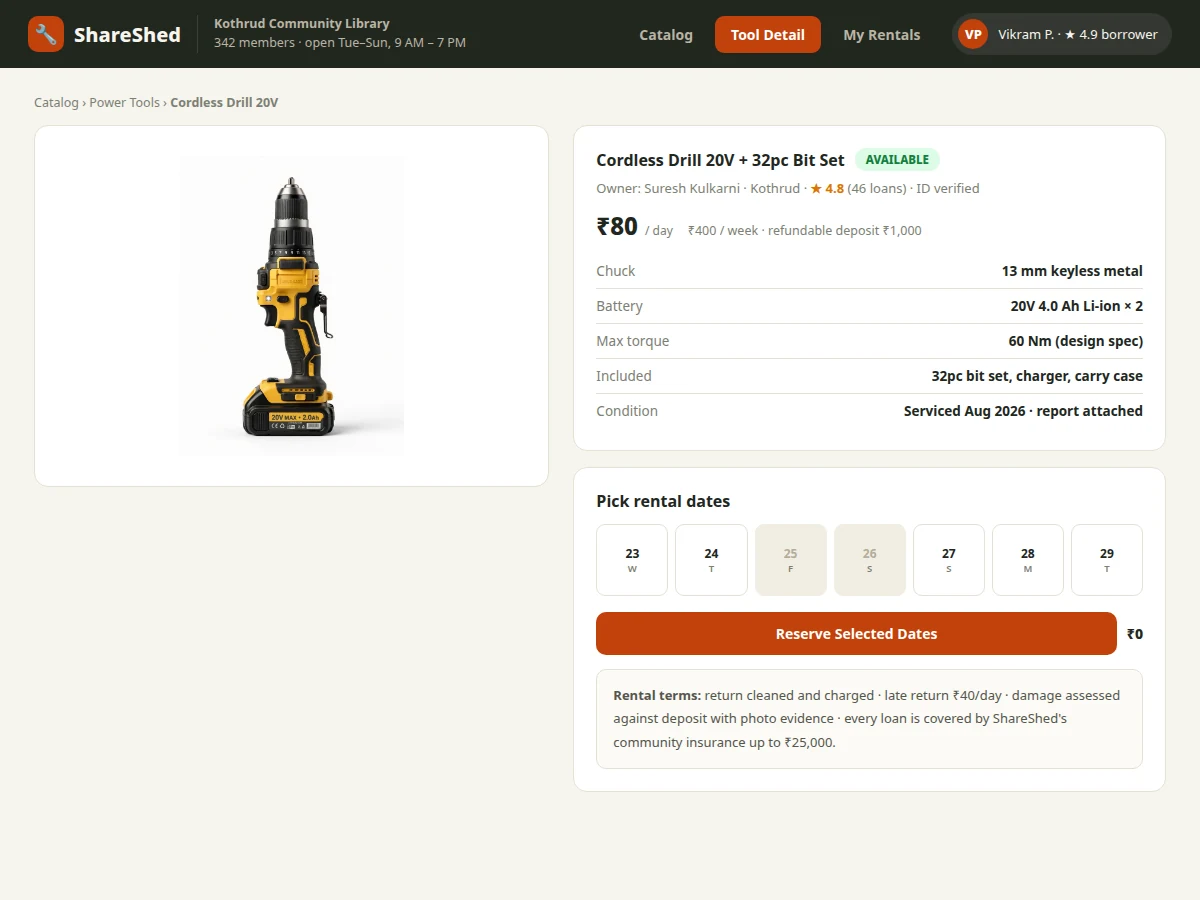
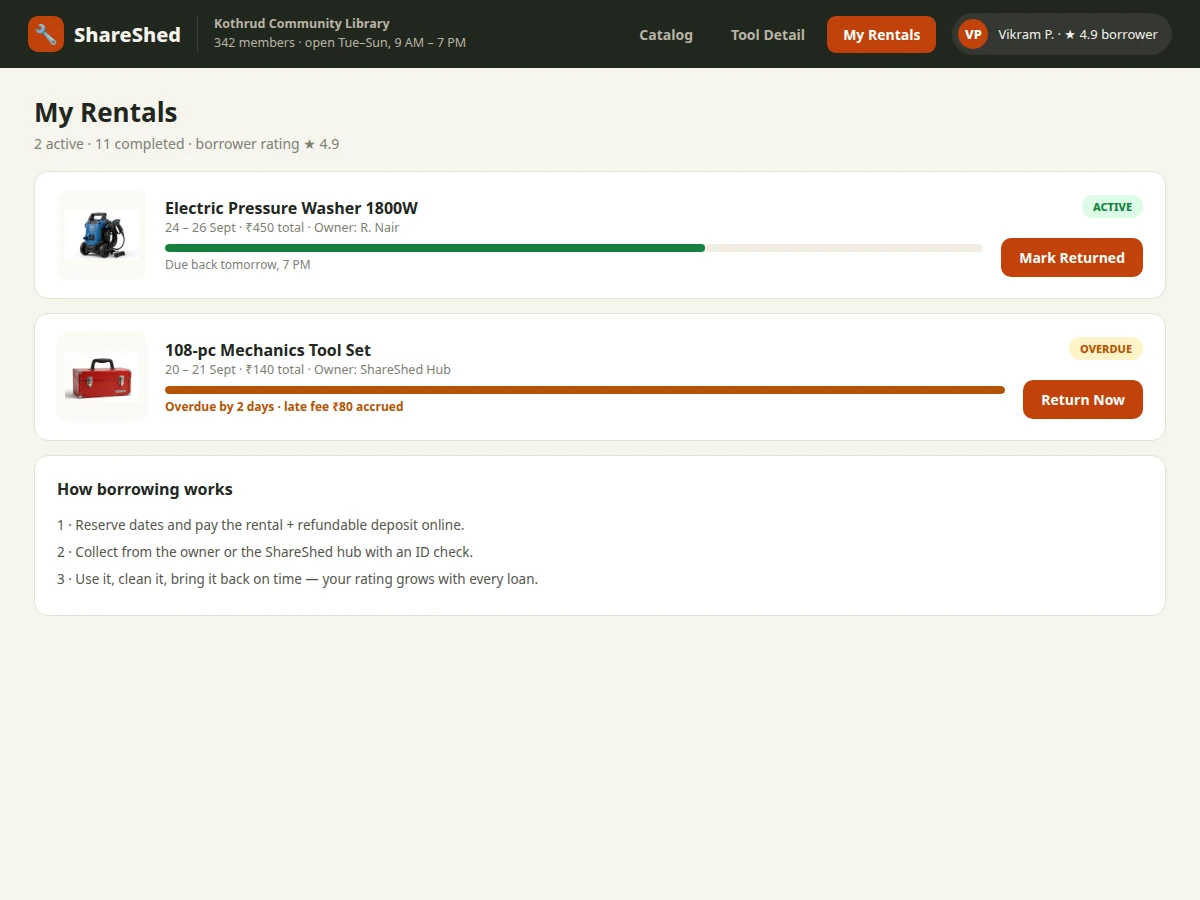
Every flat owns a drill used twice a year, a ladder used once, and a toolbox gathering dust — while the neighbour buys the same drill new for one afternoon's work. Tool libraries fix this by lending: members borrow instead of buying, and the community's idle tools do real work. But volunteer-run libraries drown in registers and WhatsApp: who has the circular saw, when is it due back, who pays for the broken chuck? This project gives the library a proper portal. The catalogue shows each tool with photos, specifications, deposit and late-fee terms; a calendar shows live availability per item; reserving is a conflict-checked booking; and every rental is tracked pickup → due → returned, with condition notes and automatic late-fee computation. The reservation-conflict logic and the rental state machine are the technical core.
How it works
- Tools are catalogued with category, specifications, deposit, daily late fee and total units.
- A member opens a tool and sees its availability calendar; reserved ranges are blocked.
- The member picks free dates and confirms; the reservation write checks for overlaps in a transaction and rejects conflicts.
- At pickup the volunteer records the deposit and a condition note; the rental enters the picked-up state.
- The tracker counts down to the due date; overdue rentals appear in the admin's alert list with accruing fines.
- On return the volunteer inspects the tool, records condition, releases the deposit and closes the rental with any fine settled.
Tech stack:
- HTML5, CSS3, JavaScript (frontend)
- PHP 8 / Laravel (backend)
- MySQL (tools, reservations, rentals, fines)
- Calendar availability rendering
- Transactional reservation writes
| Parameter | Value |
|---|---|
| Catalogue | 40+ seeded tools across 8 categories (design scope) |
| Reservation unit | Whole days on a per-item calendar (design scope) |
| Conflict rule | No overlapping reservations per tool (design logic) |
| Late fee | Per-tool daily rate, auto-computed (design scope) |
| Rental states | 5 (reserved → inspected) |
| Page load | Approximately < 2 s on broadband (expected) |
| Deployment | Shared hosting compatible (PHP/MySQL) |
Project features
- [Live availability calendar] Per-item calendar showing reserved vs free days, so members pick dates that actually work.
- [Conflict-checked reservations] Overlapping reservations for the same tool are rejected at the data layer — one tool, one borrower at a time.
- [Rental lifecycle tracking] Every rental moves through reserved, picked-up, due, returned and inspected states with timestamps.
- [Automatic late-fee computation] Overdue days multiply the tool's daily late fee; the fine ledger is computed, not hand-calculated.
- [Deposit ledger] Per-tool deposits collected at pickup and released after the return inspection passes.
- [Condition reports] Photo-annotated condition notes at pickup and return, so damage disputes have a paper trail.
- [Volunteer admin] Inventory CRUD, membership management, overdue-rental alerts and fine collection view.
What is included
- Complete portal source code (frontend + backend)
- MySQL schema with migrations (tools, reservations, rentals, deposits, fines)
- Availability calendar and conflict-checked reservation module
- Rental state machine with late-fee computation
- Volunteer admin: inventory, members, overdue alerts
- Seeded demo inventory: 40+ tools with photos and terms
- Project report PDF (reservation logic, fine computation, ER diagram, test cases)
- PPT presentation for final review
- Viva Q&A preparation document (conflict prevention, state machine, fine ledger)
Limitations & prerequisites
- Deposits and fines are ledger entries in the demo; real money collection is the operator's process.
- The demo assumes one library branch; multi-branch inventory transfer is future scope.
- Tool maintenance scheduling (sharpening, servicing) is noted as an extension, not implemented.
- Identity verification of members is a manual admin step in the demo.
- The calendar handles whole-day granularity; hourly lending is future scope.
Frequently Asked Questions
How are double-bookings prevented?
The reservation write runs in a database transaction that checks for date-range overlaps on that tool before inserting. Two members grabbing the same week cannot both succeed — the second gets a conflict message with the nearest free dates.
How are late fees calculated?
Each tool has a daily late-fee rate. Overdue days × rate accrues automatically on the rental record; the admin view shows the running total per overdue rental.
What happens if a tool comes back damaged?
The return inspection records a condition note against the rental. Damage claims deduct from the deposit ledger per the library's policy, with the photo-annotated trail as evidence.
Who runs the library?
Volunteers with the admin role: they manage inventory, approve memberships, record pickups/returns and chase overdue rentals from the alert list.
Can members reserve far in advance?
Yes — the calendar shows all future availability, and the demo allows reservations up to 60 days ahead (configurable).
Is this project suitable for a final-year project?
Yes — for Computer Science, IT and Web Development programs. Date-range conflict logic, rental state machines and fine ledgers make it a strong systems project with a real community use case. Suitable for B.E./B.Tech final-year projects in Computer Science, IT and Web Development.
Components & software requirements
- HTML5, CSS3, JavaScript (frontend)
- PHP 8 / Laravel (backend)
- MySQL (tools, reservations, rentals, fines)
- Calendar availability rendering
- Transactional reservation writes
Delivery information
Built-to-order project. Delivery timeline is shared after order confirmation based on current queue.
Support terms
Complete documentation, setup guide, and viva preparation included. Support for setup and explanation provided.