
More project photos (2)
The problem
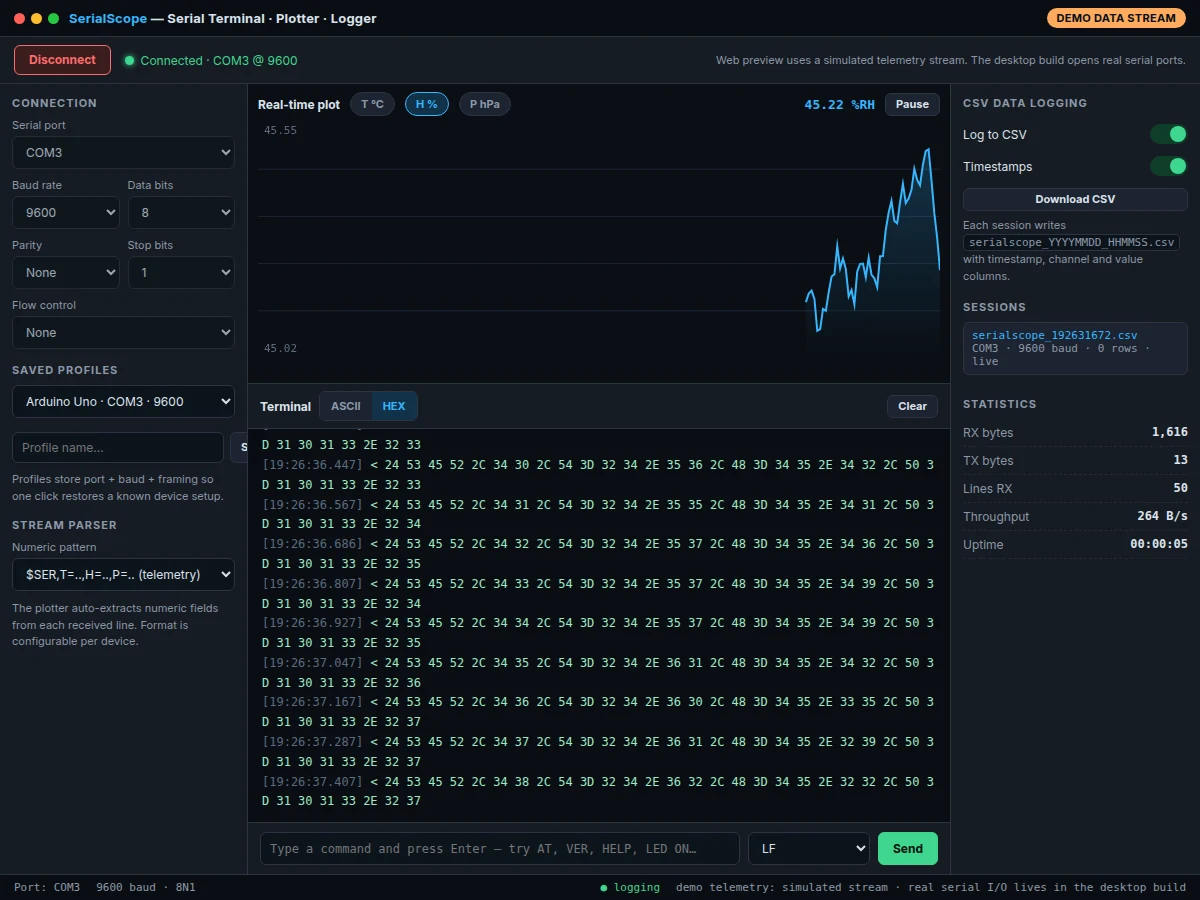
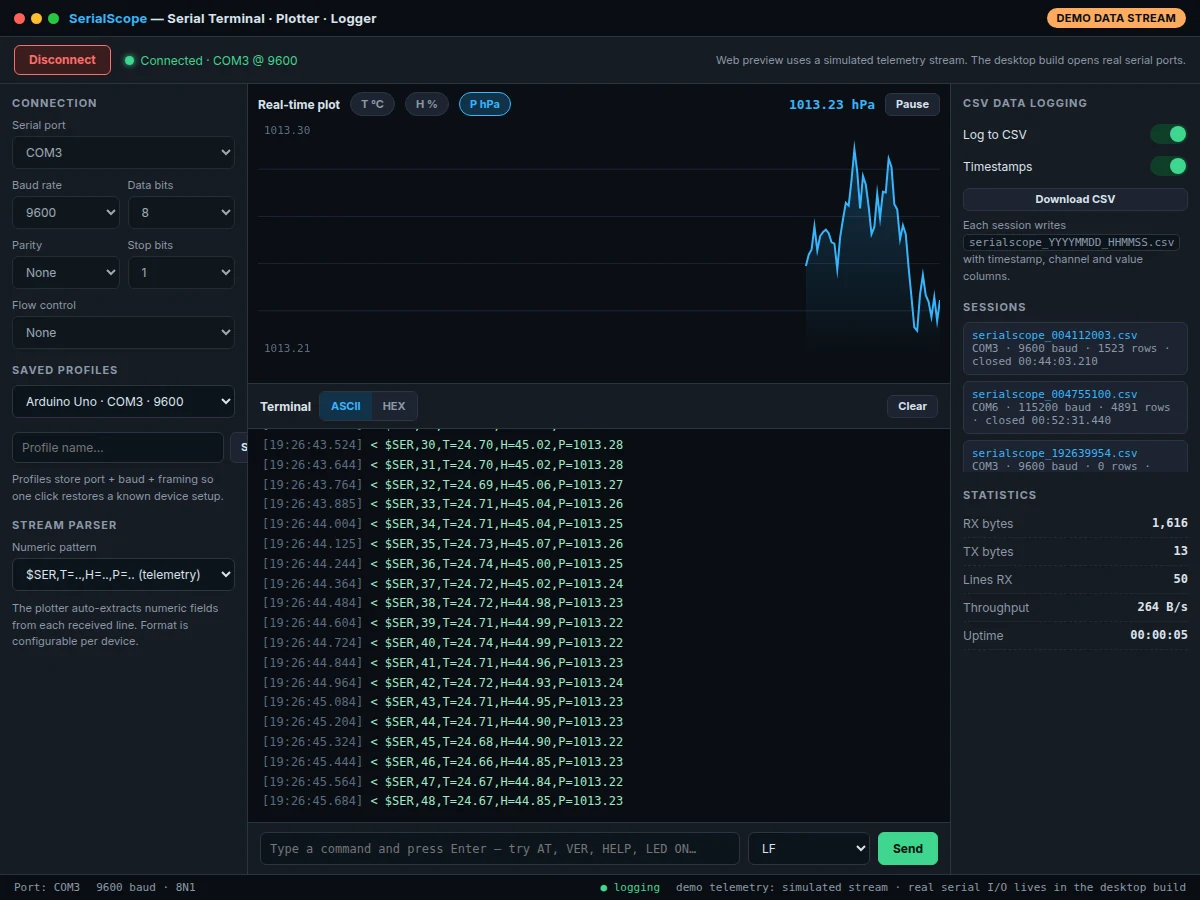
Every embedded project eventually needs a serial terminal — students debugging an Arduino or ESP32 usually fall back on the Arduino IDE's bare serial monitor, which cannot plot data, cannot log sessions, and cannot show hex. This project builds SerialScope, a proper desktop serial terminal in Electron backed by the Node.js serialport library: a timestamped TX/RX console with ASCII/hex views, a real-time scrolling plotter that pulls numeric channels out of each incoming line, and session-based CSV logging with one-click export. The student configures the real parameters of serial communication — port, baud rate, data bits, parity, stop bits, flow control — and saved profiles restore a known device setup instantly. A working web preview with a simulated telemetry stream demonstrates the full UI; the desktop build opens genuine serial ports.
Arduino or ESP32 streams telemetry lines over USB serial
Follow the working sequence
How it works
- The Electron main process enumerates available serial ports through serialport's port-listing API and presents them alongside the last-used settings.
- On connect, a serial stream opens at the chosen baud rate and framing; a line parser splits the incoming byte stream into complete lines.
- Each line is timestamped and appended both to the console (ASCII or hex view) and to the active session's CSV buffer with its direction marked.
- A numeric extractor scans every line for channel values using the configured pattern and pushes them into ring buffers that feed the scrolling plot.
- The renderer draws the chart each frame while the send box transmits typed commands with the selected line ending and logs the transmission.
- On disconnect, or on demand, the session buffer is exported as a timestamped CSV file and the session appears in the history list with its row count.
Tech stack:
- Electron (desktop shell, Windows/macOS/Linux)
- Node.js with the serialport library (real port I/O)
- HTML5, CSS and JavaScript (renderer UI)
- Canvas 2D (scrolling real-time chart)
- CSV session files via the filesystem API
- electron-builder configuration for packaged installers
| Parameter | Value |
|---|---|
| Platform | Windows, macOS and Linux desktop (Electron) |
| Serial access | Real ports via Node.js serialport in the desktop build; simulated telemetry stream in the web preview |
| Baud rates | 1200–115200 bps (configurable) |
| Framing | 7/8 data bits · None/Even/Odd parity · 1/1.5/2 stop bits · None/RTS-CTS/XON-XOFF flow control |
| Plot window | Approximately 240 samples, scrolling (configurable) |
| Sample rate | Approximately 8 samples/second at the default stream rate (expected) |
| Log format | CSV with timestamp, direction and payload columns; one file per session |
| Console buffer | Last 400 lines retained in the view (configurable) |
| Installer | electron-builder configuration included for all three desktop platforms |
Project features
- [Timestamped TX/RX console] Every received and transmitted line is logged with millisecond timestamps, colour-coded direction markers, autoscroll, and a one-click ASCII/hex view toggle for inspecting raw bytes.
- [Real-time scrolling plotter] Numeric channels are auto-extracted from each incoming line using a configurable pattern and drawn on a scrolling canvas chart with channel selector, pause/resume and a live current-value readout.
- [Session-based CSV logging] Logging can be toggled per session; each session writes a timestamped CSV file with timestamp, direction and payload columns, and past sessions stay listed with row counts.
- [Full serial-port configuration] Port enumeration plus baud rates from 1200 to 115200, 7/8 data bits, none/even/odd parity, 1/1.5/2 stop bits and RTS/CTS or XON/XOFF flow control.
- [Saved port profiles] Frequently used device setups (e.g. Arduino Uno on COM3 at 9600) are stored as named profiles and restored in one click, including a couple of ready-made examples.
- [Command send box] Type commands and send with Enter using the selected line ending (none, LF, CR, CRLF); the preview device answers AT-style queries so the round-trip is visible immediately.
- [Live session statistics] RX/TX byte counters, lines received, per-second throughput and session uptime update continuously in a dedicated panel.
Implemented in the base build: all seven features above, including the Electron desktop app with real serial-port access. Optional customization (quoted separately): a binary-protocol frame decoder for non-text devices, simultaneous multi-port sessions in tabs, and MQTT/HTTP forwarding of the logged stream. Future scope (not implemented): scripted macro sequences, automated test scripting with pass/fail assertions, and a mobile companion viewer.
What is included
- Complete Electron desktop application source code (main + renderer)
- electron-builder packaging configuration for Windows, macOS and Linux installers
- Working single-file web preview demo with the simulated telemetry stream
- Setup instructions including COM-port drivers (Windows) and dialout-group permissions (Linux)
- Project report PDF (background, serial communication theory, architecture, methodology, results)
- PPT presentation for final review
- Viva Q&A preparation document (UART framing, baud rate, parity, flow control, Electron architecture)
Limitations & prerequisites
- The web preview streams simulated telemetry; real serial-port I/O exists only in the desktop Electron build.
- Meaningful testing needs a physical serial device (Arduino, ESP32, USB-UART adapter) or a virtual COM-port pair.
- Very high baud rates with heavy logging can drop chart frames on old machines — the plot window is capped to keep the UI smooth.
- Linux users need dialout-group membership and Windows users may need USB-UART drivers (CH340/CP2102) before ports appear.
- This is a byte-stream terminal, not a protocol analyzer: it does not do bit-level timing or bus decoding.
- CSV logs grow unbounded during long sessions; starting a fresh session for rotation is a manual step.
Frequently Asked Questions
What is the main technology used?
The desktop app is built with Electron, which wraps a Chromium UI around a Node.js backend; all real serial-port work goes through the Node.js serialport library. The renderer UI is plain HTML, CSS and JavaScript with a Canvas 2D chart, so every layer is explainable in a viva without framework magic.
Does it work with Arduino and ESP32 boards?
Yes — any board that appears as a serial/COM port works, including Arduino Uno/Nano, ESP32 devkits and bare USB-UART adapters. You select the port, match the baud rate your firmware uses, and the console, plotter and logger start working immediately. Driver notes for CH340/CP2102 adapters are in the setup guide.
Why does the web demo use simulated data?
Browsers cannot open raw serial ports from a plain web page, so the preview runs a built-in telemetry generator clearly labelled as a demo data stream. It exercises the identical console, plotting and logging code paths; the Electron desktop build swaps the generator for genuine serial-port I/O.
Can it plot data from my own device's message format?
The base build parses the documented $SER,T=..,H=..,P=.. telemetry pattern plus plain comma-separated lines, and the pattern is configurable per device from the settings panel. A fully custom binary frame decoder is offered as optional customization, since binary parsing is device-specific work quoted on top of the base build.
Is this project suitable for a final-year project?
Yes — for Computer Engineering and IT programs. It demonstrates serial communication fundamentals (framing, baud rate, parity, flow control), desktop application architecture with Electron and Node.js, real-time data visualization and file-based logging, all testable against real hardware and defensible question-by-question in the viva.
What will I receive with the project?
The complete Electron app source, installer packaging configuration, the working web preview demo, setup instructions with driver and permission notes, the project report PDF, a review PPT and a viva Q&A document covering UART concepts and the app architecture. Guidance for connecting your own board and capturing a demo run is included. Suitable for B.E./B.Tech final-year projects in Computer Engineering and Information Technology.
Components & software requirements
- Electron (desktop shell, Windows/macOS/Linux)
- Node.js with the serialport library (real port I/O)
- HTML5, CSS and JavaScript (renderer UI)
- Canvas 2D (scrolling real-time chart)
- CSV session files via the filesystem API
- electron-builder configuration for packaged installers
Delivery information
Built-to-order project. Delivery timeline is shared after order confirmation based on current queue.
Support terms
Complete documentation, setup guide, and viva preparation included. Support for setup and explanation provided.
Download free synopsis (PDF)
Enter your name and email — the synopsis PDF downloads immediately. We may send occasional project updates; no spam, unsubscribe anytime.