
More project photos (2)
The problem
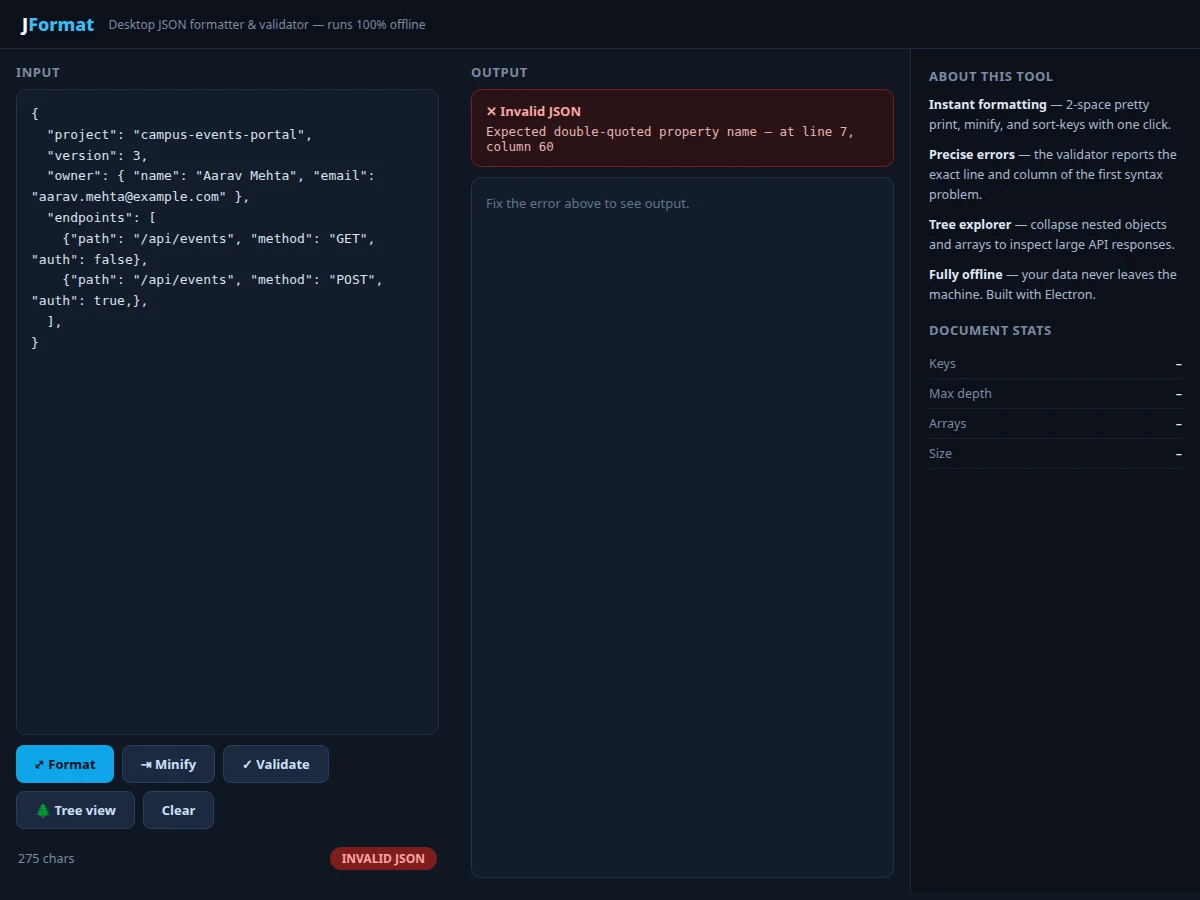
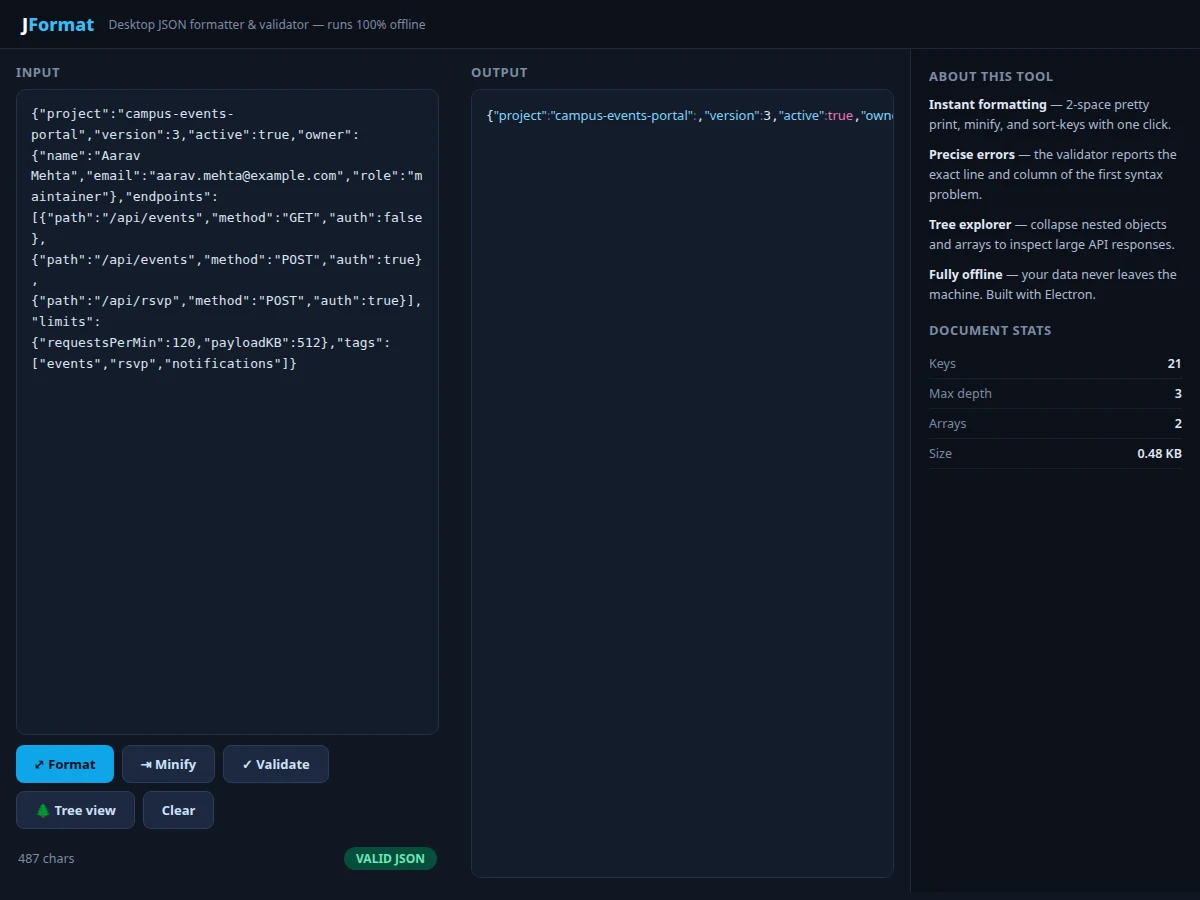
JSON is the working language of modern software — APIs return it, configs are written in it, and developers read it all day. Yet a single missing comma can waste twenty minutes, because raw JSON from a server arrives as one unreadable line and the error messages from most tools say little more than "unexpected token". This project builds a focused desktop utility that fixes the whole loop: instant pretty-printing with syntax highlighting, one-click minification, a validator that pinpoints the exact line and column of the first syntax error, and a collapsible tree view for exploring deeply nested API responses. A document-statistics panel (key count, max depth, array count, size) helps developers sanity-check large payloads at a glance. Built as an Electron desktop app, it works completely offline — a genuine requirement when the JSON contains production API keys or customer data.
How it works
- The user pastes or types JSON into the input pane of the Electron desktop window.
- On every keystroke, the app attempts
JSON.parse; the character count and a VALID/INVALID badge update live. - The Format button re-serializes the parsed object with indentation and applies regex-based syntax highlighting (keys, strings, numbers, booleans, null).
- The Minify button re-serializes without whitespace for compact storage or transmission.
- The Validate button runs the parse in strict mode and, on failure, converts the parser's character offset into a line-and-column location shown in an error panel.
- The Tree view button renders the parsed object as nested, collapsible DOM nodes with type-colored values.
- The statistics panel walks the parsed object once, counting keys, arrays and maximum depth.
Tech stack:
- Electron (desktop shell)
- JavaScript (parsing, rendering logic)
- JSON.parse / JSON.stringify (core engine)
- HTML/CSS (dark developer-theme UI)
- Node.js (file open/save)
| Parameter | Value |
|---|---|
| Parsing engine | Native JSON.parse (strict, spec-compliant) |
| Format styles | Pretty-print (2-space), minified |
| Error reporting | Line + column of first syntax error |
| Tree view | Collapsible nodes, type-colored values |
| Document stats | Keys, max depth, array count, size in KB |
| Platforms | Windows, macOS, Linux (Electron) |
| Network needed | None — fully offline |
Project features
- [One-click formatting] Pretty-print with 2-space indentation and syntax highlighting for keys, strings, numbers and booleans; minify to a single line for production payloads.
- [Precise validation errors] The validator reports the exact line and column of the first syntax problem (e.g. the trailing comma in the demo), instead of a cryptic parser message.
- [Collapsible tree explorer] Expand and collapse nested objects and arrays to navigate large API responses without scrolling through thousands of lines.
- [Document statistics] Live counts of keys, maximum nesting depth, number of arrays and document size — useful when reviewing unfamiliar payloads.
- [Error-tolerant editing] The input pane stays editable at all times; statistics and highlighting update as you type, so fixing an error is a tight feedback loop.
- [Fully offline] No server, no telemetry, no clipboard snooping — the app never transmits document content, which is the point of a desktop tool for sensitive data.
- [Sample payloads] Ships with realistic example documents so the formatter, validator and tree view can be demonstrated immediately.
What is included
- Complete Electron desktop application source code
- Build configuration for Windows/macOS/Linux packages
- User manual with worked validation examples
- Project report PDF (background, parser behavior, UI design, methodology)
- PPT presentation for final review
- Viva Q&A preparation document (JSON spec, parsing, Electron, error handling)
Limitations & prerequisites
- Validates syntax only — it does not validate against a JSON Schema; schema validation is documented as future scope.
- Extremely large documents (tens of MB) may render slowly in the tree view since every node becomes a DOM element; virtualized rendering is future scope.
- The highlighter is regex-based, so pathological strings (e.g. escaped quotes inside keys) can mis-color in rare cases without affecting correctness of parsing.
- No format conversion (JSON ↔ YAML/XML) in this version — listed as a planned extension.
- Duplicate keys are accepted per the JSON spec's leniency; the tool reports the parsed result rather than flagging them.
Frequently Asked Questions
Why a desktop app instead of a website?
Developers paste production API responses containing keys and customer data. A desktop app that never touches the network removes the entire class of "did I just paste secrets into a website" accidents.
How does it find the exact error location?
The native parser reports a character offset on failure; the app converts that offset into line and column numbers against the input text, so the error panel can say "line 9, column 42".
Can it handle very large JSON files?
Files up to a few MB format and validate instantly. The tree view is the heaviest part — documents with hundreds of thousands of nodes are better inspected in formatted text mode.
Does it support JSON Schema validation?
Not in this version — it validates syntax (well-formedness). Schema-based semantic validation is designed and documented as the natural next feature.
What makes the tree view useful?
API responses are often 5–10 levels deep. Collapsing sibling branches lets you focus on one subtree, and the type colors make strings vs numbers vs booleans obvious at a glance.
Is this project suitable for a final-year project?
Yes — for Computer Science and IT programs. It demonstrates parsing, error reporting, recursive UI rendering, desktop packaging and developer-tool UX thinking. Suitable for B.E./B.Tech final-year projects in Computer Science and Information Technology.
Components & software requirements
- Electron (desktop shell)
- JavaScript (parsing, rendering logic)
- JSON.parse / JSON.stringify (core engine)
- HTML/CSS (dark developer-theme UI)
- Node.js (file open/save)
Delivery information
Built-to-order project. Delivery timeline is shared after order confirmation based on current queue.
Support terms
Complete documentation, setup guide, and viva preparation included. Support for setup and explanation provided.