
More project photos (3)
The problem
Students usually draw ER diagrams on paper or a whiteboard during database design, then separately hand-write the CREATE TABLE statements for the same schema. The two artefacts drift apart quickly: an attribute added to the diagram is missed in the SQL, a many-to-many relationship is drawn but never resolved into a junction table, and a foreign key is typed with a different name or type from the primary key it references. Correcting that mismatch means redrawing, rechecking keys and rewriting DDL by hand. This desktop app keeps one source of truth. Entities, attributes, keys and relationships are modelled once on a canvas, a validation pass flags missing primary keys and unresolved relationships, and the DDL for MySQL or PostgreSQL is generated from that same model, so the diagram and the schema cannot silently diverge.
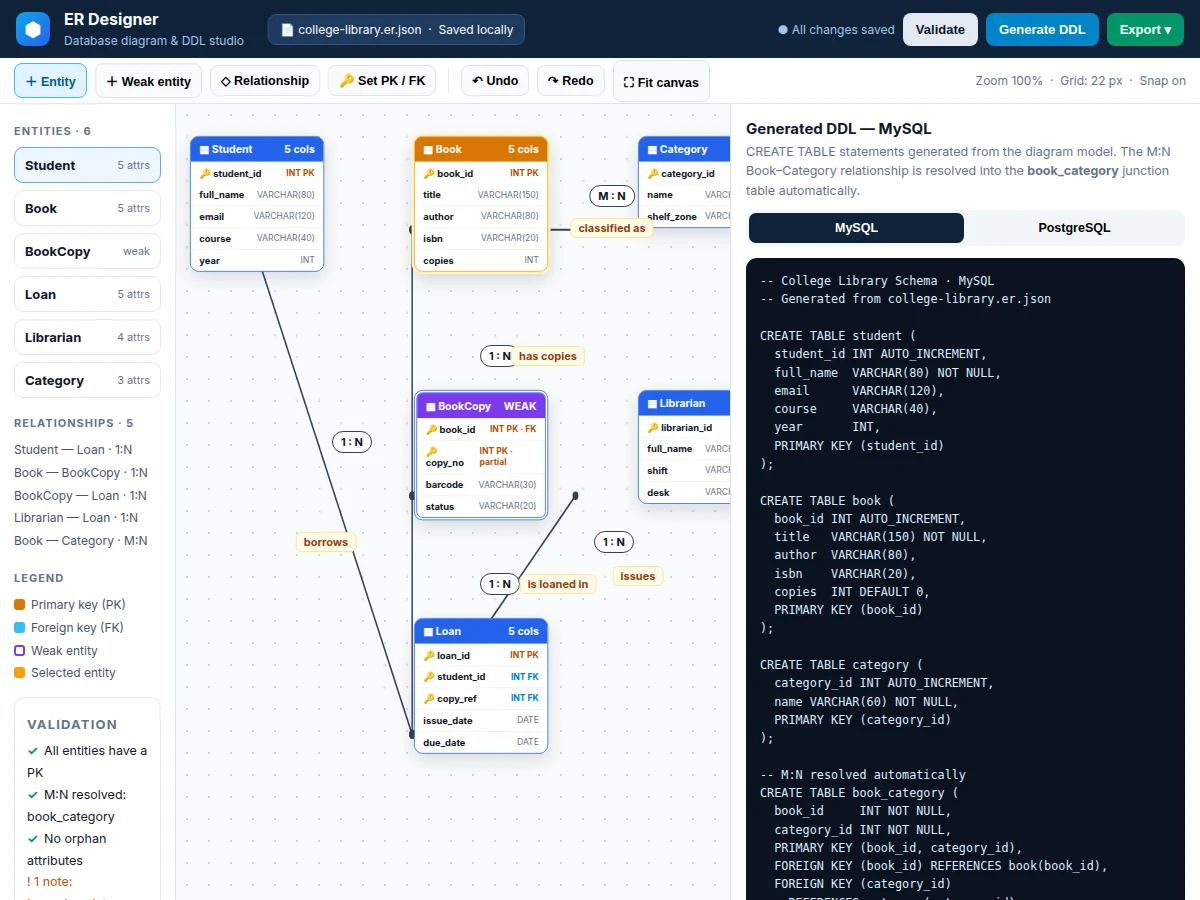
Entities, attributes and relationships with 1:1, 1:N and M:N cardinality are drawn on the SVG canvas.
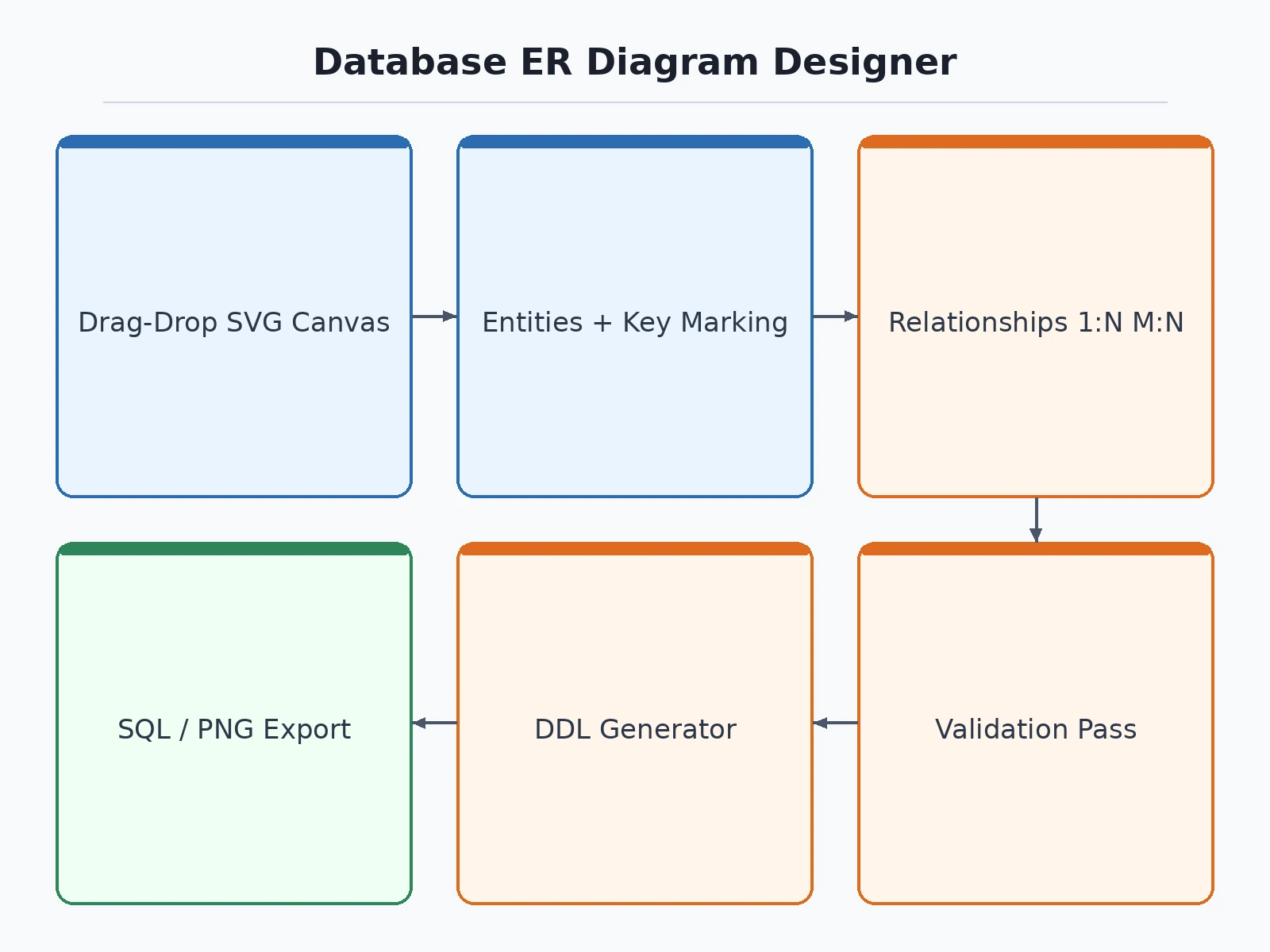
Follow the working sequence
How it works
- The user creates entities on the canvas and adds attributes to each one, naming the entity for the thing it represents, such as Student, Book or Loan in the preloaded library example.
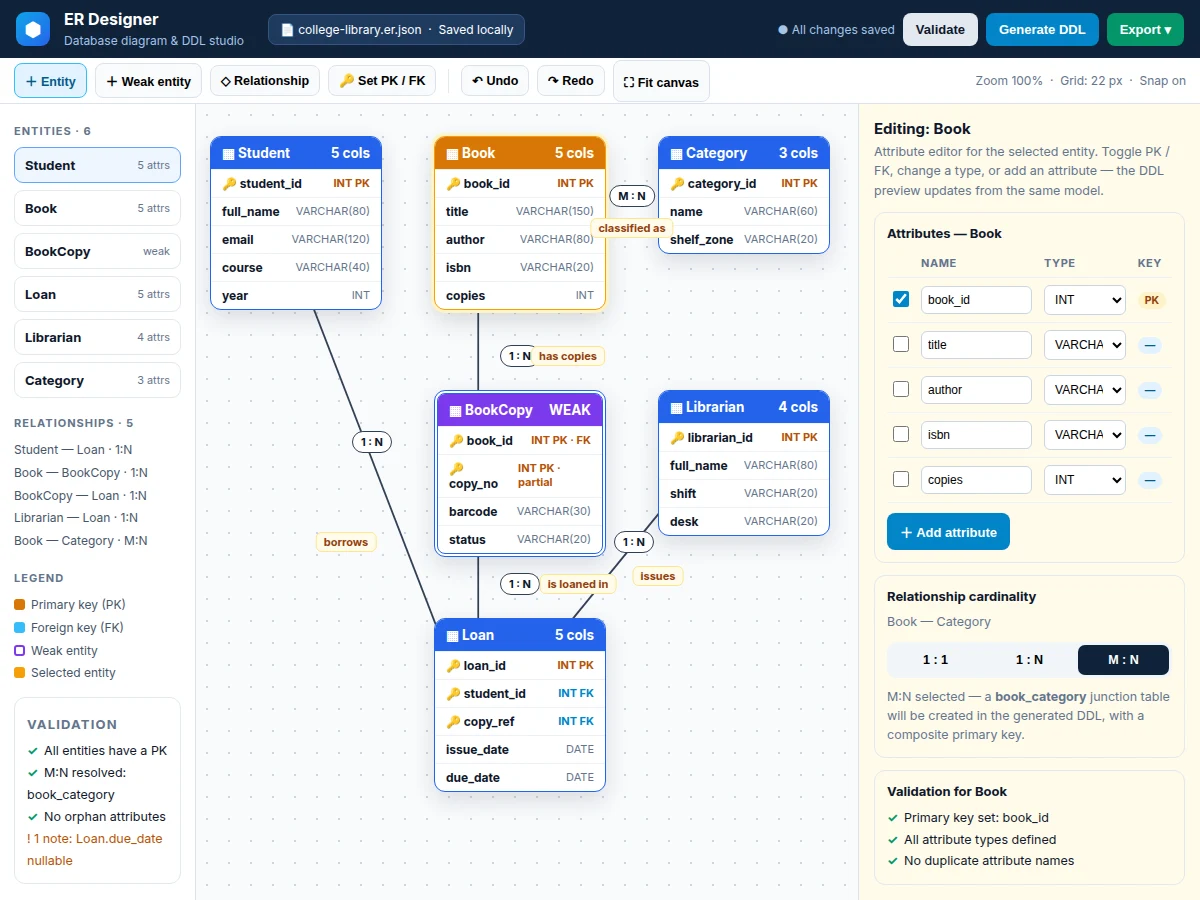
- Primary keys, foreign keys and data types are set per attribute, and weak entities are marked as weak with their partial key identified.
- Relationships are drawn between entities and each one is given a name and a cardinality — 1:1, 1:N or M:N — shown as labels on the connecting line.
- The validation pass runs over the model and flags missing primary keys, untyped attributes and any relationship that cannot be converted, so errors are fixed in the diagram rather than in SQL.
- During DDL generation, each entity becomes a table, foreign keys are placed on the many side of 1:N relationships, and every M:N relationship is resolved through a generated junction table with a composite key.
- The generated CREATE TABLE statements are previewed and exported for the selected dialect — MySQL or PostgreSQL — as a .sql file.
- The project is saved as a JSON file for later editing, and the finished diagram is exported as PNG or SVG for the project report.
Tech stack:
- Electron
- JavaScript
- SVG canvas rendering
- JSON project format
- MySQL DDL generator
- PostgreSQL DDL generator
- HTML · CSS (desktop UI)
| Parameter | Value |
|---|---|
| Platform | Desktop — Windows, macOS and Linux via Electron (design) |
| Preloaded example | College library schema — 6 entities, 5 relationships |
| Diagram size | Design target: up to approximately 40 entities per diagram |
| Relationship cardinality | 1:1, 1:N and M:N, labelled on the canvas |
| DDL dialects | MySQL and PostgreSQL only in the base build |
| Project format | JSON (.json) — save and load |
| Diagram export | PNG and SVG image formats |
| Internet requirement | None — design, validation and DDL generation run offline |
| Installer size | Approximately 90–130 MB via Electron packaging (expected) |
Project features
- [Drag-and-drop ER canvas] Entities are placed and moved on an SVG-rendered canvas as boxes listing their attributes, so the layout can be rearranged for a report figure without redrawing the whole diagram. (Implemented)
- [Entities, attributes and key marking] Each entity holds named attributes with data types, and any attribute can be marked as a primary key or foreign key; weak entities are shown with a distinct double border and a partial key. (Implemented)
- [Relationships with cardinality] Entities are connected by relationship lines labelled 1:1, 1:N or M:N, with the relationship name shown on the line, covering the cardinality notation taught in database courses. (Implemented)
- [Validation pass] A single check scans the model and flags entities with no primary key, attributes with no type, and relationships that cannot be turned into tables, before any DDL is generated. (Implemented)
- [MySQL and PostgreSQL DDL generation] The model is converted into CREATE TABLE statements in the chosen dialect, with primary keys, foreign keys and the dialect-specific auto-increment style, ready to save as a .sql file. (Implemented)
- [Automatic M:N junction tables] A many-to-many relationship does not produce invalid DDL: the generator creates a junction table named from both entities, with a composite primary key and foreign keys to each side. (Implemented)
- [JSON save / load and PNG / SVG export] The whole diagram is saved as a readable JSON project file that can be reopened and edited later, and the canvas can be exported as a PNG or SVG image for reports and presentations. (Implemented)
- Optional / future scope: reverse-engineering an existing live database into a diagram, collaborative multi-user editing and additional dialects such as SQLite or SQL Server are NOT part of the base build — they are listed as optional or future scope.
What is included
- Complete Electron source code (canvas, entity model, validation and DDL generator modules)
- Installer / packaged build for desktop use
- Sample college library-schema project file, preloaded and editable
- Setup guide (install dependencies, open the sample project, generate and export DDL)
- Project report PDF (background, ER modelling theory, methodology, module design)
- PPT presentation for final review
- Viva Q&A preparation document (primary and foreign keys, cardinality, normalisation link, junction tables)
Limitations & prerequisites
- The app generates DDL only — it does not connect to, run or migrate a live database, and applying the exported .sql file is done in a separate database tool.
- Dialect coverage is limited to MySQL and PostgreSQL in the base build; dialect-specific features such as stored procedures, triggers and views are not generated.
- There is no collaborative editing — one user edits a JSON project file at a time, and merging two edited copies is manual.
- Very large diagrams with many crossing relationships become unwieldy on a single canvas, even though the model itself still generates DDL.
- Validation checks structural completeness such as missing primary keys; it does not judge whether the modelling choices themselves are good database design.
- The tool works at design time only — it does not inspect data, suggest indexes from usage, or check an existing schema.
Frequently Asked Questions
Is this project suitable for a final-year project?
Yes — Computer Engineering and Information Technology students can use it to demonstrate desktop application development with Electron, data modelling, graph-style canvas rendering and code generation in one build. Turning an ER model into correct DDL, including junction tables for M:N relationships, gives concrete design decisions and algorithms to explain clearly in a viva.
Does the app create the database itself?
No. The app generates CREATE TABLE statements and saves them as a .sql file for MySQL or PostgreSQL. Running that file against a server is a separate step done with a normal database tool. Keeping generation separate from execution makes the output easy to inspect, edit and include in a report before anything is created.
How are many-to-many relationships handled?
An M:N relationship cannot be represented by a single foreign key, so the generator creates a junction table named from the two entities. That table holds both primary keys as a composite primary key and as foreign keys to each side, which is the standard relational mapping taught for M:N relationships.
What does the validation pass actually check?
It checks structure, not taste: entities without a primary key, attributes without a data type, duplicate attribute names inside one entity, and relationships left without a cardinality. Each problem is listed against the entity or relationship it belongs to, so the diagram can be corrected before DDL is generated from it.
Can an existing database be imported into a diagram?
Not in the base build. Reverse-engineering a live database into entities and relationships is listed as optional future scope, stated plainly rather than implied. The base workflow starts from a blank canvas or from the preloaded college library schema, which can be edited into a different schema.
Does the project need internet?
No. Drawing, validation, JSON save and load, PNG and SVG export, and MySQL and PostgreSQL DDL generation all run locally in the desktop app, so the full workflow works offline. Internet is needed only once, to download development dependencies while setting up or packaging the build.
Components & software requirements
- Electron
- JavaScript
- SVG canvas rendering
- JSON project format
- MySQL DDL generator
- PostgreSQL DDL generator
- HTML · CSS (desktop UI)
Delivery information
Built-to-order project. Delivery timeline is shared after order confirmation based on current queue.
Support terms
Complete documentation, setup guide, and viva preparation included. Support for setup and explanation provided.
Download free synopsis (PDF)
Enter your name and email — the synopsis PDF downloads immediately. We may send occasional project updates; no spam, unsubscribe anytime.