
More project photos (2)
The problem
Every developer, writer and student has a graveyard of useful text: the SSH command for the lab server, the perfect email follow-up, a regex that took an hour to write, a link to the report template. These live scattered across sticky notes, old chats and memory — and get lost exactly when needed. Clipboard managers solve the history half of this (what did I copy ten minutes ago), and snippet libraries solve the reuse half (the things I copy every week). This project builds both in one desktop application: a rolling clipboard history with timestamps, and a permanent, categorized, searchable snippet library with pinning. One click copies any snippet back to the clipboard with a confirmation toast. The data model is deliberately local-first — snippets live in on-machine storage — because the most useful snippets (server credentials, internal links, personal templates) are exactly the ones that should never sync to a cloud.
How it works
- The app presents the snippet library as cards grouped by category, with pinned items first.
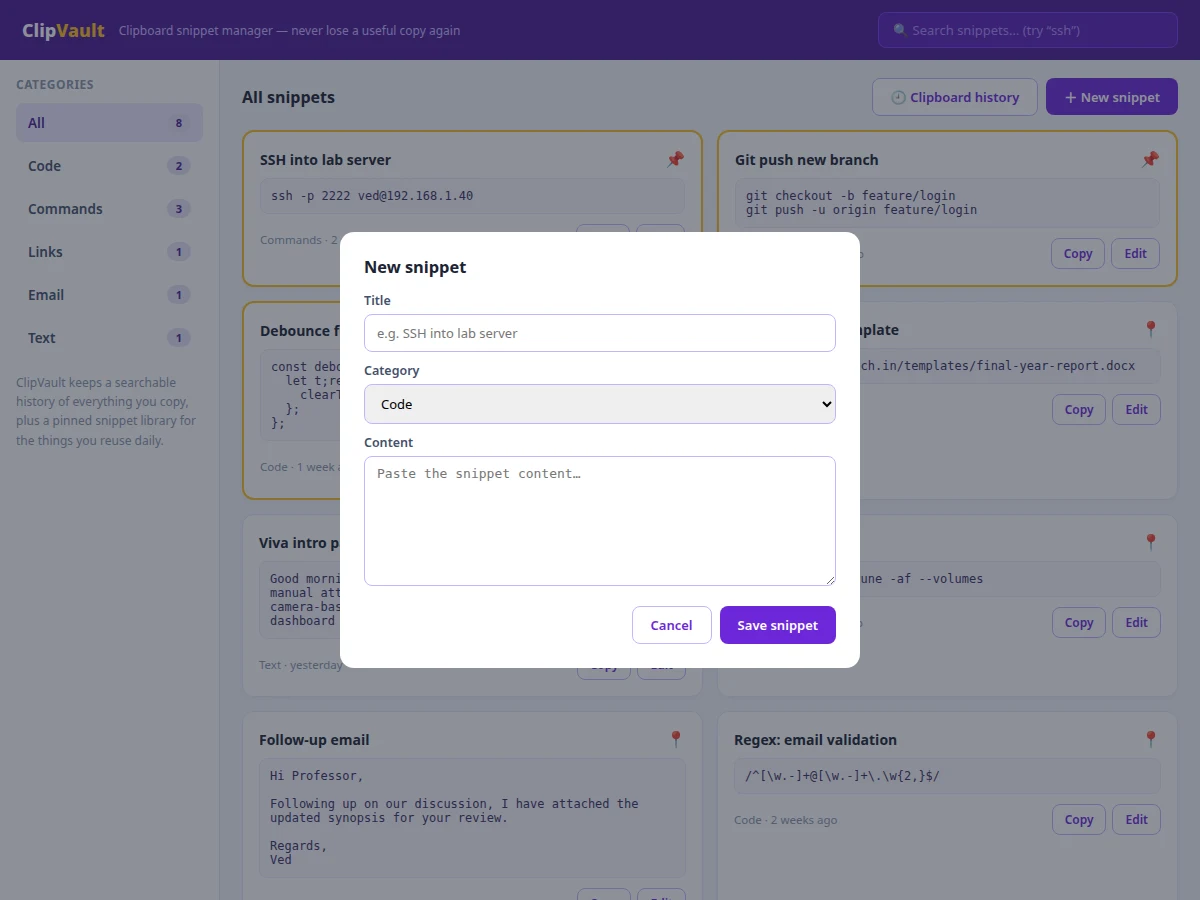
- Adding a snippet opens a dialog for title, category and content; editing reuses the same dialog pre-filled.
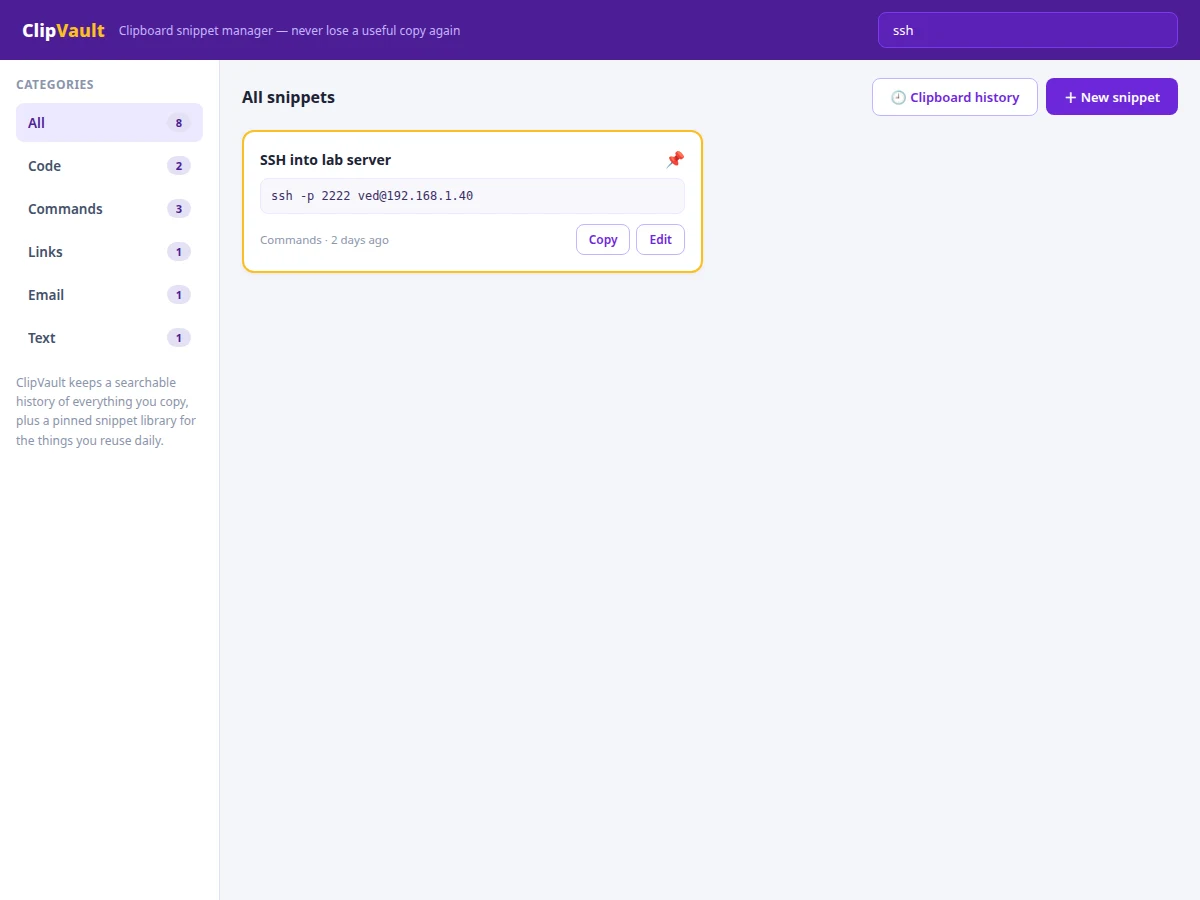
- The search box filters cards live by matching the query against titles and content (case-insensitive substring match).
- The clipboard-history view shows recently copied items with relative timestamps, kept separate from the permanent library.
- Clicking Copy writes the snippet text to the OS clipboard (via the clipboard API with an execCommand fallback) and shows a confirmation toast.
- Pinning toggles a flag that re-sorts the library so pinned snippets always appear first.
Tech stack:
- Electron (desktop shell)
- JavaScript (library logic, search, clipboard)
- Clipboard API + execCommand fallback
- LocalStorage / file-based persistence
- HTML/CSS (card-based library UI)
| Parameter | Value |
|---|---|
| Categories | 5 (Code, Commands, Links, Email, Text) |
| Search | Live substring match over title + content |
| History | Rolling recent-copies list with timestamps |
| Pinning | Pinned-first sort order |
| Storage | Local only (no cloud sync) |
| Platforms | Windows, macOS, Linux (Electron) |
| Network needed | None — fully offline |
Project features
- [Pinned snippet library] Pin the snippets you reuse daily; pinned items sort to the top and carry a visual marker so the important ones are always first.
- [Categorized organization] Code, Commands, Links, Email and Text categories with per-category counts keep different kinds of snippets from mixing.
- [Instant search] Filter the whole library as you type — searching "ssh" immediately surfaces the lab-server command.
- [Clipboard history] A rolling history of recently copied items with timestamps, separate from the permanent library.
- [One-click copy] Every card has a Copy button that returns the snippet to the OS clipboard with a confirmation toast.
- [Add and edit] A clean dialog adds new snippets or edits existing ones (title, category, content) without leaving the library view.
- [Local-first storage] All snippets persist on the machine; nothing syncs anywhere, which is a privacy feature for credential-adjacent content.
What is included
- Complete Electron desktop application source code
- Snippet data model and local persistence layer
- User manual: organizing a personal snippet library
- Project report PDF (background, clipboard architecture, local-first design, methodology)
- PPT presentation for final review
- Viva Q&A preparation document (clipboard APIs, Electron, data modeling, search)
Limitations & prerequisites
- The demo tracks copies made through its own Copy buttons; OS-wide clipboard monitoring needs native hooks that are platform-specific and listed as a desktop-integration extension.
- Search is substring-based, not fuzzy — "shh" will not find "ssh"; fuzzy matching is documented as future scope.
- No cloud sync by design — snippets stay on one machine; multi-device sync would need an encrypted sync service (future scope).
- Large binary clipboard content (images) is out of scope; the tool manages text snippets.
- Import/export of snippet libraries (JSON) is a planned extension, not included in this version.
Frequently Asked Questions
How is this different from my OS clipboard history?
OS history is a short rolling buffer of everything, unsearchable and unorganized. This adds a permanent, categorized, searchable library with pinning — the 20 things you copy every week live one click away, forever.
Is it safe to store passwords in it?
It stores locally with no network, which is safer than a cloud notes app — but it is not an encrypted password manager. The report is honest about this boundary and recommends a proper vault for credentials.
Does it watch everything I copy?
The shipped design keeps a history of copies made through the app; full OS-wide monitoring is a platform-specific native feature documented as an extension, not silently included.
Can I organize snippets my own way?
The five categories cover the common cases, and titles plus search make any personal system workable. Custom categories are a straightforward documented extension.
What happens to my snippets if I reinstall?
They persist in local storage on the machine. An export/import feature is planned so libraries can be backed up or moved.
Is this project suitable for a final-year project?
Yes — for Computer Science and IT programs. It demonstrates clipboard APIs, local data modeling, search UX and the local-first software design philosophy. Suitable for B.E./B.Tech final-year projects in Computer Science and Information Technology.
Components & software requirements
- Electron (desktop shell)
- JavaScript (library logic, search, clipboard)
- Clipboard API + execCommand fallback
- LocalStorage / file-based persistence
- HTML/CSS (card-based library UI)
Delivery information
Built-to-order project. Delivery timeline is shared after order confirmation based on current queue.
Support terms
Complete documentation, setup guide, and viva preparation included. Support for setup and explanation provided.