
More project photos (2)
The problem
A school bus safety tracker is an Android app that gives parents a live view of their child's school bus: its position on the route map, its next stops, and its expected arrival time. This project builds that app with parent, driver and school-admin views, GPS positions, stop alerts and boarding records, so families stop waiting blind at the stop.
For most school bus routes, parents get almost no information between the stop and arrival at school. The bus runs on a fixed timetable, but traffic or a changed route can shift arrival by many minutes, and parents learn of the delay only when the bus fails to appear. Without a live position, a parent cannot tell whether the bus is two minutes away or twenty, so children wait alone at the roadside and parents wait in cars. Schools face the mirror problem: when a parent phones to ask where the bus is, staff often can only repeat the timetable, and a confused handover at a busy stop is hard to reconstruct. Paper attendance adds a further gap, because a child marked present in the morning may never have boarded the bus. The result is daily uncertainty for families and avoidable calls for schools, even though the position data needed to remove it exists on the driver's phone.
How it works
The system works as a loop between three views sharing one live trip record. The driver starts the morning trip in the driver view, which begins sharing the phone's GPS position to the trip record every few seconds. The parent view reads that record and draws the bus on the route map, computes the distance to the family's stop, and converts it into an arrival estimate that updates as the bus moves. When the bus comes within the alert distance of a stop, the server sends a nearing-stop alert to the parents of children at that stop. At the stop, the driver ticks boarding on the roster, and each ticked child's parents receive a boarding alert; the same tick at school produces the drop-off alert. The school-admin view watches all trips at once, so a delayed or diverted bus is visible to the school without a phone call.
- The school admin creates the route, its stops in order, and the student roster for each stop, and assigns a driver and bus to the trip.
- The driver starts the morning trip, which begins sharing the driver's phone GPS position to the live trip record every few seconds.
- The parent view draws the bus on the route map, shows the next stop, and updates the arrival estimate as the bus moves along the route.
- When the bus comes within the alert distance of a stop, parents of children at that stop receive a nearing-stop alert on their phones.
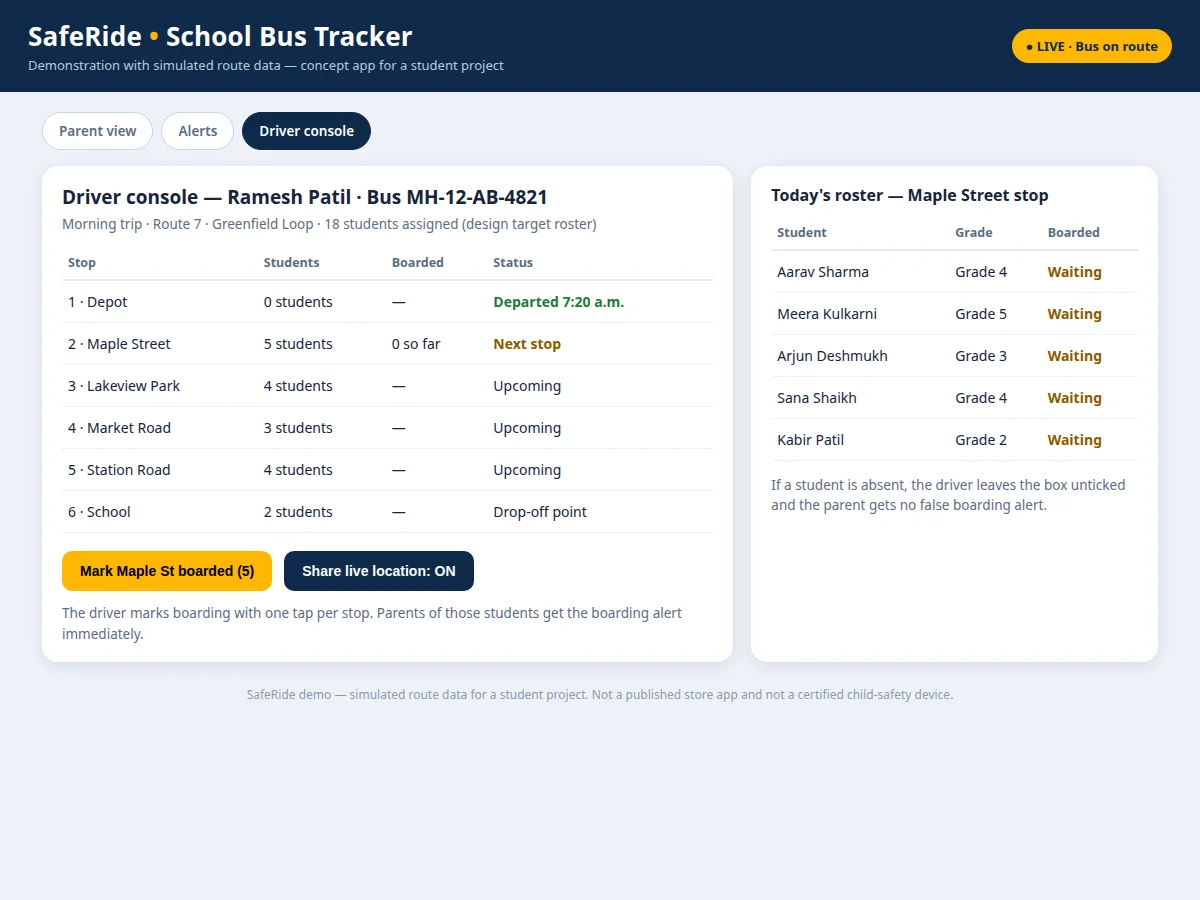
- At the stop, the driver ticks boarding once per stop on the roster, and each ticked child's parents immediately receive a boarding alert.
- The bus continues stop by stop with the arrival estimate updating throughout, and a delay or route-change notice goes out if traffic or a closure changes the plan.
- At school, the driver ticks drop-off, parents receive the drop-off alert, and the finished trip is saved to trip history with its stops, times and boarding record.
This project vs waiting without tracking
| What a parent needs | This app | Waiting without tracking |
|---|---|---|
| Knowing where the bus is | Live bus marker on the route map, updated every few seconds | Only the printed timetable, which says nothing about today's traffic |
| Knowing the bus is near | Nearing-stop alert before the bus reaches the stop | Watching the road and guessing from past days |
| Knowing your child boarded | Boarding alert when the driver ticks the roster at the stop | Waiting until the school day ends, or phoning the school |
| Learning about a delay | Delay notice with a revised arrival time | Silence until the bus fails to appear |
| Proving what happened | Saved trip history with stops, times and boarding record | Memory and conflicting accounts after the fact |
| School's view of all buses | One dashboard showing every live trip | One phone call per bus, answered from the timetable |
Tech stack:
- Kotlin · Android Studio
- Firebase Realtime Database
- Google Maps SDK for Android
- Firebase Cloud Messaging
- Android Location Services
- Retrofit · REST API
- Material Design 3 UI
- Room local cache
| Parameter | Value |
|---|---|
| Platform | Android 8.0 or later (minimum supported version) |
| Roles supported | Parent, driver and school admin |
| Live position update interval | 5 seconds (design target) |
| Nearing-stop alert trigger | 2 minutes before stop arrival (design target) |
| Boarding action | 1 tap per stop (design target) |
| Demo route stops | 6 stops (demo data) |
| Demo route waypoints | 12 waypoints (demo data) |
| Demo roster size | 18 students (demo data) |
| Backend | Firebase Realtime Database |
| Maps | Google Maps SDK for Android |
| Notifications | Firebase Cloud Messaging |
| Demo | Single-file HTML/CSS/JS demo app, runs offline after download |
Builder note: in the demo build, the bus marker advances along 12 plotted waypoints and pauses at each of the 6 stops, stepping every 4 seconds, so the parent map, the ETA panel and the alert list all describe the same trip state.
Project features
The app is built around four capabilities that matter most to a worried parent: a live route map, alerts tied to real trip events, a boarding record the driver maintains with one tap per stop, and a school view of every trip. The live map answers the basic question — where is the bus right now — without a phone call. Event alerts answer the next question — is my child on the bus — by firing only when the bus nears a stop, a child boards, or a child is dropped off, rather than buzzing for every position update. The driver roster keeps the workload realistic: one tap per stop, not one tap per child hunted through menus. Around those four, the app adds delay notices, route-change notices, alert settings and a trip history parents can re-check later.
- [Live route map with stop ETAs] Parents see the bus moving on the route map with its next stop and an arrival estimate that updates as the bus travels, instead of guessing from a printed timetable.
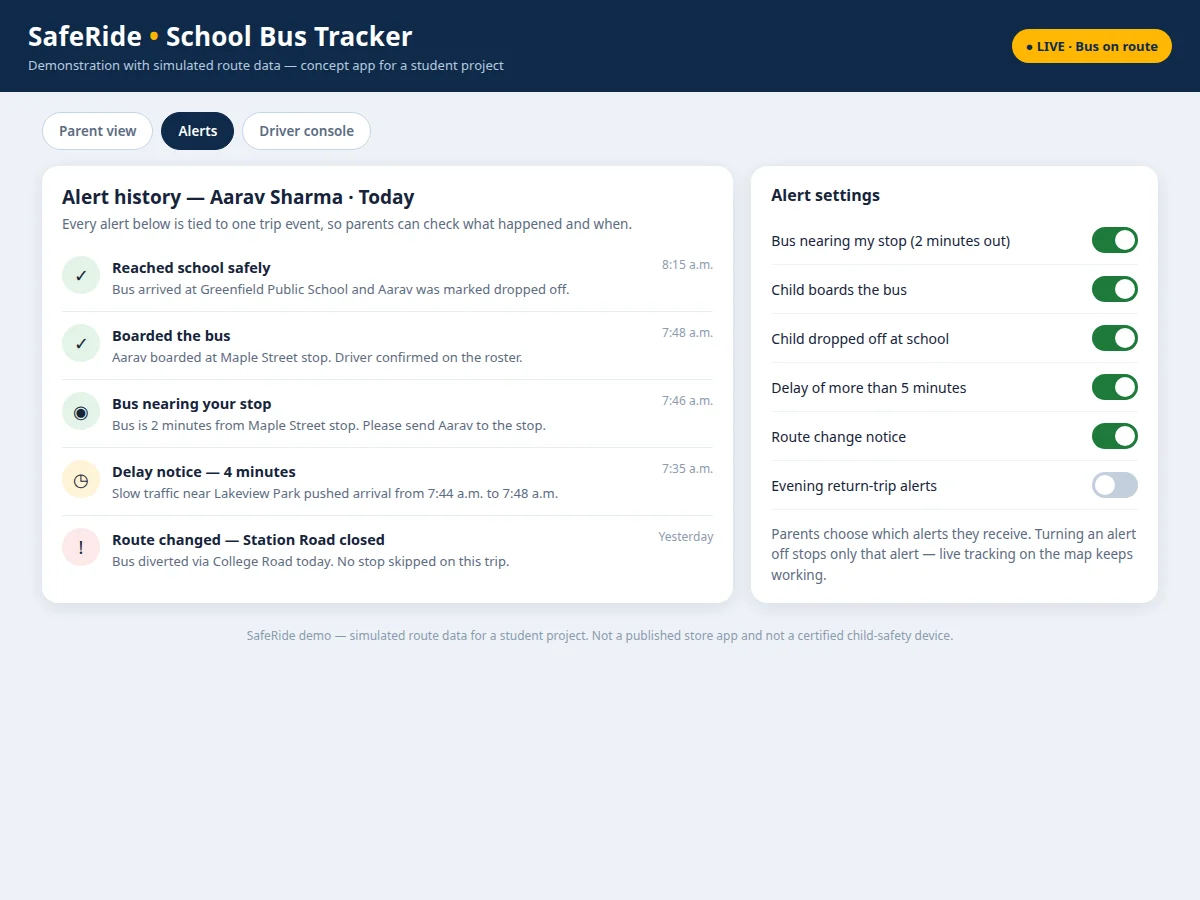
- [Nearing-stop, boarding and drop-off alerts] A nearing-stop alert goes out before the bus reaches a stop, a boarding alert confirms the child is on board, and a drop-off alert confirms arrival at school.
- [One-tap driver boarding roster] The driver ticks boarding once per stop from a short roster, so the boarding record stays accurate without distracting the driver with fiddly per-child screens.
- [School-admin trip dashboard] The school watches every live trip on one screen, spots a delayed or diverted bus immediately, and checks any trip's history afterwards.
- [Delay and route-change notices] When traffic slows the bus or a road closure diverts it, parents get a short notice with the revised arrival time instead of silence.
- [Per-parent alert settings] Each parent chooses which alerts to receive — nearing-stop, boarding, drop-off, delay or route change — so notifications stay useful rather than noisy.
- [Trip history for every school day] Each trip is saved with its stops, times and boarding record, so a parent or the school can re-check exactly what happened on any past trip.
What is included
- Android app source with parent, driver and school-admin views
- Live-trip backend setup on Firebase (trip records, rosters, alert rules)
- Working single-file demo app with parent, alerts and driver views
- Project report PDF (background, architecture, data flow, methodology, limitations)
- PPT presentation for final review
- Viva Q&A preparation document (GPS tracking, Firebase realtime data, push notifications, Android location services)
Limitations & prerequisites
- GPS accuracy depends on the driver's phone signal and GPS fix — in a tunnel or a dense built-up stretch, the marker may lag or jump, and the app says so rather than smoothing it silently.
- The demo route is simulated data, not a real bus — it proves the interface and the alert logic, not live fleet performance.
- The app is a student project build, not a certified child-safety device, and it does not replace the school's own duty of care on trips.
- Alerts need a charged driver phone with mobile data and notification permission on the parent's phone; a phone switched off or out of coverage cannot send or receive them.
- The school must keep its rosters current — a child missing from the roster gets no boarding alert, because the app never invents a boarding event.
Frequently Asked Questions
How does a parent know where the bus is?
The parent opens the app and sees the bus as a moving marker on the route map, with its next stop and expected arrival time beside it. The position refreshes every few seconds from the driver's phone, so the map shows where the bus actually is rather than where the timetable says it should be. If the bus slows in traffic, the arrival estimate moves with it, and a delay notice explains the change instead of leaving the parent guessing.
How does the boarding alert work?
When the bus reaches a stop, the driver ticks boarding once per stop on the roster, and the server immediately sends a boarding alert to the parents of each ticked child. The alert names the stop and the time, so a parent knows their child is on board within moments of the bus leaving the stop. A child left unticked — for example an absent student — produces no boarding alert, so parents never receive a false confirmation.
What happens when the bus is delayed or the route changes?
A delay notice goes to affected parents with the revised arrival time as soon as the trip falls behind its expected progress, and a route-change notice goes out when a closure diverts the bus. Parents see the diverted route on the map, so a bus that takes a different road does not look like a bus that has vanished. The school-admin dashboard shows the same delay or diversion, so the school and parents are working from the same information.
Does the driver need extra hardware?
No extra hardware is needed, because the driver's own Android phone provides the GPS position and sends it to the live trip record. The driver view runs on that phone with large tap targets for starting the trip and ticking boarding, so the driver is not fumbling through small menus. A dedicated GPS unit could be added later, but the project is designed and costed around the phone the driver already carries.
What if the driver's phone loses signal?
The parent app keeps showing the last known position with the time it was received, and it marks the position as stale instead of pretending the bus is still moving. When the driver's phone regains signal, the position and arrival estimate refresh from the new data. Trip events that happened offline, such as boarding ticks, are sent when the connection returns, so the record is completed rather than lost.
Is this project suitable for a final-year project?
Yes, for Computer Science, IT and Electronics programmes, because it combines a real Android app, live GPS data, a realtime backend and push notifications into one working system. The three roles give plenty to design, build and test, and the demo makes the whole system demonstrable in a review without needing a real school bus. The report documents the architecture, the data flow and the limits honestly, so the work stands up to technical questions.
Components & software requirements
- Kotlin · Android Studio
- Firebase Realtime Database
- Google Maps SDK for Android
- Firebase Cloud Messaging
- Android Location Services
- Retrofit · REST API
- Material Design 3 UI
- Room local cache
Delivery information
Built-to-order project. Delivery timeline is shared after order confirmation based on current queue.
Support terms
Complete documentation, setup guide, and viva preparation included. Support for setup and explanation provided.
Download free synopsis (PDF)
Enter your name and WhatsApp number — the synopsis PDF downloads immediately. We may send occasional project updates on WhatsApp; no spam.