
More project photos (2)
The problem
When a hospital needs blood urgently, families fall back on phone calls, WhatsApp forwards and social-media posts — all slow, uncoordinated, and blind to who is actually nearby, compatible and available. Blood banks publish requirement lists but cannot reach individual donors in time, and volunteer groups lose precious minutes re-checking blood groups and phone numbers by hand. The practical gap is a directory that stays live, is searchable by blood group and distance, and is wired to an instant alert channel. This project fills that gap with a native Android app: a donor directory kept current by the donors themselves, blood-group compatibility logic that restricts alerts to donors who can genuinely help, and a one-tap SOS flow that pushes the requirement to the nearest compatible donors with live delivery and response tracking — closing the loop that forwards and phone trees never close.
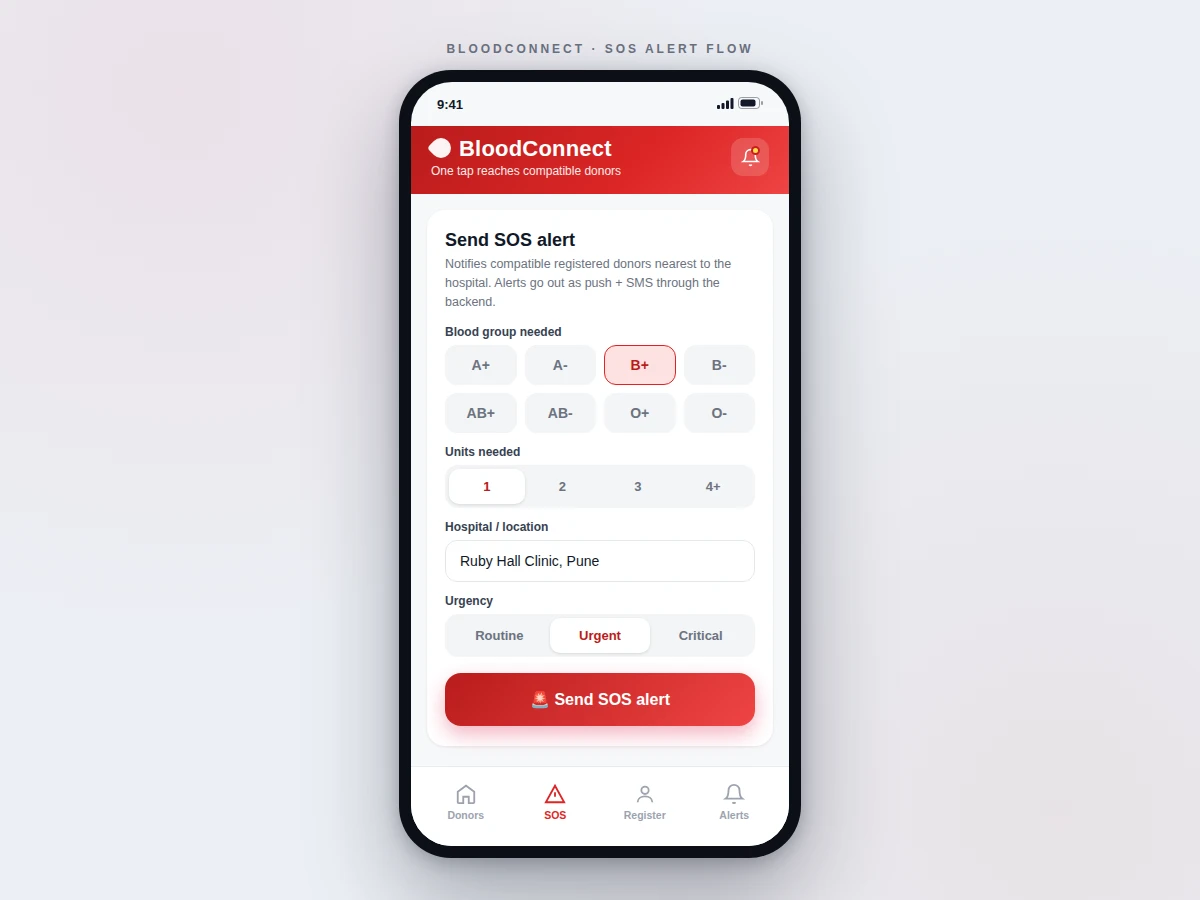
Opens SOS, picks blood group, units needed, hospital and urgency level.
Follow the working sequence
How it works
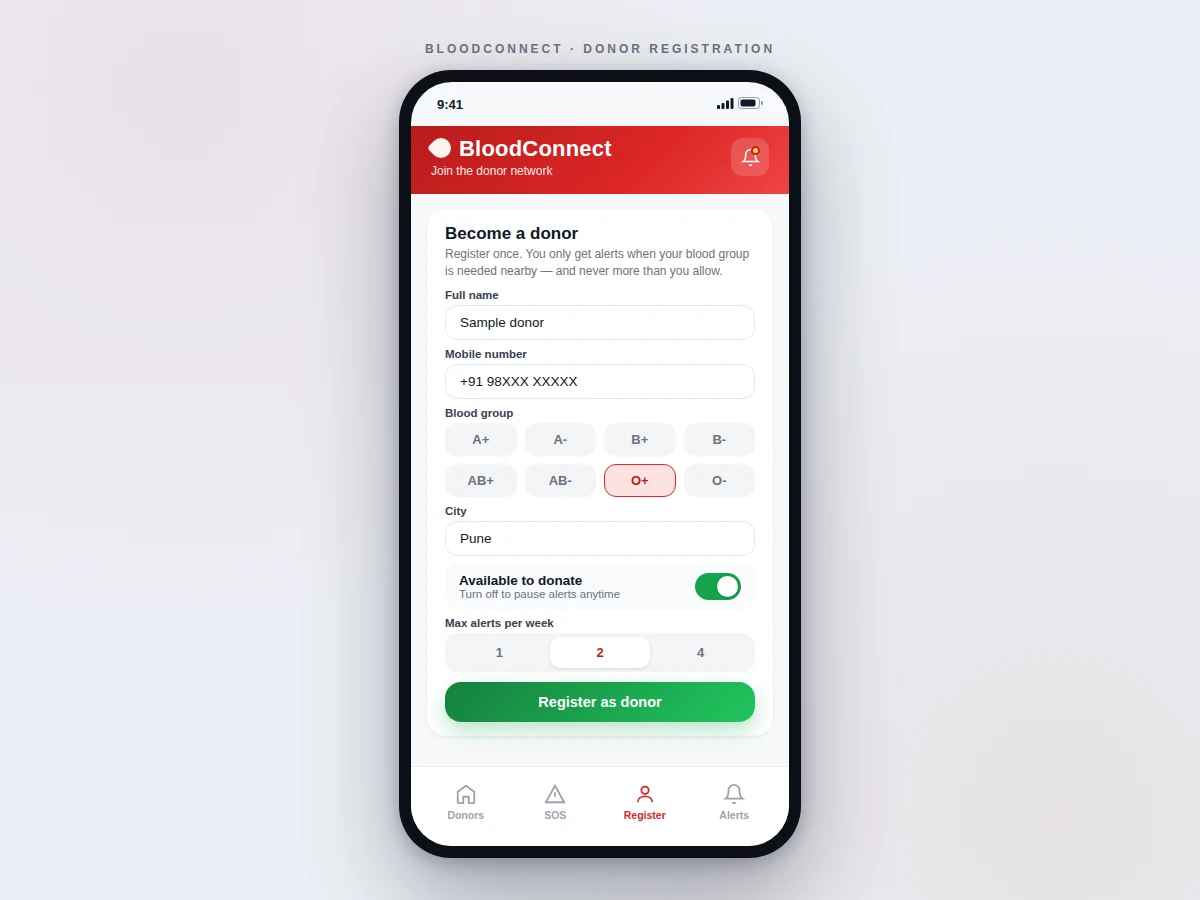
- A donor registers once with name, phone number (OTP-verified), blood group and city, sets an availability toggle and a weekly alert cap (1, 2 or 4).
- The directory screen lists available donors sorted by distance from the requester's location, with blood-group filter chips and text search.
- In an emergency, the requester opens SOS and picks the blood group, units needed (1–4+), hospital/location and urgency level (routine, urgent, critical).
- The backend applies the compatibility table and a distance radius to select exactly the donors who can help, then dispatches Firebase Cloud Messaging push notifications (SMS fallback via gateway for the rest).
- Each alert is recorded with per-donor delivery status; the requester's board moves donors from queued to delivered to read as confirmations arrive.
- A responding donor taps "I can donate" in the alert inbox; the requester sees the response instantly and the required-units counter fills until coverage is complete.
Tech stack:
- Kotlin (native Android)
- Firebase Realtime Database
- Firebase Authentication (OTP)
- Firebase Cloud Messaging (push alerts)
- Google Maps · Location SDK
- SMS gateway (fallback channel)
- Android Studio
- Git
| Parameter | Value |
|---|---|
| Platform | Native Android, Android 8.0 (API 26) and above (design target) |
| Blood groups supported | All 8 (A+, A−, B+, B−, AB+, AB−, O+, O−) |
| Compatibility matching | Full donor/recipient table, applied server-side per alert |
| Alert channels | FCM push primary; SMS fallback for donors without active app (design target) |
| Alert statuses tracked | Queued · Delivered · Read · Responded (design target) |
| Weekly alert cap per donor | 1, 2 or 4 (donor-configurable) |
| Demo data | Seeded sample donor set for on-device/emulator demonstration |
| Deliverable size | Android source + Firebase config guide + report + PPT + viva Q&A |
Project features
- [Live donor directory] Donors listed with name, blood group, city, distance and last-donation date, sorted nearest-first — searchable by name or city and filterable by all eight blood groups.
- [Blood-group compatibility engine] Every SOS request is matched against a compatibility table (for example, a B+ request alerts B+, B−, O+ and O− donors), so alerts never go to donors who cannot help.
- [One-tap SOS alerts] Pick the blood group, units, hospital and urgency; the backend dispatches push notifications to the nearest compatible donors with an SMS fallback for donors without the app active.
- [Live alert status board] Each alert shows per-donor status — queued, delivered, read, responded — so the requester watches coverage build in real time instead of guessing.
- [Donor self-registration] Donors register with name, phone (OTP-verified), blood group and city, with an availability toggle to pause alerts and a weekly alert-frequency cap.
- [SOS inbox for donors] Incoming requests arrive with hospital, units and urgency; one tap on "I can donate" notifies the requester immediately.
- [Working demo build] The deliverable includes a fully functional demo configuration with seeded sample donors, so every screen and flow can be demonstrated on an emulator or a real device before backend setup.
What is included
- Complete native Android source code (Kotlin) with the four-tab app: Donors, SOS, Register, Alerts
- Firebase backend configuration guide (Realtime Database schema, Authentication, Cloud Messaging setup)
- Seeded demo data so every screen works on an emulator or real device out of the box
- Compatibility-matching logic documented with the full blood-group table
- Project report PDF (background, architecture, data model, SOS pipeline, test procedure)
- PPT presentation for final review
- Viva Q&A preparation document (Firebase, FCM, location services, compatibility logic)
Advantages
- Live donor directory kept current by the donors themselves: name, blood group, city, distance and last-donation date, sorted nearest-first, searchable by name or city and filterable by all eight blood groups.
- Server-side blood-group compatibility engine: every SOS request is matched against a compatibility table (a B+ request alerts only B+, B-, O+ and O- donors), so alerts never go to donors who cannot help.
- One-tap SOS flow: pick blood group, units (1-4+), hospital and urgency (routine/urgent/critical); the backend dispatches Firebase Cloud Messaging push notifications with an SMS-gateway fallback, and the alert board tracks per-donor status (queued, delivered, read, responded) live.
- Donor-side controls: OTP-verified self-registration, an availability toggle to pause alerts, and a weekly alert-frequency cap (1, 2 or 4); a donor inbox shows incoming requests with hospital, units and urgency, and one tap on 'I can donate' notifies the requester instantly.
- Seeded demo dataset: the deliverable includes a fully functional demo configuration with sample donors, so every screen and flow runs on an emulator or real device before any Firebase backend setup. Tech stack: Kotlin (native Android), Firebase Realtime Database, Firebase Authentication (OTP), Firebase Cloud Messaging, Google Maps/Location SDK.
Disadvantages
- Real SOS delivery depends on the buyer's own Firebase project and SMS-gateway account; the demo runs on seeded data, so end-to-end alert latency is measured by the buyer, not claimed on the page.
- Donor locations are only as accurate as the device's GPS fix and the self-entered city at registration; the distance sort is approximate, not a routing engine.
- Push delivery can be delayed or suppressed by aggressive battery-optimization settings on some Android skins; the SMS fallback exists for exactly this reason.
- The app does not verify medical eligibility - it tracks only the last-donation date the donor entered; screening stays the hospital's responsibility.
Limitations & prerequisites
- Real SOS delivery depends on the buyer's own Firebase project and SMS-gateway account — the demo runs on seeded data and a buyer-configured backend, so end-to-end alert latency is measured by the buyer, not claimed here.
- Donor locations are only as accurate as the device's GPS fix and the city the donor entered at registration; the distance sort is approximate, not a routing engine.
- Push delivery can be delayed or suppressed by aggressive battery-optimization settings on some Android skins; the SMS fallback exists for exactly this reason.
- The app does not verify medical eligibility — it tracks only the last-donation date the donor entered; screening stays the hospital's responsibility.
- No claim is made about how fast real donors respond; the demo's animated status transitions are illustrative, not measured response data.
Frequently Asked Questions
How does the compatibility matching work?
Each SOS request is filtered through a blood-group compatibility table before any alert goes out — for example, a B+ request notifies only B+, B−, O+ and O− donors. The table is enforced server-side so an incompatible donor can never be alerted by mistake.
What happens if a donor does not have the app installed?
The backend's primary channel is Firebase Cloud Messaging push. An SMS gateway fallback is designed in for donors who registered a phone number but do not have the app active, so the alert still reaches them as a text message.
Can donors control how often they are bothered?
Yes — registration includes an availability toggle to pause alerts entirely and a weekly alert cap (1, 2 or 4). Donors only ever receive alerts for their own blood group within range.
How is this different from a WhatsApp blood-donor group?
A group broadcasts to everyone and waits; this app alerts only compatible nearby donors, tracks who received and responded to each alert in real time, and keeps the directory self-maintained instead of going stale.
What does the buyer need to run the real backend?
A free-tier Firebase project (Realtime Database, Authentication, Cloud Messaging) configured per the included guide, plus an SMS-gateway account if the SMS fallback is wanted. The demo works immediately on seeded data without any of this.
Is this project suitable for a final-year project?
Yes — for Computer Science, IT and Computer Applications programs. It demonstrates native Android development, Firebase backend design, push-notification pipelines, location services and a real rule-based matching engine. Suitable for B.E./B.Tech final-year projects in Computer Science, IT and Computer Applications.
Components & software requirements
- Kotlin (native Android)
- Firebase Realtime Database
- Firebase Authentication (OTP)
- Firebase Cloud Messaging (push alerts)
- Google Maps · Location SDK
- SMS gateway (fallback channel)
- Android Studio
- Git
Delivery information
Built-to-order project. Delivery timeline is shared after order confirmation based on current queue.
Support terms
Complete documentation, setup guide, and viva preparation included. Support for setup and explanation provided.
Download free synopsis (PDF)
Enter your name and email — the synopsis PDF downloads immediately. We may send occasional project updates; no spam, unsubscribe anytime.