
More project photos (2)
The problem
A courier management system is an Android app that books doorstep parcel pickups, prices them before the courier arrives, and tracks each parcel through scan checkpoints using its AWB number. Booking a courier by phone or WhatsApp leaves the customer with no written slot, no price until pickup, and no tracking until someone calls back — the parcel is effectively invisible between handover and delivery. This project replaces that with one app: the customer books a slot, sees the price live, and follows the parcel from pickup scan to OTP-verified delivery, while the courier's handset records every scan. Bookings and scans are stored locally in Room so the app keeps working offline, and WorkManager syncs them in the background when the network returns. The demo build covers the Pune–Mumbai corridor with four parcels and six scan stages, and the same design extends to any city pair.
This is a built-to-order software project: the Android Studio source, the clickable app demo, and the complete viva kit (report, PPT, Q&A) are prepared fresh for you.
Booking by phone vs this app
| Task | Phone / WhatsApp booking | This Android app |
|---|---|---|
| Price before booking | Quoted verbally, often only at pickup | Live estimate from the rate card as you type |
| Pickup slot | Agreed in chat, no written record | Booked slot saved in the app, reschedulable |
| Tracking | A phone call to ask where the parcel is | Scan timeline by AWB number, updated at every hub |
| Proof of delivery | A signature on paper, or nothing | OTP-verified handover recorded against the AWB |
How it works
A booking starts on the customer's phone and ends with an OTP handover at the receiver's door, and every step in between is a scan that both sides can see. The customer fills the pickup form and the app prices the booking from the rate card while checking the chosen slot against the clock; the booking is saved to the on-device Room database immediately, so a dead network never loses it. WorkManager carries the booking to the server when connectivity returns, the courier's handset scans the parcel at pickup, and each hub scan appends to the timeline that the customer and receiver watch. Because a status can only change through a scan, the timeline is an honest record of where the parcel has actually been — and the OTP handover at the end is the only step that needs the receiver present. Nothing is invented between scans, and nothing is shown before its scan exists.
- The customer enters the pickup address, destination city, parcel weight and parcel type on the booking screen.
- The app prices the booking live from the rate card and offers today's five two-hour slots, disabling any slot that has already passed.
- On confirmation the booking is written to the Room database with a generated AWB number, and a WorkManager job syncs it to the server when the network is available.
- The courier scans the parcel at pickup; the scan fixes the booked weight, starts the timeline, and triggers an FCM notification to the customer and the receiver.
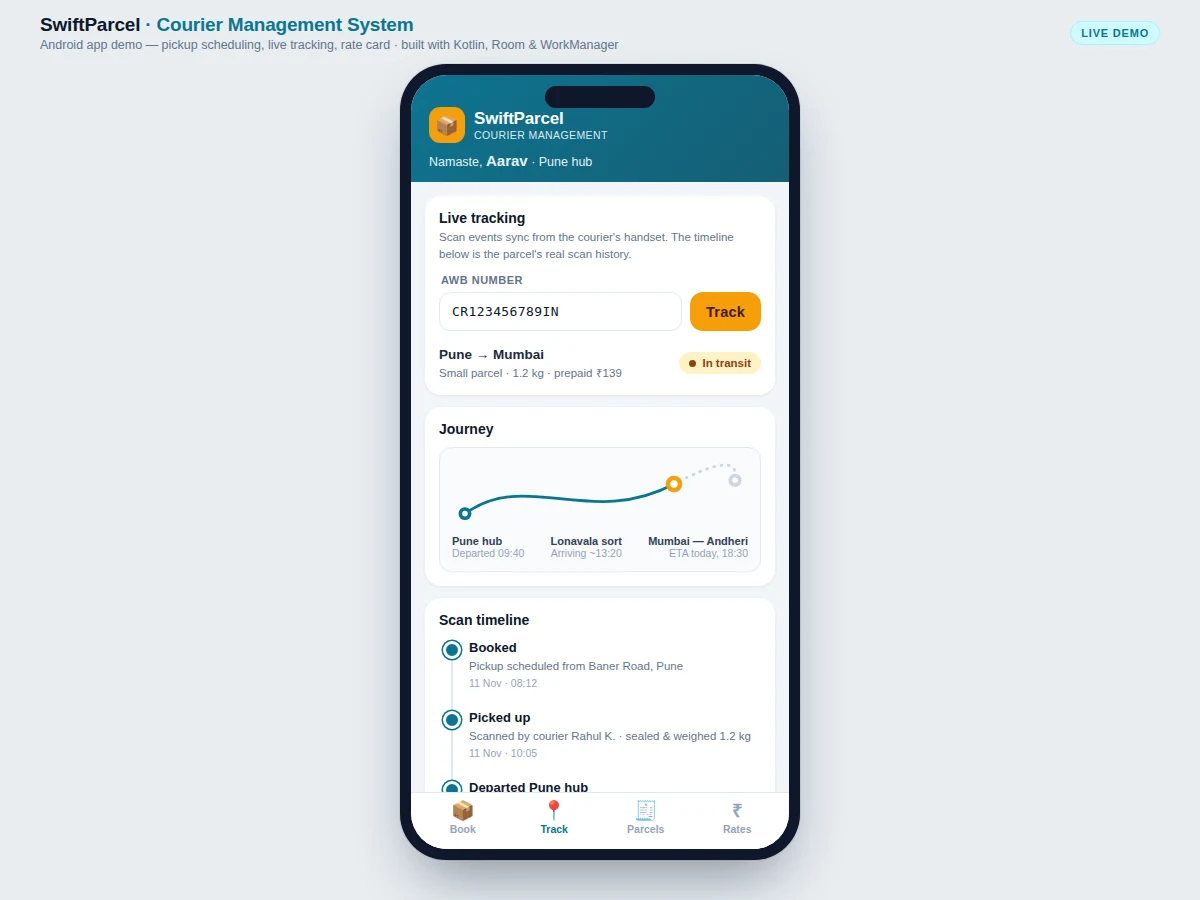
- Every hub scan — departure, sorting, out for delivery — is appended to the timeline with its time and place; the customer watches progress by AWB number.
- At the door, delivery completes only when the receiver shares the 6-digit OTP; the handover is recorded against the AWB number and the parcel moves to Delivered.
Tech stack:
- Kotlin
- Jetpack Compose
- Room database · SQLite
- WorkManager background sync
- Firebase Cloud Messaging
- Retrofit · REST API
- Material Design 3
- Android Studio · Gradle
| Parameter | Value |
|---|---|
| Minimum Android version | Android 8.0 (API level 26) or higher (design target) |
| App screens | 4 screens (Book, Track, Parcels, Rates) |
| Tracking stages | 6 scan stages from Booked to Delivered |
| WorkManager sync interval | 15 minutes minimum for periodic work (per Android documentation) |
| Local database | Room over SQLite with 3 tables: parcels, scans, slots (design target) |
| Pickup slots per day | 5 slots of 2 hours each (design target) |
| Maximum parcel weight | 30 kg per booking (design target) |
| Price estimator | 3 zones × weight slabs, computed on-device (design target) |
| Delivery proof | 6-digit OTP handover recorded per AWB (design target) |
| Demo data | 4 parcels, 6 scan events, 12 rate rows (demo build) |
Project features
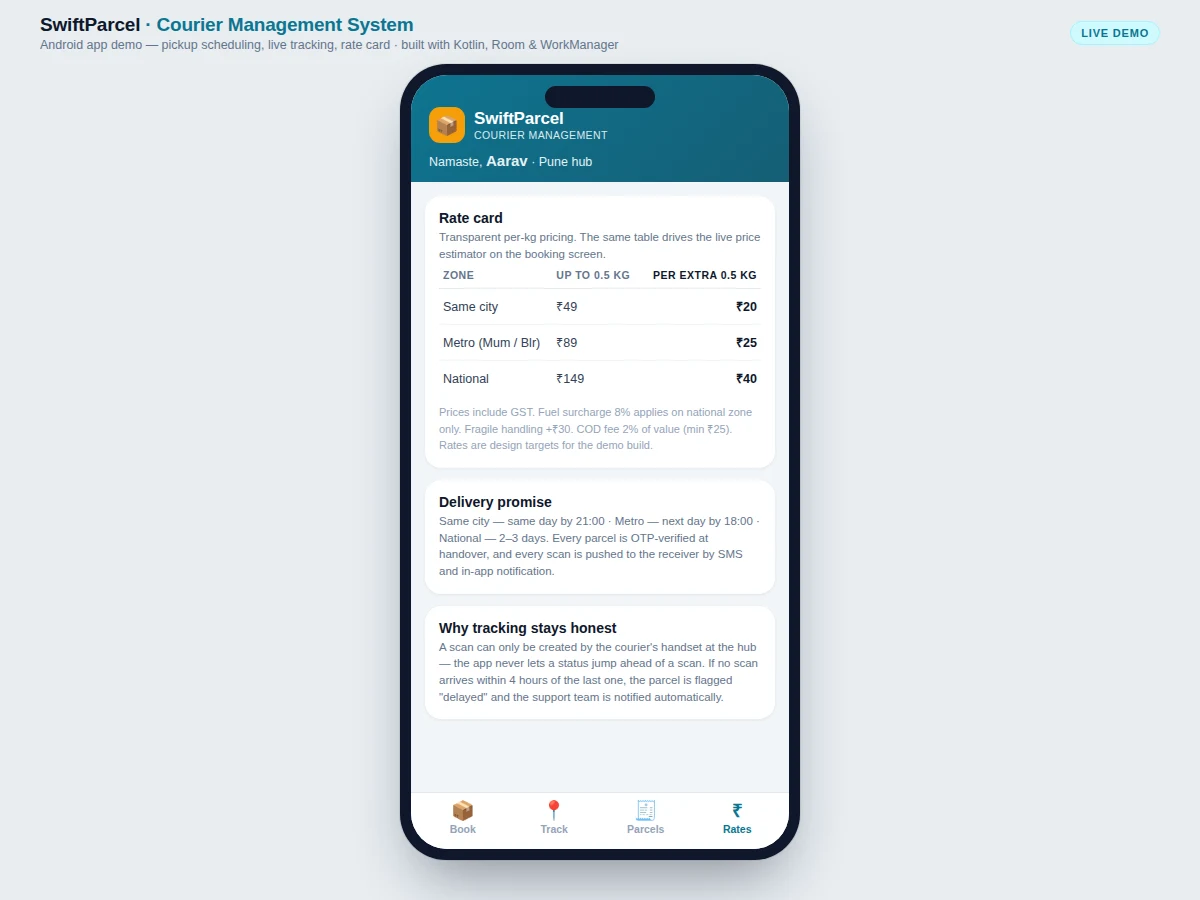
The app is built around four capabilities that work together. The pickup scheduler is the entry point: address, destination city, weight and parcel type, then one of five two-hour slots, with past slots disabled by comparing each slot start against the device clock. The live price estimator reads the same three-zone rate card the customer can open, so the ₹139 quoted for a 1.2 kg Pune–Mumbai parcel is traceable to the table. The tracking screen shows the parcel's six scan stages rather than a guessed location, and the offline-first Room store keeps every booking safe when the network drops. Around those four sit the parcels list with four parcels, the courier card with a call action, and an OTP handover that closes the delivery with proof instead of a verbal confirmation.
- [Pickup scheduling with slot picker] The customer enters a pickup address, destination city, weight and parcel type, then picks one of five two-hour slots for today. Slots whose start time has already passed are disabled by comparing against the device clock, so a pickup can never be booked in the past.
- [Live price estimator] The price updates as the form changes, computed from the rate card: three zones (same city, metro, national) with a base price up to 0.5 kg and a fixed charge per extra 0.5 kg slab. The demo's 1.2 kg Pune–Mumbai parcel prices at ₹139, matching the rate card exactly.
- [AWB tracking with scan timeline] Entering an AWB number shows the parcel's six-stage scan history — Booked, Picked up, Departed hub, In transit, Out for delivery, Delivered — with the time and place of each scan. A status can only advance when a scan exists, so the timeline can never jump ahead of reality.
- [Courier card with call action] The tracking screen names the assigned delivery partner with vehicle, rating and trip count, and offers a one-tap call. The demo courier is Rahul Kamble, bike, 4.8 stars across 312 trips.
- [Parcels list] All of the customer's parcels in one list with AWB number, route, status pill and price, so repeat bookings and delivered parcels stay visible without re-entering numbers.
- [Rate card] The full tariff in the app — base price and per-slab charge per zone, plus fragile handling, COD fee and fuel-surcharge notes — so the price the estimator shows is always traceable to a published table.
- [Offline-first storage and background sync] Bookings, scans and slots live in a Room database on the device, and WorkManager syncs them when the network returns. Periodic sync runs at most every 15 minutes, the minimum interval Android allows for periodic work.
- [OTP-verified delivery handover] Delivery completes only when the receiver shares the 6-digit OTP sent to their phone, and the handover is recorded against the AWB number as proof of delivery.
What is included
- Complete Android Studio project source in Kotlin with Jetpack Compose UI
- Room database schema with DAOs for parcels, scans and slots
- WorkManager sync worker and FCM notification wiring
- Clickable app demo (booking, tracking, parcels list, rate card) with realistic Indian data
- Project report PDF (background, design, methodology, architecture, results)
- PPT presentation for final review
- Viva Q&A preparation document (Room, WorkManager, FCM, offline-first design, OTP flow)
- Rate-card configuration and a test checklist covering booking, pricing, sync and handover
Limitations & prerequisites
- The demo's tracking uses simulated scans; a production build needs a courier handset app and a backend server, which are out of scope here.
- Live positions are hub scans, not continuous GPS — the journey view shows route stages, not the courier's real-time location.
- WorkManager periodic sync cannot run more often than every 15 minutes, so scan updates can lag up to 15 minutes while the app is backgrounded.
- Prices in the demo are design-target rates, not a live courier tariff; the rate card must be replaced with the courier's real tariff before use.
- OTP handover depends on SMS delivery; no SMS gateway is bundled with the project.
- Demo data covers the Pune–Mumbai corridor only; multi-hub routing and inter-city line-haul planning are future scope.
Requirements
- Android Studio (latest stable) with JDK 17 for the build
- Android 8.0 or higher test device, or an emulator image, for running the app
- Internet connection for FCM notification and sync testing; booking and tracking screens work offline on the Room cache
- Git for version control of the source
Timeline
- Week 1: App shell, navigation and Room schema (parcels, scans, slots tables)
- Week 2: Booking screen with slot picker, past-slot disabling and live price estimator
- Week 3: Tracking screen with scan timeline, courier card and FCM notifications
- Week 4: Parcels list, rate card, OTP handover flow and WorkManager sync
- Week 5: Testing on device, edge-case fixes, report, PPT and viva Q&A
Support
- Build help until the project runs on your device or emulator, including Gradle and SDK setup issues
- Report, PPT and viva Q&A included with the order, revised once after your guide's feedback
- Get a quotation on WhatsApp with the full scope, price and delivery date confirmed before the build starts — message with your branch, semester and deadline and the quote covers source code, report, PPT and demo
Frequently Asked Questions
Is this project suitable for a final-year project?
Yes — for Computer Science, IT and Electronics & Telecommunication programs. It demonstrates Android app design, offline-first storage with Room, background sync with WorkManager, push notifications with FCM, and a complete user journey from booking to OTP-verified delivery. The report explains each design decision, including why periodic sync is capped at 15 minutes, which makes it a strong viva topic.
How does live tracking work without tracking the courier by GPS all the time?
It tracks scans, not the courier. Each time the parcel is scanned — at pickup, at a hub departure, at sorting, and out for delivery — the scan is recorded with its time and place, and the timeline shows those checkpoints. This is how real courier tracking works: the parcel's location is the location of its last scan, which is honest and battery-friendly, unlike continuous GPS.
Why can't the app sync scans more often than every 15 minutes?
Because Android's WorkManager enforces a 15-minute minimum interval for periodic background work, as documented in the official PeriodicWorkRequest reference. The app therefore syncs at most every 15 minutes when backgrounded, and fetches immediately when the user opens the tracking screen. The report states this limit explicitly so it reads as a design constraint, not a bug.
What happens if the phone is offline when a pickup is booked?
The booking is written to the Room database on the device immediately, so nothing is lost. A WorkManager job with a network constraint carries it to the server when connectivity returns, and the booking appears in the parcels list with a Booked status right away. The same offline-first pattern keeps the tracking screen readable from the last synced scans.
Can the rate card be changed for another city or courier?
Yes. Prices live in one rate-card table — a base price up to 0.5 kg and a per-slab charge for each of the three zones — and the estimator reads that same table, so changing a row changes both the displayed tariff and every future estimate. The demo's rates are design targets for the Pune–Mumbai corridor and must be replaced with the courier's real tariff.
Does the app need a server to demonstrate?
No. The demo runs entirely on-device: bookings save to Room, the scan timeline advances through the simulate-scan action, and prices come from the built-in rate card. A server is only needed for the production step where the courier's handset and the customer's phone share scans, which the report lists as future scope.
Components & software requirements
- Kotlin
- Jetpack Compose
- Room database · SQLite
- WorkManager background sync
- Firebase Cloud Messaging
- Retrofit · REST API
- Material Design 3
- Android Studio · Gradle
Delivery information
Built-to-order project. Delivery timeline is shared after order confirmation based on current queue.
Support terms
Complete documentation, setup guide, and viva preparation included. Support for setup and explanation provided.
Download free synopsis (PDF)
Enter your name and WhatsApp number — the synopsis PDF downloads immediately. We may send occasional project updates on WhatsApp; no spam.