
More project photos (2)

The problem
Flight Ticket Booking System Android App with Fare Alerts and Live Flight Status is an Android app built in Kotlin that lets a traveller search flights, compare fares across airlines on one screen, set a target price and be notified when the fare drops, and follow a booked flight from departure gate to baggage belt. Travellers today juggle three separate tools — a booking site, a price tracker and an airline app — and re-checking fares by hand means the cheapest fare is often missed by hours. This app brings the three jobs into one flow: one search returns fares from four sample airlines, a scheduled background check compares the current fare with each saved target price, and the status screen turns gate, delay and arrival updates into a simple timeline. The demo ships with 24 sample flights across 6 Indian domestic routes and a 36-seat seat map, so every screen works without a live airline account.
| What the traveller needs | Using separate apps | With this app |
|---|---|---|
| Compare fares across airlines | Open each airline app or website in turn | One search, fares from four airlines side by side |
| Catch a price drop | Remember to re-check fares manually | Target-price alert with scheduled re-checks |
| Track a booked flight | Airline app or website, checked separately | Status timeline with gate, delay and baggage info |
| Pick a seat | During airline check-in only | Seat map at booking time, saved with the booking |
Enters the route, travel date and traveller count on the Search screen.
Follow the working sequence
How it works
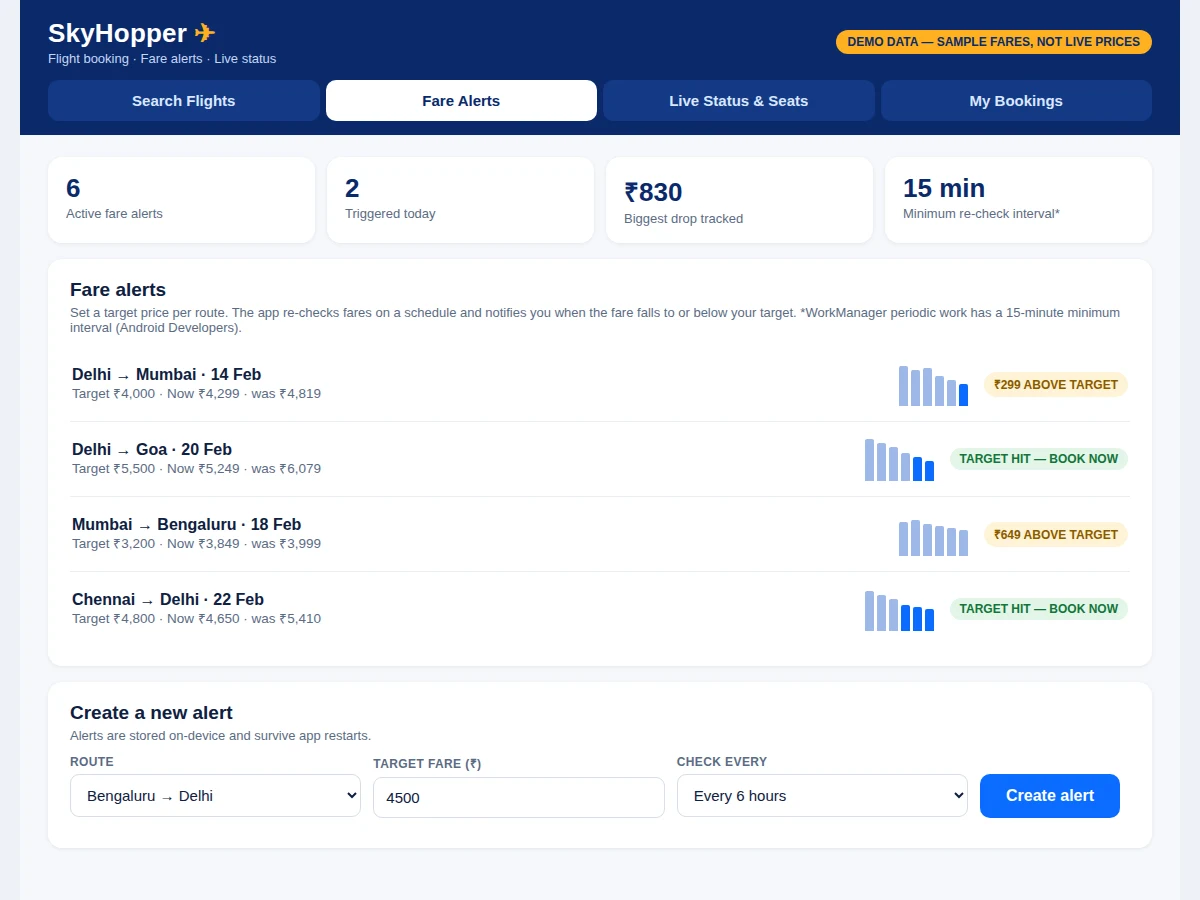
A booking starts as a search and ends as a timeline, with a background scheduler doing the waiting in between. The user enters a route, date and traveller count; the app asks the fare source for each airline through Retrofit and renders the results sorted by fare, cheapest first, with the day-on-day change beside every price. When the user saves an alert, the rule — route, date, target fare and check frequency — is stored in the Room database, and WorkManager runs the re-check on a schedule; periodic work has a 15-minute minimum interval, so the fastest re-check the platform allows is every 15 minutes. If a re-checked fare meets the target, a notification is raised and the price history is updated. Tapping a flight opens the seat map, the selected seat is saved with the booking, and the status screen then polls the flight-status feed and renders check-in, departure, en-route and arrival stages in order.
- The user enters the route, travel date and traveller count on the Search screen and submits the query.
- Retrofit calls the fare source for each airline and the responses are parsed into Kotlin data classes with Gson.
- Results are sorted by fare and rendered side by side, with the cheapest option highlighted and the change since yesterday shown per flight.
- The user taps a flight, picks a free seat on the 36-seat map, and the booking is saved to the Room database with its PNR.
- A fare alert is created by saving a route, date, target fare and check frequency; WorkManager re-checks the fare on that schedule (15-minute minimum interval).
- When a re-checked fare falls to or below the target, the app raises a notification and updates the route's price history.
- On travel day, the status screen polls the flight-status feed and renders the four-stage timeline: check-in, departed, en route, arriving with gate and baggage belt.
- Bookings stay stored on-device, so the My Bookings screen works offline; only the status refresh needs an internet connection.
Tech stack:
- Kotlin
- Android SDK · Jetpack
- Retrofit · OkHttp
- Room Database
- WorkManager
- Material Design 3
- Gradle
- Git
| Parameter | Value |
|---|---|
| Platform | Android 7.0 (API 24) or newer (design target) |
| Language | Kotlin |
| Networking | Retrofit 2 with OkHttp · Gson converter |
| Local storage | Room database (bookings, alerts, saved searches) |
| Background checks | WorkManager periodic work · 15-minute minimum interval (Android Developers) |
| Screens | 5 (Search, Results, Fare Alerts, Live Status, My Bookings) |
| Demo dataset | 24 sample flights across 6 Indian domestic routes |
| Seat map | 36 seats (6 rows × 6 columns) |
| Sample fares | ₹3,999 – ₹5,899 across the demo dataset (sample values, not live prices) |
| App size | Approximately 8–12 MB installed (expected, design target) |
| Internet | Required for fare search and status refresh; bookings readable offline |
Project features
Flight booking, fare alerts and live status are three different jobs, and this app treats each as a first-class capability rather than an afterthought. Fare comparison is the starting point: one search returns fares from four sample airlines side by side, sorted by price, with the cheapest highlighted and the day-on-day change shown per flight. Fare alerts are the second pillar: the traveller sets a target price per route and the app re-checks on a schedule, notifying only when the fare falls to or below that target. Live flight status is the third: a four-stage timeline turns check-in, departure, en-route and arrival updates into one readable screen with gate and baggage details. The interactive seat map and offline bookings complete the journey, so the app stays useful from the first search to the baggage belt.
- [Multi-airline fare comparison] One search returns fares from four sample airlines side by side, sorted by price, with the cheapest option highlighted and the change since yesterday shown for each flight.
- [Fare alerts with target price] Set a target fare per route and date; the app re-checks on a schedule and notifies you only when the fare falls to or below your target.
- [Live flight status timeline] Check-in, departure, en-route progress and arrival are shown as a four-stage timeline with gate number, terminal and baggage belt.
- [Interactive seat map] A 6-row by 6-column seat map (36 seats) marks occupied seats and lets you tap a free seat to select it; the choice is saved against the booking.
- [Offline bookings] Confirmed, upcoming and completed bookings are stored on-device with Room, so tickets and booking history stay readable without internet.
- [Price-drop history per route] Each alert shows a small fare history, so you can see whether the current fare is genuinely low or just back to its usual level.
- [Saved searches and recent routes] Frequently searched routes are kept on-device, so a repeat search starts with one tap instead of retyping the route.
What is included
- Complete Android app source code in Kotlin (Android Studio project)
- Working demo app with the 24-flight sample dataset across 6 Indian domestic routes
- Fare-alert engine with WorkManager scheduling and notification code
- Interactive seat-map module and offline bookings with Room
- Project report PDF (background, architecture, methodology, results)
- PPT presentation for final review
- Viva Q&A preparation document (Retrofit, Room, WorkManager, Material Design, app architecture)
Limitations & prerequisites
- The demo build uses a bundled sample dataset — it does not book real tickets and is not connected to any live airline API.
- Real fares and live status need an airline or aggregator API account with valid credentials, which is not included; the API layer is isolated so a live provider can be added later.
- No payment gateway is integrated in the base build, so no real ticket purchase or refund flow exists.
- Fare alerts re-check at most every 15 minutes (WorkManager periodic-work minimum), so a fare that drops and rises inside one interval can be missed.
- Sample fares and flight times are illustrative only and must not be quoted as real prices or schedules.
- The seat map covers one 36-seat cabin layout; larger aircraft layouts need a configurable map.
- Push notifications for gate changes are future scope; alerts in the base build use local notifications.
- The app is an academic prototype, not a certified travel-booking product.
Frequently Asked Questions
Is this project suitable for a final-year project?
Yes — for Computer Science, IT and Android App Development programs. It demonstrates Kotlin app development, REST API consumption with Retrofit, on-device persistence with Room, background scheduling with WorkManager, and Material Design 3 interface design, all in one working app that can be demonstrated live in a viva without a live API account. The report documents the architecture layer by layer, and the demo runs on a bundled sample dataset, so the app can be shown working with no internet connection and no live airline account.
Does the app book real flight tickets?
No. The demo build runs on a bundled sample dataset of 24 flights across 6 Indian domestic routes, so it searches, compares, alerts and tracks without any airline account. Real booking would need an airline or aggregator API with valid credentials plus a payment gateway, and both are realistic extensions — the API layer is isolated so a live provider can replace the sample data without rewriting the screens. For the viva, the student can show the same screens running on sample data and then explain exactly which module changes when a live provider is plugged in.
How do fare alerts work when the app is closed?
The alert rule is stored in the Room database and WorkManager runs the fare re-check in the background on the schedule you chose. Periodic work has a 15-minute minimum interval on Android, so the fastest re-check the platform allows is every 15 minutes. When a re-checked fare falls to or below your target, the app raises a local notification even if the app itself is not open. The alert list also shows a small price history per route, so the student can demonstrate a triggered alert and an alert still waiting for its target in the same demo.
What is the main technology used?
Kotlin with Android Jetpack. Retrofit and OkHttp handle all network calls to the fare and status sources, Room stores bookings, alerts and saved searches on-device, WorkManager schedules the background fare re-checks, and the interface is built with Material Design 3 components. The demo app is a single working build, not a set of static screens. Each layer has one job — networking, storage, scheduling, interface — which keeps the code easy to explain and easy to extend in the viva.
Can this project be customized?
Yes. Common changes are adding more routes and airlines, swapping the sample dataset for a live fare API, adding a payment gateway for real booking, push notifications for gate changes, round-trip and multi-city search, and filters for baggage, refundable fares and departure windows. College-specific requirements such as a different report format or extra screens can be included. All of these are scoped during the quotation step, so the delivered build matches the college's requirements instead of shipping features nobody asked for.
Components & software requirements
- Kotlin
- Android SDK · Jetpack
- Retrofit · OkHttp
- Room Database
- WorkManager
- Material Design 3
- Gradle
- Git
Delivery information
Built-to-order project. Delivery timeline is shared after order confirmation based on current queue.
Support terms
Complete documentation, setup guide, and viva preparation included. Support for setup and explanation provided.
Download free synopsis (PDF)
Enter your name and WhatsApp number — the synopsis PDF downloads immediately. We may send occasional project updates on WhatsApp; no spam.