
More project photos (2)

The problem
The Offline Recipe Book Android App with Ingredient Scaling and Shopping List is an Android app that keeps a personal recipe collection entirely on the phone, so cooking does not depend on mobile data, a login, or a remote server. The problem it solves is practical: cooks in kitchens with weak signal, shared family phones, or no data plan still need recipes, adjusted quantities, and a shopping list at the shop. Printed recipes cannot rescale, and most recipe apps lose their core value the moment the connection drops, because recipes, scaling, and lists all live on a server. This app removes that dependency. Recipes, ingredient quantities, and the shopping list are stored on the device itself, and the three core actions — browsing a recipe, rescaling it for a different number of servings, and building a shopping list — all work fully offline. It demonstrates local persistence, list-driven interfaces, and state that survives app restarts.
Recipes stored in the on-device database, browsed and searched offline.
How it works
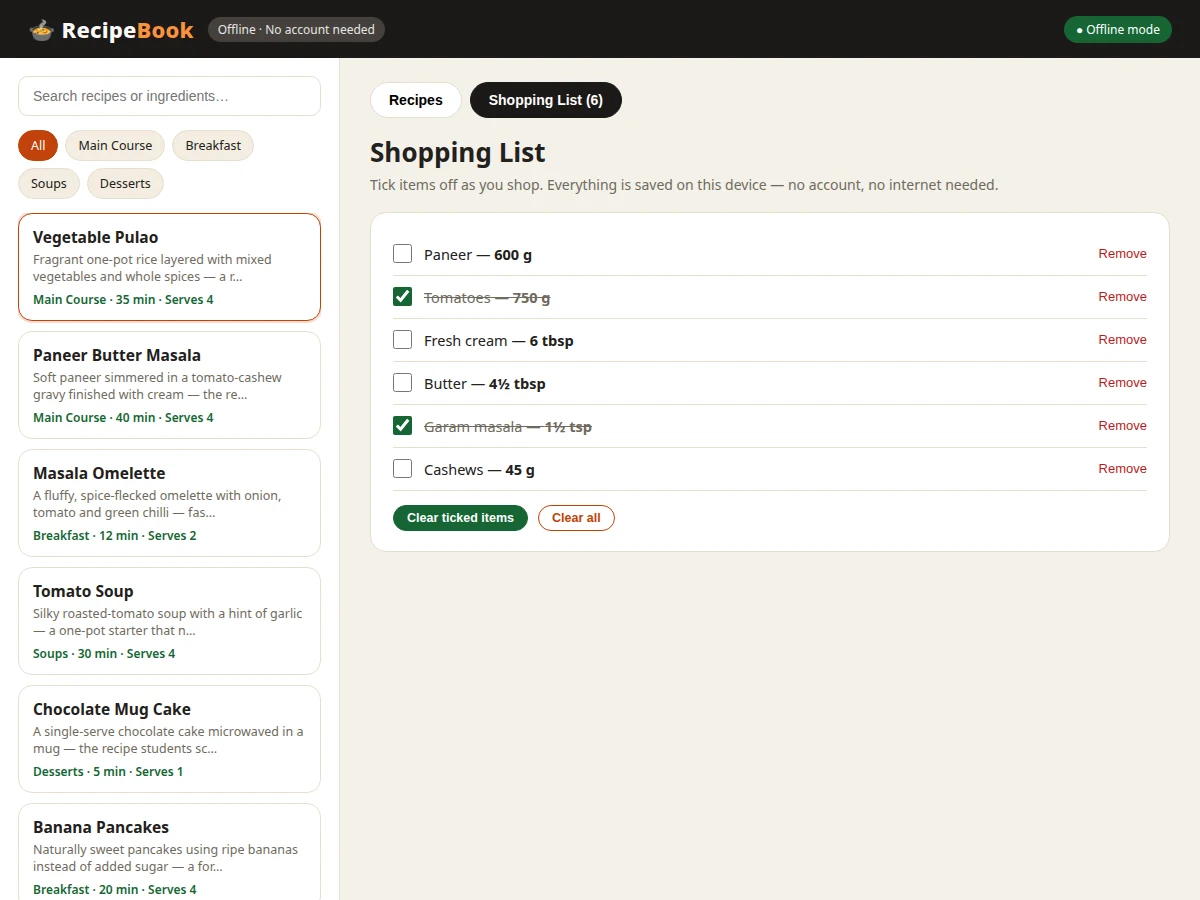
The app's flow follows the real cooking journey. The user opens the app and browses or searches the on-device recipe library, filtering by category or by an ingredient they already have. Opening a recipe shows its method, time, and difficulty alongside a base ingredient list. Dragging the servings slider multiplies every quantity by the ratio of chosen servings to the recipe's base servings, with results rounded to kitchen-friendly fractions, so a 4-serving recipe at 6 servings shows 1.5 times each amount. The user then sends individual ingredients or the whole scaled list to the shopping list, where duplicate items merge and quantities add up. At the shop, items are ticked off one by one, and the list is saved on the device, so progress survives closing the app. Back in the kitchen, the scaled recipe and its method steps are available with no connection at all.
- The app launches straight into the recipe library stored in the on-device database; no login screen and no network call are required.
- The user searches by recipe name or ingredient, or filters by category (Main Course, Breakfast, Soups, Desserts in the demo build).
- Opening a recipe loads its description, preparation time, difficulty, and the base ingredient list for its default serving count.
- Dragging the servings slider (design target: 1–12 servings) recomputes every quantity as base quantity × (chosen servings ÷ base servings), rounded to kitchen-friendly amounts.
- Tapping "Add to list" on one ingredient — or "Add all" for the whole recipe — copies the scaled quantities into the shopping list, merging duplicates by name and unit.
- In the shopping list, the user ticks off items while shopping; checked state and quantities persist on the device across app restarts.
Tech stack:
- Kotlin
- Android SDK
- Room database
- Material Design 3
- Android Studio
- Gradle
- JUnit · Espresso testing
- Git
| Parameter | Value |
|---|---|
| Platform | Android (design target: Android 8.0 and above) |
| Language | Kotlin |
| Local storage | On-device database (Room); no server account |
| Recipes in demo | 6 sample recipes (design target) |
| Servings slider range | 1–12 servings (design target) |
| Scaling rule | Base quantity × (chosen servings ÷ base servings), rounded to the nearest quarter unit below 10 units |
| Shopping list persistence | Saved on device across app restarts |
| Network requirement | None for core features (browsing, scaling, shopping list) |
| Demo | Single-file HTML/CSS/JS demo, runs offline after download |
Project features
At its core, the app does four things well. First, it stores a searchable recipe collection on the device, with categories and ingredient-based search that work without any connection. Second, a servings slider rescales every ingredient quantity the moment it moves, rounding to kitchen-friendly amounts such as halves and quarters instead of awkward decimals. Third, any ingredient — or a whole recipe at once — can be sent to a shopping list that merges duplicates, keeps quantities summed, and lets the user tick items off while shopping. Fourth, the shopping list persists across app restarts, so a half-finished list is still there the next day. Around these four capabilities sit smaller touches: recipe detail pages with method steps, category filters, and a clean Material-style interface that stays readable in a busy kitchen.
- [Offline recipe library] A personal collection of recipes stored in the on-device database, available the moment the app opens — no login screen, no loading spinner, no server round-trip.
- [Search and category filters] Recipes can be found by name or by an ingredient already at home, and filtered by category (Main Course, Breakfast, Soups, Desserts in the demo build).
- [Servings slider with live rescaling] Dragging the slider from 1 to 12 servings recomputes every ingredient quantity instantly, with results rounded to kitchen-friendly fractions.
- [Persistent shopping list] Ingredients sent to the list are saved on the device, so a half-ticked list survives closing the app, restarting the phone, and opening it again days later.
- [Duplicate merging and tick-off] Adding an ingredient that is already on the list sums the quantities instead of creating a second row, and items can be ticked off one by one while shopping.
- [Recipe detail with method steps] Each recipe shows its description, preparation time, difficulty, category, scaled ingredients, and numbered cooking steps on one readable page.
- [Material-style kitchen-readable interface] Large touch targets, high-contrast ingredient quantities, and a calm layout designed to be read at a glance with wet or busy hands.
Optional customizations (not in the base build): additional recipe categories, a vegetarian-only filter, and UI theme changes. Future scope: cloud backup and sync, multi-user sharing, and dietary or allergy filtering.
What is included
- Complete Android app source code (Kotlin)
- On-device database schema with seed recipes
- Working demo build showing the full app flow (browse, scale, shop)
- Project report PDF (background, architecture, scaling logic, methodology)
- PPT presentation for final review
- Viva Q&A preparation document (local storage, list UI, scaling logic, offline design)
- Setup instructions for building the app in Android Studio and running it on a phone or emulator
Limitations & prerequisites
- No cloud sync: recipes and lists live on one device, so switching phones does not carry them over.
- No user accounts or sharing: the app is single-user by design, and family sharing is future scope.
- Scaling is arithmetic only: it does not adjust cooking times, pan sizes, or seasoning to taste — a doubled recipe still needs the cook's judgement on heat and time.
- The demo ships 6 sample recipes (design target); a larger library is added per order requirements.
- No dietary or allergy filtering in the base build; ingredient search covers recipe and ingredient names only.
- Scaled quantities are approximate by design: rounding to kitchen-friendly fractions means a 4-serving recipe at 6 servings shows 1.5 onions, and the cook rounds to whole items in practice.
Frequently Asked Questions
Is this project suitable for a final-year project?
Yes. It suits Computer Science, IT, and Android-focused final-year projects because it covers the full app pipeline — local database design, list-based UI, state management, and a genuinely useful scaling algorithm — in one complete, demonstrable product with working screens and real code. The viva discussion can walk through real screens and real code rather than mockups, and the offline-first constraint gives the student a defensible design decision to explain.
Does the app really work without internet?
Yes, for all core features. Browsing recipes, searching, rescaling ingredients, and using the shopping list need no internet connection and no account, because every recipe and list item is stored in the on-device database, and the app opens straight into the library with no login screen. Only optional extras such as cloud backup would need a connection, and none are part of the base build.
How does ingredient scaling work?
Scaling is simple proportional arithmetic with kitchen-friendly rounding. Each ingredient's base quantity is multiplied by the ratio of chosen servings to the recipe's base servings, then rounded to the nearest quarter unit for small amounts and to whole units for larger ones. Builder note from the demo build: this rounding rule was chosen while building the demo so scaled values stay cookable — a 4-serving Paneer Butter Masala at 6 servings shows 600 g paneer (from 400 g) and 4.5 tbsp butter, not long decimals.
Can recipes or features be customized?
Yes, within realistic scope. New recipes and categories, additional filters such as vegetarian-only browsing, and UI theme changes are straightforward customizations, while cloud sync and multi-user sharing are larger additions quoted separately, and college-specific requirements such as a particular report format can also be accommodated. Tell us the changes at enquiry time and they are scoped into the quotation.
What will I receive with the project?
You receive the complete Android app source code, the on-device database schema with seed recipes, a working demo of the app flow, the project report, a review PPT, and a viva Q&A document, plus setup instructions for Android Studio and guidance on running it on a phone or emulator. The report covers background, architecture, the scaling logic, and methodology, so the documentation matches the delivered code.
Components & software requirements
- Kotlin
- Android SDK
- Room database
- Material Design 3
- Android Studio
- Gradle
- JUnit · Espresso testing
- Git
Delivery information
Built-to-order project. Delivery timeline is shared after order confirmation based on current queue.
Support terms
Complete documentation, setup guide, and viva preparation included. Support for setup and explanation provided.
Download free synopsis (PDF)
Enter your name and WhatsApp number — the synopsis PDF downloads immediately. We may send occasional project updates on WhatsApp; no spam.