
More project photos (2)
The problem
A college canteen at lunch hour is a queue problem before it is a food problem. Students arrive in one rush between lectures, join a counter line, wait to see what is available, and only then decide what to eat — so the canteen management system in this listing replaces that line with a pre-order. The canteen admin publishes the day's menu each morning with prices and veg or non-veg marks; students browse it on their phones, pre-order for a 30-minute pickup slot, and pay from a prepaid wallet. Each confirmed order gets a token number, and a live display at the counter shows which tokens are being prepared and which are ready to collect. The student arrives at the chosen slot, shows the token, and collects the food without joining the ordering queue. For the canteen, the same flow turns guesswork into a count: the kitchen sees how many thalis, dosas and coffees each slot needs before cooking starts.
Admin publishes the day's items with prices and veg marks.
Follow the working sequence
How it works
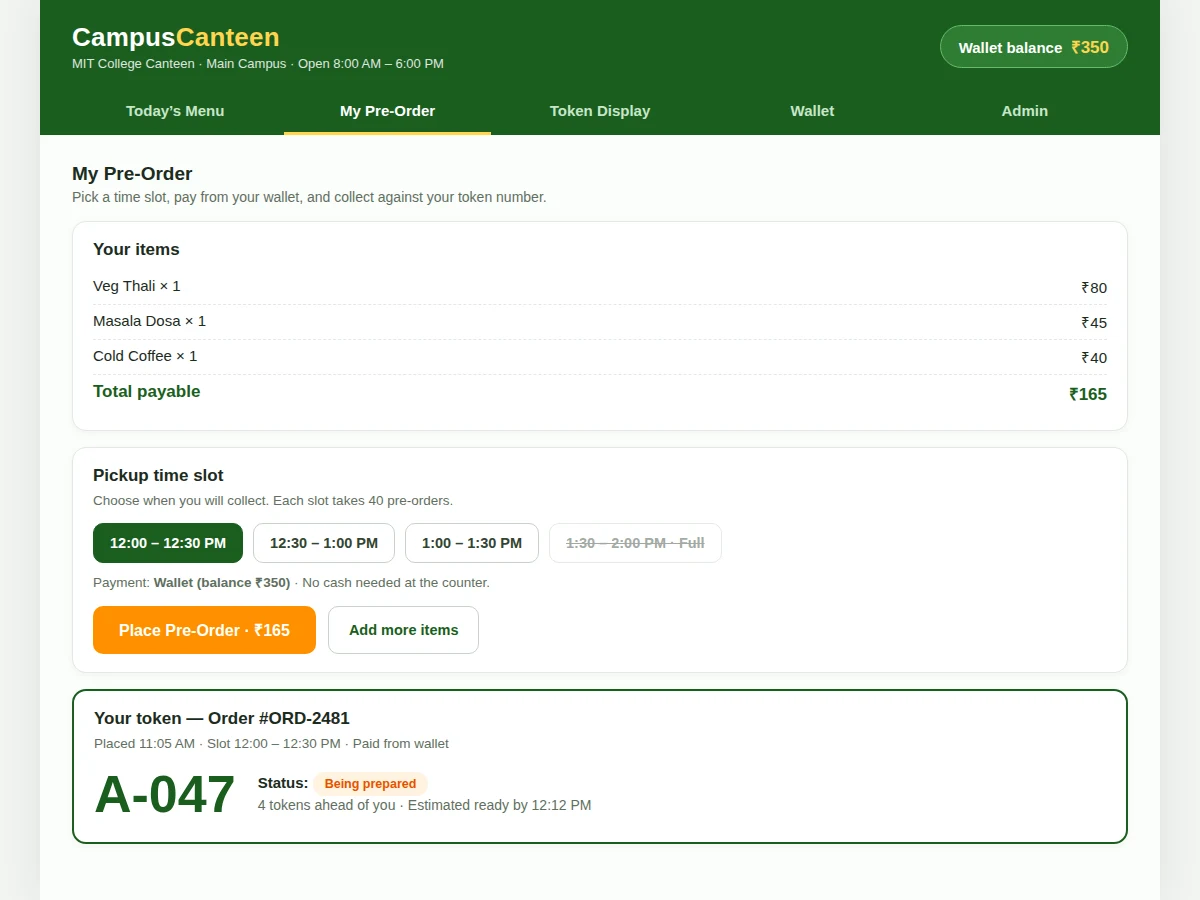
The flow runs from the canteen kitchen to the student's pocket. Each morning the admin publishes the day's menu — 12 items in the demo build — with prices and veg or non-veg marks, and sets the four 30-minute pickup slots. A student opens the app, browses the menu, adds items and picks a slot; the app totals the order, deducts it from the prepaid wallet, issues a token number such as A-047 and saves the order in the on-device Room database. WorkManager syncs the order to the canteen side, where the kitchen sees it grouped under its slot and starts preparation. As orders are served, the admin advances the token counter and the student's screen shows the token's status and how many tokens stand ahead. At the slot the student shows the token and collects the food — no ordering queue, no cash, and the kitchen knew the exact count before cooking.
- The admin publishes the day's menu in the admin module — item names, prices, veg or non-veg marks — and sets the pickup slots for the day.
- The student browses today's menu in the app and adds items; out-of-stock items are hidden automatically.
- The student picks a 30-minute pickup slot; a slot that has reached its 40-order cap (design target) is shown as full and cannot be selected.
- The app totals the order and deducts it from the prepaid wallet balance, then issues a token number and saves the order in the Room database on the device.
- WorkManager syncs the order to the canteen side when the device is online; the kitchen sees orders grouped by slot with quantities per item.
- The admin advances the token counter as orders are served, and the live token display and the student's app both update to show the current token and queue position.
- The student arrives at the chosen slot, shows the token at the counter and collects the food; the order moves to order history with its date, slot and amount.
Tech stack:
- Kotlin (Android app)
- Android Jetpack · Room local database
- WorkManager background sync
- Material Design 3 UI components
- Android Studio
- Gradle build system
- Retrofit · REST API for order sync
- Git version control
| Parameter | Value |
|---|---|
| Platform | Android 7.0 and above (API 24 minimum, design target) |
| Language | Kotlin with Android Jetpack libraries |
| Local database | Room on-device database (Jetpack library) |
| Background sync | WorkManager, periodic sync every 15 minutes when online (API minimum interval) |
| Menu items per day | 12 items in the demo build (design value) |
| Pickup slots | 4 slots of 30 minutes each (design target) |
| Orders per slot | 40 orders maximum per slot (design target) |
| Token format | Letter plus 3 digits, for example A-047 (design value) |
| Wallet top-up options | ₹100, ₹200, ₹500 and ₹1,000 (design values) |
| Demo pre-order flow | Menu to token in 3 taps (measured in the demo build) |
Project features
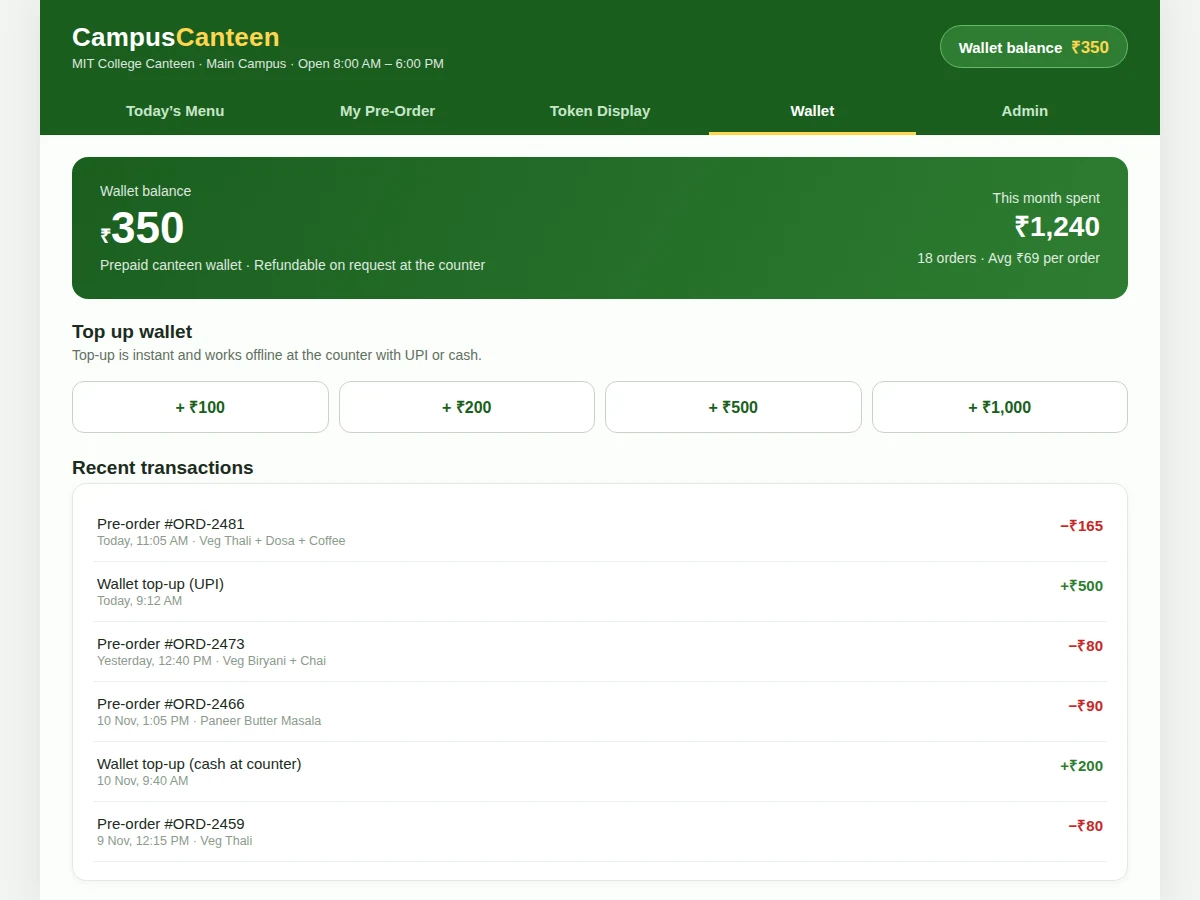
The canteen management system is built around four capabilities that together remove the lunch queue. First, daily menu publishing: the admin sets the day's items, prices and veg or non-veg marks each morning, and items that run out disappear from the student app automatically. Second, pre-order with pickup time slots: students order ahead for a 30-minute slot, each slot capped at 40 orders, so the kitchen cooks to a known count instead of guessing. Third, a live token display: every paid order gets a token number, and the counter screen shows which tokens are being prepared, which are ready, and how many tokens stand ahead of yours. Fourth, a prepaid wallet: students top up once and pay per order from the balance, so no cash changes hands at the counter and every payment is recorded in order history.
- [Daily menu publishing] The admin publishes each morning's menu with item names, prices and veg or non-veg marks, and can hide an item the moment it runs out so students never order food that is unavailable.
- [Pre-order with pickup time slots] Students add items, choose a 30-minute pickup slot and confirm the order in advance; each slot accepts 40 orders (design target) and a full slot closes so the kitchen is never overloaded.
- [Live token and queue display] Every paid order receives a token number such as A-047, and the counter display shows the token now being served, the tokens being prepared and each student's position in the queue.
- [Prepaid wallet with top-up] Students top up the wallet in fixed amounts and pay for each order from the balance; every top-up and payment is recorded, and the balance is visible on every screen.
- [Order history and reorder] Past orders stay listed with date, slot and amount, so a student can repeat a usual lunch order without rebuilding it item by item.
- [Admin order management] The admin sees orders grouped by pickup slot, marks tokens served to advance the display, and watches the day's served count and wallet collections on one screen.
- [Offline-first data with Room] Orders and the menu are stored on the device with Room, so the app keeps working without connectivity and WorkManager syncs queued orders when the network returns.
What is included
- Complete Android app source code (Kotlin, student app plus admin module)
- Room database schema and WorkManager sync implementation
- Working single-file demo of the menu, pre-order, token display and wallet screens
- Setup instructions for Android Studio and the demo build
- Project report PDF (background, methodology, architecture, results)
- PPT presentation for final review
- Viva Q&A preparation document
- Project abstract PDF
Limitations & prerequisites
- The wallet holds prepaid canteen credit, not a payment-gateway checkout: UPI and cash top-ups are recorded transactions in the app, and a live payment-gateway integration needs merchant approval that is not part of the base build.
- The live token display needs a screen at the counter; without one, students check their token status inside the app only.
- Pre-orders depend on the admin publishing the menu each day — if no menu is published, there is nothing to order that day.
- Orders placed offline wait in the Room database and sync when connectivity returns, so the kitchen sees them only after the sync; the app shows the pending state honestly until then.
- Prices in the demo (₹10–₹90 per item) are sample canteen prices; the buyer sets the real menu and prices for their own canteen.
- This is a pickup-only canteen system: there is no delivery module, no rider tracking and no outside-restaurant ordering.
Frequently Asked Questions
Is this project suitable for a final-year project?
Yes — for Computer Science, IT and Android application development programs, where it demonstrates a complete mobile product in one build: a Room-backed local database, WorkManager background sync, a multi-role app with student and admin flows, and a wallet ledger with transaction history. The build is a real working app with a demonstrable flow from menu to token, which gives the review a concrete walkthrough and a clear set of viva topics around Android architecture, offline data and background work.
How is this different from a restaurant ordering app?
A restaurant app sells delivery to strangers; this system serves one college canteen where everyone eats at the same counter in the same lunch break. The design follows from that difference: a daily menu instead of a permanent catalogue, 30-minute pickup slots instead of delivery windows, a token and queue display instead of a rider map, and a prepaid wallet instead of per-order card payments. The two solve different problems, so the features, the data model and the admin screens are all built around the canteen's single counter and fixed lunch rush.
How does the token system work?
The token is issued the moment the wallet payment succeeds, so a token always means a paid order. The token number follows a letter-plus-digits format such as A-047, and the counter display shows the token now being served alongside the tokens being prepared. The student's app shows the same status plus how many tokens stand ahead, so they know when to walk to the counter instead of waiting beside it.
Does the app work without internet?
Yes, for the core student flow, because the menu and orders live in the on-device Room database. A student can browse the menu and place a pre-order offline, and WorkManager syncs the queued order to the canteen side as soon as connectivity returns. The kitchen sees the order only after that sync, and the app marks the order as pending until then, so nothing is silently lost.
How does the wallet work, and is real money involved?
The wallet is prepaid canteen credit, not a bank account or a payment gateway. Students top up in fixed amounts of ₹100, ₹200, ₹500 or ₹1,000, recorded as UPI or cash transactions, and each order deducts from the balance with a matching entry in the transaction history. The demo uses sample balances; the college decides the real top-up and refund process at the counter.
Can the canteen admin change the menu and prices?
Yes — menu management is a core admin function, not an afterthought. The admin publishes each day's items with prices and veg or non-veg marks, edits a price when costs change, and hides an item the moment it runs out, with the change reflected in the student app immediately. The admin also advances the token counter and watches the day's served orders and wallet collections.
Components & software requirements
- Kotlin (Android app)
- Android Jetpack · Room local database
- WorkManager background sync
- Material Design 3 UI components
- Android Studio
- Gradle build system
- Retrofit · REST API for order sync
- Git version control
Delivery information
Built-to-order project. Delivery timeline is shared after order confirmation based on current queue.
Support terms
Complete documentation, setup guide, and viva preparation included. Support for setup and explanation provided.
Download free synopsis (PDF)
Enter your name and WhatsApp number — the synopsis PDF downloads immediately. We may send occasional project updates on WhatsApp; no spam.